1. Производот завршиview
The Starry Outdoor Laser Projector Light, Model ALB-RGB230-M1, is designed to project vibrant red, green, and blue laser patterns. This unit is suitable for both indoor and outdoor use, featuring a waterproof design and remote control for convenient operation. It creates dynamic light displays for various settings.

Слика 1.1: На пр.amples of laser projection in different environments.
2. Содржина на пакетот
Проверете дали сите компоненти се присутни во пакувањето:
- Starry Laser Projector Unit (Model ALB-RGB230-M1)
- Заземјен влог
- Далечински управувач
- Адаптер за напојување
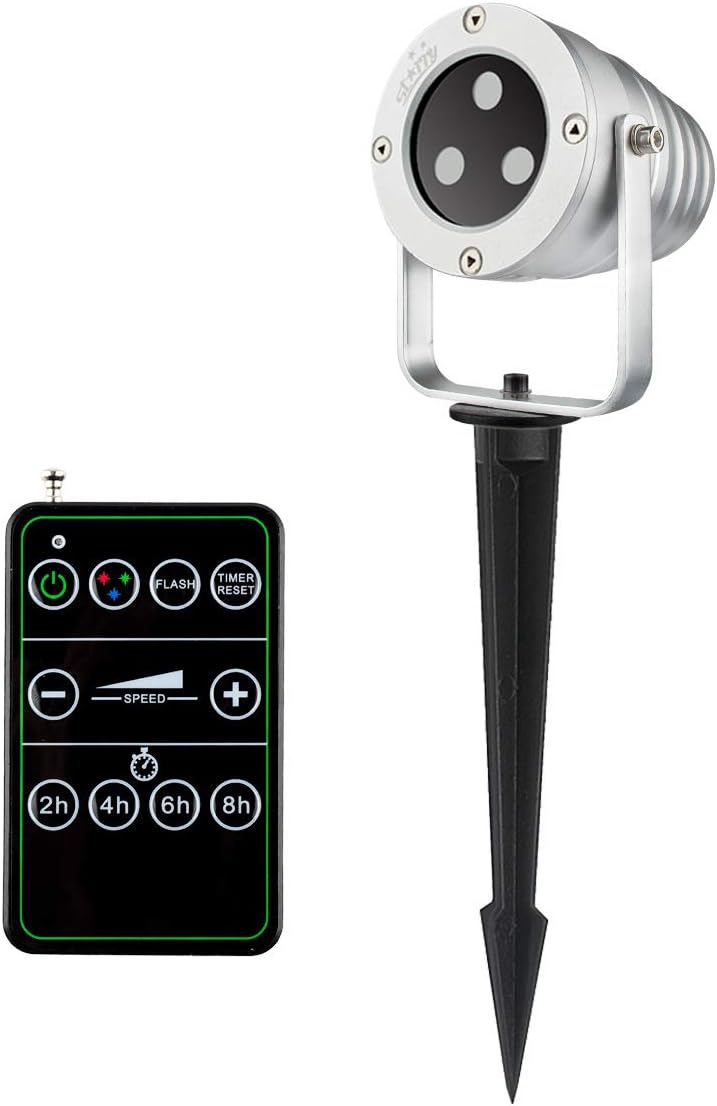
Image 2.1: Laser projector unit and remote control.
3. Инструкции за безбедност
Ве молиме прочитајте ги и почитувајте ги следниве безбедносни упатства за да спречите повреда или оштетување на производот:
- Ласерска безбедност: Do not look directly into the laser beam. Avoid direct eye exposure to the laser light. This product uses Class IIIA lasers.
- Електрична безбедност: Ensure the power adapter and cable are not damaged. Only use the provided power adapter. Do not operate the unit if the power cord is frayed or damaged.
- Отпорност на вода: The projector is rated IP65 waterproof, suitable for outdoor use in rain or snow. However, do not submerge the unit in water.
- Инсталација: Securely install the projector to prevent it from falling or being dislodged. Ensure proper ventilation around the unit.
- Температура: Operate the projector within the specified temperature range (refer to specifications). Extreme temperatures can affect performance and lifespan.
- Деца и домашни миленици: Keep the projector and its accessories out of reach of children and pets.
4. Поставување и инсталација
Follow these steps to set up your laser projector:
- Изберете локација: Select a suitable location for projection. For outdoor use, ensure the area is clear of obstructions and provides a stable surface for mounting.
- Монтирање:
- Кол за земја: Attach the ground stake to the projector base. Insert the stake firmly into soft ground.
- Flat Base (Optional): If using a flat base (not included with all models, but shown in some images), place the projector on a flat, stable surface.
- Прилагодете го аголот на проекција: Loosen the adjustment screw on the side of the projector bracket to tilt the unit to the desired angle. Tighten the screw once adjusted.
- Поврзете напојување: Plug the power adapter into the projector's power input, then plug the adapter into a standard 110V AC outdoor-rated power outlet.

Image 4.1: Projector with a flat base option, suitable for various outdoor placements.

Image 4.2: Outdoor installation demonstrating weather resistance.
5. Упатства за работа
Once installed and powered, operate the projector using the included remote control.
- Вклучување/исклучување: Press the power button on the remote control to turn the projector on or off.
- Избор на боја: Use the color buttons (Red, Green, Blue, or combinations) to select the desired laser colors.
- Режим на блиц: Press the 'FLASH' button to activate or deactivate the flashing effect.
- Прилагодување на брзината: Use the '+' and '-' buttons under 'SPEED' to increase or decrease the motion speed of the laser patterns.
- Функција на тајмер: Select a timer duration (2H, 4H, 6H, 8H) to set the projector to automatically turn off after the specified time. The projector will then turn on automatically at the same time the next day.
- Ресетирање на тајмерот: Press 'TIMER RESET' to cancel any active timer setting.

Слика 5.1: На пр.ample of projected laser patterns.

Image 5.2: Indoor projection exampле.

Image 5.3: Indoor projection on a window and wall.
6. Функции на далечински управувач
The remote control allows full command over the projector's features. It requires 1 AAA battery (not included).
- Инсталација на батерија: Open the battery compartment on the back of the remote and insert 1 AAA battery, observing polarity.
- Копче за вклучување: Turns the projector ON/OFF.
- Копчиња во боја: Cycle through Red, Green, Blue, or combined color modes.
- ФЛЕШ: Toggles the flashing effect of the laser patterns.
- БРЗИНА +/-: Adjusts the rotation speed of the projected patterns.
- TIMER (2H/4H/6H/8H): Sets the projector to operate for 2, 4, 6, or 8 hours respectively, then automatically turns off. It will reactivate at the same time the next day.
- РЕСЕТИРАЊЕ НА ТАЈМЕРОТ: Cancels any active timer setting.
7. Одржување
To ensure the longevity and optimal performance of your laser projector, follow these maintenance guidelines:
- Чистење: Нежно избришете го објективот и куќиштето на проекторот со мека, сува крпа. Не користете абразивни средства за чистење или растворувачи.
- Складирање: When not in use, especially during off-season, store the projector in a cool, dry place, away from direct sunlight and extreme temperatures.
- Инспекција на кабел: Periodically check the power cable and adapter for any signs of wear or damage. Replace if necessary.
- Отпорност на времето: While waterproof (IP65), prolonged exposure to harsh weather conditions (e.g., heavy ice accumulation) may still affect performance. Consider bringing indoors during severe weather.

Image 7.1: Projector operating in snowy conditions, demonstrating its weather-resistant design.
8 Смена на проблеми
Доколку наидете на проблеми со вашиот проектор, погледнете ги следните вообичаени проблеми и решенија:
| Проблем | Можна причина | Решение |
|---|---|---|
| Проекторот не се вклучува. | No power, faulty connection, remote battery dead. | Check power outlet. Ensure power adapter is securely connected. Replace remote control battery. |
| No laser projection. | Unit is on but laser is off, lens obstructed. | Ensure the correct color mode is selected. Clean the projector lens. |
| Далечинскиот управувач не работи. | Dead battery, out of range, obstruction. | Replace AAA battery in the remote. Ensure remote is pointed at the projector and within effective range. Remove any obstructions. |
| Laser patterns are dim or unclear. | Ambient light too high, projector too far from surface, dirty lens. | Operate in darker conditions. Move projector closer to the projection surface. Clean the projector lens. |
| Функцијата за тајмер не работи како што се очекуваше. | Incorrect timer setting, power interruption. | Press 'TIMER RESET' and re-select the desired timer duration. Ensure continuous power supply. |
9. Спецификации
| Карактеристика | Детал |
|---|---|
| Бренд | Ѕвездено |
| Број на модел | ALB-RGB230-M1 |
| Тип на извор на светлина | Ласер (црвена, зелена, сина) |
| Светли бои | Multi-colored (Red, Green, Blue) |
| Projection Patterns | Star, Square (moving motion) |
| Извор на енергија | Електричен со кабел |
| Voltage | 110 волти |
| Ватtage | 11 вати |
| Контролен метод | Далечински управувач |
| Ниво на отпорност на вода | IP65 (Водоотпорен) |
| Внатрешна/надворешна употреба | На отворено |
| Тип на монтирање | Floor Mount (Ground Stake) |
| Тежина на ставката | 1.99 фунти |
| Димензии на пакетот | 9.65 x 6.02 x 5.24 инчи |
| Далечинска батерија | 1 x AAA (не е вклучено) |
| UPC | 638827993788 |
10. Информации за гаранцијата
For detailed warranty information regarding your Starry Outdoor Laser Projector Light, please refer to the warranty card included with your product packaging or visit the official Starry webстраница. Условите за гаранција може да варираат.
11. Поддршка за корисници
If you require further assistance, have questions about your product, or need to report an issue, please contact Starry customer support through the contact information provided in your product documentation or on the official Starry website. Please have your model number (ALB-RGB230-M1) and purchase details ready when contacting support.


