Вовед
This manual provides detailed instructions for the Neoteck DAC04 4K HDMI Audio Extractor Converter. This device allows you to extract audio from an HDMI signal and output it to SPDIF (optical) and analog RCA (L/R) while passing the video signal through to an HDMI display. It supports resolutions up to 4K@30Hz and various audio formats, making it ideal for integrating modern HDMI sources with older audio systems.
Карактеристики на производот
- 4K HDMI Audio Extraction: Converts HDMI input to HDMI output with additional SPDIF and R/L analog audio outputs. Supports HDCP 1.4 and 3D.
- Поддршка со висока резолуција: Input resolution up to Ultra HD 4K@30Hz. Compatible with 1080p@60/50Hz, 1080i, 720p, 576i, 480p, and 480i. Note: Does not support 4K@60Hz.
- Versatile Audio Modes: Offers PASS, 2.0CH, and 5.1CH audio output options. Analog RCA output supports 2-channel PCM stereo audio. SPDIF output supports 2-channel PCM, Dolby Digital, and DTS (Dolby Digital Plus is not supported). HDMI output supports up to 7.1CH audio.
- LED индикатори: A red LED illuminates for power status, and a green LED illuminates for HDMI connection status.
- Издржлива конструкција: Се одликува со алуминиумска легура casing for enhanced durability and heat dissipation.
- Широка компатибилност: Suitable for various HDMI source devices including Blu-ray/DVD players, game consoles (PS3, PS4, Xbox), streaming devices (Roku, Chromecast, Amazon Fire TV, Apple TV), PCs, laptops, HD cameras, and HD DVRs.
Содржина на пакетот
Ве молиме проверете ја содржината на пакувањето при отпакувањето:
- 1 x Neoteck DAC04 HDMI Audio Extractor Converter
- 1 x USB кабел за напојување
- 1 x Упатство за употреба
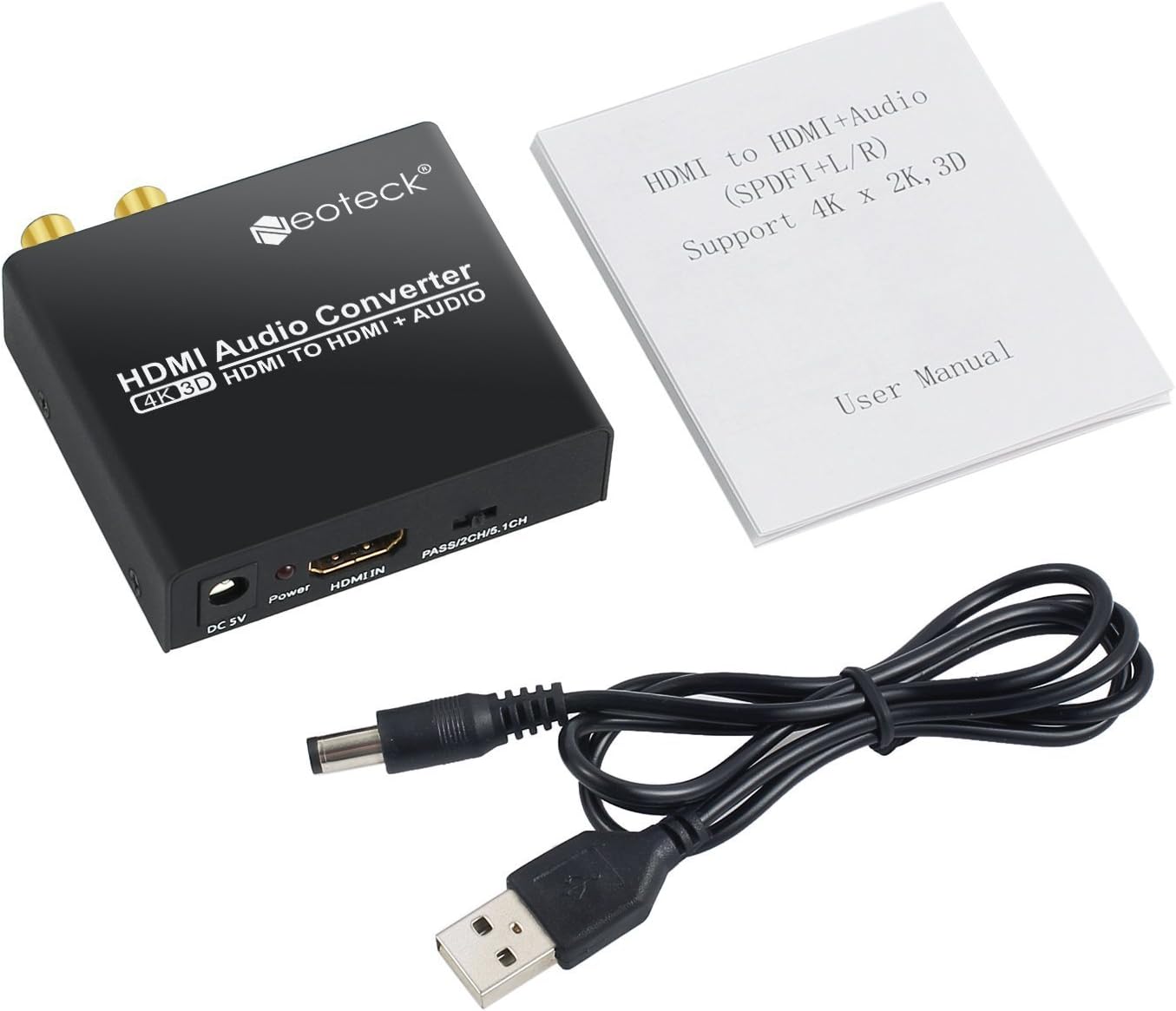
Image: Neoteck DAC04 HDMI Audio Extractor, USB power cable, and user manual included in the package.
Дијаграм на производот
Предни и задни панели
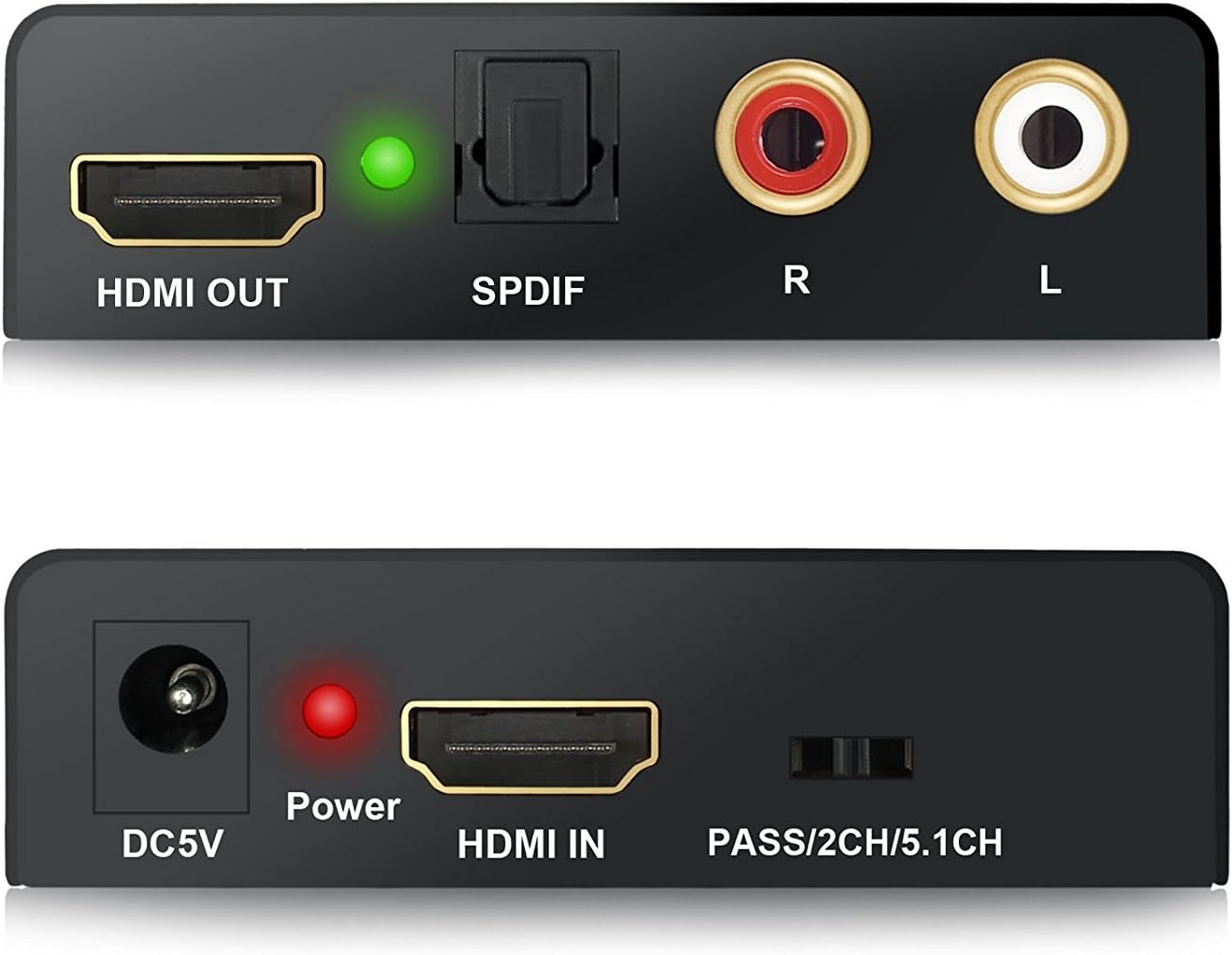
Слика: Крупен план view of the Neoteck DAC04 converter's front panel (DC5V, Power LED, HDMI IN, Audio Mode Switch) and rear panel (HDMI OUT, SPDIF, R/L RCA, HDMI LED).
- DC5V: Приклучок за влез на напојување.
- Напојување LED: Red indicator for power status.
- HDMI ВО: HDMI input port for source devices.
- PASS/2CH/5.1CH Switch: Audio mode selection switch.
- HDMI ИЗЛЕЗ: HDMI output port for display devices.
- SPDIF: Оптичка порта за аудио излез.
- R/L: Analog RCA stereo audio output ports (Red for Right, White for Left).
- HDMI LED: Green indicator for HDMI connection status.
Типичен дијаграм за поврзување

Image: Diagram illustrating how to connect a Blu-ray DVD player (HDMI In) to the Neoteck converter, then HDMI Out to an HDTV and Optical Out/RCA Out to an ampживописен.
Инструкции за поставување
- Connect your HDMI source device (e.g., Blu-ray player, PS4) to the "HDMI IN" port of the Neoteck converter using an HDMI cable.
- Connect your HDMI display (e.g., TV, projector) to the "HDMI OUT" port of the Neoteck converter using an HDMI cable.
- For audio output:
- To use optical audio, connect an optical cable from the "SPDIF" port of the converter to your audio receiver or soundbar.
- To use analog stereo audio, connect RCA cables from the "R/L" ports of the converter to your stereo ampпоживо или звучници.
- Connect the provided USB power cable to the "DC5V" port on the converter and then to a USB power source (e.g., a USB port on your TV, a USB wall adapter). The red Power LED will illuminate.
- Ensure all connected devices (source, display, audio system) are powered on. The green HDMI LED will illuminate when a stable HDMI connection is established.
Упатства за работа
The Neoteck DAC04 features a switch on the front panel to select the desired audio output mode: PASS, 2.0CH, or 5.1CH.

Image: The audio mode switch on the Neoteck DAC04 with labels for PASS, 2CH, and 5.1CH, and corresponding explanations.
- PASS Mode: In this mode, the SPDIF audio output format depends on the EDID (Extended Display Identification Data) of the connected TV or display. The audio signal is passed through without modification.
- Режим 2.0CH: Кога е поставено на "2.0CH", the SPDIF output audio format will be LPCM 2-channel stereo. This is suitable for stereo audio systems.
- Режим 5.1CH: Кога е поставено на "5.1CH", the SPDIF output audio format will be 5.1-channel. For this mode to function correctly, the source audio must also be 5.1CH. This mode supports Dolby Digital and DTS 5.1-channel audio.
Решавање проблеми
- Нема видео излез:
- Проверете дали сите HDMI кабли се безбедно поврзани.
- Verify that the HDMI source device and display are powered on and functioning correctly.
- Check if the converter's red Power LED is illuminated. If not, ensure the USB power cable is connected to a working power source.
- Confirm that your display supports the input resolution (up to 4K@30Hz). This converter does not support 4K@60Hz.
- Нема аудио излез:
- Check all audio cables (SPDIF, RCA) for secure connections.
- Ensure your audio receiver/ampОлабавувачот е вклучен и поставен на точниот влез.
- Verify the audio mode switch on the converter is set appropriately (PASS, 2.0CH, or 5.1CH) for your audio system and source content.
- If using 5.1CH mode, confirm that the source audio is indeed 5.1CH.
- Note that Dolby Digital Plus is not supported by the SPDIF output.
- If using PASS mode, the SPDIF output format depends on the TV's EDID. Try 2.0CH or 5.1CH mode if you experience issues.
- Лош аудио квалитет:
- Ensure all cables are high quality and not damaged.
- Проверете дали има пречки од други електронски уреди.
- Adjust audio settings on your source device and audio receiver.
Спецификации
| Бренд | Неотек |
| Број на модел | DAC04 |
| Влезна порта | 1 x HDMI |
| Излезни порти | 1 x HDMI, 1 x SPDIF (Optical), 1 x RCA L/R |
| HDMI резолуција | Up to 4K@30Hz, 1080p@60/50Hz, 1080i, 720p, 576i, 480p, 480i |
| Верзија за HDCP | HDCP 1.4 |
| 3Д поддршка | Да |
| Аудио излезни режими | PASS, 2.0CH, 5.1CH |
| SPDIF аудио формати | PCM 2CH, Dolby Digital, DTS (Dolby Digital Plus not supported) |
| RCA L/R Audio Formats | PCM 2CH Stereo |
| Формати на аудио HDMI | До 7.1 CH |
| Напојување | DC 5V (преку USB) |
| Casinг Материјал | Алуминиумска легура |
| Производител | Неотек |
Одржување
- Keep the device in a dry, well-ventilated area.
- Избегнувајте изложување на уредот на екстремни температури, влажност или директна сончева светлина.
- Чистете го уредот со мека, сува крпа. Не користете течни средства за чистење или аеросоли.
- Обезбедете соодветна вентилација околу уредот за да спречите прегревање.
Гаранција и поддршка
For warranty information or technical support, please refer to the contact details provided with your purchase or visit the official Neoteck webсајт. Чувајте ја вашата потврда за купување за барања за гаранција.


