Chief KRA221SXRH Expansion Arm Kit Instruction Manual
Model: KRA221SXRH
1. Вовед
This manual provides detailed instructions for the installation and use of the Chief KRA221SXRH Expansion Arm Kit. This kit is designed to expand existing Chief K1C series monitor arm installations, allowing for additional monitor configurations.
The KRA221SXRH facilitates upgrading a single-arm K1C120SXRH to a dual-arm K1C220SXRH setup or adding a third and/or fourth arm to a multi-workstation configuration when used with the KRA226 grommet plate accessory.
2. Информации за безбедност
Read all instructions carefully before installation. Failure to do so may result in personal injury or property damage.
Ensure that the mounting surface can safely support the combined weight of the arm kit, monitors, and any attached accessories.
Do not overtighten screws. Overtightening can cause damage to the product or mounting surface.
Чувајте ги малите делови подалеку од деца.
Ако имате какви било сомнежи во врска со процесот на инсталација, консултирајте се со квалификуван професионалец.
3. Содржина на пакетот
Verify that all components are present and undamaged before proceeding with installation. If any parts are missing or damaged, contact Chief customer support.
Expansion Arm (KRA221SXRH)
Комплет за хардвер за монтирање
Упатство за употреба (овој документ)
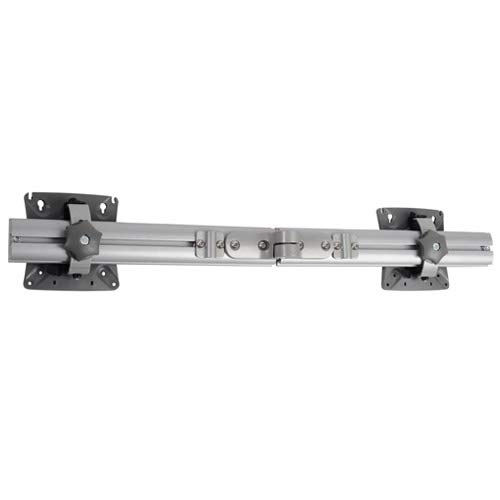
Image: Components of the Chief KRA221SXRH Expansion Arm Kit. This image displays the primary arm component and associated mounting hardware.
4. Поставување и инсталација
This section outlines the steps to install the KRA221SXRH Expansion Arm Kit. Ensure you have all necessary tools and an existing Chief K1C series mount in place.
4.1. Expanding a Single-Arm K1C120SXRH to a Dual-Arm K1C220SXRH
Prepare the Existing Mount: Ensure your existing K1C120SXRH single-arm mount is securely installed.
Attach the Expansion Arm: Locate the designated attachment point on the existing K1C mount's pole or central hub. Align the KRA221SXRH expansion arm with this point.
Secure the Arm: Use the provided mounting hardware (screws, washers, etc.) to firmly attach the expansion arm. Refer to the specific diagrams in your K1C base mount manual for precise screw locations and torque specifications.
Mount the Second Monitor: Attach your second monitor to the newly installed expansion arm using the VESA mounting plate.
Управување со кабли: Route monitor cables through the integrated cable management channels of both arms for a clean setup.
4.2. Adding a Third or Fourth Arm (Requires KRA226 Grommet Plate)
For configurations requiring three or four arms, the Chief KRA226 Grommet Plate Accessory is necessary. This accessory provides additional mounting points for expansion arms in a center-of-table setup.
Install KRA226 Grommet Plate: If not already installed, follow the instructions provided with the KRA226 grommet plate to securely mount it to your workstation.
Attach Expansion Arms: Identify the available mounting points on the KRA226 grommet plate. Attach the KRA221SXRH expansion arms to these points using the provided hardware.
Монтирање на монитори: Secure your monitors to the expansion arms.
Прилагодете и обезбедете: Make any necessary adjustments to monitor height, tilt, and swivel. Ensure all connections are tight and secure.
5. Прилагодувања
Once installed, the KRA221SXRH expansion arm allows for various adjustments to optimize your viewискуство.
Прилагодување на висината: Олабавете ја јаката clamp on the main pole (if applicable to your K1C base mount), adjust the arm to the desired height, and retighten the clamp.
Навалување и вртење: Use the adjustment knobs or screws on the monitor head to set the desired tilt and swivel angles for your monitor.
Arm Extension/Retraction: The arm can be extended or retracted to bring the monitor closer or further away from the user.
Ротација: Monitors can typically be rotated from landscape to portrait orientation.
Always ensure that adjustments are made smoothly and that all locking mechanisms are securely fastened after positioning to prevent accidental movement.
6. Одржување
Regular maintenance ensures the longevity and safe operation of your Chief KRA221SXRH Expansion Arm Kit.
Периодична инспекција: Периодично проверувајте ги сите завртки и врски за да се осигурате дека се цврсто затегнати. Затегнете ги повторно доколку е потребно.
Чистење: Исчистете ги површините на рачките со мека, дamp крпа. Избегнувајте абразивни средства за чистење или растворувачи кои би можеле да ја оштетат завршната обработка.
Подмачкување: No lubrication is typically required for the moving parts of this arm kit.
Ограничувања на тежината: Do not exceed the maximum weight capacity specified for your K1C series monitor arm and the expansion kit.
7 Смена на проблеми
Проблем
Можна причина
Решение
Раката се чувствува лабава или треперлива.
Завртките за монтирање не се доволно затегнати.
Check and retighten all mounting screws on the expansion arm and the main K1C mount.
Мониторот се витка или не ја држи позицијата.
Weight capacity exceeded or tension adjustment needed.
Ensure monitor weight is within limits. Adjust the tension mechanism on the monitor head if available (refer to your K1C base mount manual).
Difficulty attaching expansion arm.
Incorrect alignment or missing hardware.
Review installation steps. Ensure correct orientation and that all necessary hardware is used. Confirm compatibility with your existing K1C mount.
If you encounter issues not listed here, please contact Chief customer support for assistance.
8. Спецификации
Модел: KRA221SXRH
Тип на производ: Expansion Arm Kit
Компатибилност: Chief K1C series monitor arms (e.g., K1C120SXRH, K1C220SXRH)
Боја: Црното
Тежина на ставката: Приближно 11.5 фунти (5.2 кг)
Димензии на производот: Приближно 17.5 x 6.5 x 33.75 инчи (44.45 x 16.51 x 85.73 см)
Посебни карактеристики: Designed for expanding existing K1C installations, supports multi-monitor configurations with KRA226 accessory.
9. Гаранција и поддршка
For information regarding warranty coverage, please refer to the official Chief website or the warranty documentation included with your original K1C series monitor arm. Chief provides customer support for product inquiries, technical assistance, and troubleshooting.
Упатства за инсталација на држачот за интерфејс VESA на Chief MSBV Детално упатство за инсталација на држачот за интерфејс VESA на Chief MSBV, решение за монтирање на дисплеи. Опфаќа безбедност, димензии, делови, компатибилност со VESA (100x100 до 400x200) и процедури за монтирање. Вклучува информации за контакт за Legrand | AV.
Упатства за инсталација на RMF3/RMT3/RLF3/RLT3 од Chief Сеопфатно упатство за инсталација на држачите за рамни панели RMF3, RMT3, RLF3 и RLT3 од Chief, со детали за хардверските барања, чекорите на склопување и безбедносните мерки на претпазливост за различни типови ѕидови.
Водич за инсталација на универзален држач за голем наклон Chief Thinstall Сеопфатни упатства за инсталација за Chief Thinstall™ Large Tilt Universal Mount (LTTU). Ова упатство дава детални чекори за монтирање на ѕидна плоча, прицврстување на екранот, прилагодување на навалувањето и управување со каблите, обезбедувајќи безбедно и правилно поставување на вашиот екран.