Вовед
The Korg Volca Kick is an analog kick generator featuring an MS-20 resonator and a 16-step sequencer. It is designed to produce a wide range of kick drum and bass sounds, from tight, punchy kicks to deep, resonant bass, suitable for various electronic music genres. This manual provides essential information for setting up, operating, and maintaining your Volca Kick.

Слика 1: Предна страна view of the Korg Volca Kick, showcasing its controls and 16-step sequencer.
Поставување
Напојување
- Батерии: The Volca Kick requires 6 AA batteries for portable operation. Ensure batteries are inserted with correct polarity.
- Адаптер за наизменична струја: For extended use, connect a compatible 9V DC center-negative AC adapter (sold separately) to the DC 9V jack.
Аудио врски
- Излез: Connect headphones or an audio cable from the AUDIO OUT jack to a mixer or ampживописен.
- Вграден звучник: The unit features a built-in speaker for immediate sound output without external ampзаживување
Synchronization and MIDI
- Sync I/O: Use the SYNC IN and SYNC OUT jacks to synchronize with other Korg Volca series devices or compatible equipment.
- MIDI влез: Connect a MIDI cable to the MIDI IN port to control the Volca Kick from an external MIDI device or DAW.
Упатства за работа
Basic Controls and Sound Generation
The Volca Kick utilizes an analog kick generator based on the MS-20 filter, allowing for powerful and resonant sounds. The interface provides direct control over various parameters to shape your kick and bass sounds.
- Теренот: Adjusts the fundamental frequency of the kick sound.
- Свиткајте: Controls the pitch envelope, creating a 'bending' effect typical of kick drums.
- Време: Sets the duration of the pitch bend.
- Pulse Color: Modifies the timbre of the pulse oscillator.
- Ниво: Adjusts the output level of the pulse oscillator.
- Напад: Controls the attack time of the ampковерт за лагер.
- Распаѓање: Controls the decay time of the ampковерт за лагер.
- Возење: Adds distortion and saturation for aggressive sound shaping.
- Тон: Adjusts the overall tonal character of the sound.

Слика 2: Аголна view of the Korg Volca Kick, highlighting the various knobs and buttons for sound manipulation.
Секвенсер од 16 чекори
The integrated 16-step sequencer allows for intuitive pattern creation and real-time performance.
- Step Buttons: Use the 16 step buttons to program your rhythm patterns. Press a button to activate a step, press again to deactivate.
- Режим на снимање: Enter record mode to capture real-time knob movements (motion sequencing) and note inputs.
- Пушти/Стоп: Starts and stops the sequencer playback.
- Темпо: Ја прилагодува брзината на репродукција на секвенцерот.
- Замав: Adds a rhythmic swing feel to your patterns.
- Акцент: Adds emphasis to specific steps.
- Touch FX: Provides real-time effects for dynamic performance.
- Active Step: Allows you to skip steps in a pattern, creating variations.
- Меморија: Save and recall your created patterns.
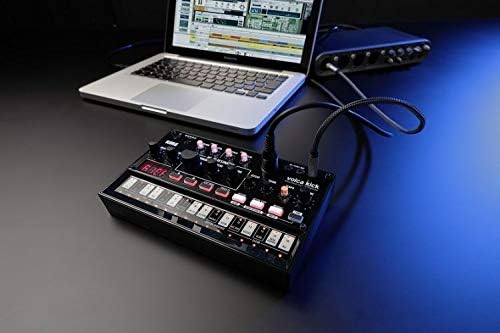
Figure 3: The Korg Volca Kick connected to a laptop, demonstrating its integration capabilities with external devices.
Одржување
To ensure the longevity and optimal performance of your Korg Volca Kick, follow these maintenance guidelines:
- Чистење: Користете мека, сува крпа за чистење на уредот. Избегнувајте абразивни средства за чистење или растворувачи.
- Складирање: Чувајте го уредот на ладно и суво место, подалеку од директна сончева светлина, екстремни температури и висока влажност.
- Нега на батеријата: Отстранете ги батериите ако уредот нема да се користи подолг период за да се спречи истекување.
Решавање проблеми
If you encounter issues with your Volca Kick, refer to the following common troubleshooting steps:
- Без моќност: Check battery installation and charge level. If using an AC adapter, ensure it is correctly connected and the correct voltage/polarity.
- Нема звук: Verify that the volume knob is turned up. Check audio cable connections and ensure external speakers/headphones are working.
- Секвенцерот не се репродуцира: Ensure the sequencer is in play mode and not paused or stopped. Check tempo settings.
- MIDI проблеми: Confirm MIDI cable connection and correct MIDI channel settings on both the Volca Kick and your external device.
Спецификации
| Карактеристика | Спецификација |
|---|---|
| Материјал за тело | Пластика |
| Тежина на ставката | 13.3 унци (377 грама) |
| Димензии на производот | 10.35 x 6.02 x 2.79 инчи |
| Број на модел на ставка | VOLCAKICK |
| Батерии | Потребни се 6 AA батерии (алкални) |
| Тип на конектор | 9V DC Centre-Negative |
| Број на копчиња на тастатурата | 16 |
| Производител | Корг САД Инк. |
Гаранција и поддршка
За информации за гаранцијата и техничка поддршка, ве молиме погледнете го официјалниот Korg webлокација или контактирајте го вашиот локален дистрибутер на Korg. Зачувајте го доказот за купување за гаранциски барања.


