1. Вовед
This user manual provides detailed instructions for the safe and efficient operation of your Xerox VersaLink B405/DN Monochrome Multifunction Printer. It covers initial setup, daily use, routine maintenance, and troubleshooting common issues. Please read this manual thoroughly before using the device to ensure optimal performance and longevity.

Слика 1.1: Предна страна view of the Xerox VersaLink B405/DN Multifunction Printer.
2. Информации за безбедност
Внимавајте на следниве безбедносни мерки за да спречите повреда и оштетување на печатачот:
- Секогаш поврзувајте го печатачот на заземјен штекер.
- Не блокирајте ги отворите за вентилација.
- Држете го печатачот подалеку од вода или прекумерна влажност.
- Use only specified power cords and accessories.
- Do not attempt to service the printer yourself; refer all servicing to qualified personnel.
3. Содржина на пакетот
Проверете дали сите артикли се присутни во пакувањето:
- Xerox VersaLink B405 Multifunction Printer
- Standard Capacity Toner Cartridge (5900 capacity)
- ЦД со софтвер и документација
- Водич за инсталација
- Водич за брза употреба
- Кабел за напојување
- Кабел за факс
4. Поставување
4.1 Отпакување и поставување
Carefully remove the printer from its packaging. Place the printer on a stable, level surface with adequate ventilation. Ensure sufficient space around the device for operation and maintenance.
4.2 Поврзување за напојување
Connect the provided power cord to the printer's power inlet and then to a grounded electrical outlet.
4.3 мрежно поврзување
Connect an Ethernet cable from your network router or switch to the Ethernet port on the rear of the printer. This printer uses an Ethernet hardware interface for network connectivity.
4.4 Инсталација на софтвер
Insert the software and documentation CD into your computer's CD-ROM drive. Follow the on-screen instructions to install the printer drivers and utility software. Alternatively, visit the official Xerox support webВеб-страница за преземање на најновите драјвери.
4.5 Ставање хартија
Open the paper tray located at the front of the printer. Adjust the paper guides to fit the size of your paper. Load the paper stack, ensuring it does not exceed the maximum fill line. The printer supports various print media including plain paper, envelopes, and labels, with a maximum media size of 8.5 x 14 inches.

Слика 4.1: Предна страна view showing the paper trays for loading media.
4.6 Инсталација на кертриџ за тонер
If the toner cartridge is not pre-installed, open the front access panel of the printer. Carefully insert the standard capacity toner cartridge into its designated slot until it clicks into place. Close the access panel.
5. Упатства за работа
The VersaLink B405/DN features an intuitive control panel for managing various functions.
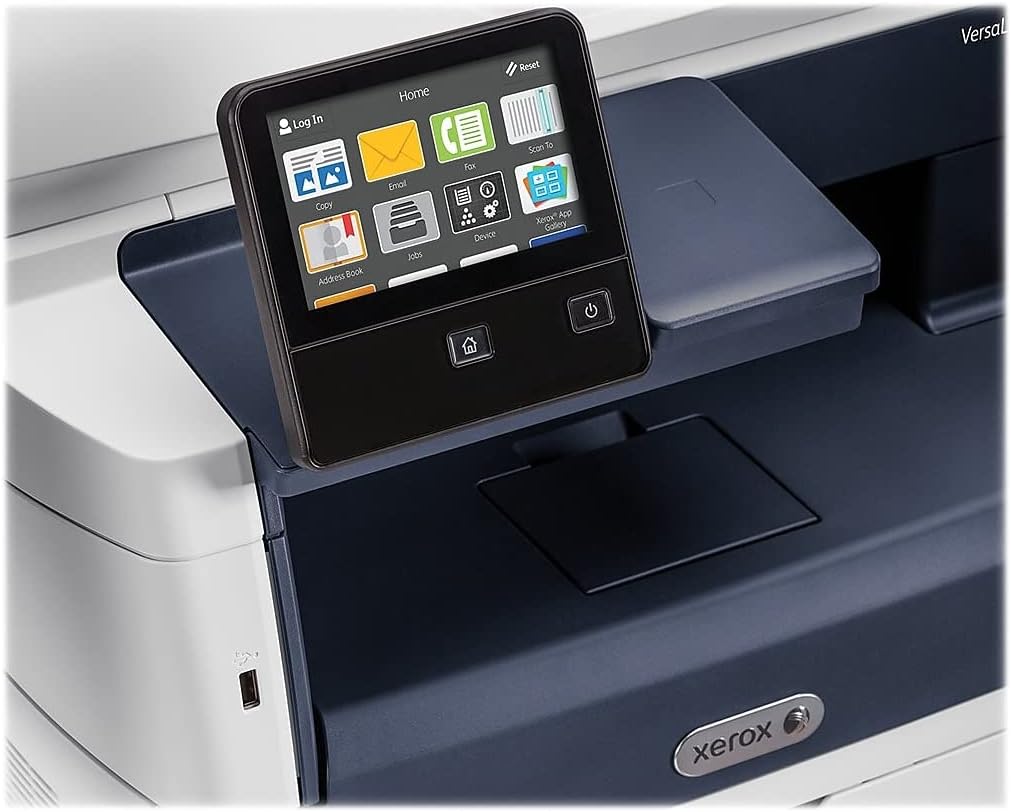
Figure 5.1: The touch-screen control panel for printer operation.
5.1 Печатење
To print a document from your computer, select the Xerox VersaLink B405/DN from your printer list. Adjust print settings such as paper size, orientation, and duplex printing (automatic dual-sided printing is supported) as needed. Confirm the print job.
5.2 Копирање
Place your document face-up in the Automatic Document Feeder (ADF) or face-down on the scanner glass. On the control panel, select the 'Copy' function. Adjust settings like number of copies, lightness/darkness, and two-sided copying. Press the 'Start' button to begin copying.

Figure 5.2: Paper loaded in the Automatic Document Feeder for copying or scanning multiple pages.
5.3 Скенирање
Place your document in the ADF or on the scanner glass. On the control panel, select the 'Scan' function. Choose your desired scan destination (e.g., Scan to Email, Scan to Network, Scan to USB). Configure scan settings such as resolution and file формат. Притиснете „Старт“ за да го започнете скенирањето.

Figure 5.3: The scanner lid open, showing the flatbed for scanning single pages or delicate documents.
5.4 Факсирање
Connect the provided fax cord to the printer's fax port and a telephone wall jack. Place your document in the ADF or on the scanner glass. On the control panel, select the 'Fax' function. Enter the recipient's fax number and press 'Start'.
6. Одржување
6.1 Замена на тонер
When the printer indicates low toner, order a replacement Xerox toner cartridge. Open the front access panel, remove the old cartridge by pulling it out, and insert the new cartridge until it locks into place. Close the panel.
6.2 Чистење
Редовно чистете ја надворешноста на печатачот со мека, дamp cloth. For the scanner glass, use a lint-free cloth and a non-abrasive glass cleaner. Avoid spraying cleaner directly onto the glass.
6.3 Расчистување на заглавена хартија
If a paper jam occurs, the control panel will display instructions. Open the indicated access covers and carefully remove any jammed paper, pulling in the direction of the paper path. Ensure all paper fragments are removed before closing the covers.
7 Смена на проблеми
Овој дел се однесува на вообичаени проблеми со кои може да се соочите:
- Печатачот не реагира: Check power connections, network cable, and ensure the printer is online. Restart both the printer and your computer.
- Лош квалитет на печатење: Check toner levels. Perform a print quality diagnostic from the printer's control panel or software. Clean the print heads if necessary (refer to the printer's internal menu).
- Заглавување на хартија: Follow the instructions on the control panel to locate and clear the jam. Ensure paper is loaded correctly and not creased or damaged.
- Проблеми со скенирањето: Verify network connectivity. Ensure the scanner glass and ADF are clean. Check scan settings on the control panel.
For more complex issues, consult the full documentation on the provided CD or the Xerox support webсајт.
8. Спецификации
| Карактеристика | Спецификација |
|---|---|
| Димензии на производот | 19.5" Д x 19.5" Ш x 21.7" В |
| Тежина на ставката | 48 фунти |
| Максимална големина на медиум | 8.5 x 14 инчи |
| Максимален капацитет на влезен лист | 2350 листови |
| Максимална црно-бела резолуција за печатење | 1200 x 1200 dpi |
| Максимална брзина на печатење монохроматски | 47 ppm |
| Максимална брзина на копирање (црно-бело) | 6.2 seconds (first copy out) |
| Двострано печатење | Автоматски |
| Хардверски интерфејс | Етернет, USB |
| Капацитет за складирање на меморија | 2 GB |
| Број на процесори | 2 |
| Тип на мастило за печатач | Тонер |
| Тип на скенер | Document (ADF and Flatbed) |
9. Гаранција и поддршка
The Xerox VersaLink B405/DN Monochrome Multifunction Printer comes with a standard one-year warranty. For warranty claims, technical support, or service inquiries, please contact Xerox customer support directly. Refer to the official Xerox website or the documentation included with your product for contact details and further support resources.