1. Вовед
The EMEET PIXY is a sophisticated dual-camera AI-powered PTZ (Pan-Tilt-Zoom) 4K webcam designed for high-quality video streaming, online meetings, and content creation. It integrates advanced AI features for intelligent tracking, autofocus, and audio processing to enhance your visual and auditory experience.

Image: EMEET PIXY Dual-Camera AI-Powered PTZ 4K Webcam overview.
2. Поставување
2.1 Што има во кутијата

Image: Contents of the EMEET PIXY product packaging.
- EMEET PIXY Webкамери x 1
- Webcam Clip x 1
- 5 ft USB 2.0 C-C Cable x 1
- Type-C to A adapter x 1
- Упатство за употреба x 1
2.2 Физичка инсталација
The EMEET PIXY can be mounted using the included webcam clip or a tripod (sold separately).
- Користење на Webcam Clip: Прикачете го webcam clip to the bottom of the PIXY camera. Place the camera with the clip securely on top of your monitor or laptop screen. Adjust the angle as needed.
- Користење на статив: The camera base features a standard tripod screw mount. Attach the PIXY directly to a compatible tripod for flexible positioning.

Image: Demonstrates various mounting options and adjustable heights for the EMEET PIXY.
2.3 Поврзување
Connect the EMEET PIXY to your computer using the provided USB-C to C cable. If your computer only has USB-A ports, use the included Type-C to A adapter.
- Plug the USB-C end of the cable into the camera.
- Plug the other end (USB-C or USB-A with adapter) into an available USB port on your computer.
- The camera is plug-and-play and should be recognized by your operating system automatically.
2.4 Инсталација на софтвер
For full control and advanced features, download and install the EMEET STUDIO software from the official EMEET website. EMEET STUDIO is compatible with Windows 10+ (64-bit) and macOS 10.14+.

Image: EMEET PIXY connected to a laptop, showing the EMEET STUDIO software interface and USB connection.
3. Упатства за работа
3.1 Dual-Camera AI-Powered PTZ Features
The EMEET PIXY features a unique dual-camera system for enhanced performance:
- 4K Main Imaging Camera: Equipped with a 1/2.55" Sony sensor and PDAF focus for ultra-clear UHD 4K@30FPS video.
- Auxiliary AI Camera: Detects face position to optimize autofocus and exposure, ensuring flawless skin tones in various lighting conditions.
- PDAF & AI Autofocus: Combined for rapid 0.2s focusing, significantly faster than conventional webкамери.

Image: Diagram highlighting the 4K imaging camera and AI-assisted camera components of the EMEET PIXY.

Image: Visual comparison demonstrating the rapid 0.2s autofocus speed of EMEET PIXY.
3.2 Intelligent Tracking and Gesture Control
The PIXY utilizes a 3-chip AI system for smooth and responsive tracking:
- 3-Chip AI: Dedicated chips for imaging, AI assistance (motion prediction, lighting), and PTZ control (310° pan / 180° tilt).
- Контрола со гестови: Activate features by holding an open palm centered for 2 seconds.

Image: EMEET PIXY showcasing its intelligent auto-tracking capabilities and effortless gesture control.

Image: EMEET PIXY demonstrating face tracking for seamless Switch 2 gameplay, with PTZ movement indicated.
3.3 EMEET STUDIO Control Software
The EMEET STUDIO software provides comprehensive control over your PIXY webкамера:
- Претходно поставени позиции: Instantly switch between predefined camera angles.
- Режим на бела табла: Automatically detects whiteboards for optimal framing; manual adjustment available.
- Режим на приватност: Activate by tilting the PIXY downward, or via timer/app settings.
- FOV Adjustment: Поле на View is adjustable in 1080P & 2K 30FPS modes; locked in 4K 30FPS & 1080P 60FPS for stability.
- AIGC: Built-in Artificial Intelligence Generated Content for creating shot lists and movements.
- Режим на портрет: Instantly rotate PIXY and flip the image for mobile-ready content.

Image: EMEET STUDIO software interface displaying preset positions and PTZ control options for the EMEET PIXY.

Image: EMEET PIXY in whiteboard mode, showing automatic identification and manual adjustment features.

Image: EMEET PIXY demonstrating privacy mode activation by tilting the camera or through software settings.
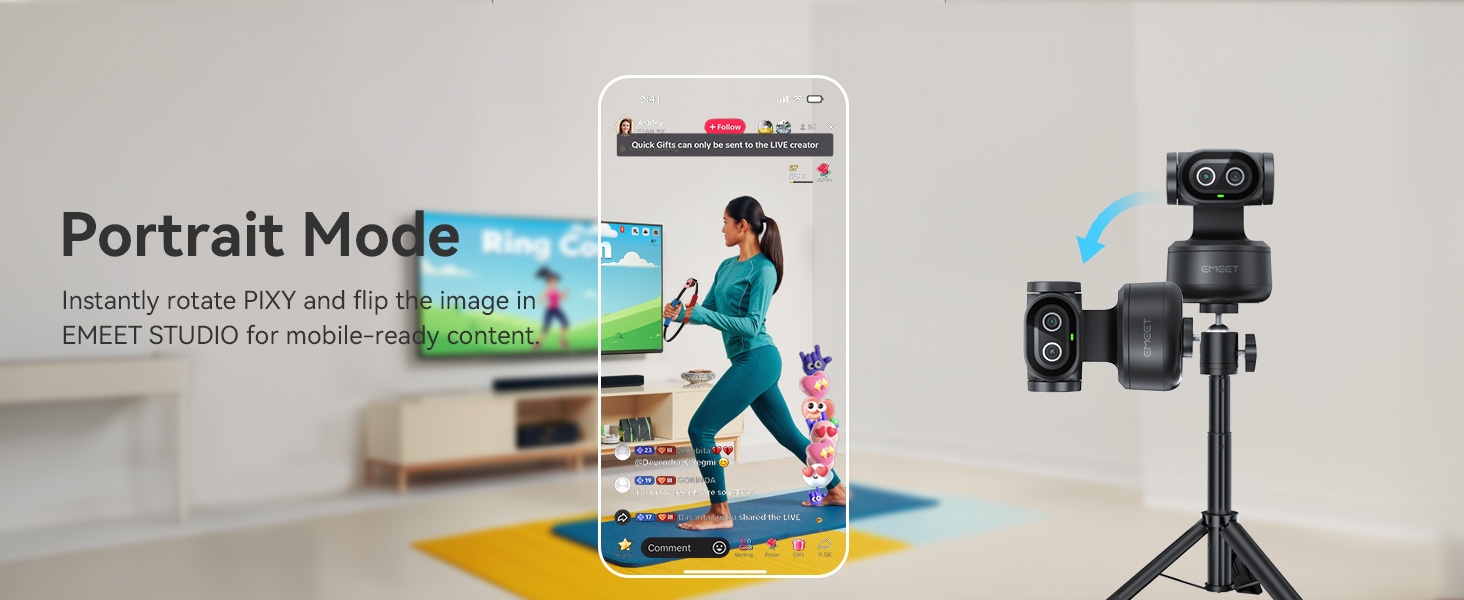
Image: EMEET PIXY in portrait mode, optimized for mobile content creation with image flipping.
3.4 3-Mic Array for Multiple Scenes
The EMEET PIXY features a triple-microphone array with various audio modes:
- Режим во живо: Filters steady background noise (e.g., fans, AC) for clear live streams.
- Noise Canceling Mode: Blocks both steady hums and sudden sounds (e.g., keyboard clicks, door slams) for podcasts, courses, and recordings.
- Original Sound Mode: Captures full ambient detail for music and singing.

Image: Diagram showing the triple-microphone array and different audio modes (Live, Noise Canceling, Original Sound) of the EMEET PIXY.
3.5 Компатибилност
The EMEET PIXY is compatible with a wide range of platforms and operating systems:
- Платформи: OBS, Twitch, YouTube, Facebook, XSplit, ManyCam, Switch 2 Camera, Xbox, PS5 (requires external capture card).
- Системски барања: Windows 10+ (64-bit, not ARM), macOS 10.14+.

Image: EMEET PIXY integrated into a live streaming setup, highlighting compatibility with various platforms.
4. Одржување
To ensure optimal performance and longevity of your EMEET PIXY webкамера, следете ги овие упатства за одржување:
- Чистење леќи: Gently wipe the camera lenses with a soft, lint-free cloth. Avoid using harsh chemicals or abrasive materials that could scratch the lens.
- Отстранување прашина: Use a soft brush or compressed air to remove dust from the camera body and microphone grilles.
- Складирање: When not in use, store the camera in a clean, dry place away from direct sunlight and extreme temperatures. Utilize the privacy mode or cover the lens to protect it from dust and accidental activation.
- Грижа за кабел: Избегнувајте прекумерно виткање или извиткување на USB кабелот за да спречите оштетување.
5 Смена на проблеми
If you encounter issues with your EMEET PIXY, refer to the following common troubleshooting steps:
- Камерата не е откриена:
- Ensure the USB cable is securely connected to both the camera and your computer.
- Обидете се да се поврзете на друга USB порта.
- Рестартирајте го компјутерот.
- Check your computer's device manager (Windows) or System Information (macOS) to see if the camera is listed.
- Лош квалитет на сликата:
- Уверете се дека објективот на камерата е чист и без дамки.
- Check your lighting conditions. Adequate lighting is crucial for optimal image quality.
- Open EMEET STUDIO and adjust brightness, contrast, and other image settings.
- Verify that the camera is set to the desired resolution (e.g., 4K) in your application settings.
- Нема звук или квалитетот на звукот е слаб:
- Ensure the PIXY is selected as the default microphone in your computer's sound settings and your video conferencing application.
- Check the microphone mode in EMEET STUDIO (Live, Noise Canceling, Original Sound) and select the most appropriate one for your environment.
- Уверете се дека микрофонот не е исклучен.
- AI Tracking Issues:
- Ensure you are within the recommended tracking range and that your face is clearly visible to the camera.
- Avoid rapid, jerky movements that might cause the camera to lose track.
- Check EMEET STUDIO settings to ensure tracking is enabled and configured correctly.
6. Спецификации
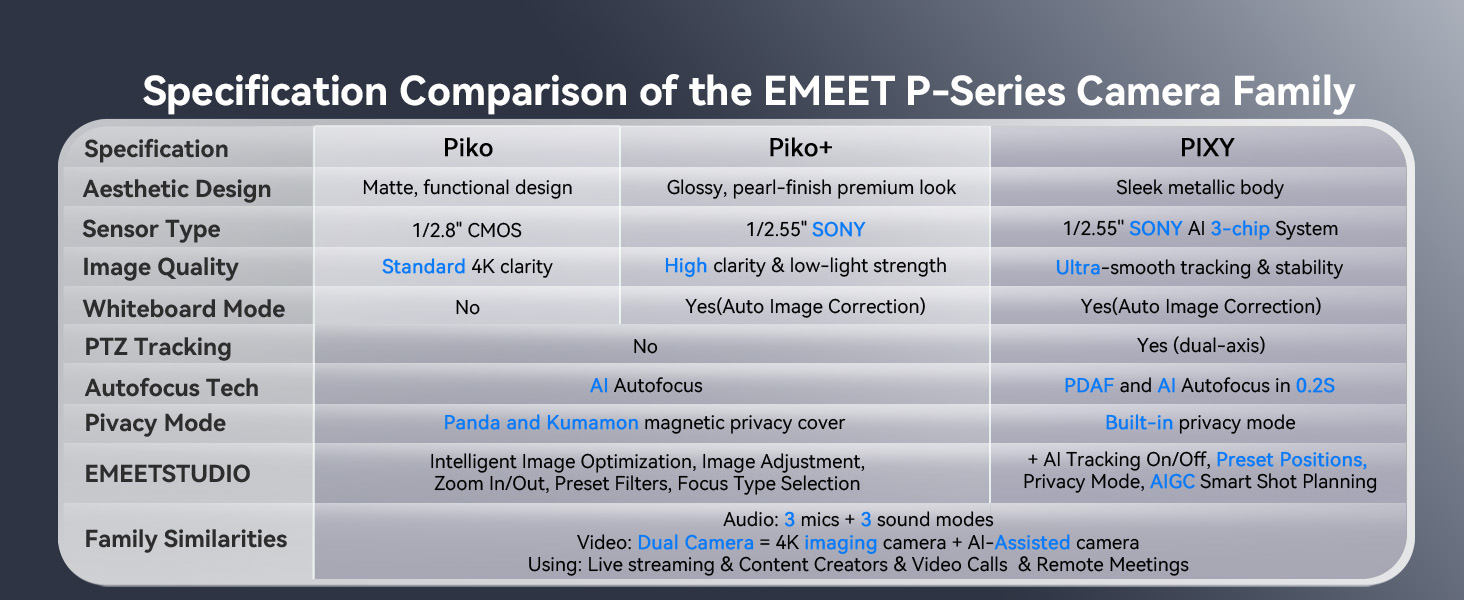
Image: Comparison table of EMEET P-Series camera specifications, including PIXY.
| Карактеристика | Детал |
|---|---|
| Димензии на производот | 2.09 x 2.09 x 2.87 инчи |
| Тежина на ставката | 11.3 унци |
| Број на модел на ставка | Е3138 |
| Бренд | ЕМЕЕТ |
| Технологија на фотосензор | SONY |
| Резолуција за снимање видео | 4K |
| Максимална фокусна должина | 3000 милиметри |
| Максимална решетка | 1.8 f |
| Тип на флеш меморија | NOT Available, Rely on Your PC/Mac |
| Формат за снимање видео | YUY2 / MJPEG |
| Поддржан аудио формат | AAC, PCM |
| Големина на екранот | 3.8 инчи |
| Технологија за поврзување | USB |
7. Гаранција и поддршка
- Гаранција: EMEET provides a 2-year exclusive warranty for this product.
- Техничка поддршка: Lifetime professional technical team support is available. For assistance, please visit the official EMEET webсајт или контактирајте со нивната служба за корисници.


