Вовед
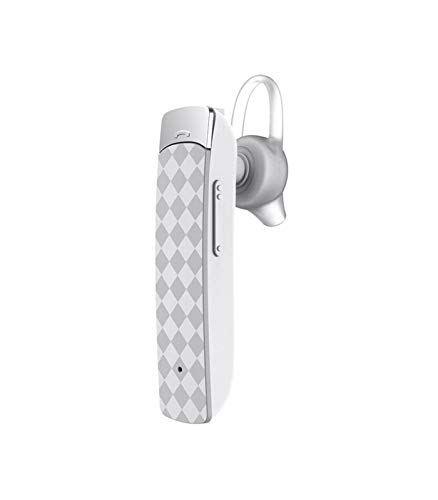
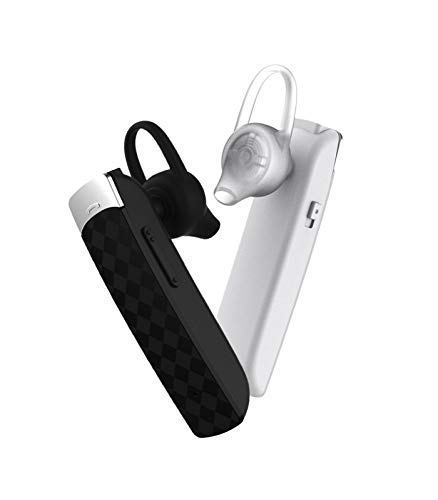
The Astrum ET200 Stereo Wireless Headset is an in-ear Bluetooth headset designed for hands-free communication and audio playback. Featuring Bluetooth V4.0 connectivity, it supports music and call functions with an in-built microphone and audio caller ID. This manual provides detailed instructions to help you set up, operate, and maintain your headset.
Што има во кутијата
- 1 x Astrum ET200 Wireless Headset Earphone
- 1 x Кабел за полнење
- 2 x Ear-hooks (various sizes)
- 1 x Упатство за употреба
Производот завршиview

Поставување
1. Полнење на слушалките
Before first use, fully charge the headset. Connect the provided charging cable to the headset's charging port and the other end to a USB power source (e.g., computer USB port, wall adapter). The charging indicator light will illuminate during charging and turn off or change color when fully charged. Charging time is approximately 2 hours.
2. Спарување со уред со Bluetooth
- Осигурете се дека слушалките се исклучени.
- Press and hold the multi-function button on the headset until the indicator light flashes red and blue alternately, indicating pairing mode.
- На вашиот уред со Bluetooth (паметен телефон, таблет итн.), одете во поставките за Bluetooth и овозможете Bluetooth.
- Пребарај за available devices. The headset will appear as "ET200" or similar.
- Select "ET200" to connect. If prompted for a password, enter "0000".
- Once successfully paired, the indicator light will flash blue slowly, and you may hear a confirmation tone.
The headset supports Bluetooth V4.0 and has a range of up to 10 meters (33 feet) in an open environment.
Упатства за работа
Вклучување/исклучување
- Вклучување: Притиснете го и држете го повеќефункционалното копче приближно 3 секунди додека не почне да трепка сината индикаторска сијаличка.
- Исклучено: Притиснете го и држете го повеќефункционалното копче приближно 3 секунди додека црвената индикаторска сијаличка не трепка, а потоа не се исклучи.
Контрола на повици
- Одговори на повикот: Briefly press the multi-function button.
- Крај на повикот: Briefly press the multi-function button during a call.
- Одбијте го повикот: Press and hold the multi-function button for 2 seconds when an incoming call rings.
- Повторно бирајте последен број: Двоен притисок на копчето за повеќе функции.
Репродукција на музика
- Пушти/Пауза: Briefly press the multi-function button.
- Следна песна: Притиснете и задржете го копчето за јачина на звук +.
- Претходна песна: Притиснете и држете го копчето за јачина на звук -.
Прилагодување на јачината на звукот
- Зголемете ја јачината на звукот: Briefly press the Volume + button.
- Намалување на јачината на звукот: Briefly press the Volume - button.
Одржување
- Редовно чистете ги слушалките со мека, сува крпа. Не користете абразивни средства за чистење или растворувачи.
- Избегнувајте изложување на слушалките на екстремни температури, влажност или директна сончева светлина.
- Чувајте ги слушалките на ладно и суво место кога не ги користите.
- Не обидувајте се да ги расклопите или модифицирате слушалките, бидејќи тоа ќе ја поништи гаранцијата.
Решавање проблеми
| Проблем | Можна причина | Решение |
|---|---|---|
| Слушалките не се вклучуваат. | Слаба батерија. | Наполнете ги слушалките целосно. |
| Не може да се спарат слушалките. | Headset not in pairing mode; Bluetooth disabled on device; device out of range. | Ensure headset is in pairing mode (flashing red/blue). Enable Bluetooth on your device. Move device closer to headset (within 10m). |
| Нема звук или звукот е слаб. | Јачината на звукот е прениска; слушалките не се поврзани; пречки. | Increase volume on headset and device. Re-pair the headset. Move away from other wireless devices. |
| Проблеми со квалитетот на повикот. | Слаб сигнал; микрофонот е блокиран. | Преместете се во област со подобар сигнал. Уверете се дека микрофонот не е покриен. |
Спецификации
- Модел: ЕТ200
- Технологија за поврзување: Bluetooth V4.0
- Bluetooth Profiles: HFP / HSP / A2DP / AVRCP
- Безжичен опсег: До 10 метри (33 стапки)
- Време на повик: До 5 часа
- Време на играње: До 4.5 часа
- Време на полнење: До 2 часа
- Време на мирување: До 200 часа
- Тип на контрола: Контрола на повици, допир
- Тежина на ставката: 10 грама
- Димензии на производот: 3.5 x 3.5 x 12.8 cm
- Материјал: Пластика
Гаранција и поддршка
The Astrum ET200 Stereo Wireless Headset comes with a 1-годишна гаранција од производителот од датумот на купување. Оваа гаранција ги покрива производствените дефекти и изработката при нормална употреба. Не ги покрива штетите предизвикани од злоупотреба, несреќи, неовластени модификации или нормално абење.
For warranty claims, technical support, or any inquiries, please contact Astrum customer service. You can find more information and contact details on the official Astrum webстраницата или преку вашето место за купување.
Visit the official Astrum store for more products and support: Astrum Store on Amazon


