1. Вовед
The HP EliteOne 800 G3 All-in-One PC is designed to provide a powerful and integrated computing experience. This manual will guide you through the setup, operation, and maintenance of your new device, ensuring optimal performance and longevity.
Key features include a 23.8-inch display, robust processors, advanced security features, and enhanced collaboration tools. The sleek design integrates all components into a single unit, minimizing cable clutter and maximizing workspace efficiency.
2. Што има во кутијата
Проверете дали сите компоненти се присутни во пакувањето:
- Personal computer (HP EliteOne 800 G3 All-in-One)
- Поставете го држачот
- Глувче
- Тастатура
- Адаптер за напојување и кабел
- Документација (ова упатство, информации за гаранцијата)
3. Поставување
Follow these steps to set up your HP EliteOne 800 G3 All-in-One PC:
- Распакувајте го компјутерот: Carefully remove the All-in-One PC and its components from the packaging. Place the PC on a stable, flat surface.
- Прикачете го штандот: Securely attach the recline stand to the back of the All-in-One PC according to the instructions provided in the quick setup guide (if applicable). Ensure it clicks into place or is fastened with screws as directed.
- Поврзете периферни уреди:
- Connect the USB keyboard to an available USB port on the PC.
- Connect the USB mouse to another available USB port on the PC.
- If using wired network, connect an Ethernet cable to the RJ-45 port.
- Поврзете напојување: Connect the power cable to the power adapter, then plug the adapter into the PC's power input port. Plug the other end of the power cable into a grounded electrical outlet.
- Вклучување: Press the power button, usually located on the side or bottom bezel of the display. The PC will boot up, and the Windows 10 Pro operating system will begin its initial setup process. Follow the on-screen prompts to complete the setup, including language selection, network connection, and user account creation.
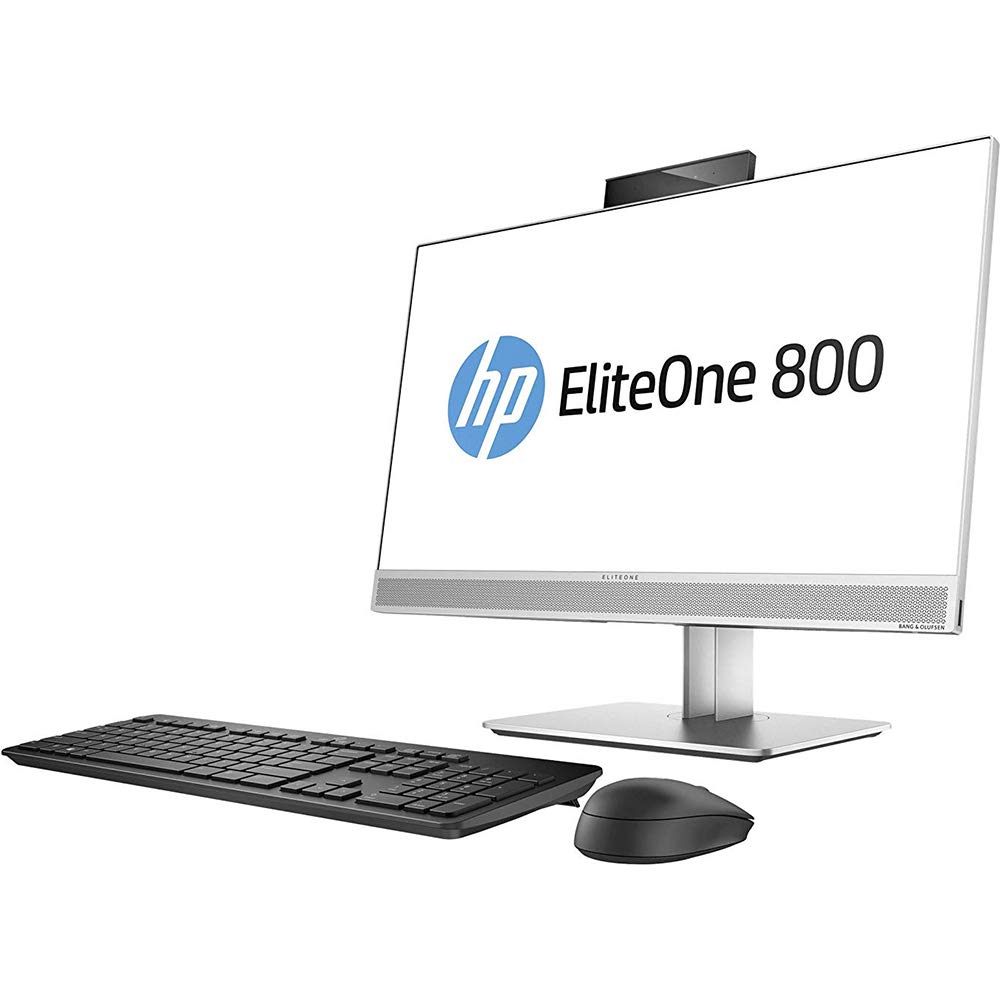
Слика 3.1: HP EliteOne 800 G3 All-in-One PC with connected peripherals. This image illustrates the general appearance of the computer and its basic setup components.
4. Ракување со компјутерот
Your HP EliteOne 800 G3 is pre-installed with Windows 10 Pro, offering a familiar and productive computing environment. Here are some operational highlights:
- Прикажи: The 23.8-inch Full HD (1920x1080) display provides clear visuals for work and entertainment. Some models may feature an optional non-glare touchscreen for interactive use.
- Аудио: Experience enhanced audio with Audio by Bang & Olufsen. The PC also includes HP Noise Cancellation software and HP Audio Boost for clear communication during calls and meetings.
- Webкамери: Utilize the integrated front and optional rear-facing webcams for video conferencing and capturing images.
- Изведба: Equipped with powerful Intel processors, 8 GB DDR4 RAM, and a 256 GB SSD, the system delivers responsive performance. Intel HD Graphics 630 handles visual tasks efficiently.
- Поврзување: Connect to networks via 802.11abg wireless or Gigabit Ethernet. Multiple USB ports are available for connecting external devices.
- Безбедност: Benefit from HP's integrated security features designed to protect your data and system.
5. Одржување
Proper maintenance ensures the longevity and optimal performance of your All-in-One PC:
- Чистење на екранот: Користете мека крпа без влакненца, специјално дизајнирана за електроника. Лесно исплакнетеampИзмијте ја крпата со вода или неабразивен чистач за екран. Избегнувајте прскање течност директно врз екранот.
- Чистење на шасијата: Избришете ги надворешните површини со мека, гamp крпа. Не користете груби хемикалии или абразивни средства за чистење.
- Ажурирања на софтверот: Regularly check for and install operating system updates (Windows Update) and driver updates (HP Support Assistant) to ensure system stability and security.
- Вентилација: Ensure that the ventilation openings on the PC are not blocked to prevent overheating. Keep the PC in a well-ventilated area.
- Бекап на податоци: Периодично правете резервна копија на важните податоци на надворешен диск или складирање во облак за да спречите губење на податоци.
6 Смена на проблеми
Овој дел се однесува на вообичаени проблеми со кои може да се соочите:
- No Power / PC Does Not Turn On:
- Ensure the power cable is securely connected to both the PC and the electrical outlet. Try a different outlet. Verify the power adapter is functioning correctly.
- Нема приказ / Празен екран:
- Check if the PC is powered on. If the PC is on but the screen is blank, try restarting the computer. Ensure no external display cables are connected that might be redirecting the output.
- Нема аудио:
- Check the volume settings in Windows. Ensure speakers are connected and powered on (if external). Verify audio drivers are installed and up to date in Device Manager.
- Проблеми со мрежната поврзаност:
- For Wi-Fi, ensure the wireless adapter is enabled and you are connected to the correct network. For wired connection, check the Ethernet cable and router status. Restart your router/modem.
- System Slowdown / Unresponsive:
- Close unnecessary applications. Check Task Manager for processes consuming high CPU or RAM. Run a virus scan. Ensure sufficient free space on the SSD.
If problems persist, consult the HP support webсајт или контактирајте со службата за корисници.
7. Спецификации
Detailed technical specifications for the HP EliteOne 800 G3 All-in-One PC:
| Карактеристика | Спецификација |
|---|---|
| Број на модел | 1JF75UT#ABA |
| Големина на приказ | 23.8 инчи |
| Максимална резолуција на екранот | 1920 x 1080 пиксели (Full HD) |
| Процесор | Intel Core (3.4 GHz Cortex) |
| RAM меморија | 8 GB DDR4 |
| Складирање | 256 GB SSD |
| Графички копроцесор | Intel HD Graphics 630 |
| Оперативен систем | Windows 10 Pro |
| Безжичен тип | 802.11abg |
| Тип на оптички погон | ДВД-Р |
| Тежина на ставката | 13.29 фунти (приближно 6.03 кг) |
| Димензии на производот (ДxШxВ) | 21.2 x 2.1 x 13.5 инчи (приближно 53.8 x 5.3 x 34.3 см) |
| Боја | Црна/Сребрена |
8. Гаранција и поддршка
Your HP EliteOne 800 G3 All-in-One PC comes with a standard manufacturer's warranty. Please refer to the warranty documentation included with your product for specific terms and conditions, including coverage duration and service procedures.
За техничка поддршка, преземање драјвери и дополнителни ресурси, посетете ја официјалната страница за поддршка на HP. website. You may also consider optional protection plans for extended coverage and support, such as the 3-Year Protection Plan or Complete Protect monthly plan, which can be purchased separately.
When contacting support, have your product model number (1JF75UT#ABA) and serial number ready.