1. Вовед
The COMPUTHERM Q7RF wireless room thermostat is designed for precise control of heating and air conditioning systems. This programmable device allows you to set individual temperature schedules for each day of the week, optimizing comfort and energy efficiency in your home or office. Its wireless design offers flexible placement of the thermostat unit, while the receiver unit connects directly to your boiler or air conditioning system, compatible with both 24V and 230V control circuits.
2. Содржина на пакетот
Проверете дали сите компоненти се присутни во вашето пакување:
- 4 x COMPUTHERM Q7RF Room Thermostat (Transmitter Unit)
- 4 x COMPUTHERM Q7RF Receiver Unit
- Упатство за употреба (овој документ)
- Завртки за монтирање и ѕидни приклучоци
3. Производот завршиview
The COMPUTHERM Q7RF system consists of two main components: the thermostat unit (transmitter) and the receiver unit. The thermostat unit measures the room temperature and allows you to set desired temperatures and programs. The receiver unit connects to your heating or cooling system and switches it on or off based on signals from the thermostat unit.

Слика 1: Готовоview of the COMPUTHERM Q7RF 4-piece set, showing multiple thermostat and receiver units.
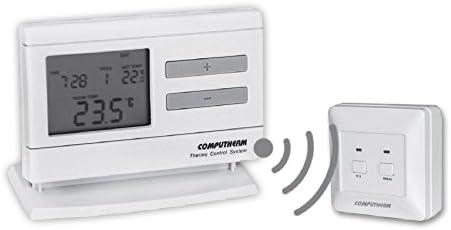
Figure 2: A single COMPUTHERM Q7RF thermostat unit communicating wirelessly with its receiver unit.
3.1 Thermostat Unit (Transmitter)
- LCD дисплеј: Shows current temperature, set temperature, time, day, and program status.
- Контролни копчиња: For setting temperature, time, and programming schedules.
- Оддел за батерии: За напојување.
3.2 Ресивер единица
- Терминали за жици: For connection to the heating/cooling system.
- Индикатори за статусот: LEDs to show power and relay status.
- Manual Override Buttons: For temporary manual control.
4. Спецификации
| Карактеристика | Спецификација |
|---|---|
| Бренд | КОМПЈУТЕРКА |
| Модел | Q7RF |
| Switching Voltage | 24V AC/DC, ... 250V AC, 50Hz |
| Потрошувачка на енергија | 6W |
| Опсег на мерење на температурата | 3 – 45°C (in 0.1°C increments) |
| Прилагодлив температурен опсег | 5 – 40°C (in 0.5°C increments) |
| Точност на мерење на температурата | ±0.5°C |
| Тип на контролер | Притиснете го копчето |
| Технологија за поврзување | Безжичен (радиофреквенција) |
| Посебни карактеристики | Programmable, Compatible with various system voltages |
5. Поставување и инсталација
5.1 Thermostat Unit Placement and Battery Installation
- Изберете локација: Place the thermostat unit in a central area of the room where it can accurately measure the ambient temperature, away from direct sunlight, drafts, or heat sources.
- Инсталирајте батерии: Open the battery compartment on the back of the thermostat unit. Insert the required batteries (typically AA or AAA, refer to the unit's markings) ensuring correct polarity. Close the compartment.
- Вклучување: The display should light up, indicating the unit is powered.
5.2 Ожичување на приемната единица
WARNING: Electrical installation should only be performed by a qualified electrician. Disconnect power to the heating/cooling system before proceeding.
- Монтирајте го приемникот: Secure the receiver unit near your boiler or air conditioning system using the provided screws and wall plugs.
- Пристапни терминали за ожичување: Open the cover of the receiver unit to expose the wiring terminals.
- Поврзете се со системот: Connect the receiver unit to the two-wire room thermostat connection point of your boiler or AC system. Ensure connections are secure and follow the wiring diagram provided with your heating/cooling system and the receiver unit. The COMPUTHERM Q7RF is compatible with both 24V and 230V control circuits.
- Вратете ја моќноста: Once wiring is complete and verified, close the receiver unit cover and restore power to your heating/cooling system.
5.3 Pairing the Units (If not pre-paired)
Refer to the specific instructions provided with your Q7RF set for pairing procedures. Typically, this involves pressing a pairing button on the receiver unit and then initiating a pairing sequence on the thermostat unit within a short timeframe. A successful pairing will usually be indicated by an LED on the receiver or a message on the thermostat display.
6. Упатства за работа
6.1 Разбирање на LCD екранот
The LCD display provides all necessary information about the thermostat's current status and settings.

Слика 3: Детално view of the COMPUTHERM Q7RF LCD display, illustrating various indicators such as program number, manual modification symbol, weekdays, time, set temperature, actual room temperature, low battery symbol, boiler ON state, and timed control symbol.
- Неделни денови: Го означува тековниот ден од неделата.
- Exact Time / Time Left: Displays the current time or time remaining for a manual modification.
- Број на програма: Shows the active program segment.
- Поставете температура: The desired temperature set by the user.
- Actual Room Temperature: The current temperature measured by the thermostat.
- Symbol for Manual Modification: Indicates that the thermostat is currently operating under a temporary manual override.
- Temp. Modified until next manual intervention: Shows the duration of a temporary temperature change.
- Symbol for Low Battery Voltage: Се појавува кога батериите треба да се заменат.
- Symbol for Boiler ON State: Indicates when the heating/cooling system is active.
- Symbol for Timed Control: Indicates that a programmed schedule is active.
6.2 Поставување на тековното време и ден
- Притиснете го ВРЕМЕ копче.
- Користете го + or - копчиња за да го прилагодите часот, потоа притиснете ВРЕМЕ повторно да се потврди.
- Repeat for minutes and day of the week.
6.3 Рачно прилагодување на температурата
- Во нормален режим на работа, притиснете го копчето + or - копчиња за прилагодување на саканата температура.
- The new temperature will be maintained until the next programmed time slot or until manually overridden again.
6.4 Programming Daily/Weekly Schedules
The Q7RF allows for independent programming for each day of the week. You can typically set multiple time periods with different temperatures for each day.
- Притиснете го ПРОГ копче за да влезете во режим на програмирање.
- Користете го ДЕН button to select the day you wish to program (e.g., MON, TUE, etc.).
- Користете го ВРЕМЕ и +/- buttons to set the start time for the first program period.
- Користете го ПОСТАВИ ТЕМП и +/- buttons to set the desired temperature for this period.
- Притиснете ПРОГ again to move to the next program period for the same day, or use ДЕН да се префрли на следниот ден.
- Repeat until all desired periods and days are programmed.
- Притиснете го ТРЧЕТЕ or ИЗЛЕЗ button to save and exit programming mode.
7. Одржување
7.1 Замена на батеријата
When the low battery symbol appears on the LCD display, replace the batteries immediately to ensure continuous operation. Use new, high-quality alkaline batteries of the specified type.
- Open the battery compartment cover on the back of the thermostat unit.
- Отстранете ги старите батерии.
- Insert new batteries, observing correct polarity (+/-).
- Затворете го капакот на преградата за батерии.
7.2 Чистење
Clean the thermostat and receiver units with a soft, dry cloth. Do not use abrasive cleaners, solvents, or spray directly onto the units, as this may damage the electronics or finish.
8 Смена на проблеми
| Проблем | Можна причина | Решение |
|---|---|---|
| Екранот на термостатот е празен | Починати батерии | Заменете ги батериите со нови. |
| Системот за греење/ладење не реагира | 1. Receiver unit not powered 2. Units not paired 3. Wiring issue 4. Надвор од опсегот | 1. Check power supply to receiver. 2. Perform pairing procedure (Section 5.3). 3. Verify wiring connections (Section 5.2). 4. Move thermostat closer to receiver or check for obstructions. |
| Неправилно отчитување на температурата | Thermostat placed in unsuitable location (direct sun, draft) | Relocate thermostat to a more central and stable temperature area. |
| Programmed schedule not active | Thermostat in manual override mode | Exit manual override mode (e.g., press RUN/AUTO button) to resume programmed operation. |
9. Гаранција и поддршка
COMPUTHERM products are manufactured to high-quality standards. For warranty information, please refer to the warranty card included with your product or contact your retailer. For technical support, please reach out to the COMPUTHERM customer service or your local distributor. Keep your purchase receipt as proof of purchase.


