1. Вовед
This manual provides comprehensive instructions for the safe and effective use of the PCE Instruments PCE-170 A Light Meter. This device is designed for measuring illuminance (lux or foot-candles) in various environments, such as offices, factories, and outdoor settings. It features a wide measurement range, fast response time, and a compact design for ease of use.
Ве молиме внимателно прочитајте го ова упатство пред да го ракувате со уредот и зачувајте го за во иднина.
2. Информации за безбедност
Observe the following safety precautions to prevent injury and avoid damage to the device:
- Не го изложувајте уредот на екстремни температури, влажност или директна сончева светлина.
- Избегнувајте силни вибрации или удари.
- Не обидувајте се да го отворите или модифицирате уредот. За сите сервиси обратете се на квалификуван персонал.
- Keep the light sensor clean and free from obstructions to ensure accurate readings.
- Отстранете ја батеријата ако уредот нема да се користи подолг период за да спречите истекување.
- Отстранете ги батериите и уредот според локалните прописи.
3. Производот завршиview
The PCE-170 A Light Meter consists of a main unit with a display and control buttons, and an integrated light sensor.

Слика 1: Предна страна view of the PCE-170 A Light Meter, showing the display, control buttons, and light sensor at the top.
3.1 Компоненти
- Сензор за светлина: Located at the top of the device, protected by a white dome. This silicon photodiode measures incident light.
- LCD дисплеј: A 5-digit display showing measurement values, units (lux/fc), and function indicators (e.g., AUTO RANGE, HOLD, MIN, MAX).
- Копче за вклучување (Вклучено/Исклучено): Го вклучува или исклучува уредот.
- Копче за калкулација: Used for zero adjustment.
- Копче HOLD: Го замрзнува тековното отчитување на екранот.
- fc/lx Button: Toggles between foot-candle (fc) and lux (lx) measurement units.
- Копче RANGE: Manually selects measurement ranges or activates auto-ranging.
- Оддел за батерии: Located at the rear, houses the 9V battery.

Слика 2: Одблиску view of the LCD display, showing a reading of "534 lx" and "AUTO RANGE 4 000".
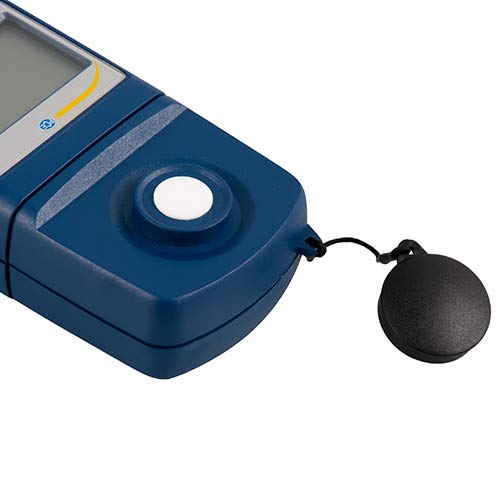
Слика 3: Детално view of the light sensor at the top of the device, with its protective cap removed.
4. Поставување
4.1 Инсталација на батерија
- Пронајдете го капакот на преградата за батерии на задната страна од уредот.
- Slide the cover open or unscrew it, depending on the model.
- Insert one 9V battery, observing the correct polarity (+/-).
- Добро заменете го капакот на преградата за батерии.
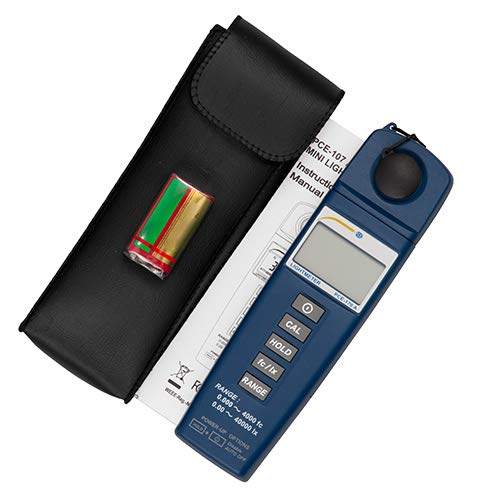
Слика 4: The PCE-170 A Light Meter shown with its carrying case and the included 9V battery, ready for installation.
4.2 Почетно вклучување
Притиснете го Моќ button to turn on the device. The display will illuminate and show a reading. If the battery symbol appears, replace the battery.
5. Упатства за работа
5.1 Преземање на мерење
- Вклучете го уредот користејќи го Моќ копче.
- Ensure the light sensor is clean and unobstructed.
- Position the light sensor at the location where illuminance is to be measured. Ensure the sensor is facing the light source directly for accurate readings.
- The current illuminance value will be displayed on the LCD.

Слика 5: A user measuring light levels in an office environment with the PCE-170 A Light Meter.
5.2 Changing Measurement Units (fc/lx)
Притиснете го fc/lx button to toggle between foot-candles (fc) and lux (lx) units. The selected unit will be indicated on the display.
5.3 Функција HOLD
Притиснете го ДРЖИ копче за замрзнување на тековното отчитување на екранот. Притиснете го повторно за да го ослободите задржувањето и да продолжите со мерењата во живо.
5.4 Zero Adjustment (CAL)
За да извршите прилагодување на нула:
- Place the light sensor in a completely dark environment (e.g., cover it with the protective cap or place it in a dark box).
- Притиснете го CAL button. The display should show "0.00" or a value very close to zero.
- If the display does not show zero, repeat the process.
5.5 Избор на опсег
The device typically operates in auto-ranging mode. To manually select a range or cycle through available ranges, press the РАНГ button. The display will indicate the active range. Press and hold the РАНГ button to return to auto-ranging mode.
5.6 Min/Max Function (Power-Up Option)
The PCE-170 A supports Min/Max recording. To activate this feature, refer to the power-up options indicated on the device label (e.g., press and hold a specific button during power-on). This function records the minimum and maximum illuminance values detected during a measurement session.
6. Одржување
6.1 Чистење
Wipe the device with a soft, dry cloth. Do not use abrasive cleaners or solvents. Keep the light sensor clean and free of dust or smudges, as this can affect measurement accuracy.
6.2 Складирање
When not in use, store the PCE-170 A Light Meter in its carrying case in a cool, dry place, away from direct sunlight and extreme temperatures. Remove the battery if storing for extended periods.
7 Смена на проблеми
| Проблем | Можна причина | Решение |
|---|---|---|
| Уредот не се вклучува. | Мртва или неправилно инсталирана батерија. | Проверете го поларитетот на батеријата или заменете ја со нова батерија од 9V. |
| На екранот се прикажува „OL“ (Преоптоварување). | Light intensity exceeds the current measurement range. | Switch to a higher measurement range using the РАНГ button, or move to a less intensely lit area. |
| Неточни читања. | Dirty sensor, incorrect zero adjustment, or sensor not facing light source correctly. | Clean the sensor, perform zero adjustment in darkness, and ensure the sensor is properly oriented. |
| Екранот е празен или трепка. | Слаба батерија. | Заменете ја батеријата од 9V. |
8. Спецификации
| Параметар | Вредност |
|---|---|
| Опсези на мерење | 0.00 ... 40,000 lux / 0.000 ... 4000 fc |
| Резолуција | 0.01 лукс / 0.001 fc |
| Точност | ±3% of measurement value + 5 digits |
| Индикатор за преоптоварување | „ОЛ“ |
| Мерење на стапка | На секои 2 секунди |
| Работна температура | 0 ... 40°C / 32 ... 104°F |
| Сензор за светлина | Silicon photodiode, corrected cosine angle |
| Приказ | LCD со 5 цифри |
| Извор на енергија | Батерија 9V (вклучена) |
| Димензии | 33 x 54 x 196 mm / 1.3 x 2.1 x 7.7 инчи |
| Тежина | 180 g / <1 lb (approx. 9.17 ounces) |
8.1 Опсег на испорака
The standard delivery package includes:
- 1 x PCE-170 A Lux Meter
- 1 x 9V батерија
- 1 x торбичка за носење
- 1 x Упатство за употреба (овој документ)
9. Гаранција и поддршка
PCE Instruments provides a warranty for this product against defects in materials and workmanship. For specific warranty terms and conditions, please refer to the warranty card included with your purchase or visit the official PCE Instruments website. For technical support, service, or calibration inquiries, please contact PCE Instruments customer service.
PCE Instruments US: Посетете ја продавницата