Вовед
Thank you for choosing the Dörr 204473 8 MP Snapshot IR TFT Trail Camera. This camera is designed for versatile surveillance, offering high-quality images and videos both day and night. Its robust, weatherproof design makes it ideal for outdoor use, capturing wildlife or monitoring property with its motion detection capabilities. Please read this manual carefully before operating the camera to ensure proper use and to maximize its performance.
Информации за безбедност
- Не го изложувајте фотоапаратот на екстремни температури или директна сончева светлина подолг период.
- Ensure the battery compartment is securely closed to maintain water resistance.
- Use only recommended battery types (AA batteries). Do not mix old and new batteries, or different types of batteries.
- Држете ја камерата подалеку од силни магнетни полиња.
- Не обидувајте се да ја расклопите или модифицирате камерата. Ова ќе ја поништи гаранцијата.
- Отстранете ги батериите и електронските компоненти одговорно во согласност со локалните прописи.
Производот завршиview
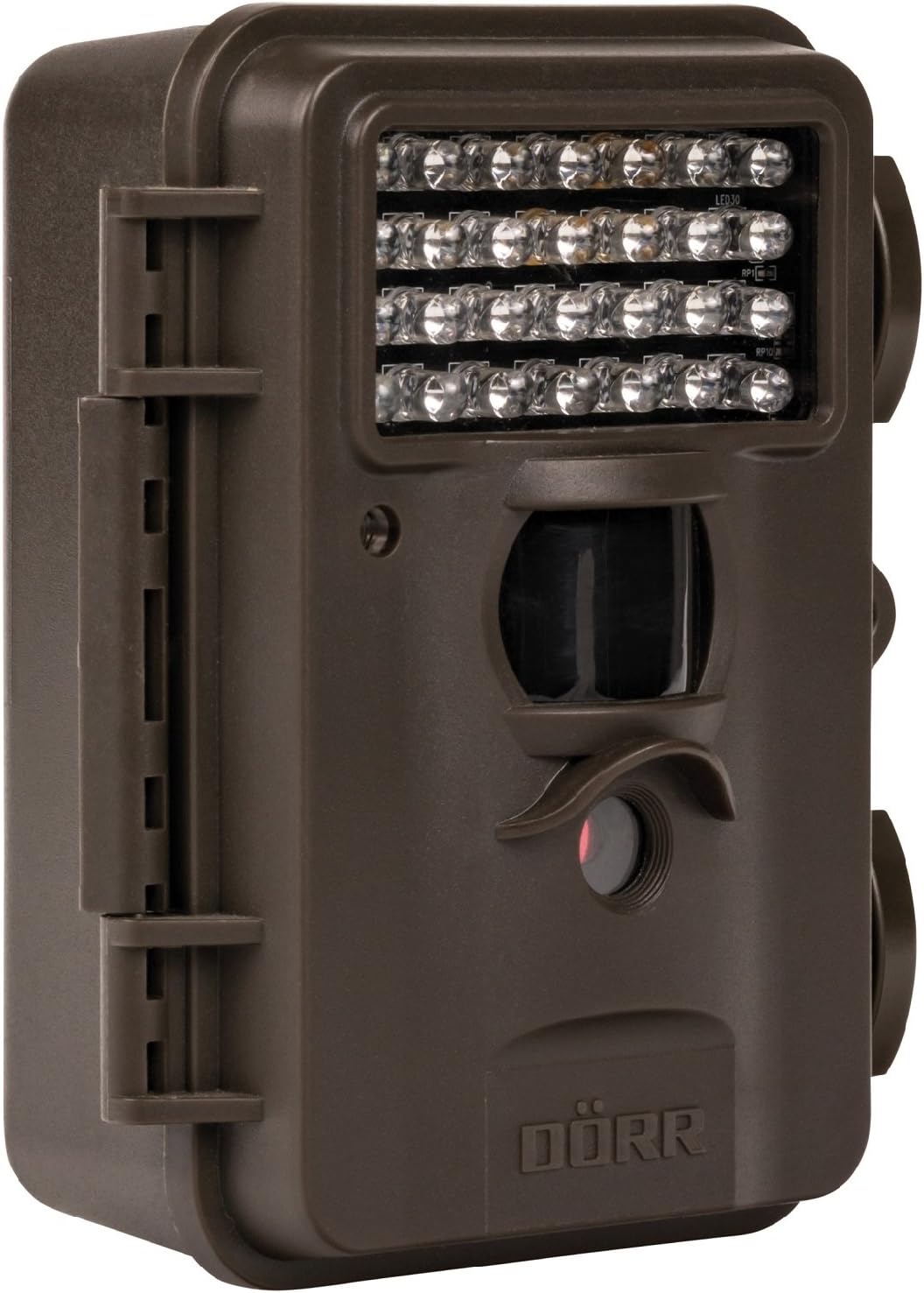
This image displays the front of the Dörr 204473 Trail Camera. Visible features include the array of 28 infrared LEDs at the top, the passive infrared (PIR) motion sensor below the LEDs, and the camera lens at the bottom. The camera has a rugged, dark brown, weatherproof casing with a latch on the left side.
The Dörr 204473 camera features a compact and durable design. Key components include:
- Инфрацрвени LED диоди: 28 nearly invisible LEDs for night illumination up to 15 meters.
- ПИР сензор за движење: Detects movement to trigger photo or video capture.
- Објектив на камерата: Captures 8MP still images and video.
- TFT дисплеј: For menu navigation and viewing captured media (located inside the camera).
- Контролна тастатура: For setting up and operating the camera.
- Weatherproof Housing: Protects the camera from environmental elements.
Поставување
1. Инсталација на батерија
- Open the camera housing latch on the side.
- Пронајдете ја преградата за батерии.
- Insert 4 or 8 AA batteries, ensuring correct polarity (+/-).
- Добро затворете го капакот на преградата за батерии.
2. Инсталација на SD-картичка
- With the camera housing open, locate the SD/SDHC card slot.
- Insert an SD/SDHC memory card (up to 32 GB) into the slot until it clicks into place. Ensure the card is inserted in the correct orientation.
- За да ја извадите, нежно притиснете ја картичката додека не испадне.
3. Монтирање на камерата
The camera can be mounted using a strap or a wall mount. Ensure the camera is positioned to capture the desired area without obstructions. The mounting type is wall mount.
- Монтирање на ремен: Thread the provided strap through the slots on the back of the camera and secure it around a tree or pole.
- Монтирање на ѕид: Use appropriate screws and anchors (not included) to secure the camera to a wall or flat surface.
Упатства за работа
1. Вклучување/исклучување
- To power on, slide the power switch to the 'ON' position.
- За да го исклучите, поместете го прекинувачот за вклучување во положба „ИСКЛУЧЕНО“.
2. Навигација во менито
Once powered on, the TFT display will activate. Use the keypad buttons (UP, DOWN, LEFT, RIGHT, OK, MENU) to navigate through the settings menu. The menu is available in English and German.
3. Поставување датум и време
- Enter the menu and navigate to 'Date/Time' settings.
- Use the navigation buttons to set the current date and time.
- Confirm with 'OK'. Each captured image will display the time, date, and temperature in °C.
4. Photo/Video Modes and Settings
The camera supports both still image and video capture. Adjust settings such as resolution, trigger interval, and burst mode via the menu.
- Резолуција: Set to 8MP for still images.
- Време на активирање: The camera has a fast trigger time of 1.3 seconds.
- Откривање на движење: Configure the sensitivity of the PIR sensor.
- Ноќно гледање: The 28 IR LEDs automatically activate in low light conditions for night vision up to 15 meters.
5. Viewинг Files
Можеш view captured photos and videos directly on the camera's TFT display or by connecting the camera to a computer via USB (cable not included) or by inserting the SD card into a card reader.
Одржување
- Чистење: Use a soft, dry cloth to clean the camera lens and housing. Do not use abrasive cleaners or solvents.
- Нега на батеријата: Отстранете ги батериите ако фотоапаратот нема да се користи подолг период за да спречите протекување.
- Складирање: Чувајте го фотоапаратот на ладно и суво место, подалеку од директна сончева светлина кога не го користите.
Решавање проблеми
| Проблем | Можна причина | Решение |
|---|---|---|
| Камерата не се вклучува | Слаби или празни батерии; неправилен поларитет на батериите. | Заменете ги батериите; осигурајте се дека поларитетот е точен. |
| Нема снимени слики/видеа | SD card full or not inserted correctly; motion sensor blocked or sensitivity too low. | Insert/replace SD card; format SD card; clear sensor path; increase sensor sensitivity. |
| Лош квалитет на сликата ноќе | Subject too far from camera; IR LEDs obstructed. | Ensure subject is within 15m range; clear any obstructions from IR LEDs. |
| Камерата не детектира движење | PIR sensor sensitivity too low; camera positioned incorrectly. | Increase PIR sensitivity; reposition camera for optimal detection angle. |
Спецификации
| Карактеристика | Детал |
|---|---|
| Бренд | DÖRR |
| Број на модел | 204473 |
| Ефективна сепак резолуција | 8 MP |
| Ефективна видео резолуција | 8 MP |
| Опсег на ноќни визии | 15 метри |
| Број на IR LED диоди | 28 |
| Време на активирање | 1.3 секунди |
| Складирање | SD/SDHC Memory Card (up to 32 GB) |
| Извор на енергија | 4x or 8x AA Batteries |
| Боја | Црното |
| Материјал | Метал |
| Димензии на ставката (Д x Ш x В) | 10 x 7 x 12.2 cm |
| Ниво на отпорност на вода | Водоотпорен |
| Тип на монтирање | Монтирање на ѕид |
| Препорачани апликации | Детекција на движење, ноќен вид |
Гаранција и поддршка
For warranty information and technical support, please refer to the documentation provided with your purchase or visit the official Dörr webстраница. Зачувајте го доказот за купување за какви било гаранциски побарувања.


