Вовед
Ви благодарам за купувањетоasing the Wireless Bluetooth Headset. This manual provides essential information for the proper use, setup, and maintenance of your new headset. Please read it thoroughly before use to ensure optimal performance and longevity of the product.
Содржина на пакетот
Ве молиме проверете дали сите артикли наведени подолу се вклучени во вашиот пакет:
- Wireless Bluetooth Headset (2 units)
- USB кабел за полнење (2 единици)
- Упатство за употреба

Image: Contents of the headset package, showing one black headset and a white USB charging cable.
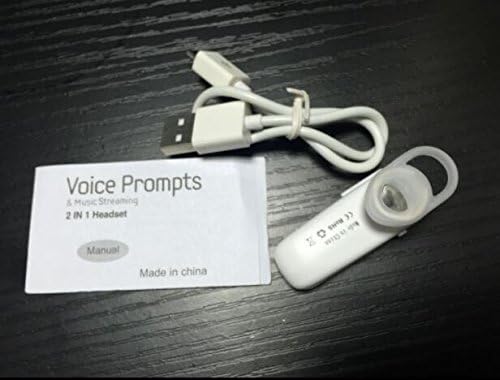
Image: Contents of the headset package, showing one white headset, a white USB charging cable, and the printed user manual.
Производот завршиview
The Wireless Bluetooth Headset is designed for convenience and portability, ideal for sports, driving, and daily use. It features a super mini design and supports voice prompts and music streaming.

Слика: напред view of the product packaging, displaying the black wireless Bluetooth headset inside its clear plastic casing.
Спецификации
| Карактеристика | Опис |
|---|---|
| Bluetooth верзија | V3.0 + EDR |
| Поддршка Проfiles | Headset, Handsfree, A2DP |
| Talk Time/Playing Time | До 5 часа |
| Време на мирување | До 80 часа |
| Извор на енергија | Вградена литиум-јонска батерија што се полни |
| Технологија за поврзување | Безжичен |
| Форма фактор | Во уво |
| Тежина на ставката | 15.8 ounces (for 2 units) |
| Димензии на пакетот | 1.97 x 1.57 x 1.18 инчи |
| Број на модел | Yu- TLXgo-2201 |

Image: Back of the product packaging, displaying a list of product specifications including Bluetooth version, talk time, and power source.
Поставување
Полнење на слушалките
- Поврзете го малиот крај од USB кабелот за полнење со приклучокот за полнење на слушалките.
- Поврзете го поголемиот крај од USB кабелот за полнење со USB извор на напојување (на пр., USB порт на компјутер, USB адаптер за ѕид).
- The indicator light on the headset will illuminate during charging. It will change color or turn off once fully charged.
- Целосното полнење обично трае приближно 1-2 часа.
Спарување со уред со Bluetooth
- Ensure the headset is fully charged before initial pairing.
- With the headset turned off, press and hold the Multi-function Button (MFB) for approximately 5-7 seconds until the indicator light flashes red and blue alternately. This indicates the headset is in pairing mode.
- On your Bluetooth-enabled device (smartphone, tablet, etc.), go to the Bluetooth settings and ensure Bluetooth is enabled.
- Пребарај за available devices. The headset should appear in the list, typically named "MBT2013" or similar.
- Select the headset from the list to connect. If prompted for a password, enter "0000" (four zeros).
- Once successfully paired, the indicator light will stop flashing and may show a steady blue light, and you may hear a voice prompt confirming the connection.
- The headset will automatically connect to the last paired device when turned on, if the device's Bluetooth is active and within range.
Упатства за работа
Вклучување/исклучување
- Вклучување: Press and hold the Multi-function Button (MFB) for about 3 seconds until the blue indicator light flashes and you hear a voice prompt.
- Исклучено: Press and hold the MFB for about 3-4 seconds until the red indicator light flashes and you hear a voice prompt.
Управување со повици
- Одговори на повикот: Притиснете го MFB еднаш.
- Крај на повикот: Притиснете го MFB еднаш за време на повик.
- Одбијте го повикот: Press and hold the MFB for about 2 seconds during an incoming call.
- Повторно бирајте последен број: Притиснете двапати на MFB кога не сте на повик.
Репродукција на музика
- Пушти/Пауза: Press the MFB once during music playback.
Забелешка: Контролата на јачината на звукот може да се управува директно од вашиот поврзан уред.
Одржување
- Чистење: Користете мека, сува крпа за чистење на слушалките. Не користете груби хемикалии или абразивни материјали.
- Складирање: Чувајте ги слушалките на ладно и суво место, подалеку од директна сончева светлина и екстремни температури.
- Нега на батеријата: За да го продолжите животниот век на батеријата, редовно полнете ги слушалките, дури и ако не ги користите често. Избегнувајте целосно празнење на батеријата подолг период.
- Отпорност на вода: Овие слушалки не се водоотпорни. Избегнувајте изложување на вода или прекумерна влага.
Решавање проблеми
- Слушалките не се вклучуваат:
- Ensure the headset is fully charged. Connect it to a power source and try again.
- Не може да се спари со уред:
- Ensure the headset is in pairing mode (red and blue lights flashing alternately). Make sure Bluetooth is enabled on your device and it is within range (typically 10 meters). Try restarting both the headset and your device.
- Нема звук или звукот е со слаб квалитет:
- Check the volume levels on both the headset and your connected device. Ensure the headset is properly connected to your device. Move closer to your device to avoid interference.
- Headset disconnects frequently:
- Ensure the headset is within range of your device. Check for potential interference from other wireless devices. Try re-pairing the headset.
Информации за безбедност
- Do not disassemble, repair, or modify the headset. This may cause fire, electronic breakdown, or complete damage to the product.
- Keep the headset away from extreme temperatures, humidity, and corrosive substances.
- Избегнувајте испуштање или изложување на слушалките на силни удари.
- Do not expose the headset to open flames or dispose of it in fire.
- Отстранете го производот и неговата батерија одговорно во согласност со локалните прописи.
Гаранција и поддршка
За информации за гаранцијата или техничка поддршка, ве молиме погледнете ги контакт информациите што ги обезбедил вашиот продавач или официјален претставник на производителот. webстраница. Ве молиме задржете го доказот за купување за гаранциски барања.


