1. Вовед
The SAM4s ER-940 is a commercial-grade, full-featured electronic cash register designed for food service and various business environments. It combines ease of use with robust functionality, featuring a large flat spill-resistant keyboard, a high-speed thermal receipt printer, and extensive programming capabilities. This manual provides essential information for setting up, operating, maintaining, and troubleshooting your ER940 cash register.
2. Поставување
2.1 Распакување и почетно поставување
Carefully remove the cash register from its packaging. Place the unit on a stable, flat surface, ensuring adequate ventilation. Keep the area around the register clear of liquids to prevent spills on the keyboard.
2.2 Поврзување за напојување
Connect the power adapter to the cash register and then plug it into a standard electrical outlet. Ensure the power switch is in the 'Off' position before connecting, then turn it 'On'.
2.3 Периферни врски
The ER940 features two standard serial ports for connecting various peripherals such as barcode scanners or external printers. Refer to the peripheral's specific manual for connection instructions.
2.4 Loading Receipt Paper
The ER940 uses a 2.25" high-speed drop-and-load thermal receipt printer. To load paper, open the printer cover, place the thermal paper roll into the compartment, ensuring the paper feeds correctly under the roller, and close the cover. A small amount of paper should protrude from the slot.
3. Операција
3.1 Basic Sales Transaction
To perform a basic sale, enter the price of the item using the numeric keypad, then press the corresponding department key (e.g., D1, D2). Repeat for all items. To finalize the transaction, press the 'Cash' button for exact change or 'Card' for card payments. The receipt will print automatically.
Video 3.1: Demonstrates basic sales, handling change, multiple item sales, and split payments on a Nadex CR600 cash register. The principles apply to the Sam4S ER940.
3.2 Handling Change
If a customer pays with a larger bill than the total, enter the amount of cash received after ringing up all items. Press the 'Cash' button. The register display and receipt will show the total amount due, the payment received, and the change to be given to the customer.
3.3 Multiple Item Sales
For multiple units of the same item, first enter the quantity using the numeric keypad, then press the 'X' (multiply) button, followed by the item's price and its department key. The register will calculate the subtotal for these items.
3.4 Split Payments
To accept split payments (e.g., cash and card), ring up all items. If the customer pays a portion in cash, enter the cash amount and press 'Cash'. The display will show the remaining balance. Then, process the remaining balance via card by pressing 'Card'. The receipt will detail both payment methods.
3.5 Holding Transactions
The ER940 allows you to hold a transaction for later completion. This is useful if a customer needs to retrieve an item or step away temporarily. To hold a transaction, after entering items, press the designated 'Hold' key (which can be programmed, e.g., D6). A receipt will print indicating the transaction is on hold. To recall and complete a held transaction, press 'Shift' followed by the 'Hold' key.
Video 3.5: Instructions on how to hold a transaction for later on a Nadex CR360 cash register. The process is similar for the Sam4S ER940.
3.6 Customizing Receipt Header/Footer
You can personalize your receipts by customizing the header and footer messages. To do this, turn the key to 'P' (Program) mode. Navigate to 'System Setting' > 'Header & Footer'. Use the arrow keys and 'Subtotal' button to select and edit each line of text. Once changes are made, press 'Cash Subtotal' to save and exit. Then, return the key to 'Reg' (Register) mode.
Video 3.6: Guide to customizing the receipt header and footer on a Nadex CR600 cash register. The procedure is comparable for the Sam4S ER940.
4. Клучни карактеристики
- 150 Key Position Flat Keyboard: Supports 100 or more PLU locations for efficient item entry.
- High-Speed Thermal Printer: Two-station 2.25" drop-and-load thermal receipt and journal printers for quick and clear printing.
- Electronic Journal: Saves or prints an electronic sales journal, allowing for quick transaction-level information search and investigation.
- Full-Size Cash Drawer: Features 5 bill and 5 coin slots with media slots for checks or coupons.
- Extensive PLU Capacity: Up to approximately 2,000 PLUs accessible directly or indirectly.
- Automatic Tax Computation: Supports up to 4 rates or tables.
- Multiple Media Keys: 10 media keys including Cash, Check, and up to 8 Charge Keys.
- Clerk/Cashier Management: Supports up to 50 Clerks/Cashiers.
- Graphic Bitmap Logo: Customizable logo printing on receipts.
- Waterproof Keyboard Caps: Durable keys designed for spill resistance (as seen in similar models).
- Повеќе интерфејси: Compatible with various external devices like barcode scanners (as seen in similar models).
- Customer Display Screen: An 8-digital customer screen shows time, sales, and changes (as seen in similar models).
- Staff Display Screen: A 2.8 Inch TFT LCD screen for staff (as seen in similar models).
- Брза брзина на печатење: 90mm/s printing speed for efficient transaction processing (as seen in similar models).
- One-Key Auto Open Cash Drawer: Convenient access to the cash drawer (as seen in similar models).
- Check Slot: Dedicated slot for checks or large bills (as seen in similar models).
Видео 4.1: Надview of features on a PYY Electronic Commercial Cash Register, illustrating functionalities such as waterproof keys, multiple interfaces, customer screen, and printing speed, which are common to modern cash registers like the Sam4S ER940.
5. Одржување
5.1 Општо чистење
Regularly clean the exterior of the cash register with a soft, damp cloth. Avoid abrasive cleaners or solvents. Keep the printer area free of dust and paper debris.
5.2 Cash Drawer Management
The cash drawer features 5 bill slots with spring-loaded clips and 5 coin slots. The coin tray is removable, allowing for storage of valuables, checks, or receipts underneath. Ensure the drawer mechanism is free of obstructions for smooth operation.
Video 5.2: Demonstrates the features of a CR180 Cash Register's cash drawer, including bill and coin slots, which are similar to the Sam4S ER940.
6 Смена на проблеми
6.1 Заеднички прашања
- Печатачот не печати: Check if the paper roll is correctly loaded and if the printer cover is closed securely. Ensure the thermal paper is loaded with the correct side facing the print head.
- Cash Drawer Not Opening: Verify that the register is powered on and that a transaction has been completed or the 'Cash No Sale' key has been pressed. Check for any obstructions in the drawer mechanism.
- Грешки при прикажување: If an error message appears, consult the specific error code in the full user manual for detailed solutions. Often, turning the key to 'Off' and then back to 'Reg' can clear minor errors.
- Тастатурата не реагира: Ensure the key is in the correct mode (e.g., 'Reg' for sales). If the keyboard is spill-resistant, ensure no liquid has entered the internal components.
7. Спецификации
| Карактеристика | Детал |
|---|---|
| Димензии на производот | 22 x 20 x 15 инчи |
| Тежина на ставката | 29.9 фунти |
| Производител | SAM4S |
| Датум прв на располагање | 30 јуни 2017 година |
| Тип на тастатура | 150 Key Position Flat Keyboard |
| Тип на печатач | Two Station 2.25" High Speed Drop and Load Thermal Receipt & Journal Printers |
| PLU Capacity | Up to 2,000 PLUs |
| Фиока за готовина | Full Size 5 Bill / 5 Coin with Media Slots |
8. Гаранција и поддршка
For warranty information, technical support, or service inquiries, please refer to the documentation provided with your purchase or contact your authorized Sam4S dealer. Keep your purchase receipt and model number handy for faster service.
9. Related Money Management Solutions
While the Sam4S ER940 is a robust cash register, other tools can complement your money management needs. Below is an example of coin and cash counting/sorting machines.
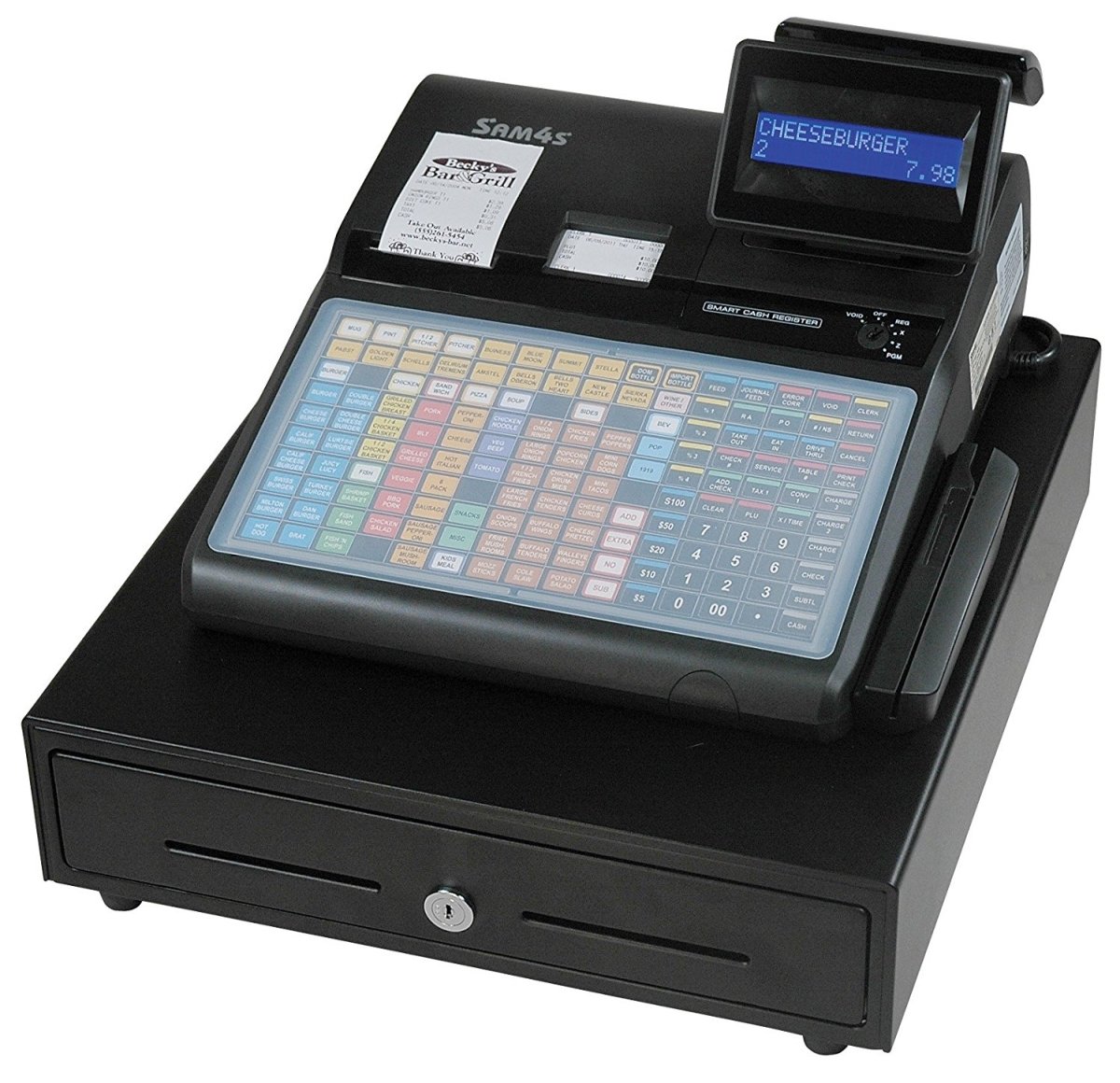
Image 9.1: A Nadex coin counter and a bill counter, demonstrating automated money handling solutions. This image is for illustrative purposes of related products and does not depict the Sam4S ER940 cash register.
Видео 9.2: Оверview of Nadex Coin and Cash Counting/Sorting Machines, showcasing their functionality for efficient money processing. This video is for general information on money management tools and does not feature the Sam4S ER940 cash register.


