Вовед
The Pure Siesta S6 is a sophisticated DAB/DAB+ and FM alarm clock radio designed to enhance your bedside experience. It features a large, ultra-clear CrystalVue display, impressive audio quality via Bluetooth, and a convenient USB port for charging your devices. This manual provides comprehensive instructions for setting up, operating, and maintaining your Siesta S6.
Клучни карактеристики
- Безжичен аудио пренос: Use Siesta S6 as a wireless speaker to stream audio content from your smartphone, laptop, or tablet via Bluetooth.
- CrystalVue+ Display: Large, ultra-clear display for optimal readability, with adaptive brightness.
- Siesta Timer: Program a short nap with a single button press.
- Integrated USB Power Port: Keep your phone, tablet, or other devices fully charged by connecting them to the built-in USB port.
- DAB/DAB+ и FM радио: Пристапете до широк спектар на дигитални и аналогни радио станици.
- Повеќекратни аларми: Set up to three independent alarms with customizable days, sources (tone, last station, preset), and volume.
Водич за поставување
Follow these steps to set up your Pure Siesta S6 for the first time.
- Отпакувајте го уредот: Carefully remove the Siesta S6 from its packaging.
- Поврзете напојување: Insert the supplied mains adapter into the DC IN port on the back of the unit. Plug the adapter into a wall outlet.
- Поставете ја антената: Uncoil the wire antenna fully for optimal DAB/DAB+ and FM reception. Position it away from other electronic devices.
- Првично скенирање: Upon first power-up, the Siesta S6 will automatically scan for available DAB/DAB+ radio stations and set the clock. This process may take a few minutes.
- Adjust Display Brightness (Optional): The display brightness adjusts automatically. If desired, you can manually adjust this setting via the "Menu" section.

Слика: Заден дел view of the Siesta S6, highlighting the USB charging port and the power input.

Слика: Аголна предна страна view of the Pure Siesta S6, displaying the time and alarm indicators.
Упатства за работа
This section details the various functions and controls of your Siesta S6.
Контролите се завршениview
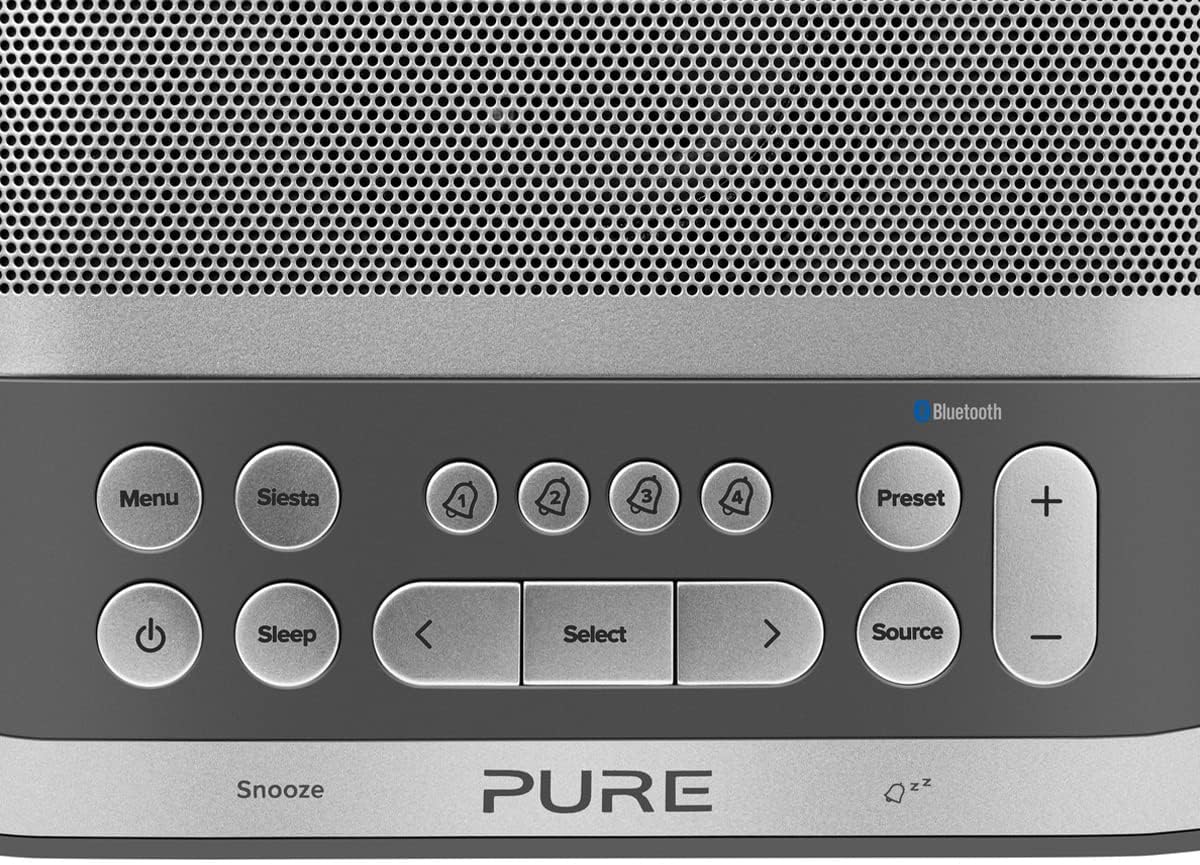
Image: Close-up of the top panel buttons, including Menu, Siesta, Alarm 1-4, Preset, Volume, Power, Sleep, Source, and Navigation buttons.
- Копче за вклучување (●): Притиснете за да го вклучите или исклучите уредот.
- Копче за мени: Access system settings and options.
- Siesta Button: Activates the Siesta timer for short naps.
- Alarm Buttons (1, 2, 3, 4): Press to activate/deactivate or configure individual alarms.
- Копче претходно поставено: Save and recall your favorite radio stations.
- Копчиња за јачина на звук (+/-): Прилагодете ја јачината на звукот.
- Копче за спиење: Set a sleep timer for the radio to turn off automatically.
- Изворно копче: Префрлете се помеѓу режимите DAB, FM и Bluetooth.
- Копчиња за навигација (< Select >): Движете се низ менијата и изберете опции.
- Snooze Bar: Press to temporarily silence an active alarm.
Работење со радио (DAB/DAB+ и FM)
- Изберете режим: Притиснете го Извор button to cycle between DAB and FM radio modes.
- Намести станици:
- DAB: In DAB mode, use the < и > buttons to browse available stations. Press Изберете да се вклучите во станица.
- FM: Во режимот FM, притиснете Изберете to auto-scan for the next available station. Use < и > за дотерување.
- Зачувај ги претходно поставените поставки: За да зачувате станица, притиснете и држете го копчето Претходно поставено копче. Користете < и > за да изберете претходно поставен број, потоа притиснете Изберете да се потврди.
- Потсетете ги претходно поставените поставки: Накратко притиснете го Претходно поставено копче. Користете < и > to select a preset, then press Изберете.
Bluetooth Pairing and Streaming
- Влезете во режим на Bluetooth: Притиснете го Извор button until "Bluetooth" is displayed. The Siesta S6 will enter pairing mode, indicated by a flashing Bluetooth icon.
- Спарете го вашиот уред: On your smartphone, tablet, or computer, enable Bluetooth and search for "Pure Siesta S6" in the list of available devices. Select it to pair.
- Започни со стриминг: Once paired, you can play audio from your device, and it will stream wirelessly to the Siesta S6.
Поставување аларми

Image: A hand interacting with the top controls of the Siesta S6, demonstrating alarm setting.
- Select Alarm: Притиснете едно од Alarm (1, 2, 3, or 4) buttons to select an alarm to configure.
- Конфигурирајте ги поставките: Користете го < и > buttons to adjust the time, alarm source (DAB, FM, Tone, Last Station), volume, and days of the week (Everyday, Weekdays, Weekends, Once). Press Изберете за да ја потврдите секоја поставка.
- Активирај/деактивирај: Кратко притиснете го соодветното Аларм button to toggle the alarm on or off. An active alarm will show its indicator on the display.
- Одложи: Кога ќе се огласи аларм, притиснете го копчето Одложи bar to temporarily silence it. The alarm will sound again after the snooze period.
- Стоп за аларм: To turn off a sounding alarm completely, press the Моќ копче.
Using the Siesta Timer
The Siesta timer allows you to set a short nap timer.
- Активирај: Притиснете го Сиеста копче.
- Поставете времетраење: Користете го < и > buttons to set the desired nap duration (e.g., 5, 10, 15 minutes).
- Потврди: Притиснете Изберете to start the Siesta timer. The display will show the countdown.
USB полнење
The USB port on the back of the Siesta S6 can be used to charge your mobile devices.
- Connect your device's USB charging cable to the USB port on the Siesta S6.
- Ensure the Siesta S6 is powered on and connected to mains electricity.
- Полнењето ќе започне автоматски.
Одржување
Proper care will ensure the longevity of your Siesta S6.
- Чистење: Wipe the unit with a soft, dry, lint-free cloth. Do not use abrasive cleaners, waxes, or solvents.
- Поставување: Avoid placing the unit in direct sunlight, near heat sources, or in environments with high humidity or dust.
- Вентилација: Обезбедете соодветна вентилација околу уредот за да спречите прегревање. Не ги блокирајте отворите за вентилација.
Решавање проблеми
If you encounter issues with your Siesta S6, refer to the following common problems and solutions.
| Проблем | Решение |
|---|---|
| Нема моќ | Осигурајте се дека адаптерот за напојување е безбедно поврзан и со уредот и со функционален ѕиден штекер. |
| Лош радио прием | Fully extend and reposition the wire antenna. Try moving the unit to a different location, away from other electronic devices that may cause interference. Perform a full scan for DAB stations. |
| Bluetooth не се поврзува | Ensure the Siesta S6 is in Bluetooth pairing mode (flashing icon). Make sure Bluetooth is enabled on your device and it is within range. Try unpairing and re-pairing the device. |
| Алармот не се огласува | Verify that the alarm is activated (indicator on display). Check the alarm volume setting. Ensure the alarm time is correctly set. |
| Display Too Dim/Bright | Access the Menu settings to adjust the display brightness or toggle the automatic brightness feature. |
Спецификации
| Карактеристика | Детал |
|---|---|
| Бренд | Чиста |
| Број на модел | P149584 |
| Боја | Ноар (црна) |
| Тип на производ | Радио со дигитален будилник |
| Големина на приказ | 3.9 инчи |
| Поврзување | Bluetooth |
| Посебни карактеристики | Alarm, Siesta Timer, USB Charging Port |
| Компатибилни уреди | Mobile Phone, Tablet |
| Извор на енергија | Напојувано од мрежа |
| Димензии на производот | 14.6L x 7H centimeters |
Гаранција и поддршка
Pure products are designed and manufactured to the highest standards. For warranty information and technical support, please refer to the warranty card included with your product or visit the official Pure webстраница. Зачувајте го доказот за купување за гаранциски побарувања.
For further assistance, you may also contact Pure customer service through their official channels.