1. Вовед
This manual provides instructions for the ROCCAT KONE Aimo Gaming Mouse. The KONE Aimo features an Owl-Eye Optical Sensor, customizable RGB AIMO LED illumination, and 23 programmable keys. It is designed for precision and ergonomic comfort during extended use.
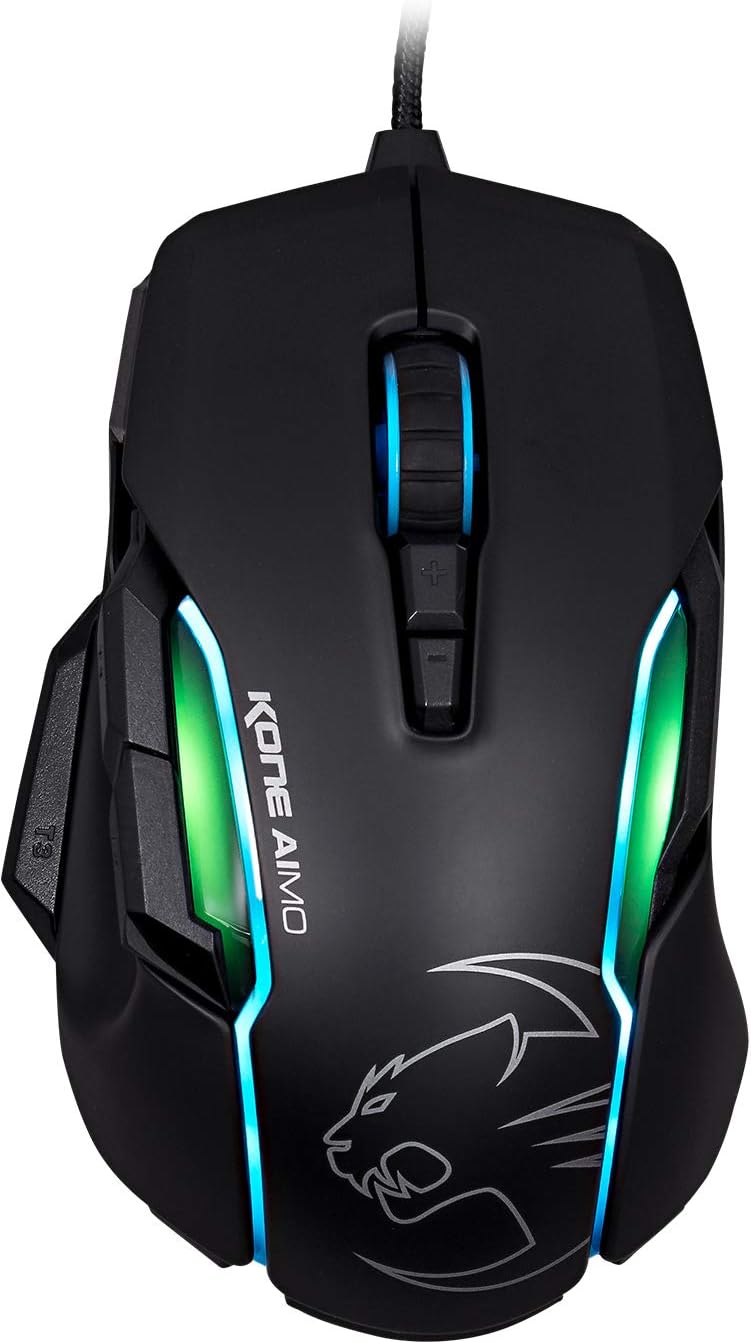
Слика 1: Врв view of the ROCCAT KONE Aimo Gaming Mouse, showcasing its ergonomic shape and RGB lighting zones.
2. Содржина на пакетот
Проверете дали сите артикли се присутни во пакувањето:
- KONE AIMO Mouse with Attached Braided USB Cable
- Брз водич
- Налепници на ROCCAT

Figure 2: Retail packaging of the ROCCAT KONE Aimo Gaming Mouse.
3. Поставување
- Поврзете го глувчето: Plug the USB cable of the ROCCAT KONE Aimo mouse into an available USB port on your computer.
- Инсталација на драјвери: Your operating system (Windows 7, 8, 8.1, 10) should automatically detect and install the necessary drivers.
- Инсталирајте го софтверот ROCCAT Swarm: For full customization of DPI settings, button assignments, and AIMO lighting, download and install the ROCCAT Swarm software from the official ROCCAT webстраница. Овој софтвер ви овозможува да креирате и управувате со проfiles.

Figure 3: The ROCCAT KONE Aimo mouse in use on a mouse pad, connected to a computer.
4. Упатства за работа
4.1. Функции на копчињата
The KONE Aimo features 23 programmable keys, including a tri-button thumb zone and a 4D tilting Titan wheel. These can be customized via the ROCCAT Swarm software.
- Лев/Десен клик: Стандардни функции на глувчето.
- Scroll Wheel (4D Titan Wheel): Scrolls vertically and can tilt horizontally for additional functions. Also acts as a clickable button.
- DPI Adjustment Buttons: Located above and below the scroll wheel, these buttons allow for on-the-fly DPI sensitivity changes. Settings are configured in the Swarm software.
- Thumb Buttons (T1, T2, T3): Three buttons located on the left side, easily accessible by the thumb. The bottom-most button (T3) is often defaulted to the Easy-Shift[+] function.
- Копче за лесно менување на брзини[+]: This exclusive ROCCAT feature doubles the number of programmable functions for other buttons when held down, effectively expanding the total programmable keys.

Слика 4: Детално view of the programmable thumb buttons (T1, T2, T3) on the left side of the mouse.
4.2. AIMO Lighting System
The AIMO lighting system provides intelligent, reactive RGB illumination across four independently configurable LED light zones and the glowing mouse wheel. It can synchronize with other compatible ROCCAT devices and is programmable through the ROCCAT Swarm software.

Figure 5: The KONE Aimo mouse displaying its multi-zone RGB AIMO illumination.
4.3. Owl-Eye Optical Sensor
The mouse is equipped with the ROCCAT Owl-Eye Optical Sensor, a modified PixArt 3361 sensor, offering adjustable DPI from 100 to 12,000. This sensor provides precise tracking and responsiveness. A built-in tracking distance control unit monitors the lift-off distance for enhanced accuracy.

Figure 6: The bottom of the mouse, highlighting the Owl-Eye Optical Sensor.
4.4. Ергономија
The KONE Aimo features refined ergonomics designed for comfort during extended use. Its shape provides a natural fit for the hand, with a dedicated thumb rest area.

Figure 7: A hand gripping the KONE Aimo mouse, illustrating its ergonomic design.
5. Одржување
- Чистење: Користете мека, сува крпа за чистење на површината на глувчето. За тврдокорна нечистотија, малкуamp може да се користи крпа, осигурувајќи се дека влагата нема да навлезе во внатрешните компоненти.
- Нега на сензорот: Одржувајте го оптичкиот сензор на долната страна од глувчето чист и без прашина или остатоци за да обезбедите оптимални перформанси на следење.
- Управување со кабли: Избегнувајте остри свиткувања или прекумерно влечење на плетениот USB кабел за да спречите оштетување.
6 Смена на проблеми
- Глувчето не реагира:
- Осигурајте се дека USB кабелот е безбедно приклучен во функционален USB порт.
- Try a different USB port or another computer to rule out port or system issues.
- Рестартирајте го компјутерот.
- Tracking Issues / Inaccurate Movement:
- Исчистете го оптичкиот сензор на дното на глувчето.
- Ensure you are using the mouse on a clean, suitable mouse pad or surface.
- Check DPI settings in the ROCCAT Swarm software.
- RGB Lighting Not Working / Incorrect:
- Verify that the ROCCAT Swarm software is running and updated.
- Проверете ги поставките за осветлување во софтверот Swarm.
- Осигурајте се дека RGB осветлувањето не е контролирано од конфликтен софтвер.
- Копчињата не функционираат:
- Проверете ги распределбите на копчињата во софтверот ROCCAT Swarm.
- Ensure the software is not experiencing issues (try restarting it).
7. Спецификации
| Карактеристика | Детал |
|---|---|
| Бренд | ROCCAT |
| Број на модел | ROC-11-815-BK |
| Сензор | Owl-Eye Optical Sensor (modified PixArt 3361) |
| Опсег на DPI | 100 до 12,000 DPI |
| Програмабилни копчиња | 23 (со Easy-Shift[+]) |
| Осветлување | RGBA AIMO LED Illumination (4 independent zones + scroll wheel) |
| Поврзување | USB (жичен) |
| Компатибилност на оперативниот систем | Windows 7, Windows 8, Windows 8.1, Windows 10 (32-bit and 64-bit versions) |
| Тежина на ставката | 11.2 унци (приближно 317.5 грама) |
| Димензии на производот (ДxШxВ) | 5.12 x 2.95 x 1.57 инчи (приближно 13 x 7.5 x 4 cm) |
8. Гаранција и поддршка
For warranty information, technical support, and additional resources, please visit the official ROCCAT website or contact ROCCAT customer service. Keep your proof of purchase for warranty claims.
Можете исто така да ја посетите Продавница ROCCAT на Amazon за повеќе информации за производот.


