1. Вовед
Thank you for choosing the CELLO Quick Pop 300 2-Slice Automatic Pop-up Toaster. This appliance is designed for efficient and convenient toasting of bread slices. Featuring 7 browning levels, a cool-touch body, and a removable crumb tray, it ensures a safe and enjoyable user experience. Please read this manual thoroughly before use to ensure proper operation and maintenance.
2. Важни заштитни мерки
- Прочитајте ги сите упатства пред да го користите тостерот.
- Не допирајте жешки површини. Користете рачки или копчиња.
- За заштита од електричен удар, не потопувајте го кабелот, приклучоците или тостерот во вода или друга течност.
- Внимателен надзор е неопходен кога некој апарат се користи од или во близина на деца.
- Исклучете го од штекер кога не се користи и пред чистење. Оставете да се излади пред да ги ставите или извадите деловите.
- Не ракувајте со ниеден апарат со оштетен кабел или приклучок, или откако апаратот не функционира или е оштетен на кој било начин.
- Употребата на додатоци кои не се препорачани од производителот на апаратот може да предизвика повреди.
- Не користете на отворено.
- Не дозволувајте кабелот да виси над работ на масата или шанкот или да допира жешки површини.
- Не ставајте на или во близина на загреан гас или електричен пламеник или во загреана рерна.
- Секогаш прво приклучувајте го приклучокот на апаратот, а потоа вклучете го кабелот во штекерот. За да го исклучите, исклучете го кој било контролер, а потоа извадете го приклучокот од штекерот.
- Не користете го апаратот за друга употреба освен наменетата.
- Преголема храна, пакувања со метална фолија или прибор за јадење не смеат да се ставаат во тостер бидејќи може да предизвикаат пожар или ризик од електричен удар.
- Може да настане пожар ако тостерите се покриени или допираат запалив материјал, вклучувајќи завеси, драперии, ѕидови и слично, кога работат.
- Не обидувајте се да ја исфрлите храната кога тостерот е приклучен.
- Не работете без надзор.
3. Производот завршиview
Familiarize yourself with the components of your CELLO Quick Pop 300 Toaster:
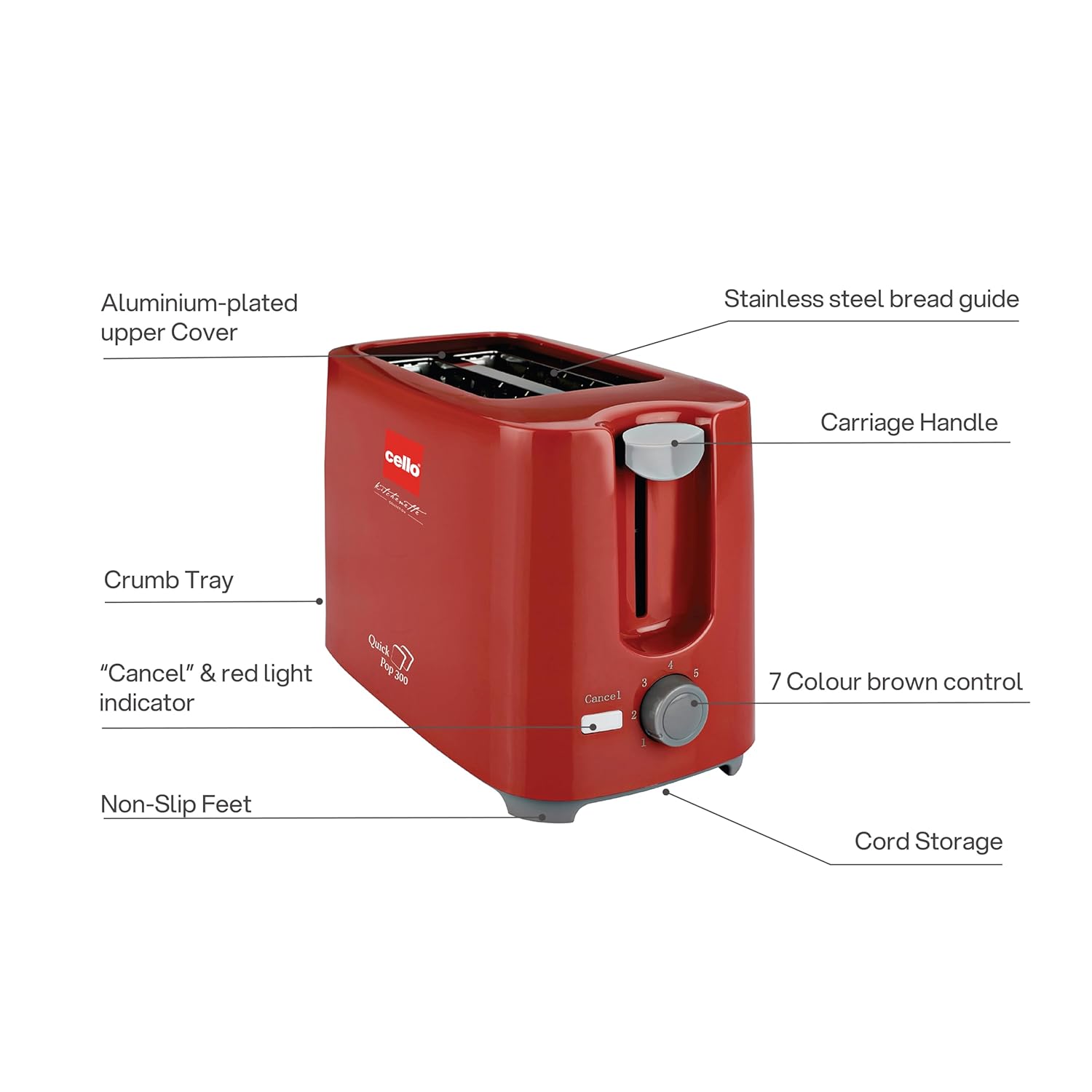
Слика 3.1: Main components of the CELLO Quick Pop 300 Toaster.
- Aluminium-plated Upper Cover: Provides durability and a sleek finish.
- Stainless Steel Bread Guide: Ensures bread slices are centered for even toasting.
- Carriage Handle: Used to lower and raise bread into the toasting slots.
- Послужавник за трошки: Отстранлив послужавник сместен на дното за лесно чистење на трошките.
- "Cancel" & Red Light Indicator: Button to stop the toasting cycle and indicator light for operation.
- 7 Colour Brown Control: Dial to select desired browning level from 1 (lightest) to 7 (darkest).
- Стапала што не се лизгаат: Provides stability and prevents the toaster from sliding on surfaces.
- Складирање на кабел: Integrated area at the base for neat storage of the power cord.

Слика 3.2: Детално views of key features including the crumb tray, browning control, upper cover, carriage handle, cord storage, and non-slip feet.
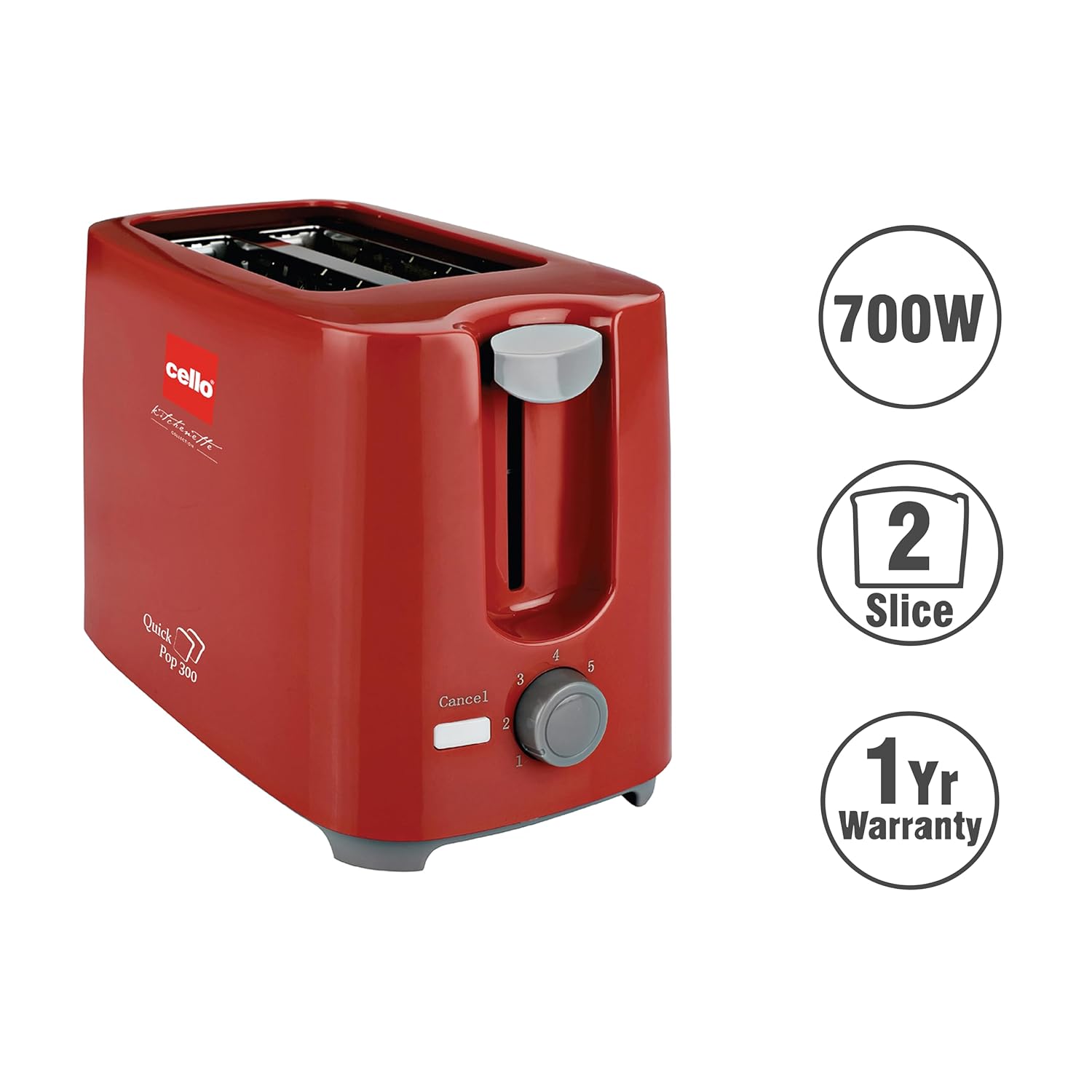
Слика 3.3: The CELLO Quick Pop 300 Toaster, a 700W appliance with a 2-slice capacity, backed by a 1-year warranty.
4. Поставување
- Unpack the Toaster: Carefully remove the toaster and all packaging materials from the box. Retain the user manual and warranty card.
- Поставување: Place the toaster on a stable, flat, heat-resistant surface, away from flammable materials such as curtains or walls. Ensure there is adequate ventilation around the appliance.
- Почетна употреба: Before first use, operate the toaster without bread for a few minutes on the highest browning setting (7) to burn off any manufacturing residues. A slight odor or smoke may be present; this is normal and will dissipate. Ensure the area is well-ventilated.
- Поврзување за напојување: Приклучете го кабелот за напојување во соодветен штекер.
Видео 4.1: Unboxing and initial setup of the CELLO Quick Pop 300 Toaster, demonstrating how to remove it from packaging and prepare for use. This video is provided by the seller.
5. Операција
- Вметнете леб: Place up to two slices of bread into the toasting slots. The stainless steel bread guide will automatically center the bread.
- Изберете ниво на запечување: Свртете го 7 Colour Brown Control dial to your desired browning setting. Level 1 is for light toast, and Level 7 is for dark toast.
- Започнете со печење: Притиснете надолу на Рачка за кочија until it locks into place. The red light indicator will illuminate, signifying that the toasting cycle has begun.
- Автоматски скокачки прозорец: Once the selected browning level is achieved, the toast will automatically pop up, and the red light indicator will turn off.
- Функција за откажување: За да го запрете циклусот на печење во кое било време, притиснете го копчето "Cancel" button. The carriage handle will immediately pop up, and the red light will turn off.
Видео 5.1: Кратко времеview of the CELLO Quick Pop 300 Toaster's features, including the carriage handle, browning control, and crumb tray. This video is provided by the seller.
6. Чистење и одржување
Редовното чистење обезбедува оптимални перформанси и го продолжува векот на траење на вашиот тостер.
- Исклучете го од струја и оладете: Секогаш исклучувајте го тостерот од штекерот и оставете го целосно да се олади пред чистење.
- Празен послужавник за трошки: Извлечете го Removable Bread Crumbs Tray located at the bottom of the toaster. Dispose of the crumbs. Wipe the tray with a damp крпа и темелно исушете пред повторно да ја вметнете.
- Надворешно чистење: Избришете ја надворешноста на тостерот со мека, дamp крпа. Не користете абразивни средства за чистење или метални жлебови за чистење, бидејќи тие можат да ја изгребат површината.
- Чистење на ентериерот: Do not insert any objects into the toasting slots to clean them. If food gets stuck, unplug the toaster and carefully remove it once the appliance has cooled.
- Складирање на кабел: Utilize the integrated cord storage facility at the base of the toaster to keep the power cord neatly wrapped when not in use.
7 Смена на проблеми
If you encounter any issues with your toaster, refer to the following common problems and solutions:
| Проблем | Можна причина | Решение |
|---|---|---|
| Тостерот не се вклучува. | Not plugged in; power outlet malfunction; carriage handle not fully depressed. | Ensure the toaster is securely plugged into a working outlet. Press the carriage handle down until it locks. |
| Лебот не се препечува или се препечува нерамномерно. | Browning control set too low; bread slices too thick or thin; first use residue. | Adjust the browning control to a higher setting. Ensure bread fits properly in slots. Perform initial burn-off cycle if new. |
| Чад или мирис на горење. | Crumbs in the toaster; food stuck in slots; initial use residue. | Unplug and let cool. Empty and clean the crumb tray. Carefully remove any stuck food. Ensure proper ventilation during initial use. |
| Carriage handle does not stay down. | Toaster not plugged in or no power; browning cycle not initiated. | Ensure the toaster is plugged in and the power outlet is active. The handle will only lock down when power is supplied and the toasting cycle can begin. |
8. Спецификации
- Бренд: Виолончело
- Модел: Quick Pop 300
- Боја: Црвено
- Материјал: Акрилонитрил бутадиен стирен (ABS)
- Димензии на производот: 6.1D x 11.8W x 7.5H сантиметри
- Ватtage: 700 вати
- Број на парчиња: 2
- Поставки за Браунинг: 7 нивоа
- Voltage: 240 волти
- Тежина на ставката: 810 грама
- Посебни карактеристики: Anti-Slip Base, Automatic Shut-Off, Cancel Function, Cool Touch Exterior, Removable Crumb Tray
- Земја на потекло: Индија

Слика 8.1: Dimensions of the CELLO Quick Pop 300 Toaster.
9. Гаранција и поддршка
The CELLO Quick Pop 300 Toaster comes with a 1 година гаранција од датумот на купување. Ве молиме погледнете ја приложената гарантна картичка за детални услови и одредби.
For prompt after-sales service or any inquiries, please contact CELLO customer care:
- All India Customer Care No: 7400001799
- Е-пошта: customercare@cellokitchenette.com

Слика 9.1: CELLO Customer Care details for support and service.


