1. Производот завршиview
The CYCPLUS USB ANT+ Stick Dongle Adapter U1 is a wireless receiver designed to bridge the gap between traditional bike trainers and modern cycling software. It receives ANT+ wireless radio signals from various sensors and translates them into a USB protocol, enabling seamless integration with popular training applications. This device is essential for indoor cycling enthusiasts looking to enhance their virtual training experience.
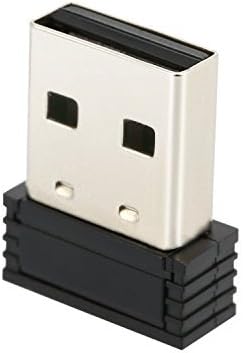
Слика 1: Предна страна view of the CYCPLUS USB ANT+ Stick Dongle Adapter. This compact device features a standard USB-A connector on one end and the ANT+ receiver module on the other, designed for easy plug-and-play functionality with computers.
2. Водич за поставување
Setting up your CYCPLUS USB ANT+ Stick Dongle Adapter is straightforward.
- Системска компатибилност: Ensure your computer runs on a compatible operating system. The U1 dongle is designed for use with PC/Laptop running Windows or macOS. Please note: This device is not compatible with Android or iPhone mobile devices.
- Connect the Dongle: Insert the USB ANT+ stick into an available USB port on your desktop or laptop computer.
- Инсталација на драјвери: In most cases, the required drivers will install automatically upon connecting the device to your computer. If automatic installation does not occur, or if you encounter any driver-related issues, please contact CYCPLUS customer service for assistance.
- Оптимално поставување: For best performance, position the dongle within 3 meters (approximately 10 feet) of your ANT+ sensors (e.g., bike trainer, heart rate monitor, speed/cadence sensors). The maximum effective range is 5 meters.

Слика 2: Страна view of the CYCPLUS USB ANT+ Stick Dongle Adapter, highlighting the USB connector. This view demonstrates its compact design, making it easy to plug into any standard USB port.
3. Упатства за работа
Once the ANT+ dongle is successfully set up, you can begin using it with your preferred cycling applications.
- Компатибилност на софтвер: The CYCPLUS U1 dongle is compatible with popular indoor cycling software platforms, including Zwift, TheSufferfest, TrainerRoad, and Rouvy.
- Sensor Data Collection: The dongle is designed to collect various sensor data via the ANT+ wireless protocol. This includes:
- Cadence sensors
- Сензори за брзина
- Heart rate monitors
- Мерачи за моќност
- Channel Support: The dongle supports 8 ANT+ channels, allowing it to connect to multiple sensors simultaneously.
- Using with Cycling Software:
- Launch your chosen cycling application (e.g., Zwift).
- Navigate to the device pairing or sensor connection section within the application.
- The application should detect the ANT+ dongle and then allow you to search for and connect to your ANT+ enabled sensors.
- Follow the on-screen prompts within the application to complete the pairing process for each sensor.
4. Одржување
The CYCPLUS USB ANT+ Stick Dongle Adapter U1 requires minimal maintenance to ensure its longevity and optimal performance.
- Чистење: Gently wipe the exterior of the dongle with a soft, dry cloth to remove dust or debris. Avoid using liquid cleaners or abrasive materials.
- Складирање: When not in use, store the dongle in a dry, cool place, away from direct sunlight and extreme temperatures. Protect the USB connector from damage.
- Ракување: Ракувајте со адаптерот внимателно. Избегнувајте да го испуштате или да го изложувате на силни удари, што може да ги оштети внатрешните компоненти.
5 Смена на проблеми
If you encounter issues with your CYCPLUS USB ANT+ Stick Dongle Adapter, refer to the following common troubleshooting steps:
| Проблем | Можна причина | Решение |
|---|---|---|
| Компјутерот не го препознава Dongle-от. |
|
|
| Sensors not connecting or frequently disconnecting. |
|
|
| Dongle not working with Android/iPhone. | Некомпатибилност. | The CYCPLUS U1 dongle is designed for Windows and macOS computers only and is not compatible with Android or iPhone devices. |
6. Спецификации
| Карактеристика | Детал |
|---|---|
| Бренд | ЦИКПЛУС |
| Број на модел | U10 |
| Боја | Black (U1 Stick) |
| Материјал | ABS |
| Димензии (Д x Ш x В) | 18.5mm x 14.5mm x 6mm (0.72" x 0.57" x 0.24") |
| Тежина на ставката | 1.7g (0.06oz) / 0.634 ounces (packaged) |
| Безжичен протокол | 2.4Ghz ANT+ wireless communications protocol |
| Опсег | 5 meters (Best performance within 3 meters) |
| Број на канал | 8 |
| Хардверски интерфејс | USB |
| Протокол за врска со податоци | USB |
| Стапка на пренос на податоци | 3 мегабити во секунда |
| Компатибилни оперативни системи | Windows, macOS |
| Поддржан софтвер | Zwift, TheSufferfest, TrainerRoad, Rouvy |
7. Гаранција и поддршка
CYCPLUS is committed to providing high-quality products and excellent customer service.
- Гаранција: All CYCPLUS products, including the USB ANT+ Stick Dongle Adapter U1, come with a two-year warranty and full lifetime service.
- Поддршка за корисници: If you have any questions, require technical assistance, or encounter any issues not covered in this manual, please do not hesitate to contact CYCPLUS customer service. We are always ready to assist you.


