1. Вовед
This manual provides essential information for the safe and efficient operation of your AUXUS iRis AX32LSP01-SM 32-inch Smart Android LED TV. Please read these instructions thoroughly before using the product and retain them for future reference.
The AUXUS iRis AX32LSP01-SM features a 32-inch HD Ready LED display, integrated Android operating system for smart functionality, wireless display capabilities, and multiple connectivity options. It is designed to provide an immersive viewинг и интерактивно искуство.

Слика 1.1: Предна страна view of the AUXUS iRis 32-inch Smart Android LED TV, showcasing неговиот дисплеј.
2. Информации за безбедност
Следете ги следниве безбедносни мерки за да спречите оштетување на телевизорот и да ја обезбедите личната безбедност:
- Не го изложувајте телевизорот на дожд или влага за да спречите пожар или електричен удар.
- Не го отворајте телевизорот casing. Целото сервисирање обратете се на квалификуван персонал.
- Обезбедете соодветна вентилација. Не ги блокирајте отворите за вентилација.
- Поставете го телевизорот на стабилна, рамна површина за да спречите паѓање.
- Заштитете го кабелот за напојување од одење или штипкање.
- Исклучете го телевизорот од струја за време на грмотевици или кога не се користи подолг период.
3. Содржина на пакетот
Проверете дали сите артикли се присутни во пакувањето:
- 1 x AUXUS iRis 32-inch LED TV
- 1 x Поставка за на маса (сет)
- 1 x Упатство за употреба (овој документ)
- 1 x Гарантна картичка
- 1 x далечински управувач
4. Поставување
4.1 Отпакување
Carefully remove the TV and all accessories from the packaging. Retain the packaging materials for future transport or servicing.
4.2 Поставување на штандот
If using the table-top stand, attach the stand bases to the bottom of the TV using the provided screws. Ensure the stand is securely fastened before placing the TV on a flat, stable surface.
4.3 Монтирање на ѕид
The TV supports VESA-compatible wall mounts (not included). Consult a professional for wall mounting to ensure proper installation and safety.
4.4 Поврзување на периферни уреди
Refer to the back panel diagram for port locations. Ensure the TV is powered off before making any connections.
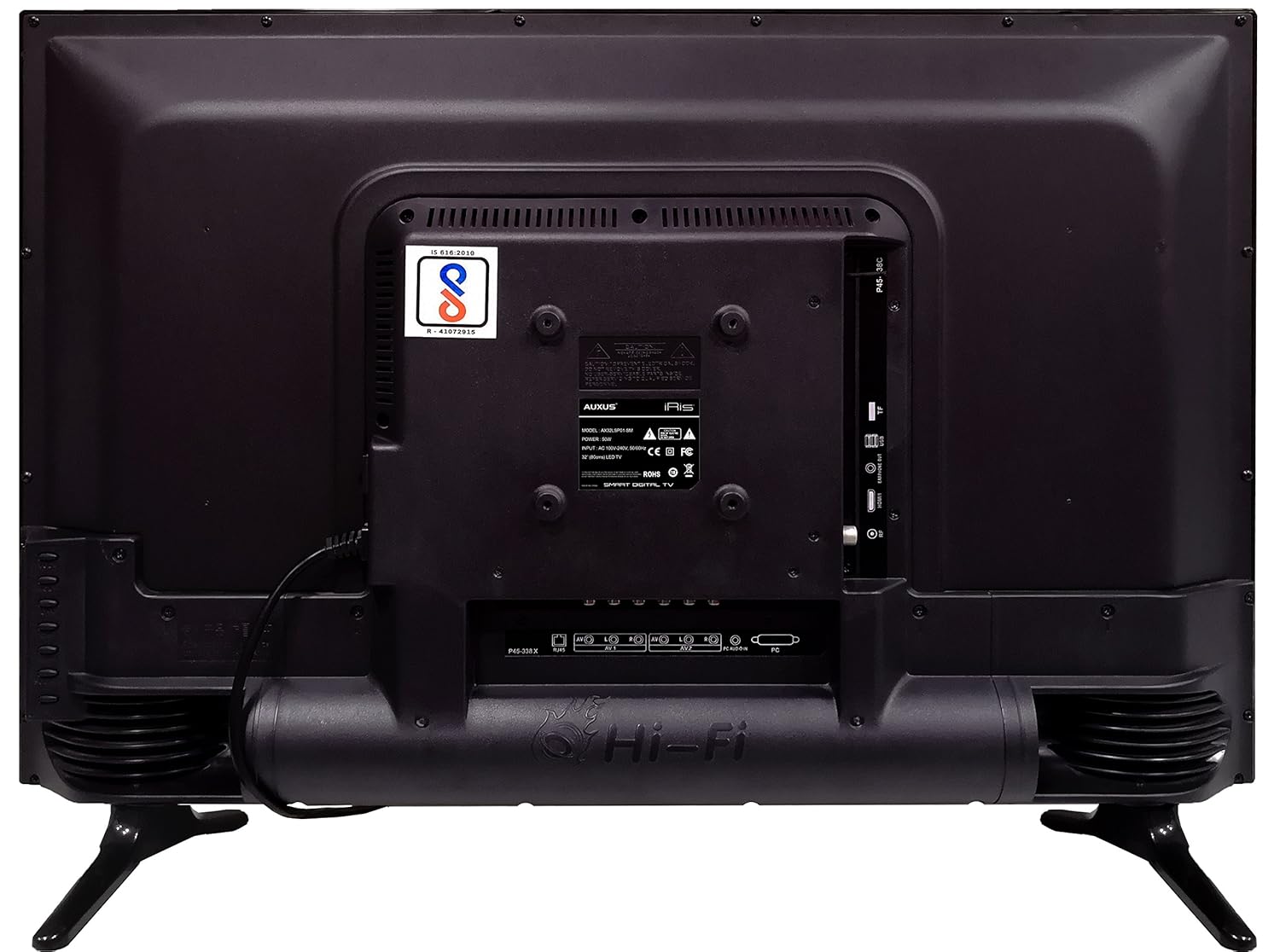
Figure 4.1: Rear panel of the TV with various input/output ports.

Слика 4.2: Детално view of the bottom interface ports.

Figure 4.3: Icons representing multiple connectivity options.
- Моќност: Поврзете го кабелот за напојување со телевизорот, а потоа со ѕидниот штекер.
- Антена/кабел: Connect an antenna or cable TV signal to the RF port.
- USB: Insert USB drives for media playback or software updates into the USB ports. The TV has 2 USB ports.
- Етернет (RJ45): Поврзете етернет кабел за жична интернет конекција.
- AV (Аудио/Видео): Use RCA cables for older devices. The TV has AV1 and AV2 inputs.
- PC IN (VGA): Connect a computer using a VGA cable for video and a 3.5mm audio cable for sound (PC AUDIO IN).
- Слушалки: Поврзете слушалки на 3.5 мм приклучок за приватно слушање.
5. Ракување со телевизорот
5.1 Првично поставување
- After connecting the power, press the Power button on the remote control or TV.
- Следете ги упатствата на екранот за да го изберете вашиот јазик, земја и временска зона.
- Connect to your network: Choose Wi-Fi and enter your password, or ensure an Ethernet cable is connected.
- Complete the channel scan if connecting an antenna/cable.
Далечински управувач 5.2
The remote control allows you to navigate menus, adjust volume, change channels, and access smart features. Familiarize yourself with its buttons for optimal use.
5.3 Smart TV Features (Android OS)
Your TV runs on the Android operating system, providing access to a variety of applications and internet services.

Figure 5.1: TV displaying a smart interface, such as Netflix.
- Навигација: Use the directional pad and 'OK' button on the remote to browse the Android interface.
- Безжичен дисплеј: Utilize the built-in wireless display feature to mirror content from compatible smartphones or tablets to your TV.
- Internet Browsing & Apps: Connect to the internet to browse websites or download and use applications from the app store.
- Играње: The Android platform supports various games, offering an adrenaline-pumping gaming experience.
5.4 Поставки за слика и звук
Пристапете до менито за поставки на телевизорот за да ги прилагодите поставките за слика и звук.
- Слика: Adjust brightness, contrast, color, sharpness, and select picture modes (e.g., Standard, Dynamic, Movie).
- Звук: Optimize audio with settings for volume, balance, equalizer, and sound modes. The TV features 'Boomr Speakers' for enhanced audio output.
5.5 Избор на влезен извор
Press the 'Source' or 'Input' button on your remote to switch between connected devices (HDMI 1, HDMI 2, AV 1, AV 2, PC, TV).
6. Одржување
6.1 Чистење на телевизорот
- Секогаш исклучувајте го телевизорот од струја пред чистење.
- Use a soft, dry cloth to wipe the screen and TV casing.
- For stubborn marks on the screen, use a screen cleaner specifically designed for LED displays, applied to the cloth, not directly to the screen.
- Избегнувајте користење абразивни средства за чистење, восоци или растворувачи.
6.2 Ажурирања на софтверот
Периодично проверувајте за ажурирања на софтверот преку менито за поставки на телевизорот за да обезбедите оптимални перформанси и пристап до најновите функции.
7 Смена на проблеми
Доколку наидете на проблеми со вашиот телевизор, погледнете ги следните вообичаени проблеми и решенија:
| Проблем | Можно решение |
|---|---|
| Нема моќ | Check if the power cord is securely connected and the power outlet is working. |
| Нема слика, но звукот е присутен | Проверете дали е избран точниот влезен извор. Проверете ги кабелските врски со надворешните уреди. |
| Нема звук, но сликата е присутна | Проверете го нивото на јачина на звук и статусот на исклучување на звукот. Проверете ги поврзувањата на аудио каблите. |
| Далечинскиот управувач не работи | Заменете ги батериите. Осигурајте се дека нема пречки помеѓу далечинскиот управувач и телевизорот. |
| Android system hangs or is slow | Restart the TV by unplugging it for a few minutes. Close unused applications. |
| Проблеми со мрежната врска | Check Wi-Fi password or Ethernet cable connection. Restart your router. |
8. Спецификации
| Карактеристика | Спецификација |
|---|---|
| Бренд | AUXUS |
| Име на моделот | AX32LSP01-SM |
| Големина на екранот | 32 инчи (82 см) |
| Технологија на прикажување | LED, IPS панел |
| Резолуција | HD Ready (1366 x 768p) |
| Viewинголен агол | 178 степени |
| Оперативен систем | Андроид |
| Дигитален капацитет за складирање | 8 GB |
| RAM меморија | 1 GB |
| Режим за излез на звук | Surround (Boomr Speakers) |
| HDMI порти | Повеќекратни |
| USB порти | 2 |
| Технологија за поврзување | Ethernet, Wi-Fi (Wireless Display) |
| Други пристаништа | AV (RCA), PC IN (VGA), PC Audio In, Headphone (3.5mm), RF (Antenna) |
| Тип на монтирање | Wall Mount / Table Top Stand |
| Димензии на производот (ДxШxВ) | 84 x 13 x 59 cm |
| Тежина на ставката | 6.5 кг |
9. Гаранција и поддршка
Your AUXUS iRis AX32LSP01-SM TV comes with a warranty. Please refer to the included Warranty Card for specific terms, conditions, and duration of the warranty coverage.
For technical support, service requests, or further inquiries, please contact AUXUS customer service. Contact details can typically be found on the warranty card or the official AUXUS webсајт.