1. Вовед
Welcome to the user manual for your Xfinity XR15 Voice Control Remote. This remote is designed to enhance your Xfinity X1 experience by providing intuitive control over your entertainment system. With its advanced voice command capabilities and user-friendly design, navigating your TV content has never been easier.

Слика 1: Предна страна view of the Xfinity XR15 Voice Control Remote.
2. Клучни карактеристики
- Гласовна контрола: Find content, change channels, and control your DVR using simple voice commands.
- Тастатура со позадинско осветлување: Buttons illuminate automatically when the remote is moved, ideal for low-light environments.
- Aim Anywhere Feature: Operates without needing to be pointed directly at your TV Box.
- Автоматско спарување: Simplifies the setup process with compatible Xfinity equipment.
- Карактеристики за пристапност: Easy access to Closed Captioning, video description, and voice guidance.
- TV Input Control: Manage your TV's input source directly from the remote.
3. Поставување и спарување
3.1. Инсталација на батерија
The Xfinity XR15 remote requires two AAA batteries. To install:
- Пронајдете ја преградата за батерии на задниот дел од далечинскиот управувач.
- Лизнете го капакот на батеријата надолу и отстранете го.
- Вметнете две AAA батерии, внимавајќи на точниот поларитет (+ и -).
- Лизгајте го капакот на батеријата на своето место додека не кликне безбедно.

Слика 2: Локација на преградата за батерии.
3.2. Автоматско спарување
The XR15 remote is designed for automatic pairing with Xfinity X1 TV Boxes (Xi6, Xi5, XG2, X1). Simply ensure your TV Box is powered on and follow these general steps:
- Point the remote at your TV Box.
- Притиснете и задржете го Xfinity button (located below the directional pad) for 3-5 seconds.
- Follow any on-screen prompts that appear on your television.
- If prompted for a 3-digit pairing number, enter it even if it doesn't appear on screen.
The remote should automatically pair within a few minutes. If pairing is unsuccessful, ensure the remote is close to the TV and TV Box, and try again.
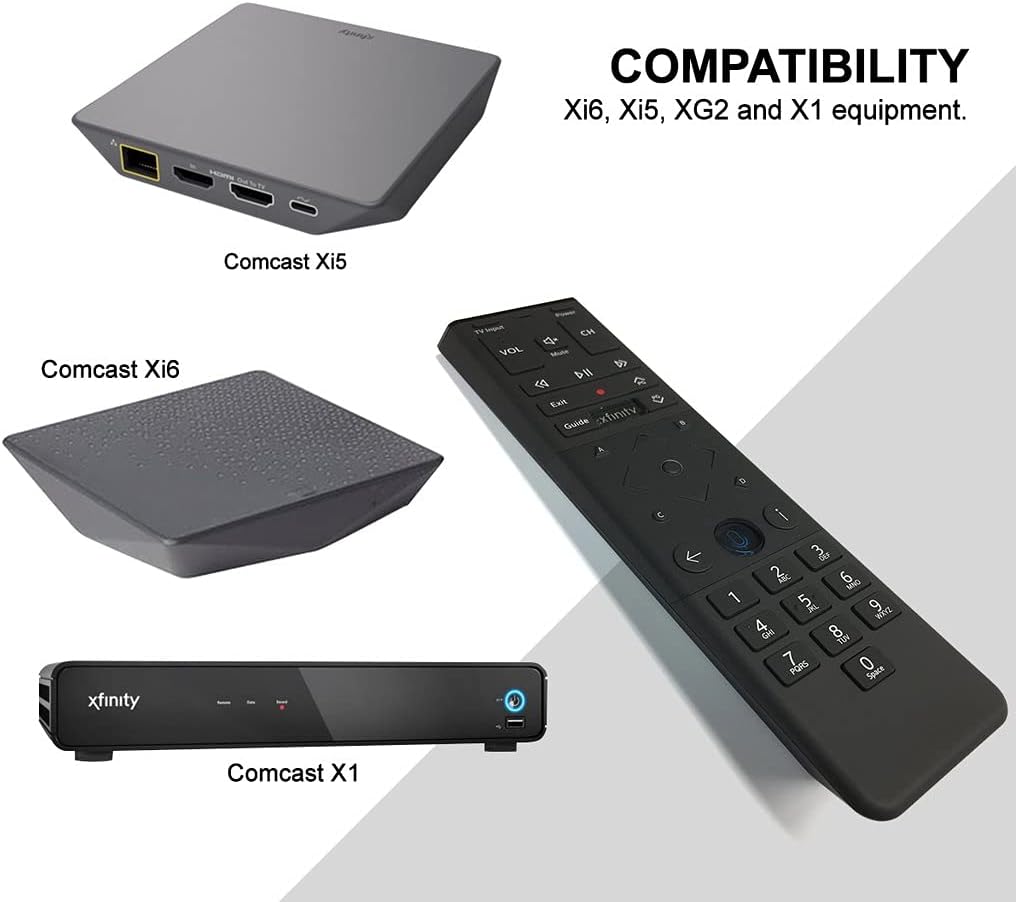
Figure 3: Compatible Xfinity TV Box models.
4. Функции на копчињата
The XR15 remote features a comprehensive set of buttons for controlling your TV and Xfinity services. Refer to the diagram below for a visual guide.

Figure 4: Xfinity XR15 Remote Button Layout.
| Копче | Функција |
|---|---|
| Моќ | Turns the TV and TV Box on or off. |
| Внес на ТВ | Префрлува на следниот достапен влез на вашиот телевизор. |
| VOL +/- | Ја зголемува или намалува јачината на звукот. |
| Исклучи звук | Го вклучува или исклучува звукот. |
| CH +/- | Selects the next or previous channel. |
| Пушти/Пауза | Plays or pauses live TV, Xfinity On Demand, or DVR content. |
| FF (брзо премотување напред) | Fast forwards Xfinity On Demand or DVR content. |
| Rew (Rewind) | Rewinds Xfinity On Demand or DVR content. |
| Излезете | Exits on-screen guides; stops and exits Xfinity On Demand and DVR content. |
| Record (red dot) | Ја снима тековната програма или ги зачувува идните програми на вашиот DVR. |
| Xfinity | Displays the main menu of the guide, providing access to all guide features. |
| Водич | Ги прикажува ТВ програмите. |
| Информации (i) | Прикажува информации за програми и известувања. |
| Назад | Navigates back in menus or returns to previous screens. |
| Копчиња со броеви (0-9) | Used for direct channel entry or predictive text (T9) for content search. |
5. Гласовна контрола
The voice control feature is a primary benefit of the XR15 remote. It allows you to quickly find content, change channels, and manage your DVR without typing.

Figure 5: Voice Control Button.
5.1. Using Voice Commands
- Притиснете и задржете го Гласовна контрола копче (икона за микрофон) на далечинскиот управувач.
- Зборувајте јасно во микрофонот што се наоѓа на горниот дел од далечинскиот управувач.
- Отпуштете го копчето кога ќе завршите со зборување.
ExampЛистови од гласовни команди:
- "Tune to CNN"
- „Најди акциони филмови“
- "Record this show"
- "Што има вечерва?"
- „Стартувај Netflix“
6. Спецификации
| Атрибут | Детал |
|---|---|
| Димензии на производот | 7 x 2 x 1 инчи |
| Тежина на ставката | 3.52 унци |
| Број на модел | 8541713007 |
| Потребни се батерии | 2 AAA батерии (вклучени) |
| Компатибилни уреди | Xfinity X1 TV Boxes (Xi6, Xi5, XG2, X1) |
| Боја | Црното |
| Специјална карактеристика | Consolidated All Power and TV Power functionality |
7. Одржување
7.1. Замена на батеријата
When the remote's performance declines or the backlight feature becomes dim, it's time to replace the batteries. Follow the battery installation steps in Section 3.1.
7.2. Чистење
To clean your remote, use a soft, dry cloth. Avoid using liquid cleaners or abrasive materials, as these can damage the remote's surface or internal components.
8. Поддршка
For further assistance, please refer to the official Xfinity support resources or contact Xfinity customer service. Detailed troubleshooting guides and additional information can be found on the Xfinity webсајт.


