1. Вовед
This user manual provides comprehensive instructions for the installation, operation, maintenance, and troubleshooting of the IP-COM G3224P 24-Port Managed PoE Switch. Please read this manual thoroughly before using the device to ensure proper and safe operation.
The IP-COM G3224P is a high-performance managed Power over Ethernet (PoE) switch designed for small to medium-sized businesses and enterprise networks. It offers 24 Gigabit Ethernet ports with PoE+ capabilities and additional SFP ports for fiber uplinks, providing flexible and scalable network solutions.
2. Производот завршиview
2.1 Содржина на пакетот
- IP-COM G3224P 24-Port Managed PoE Switch
- Кабел за напојување
- Комплет за монтирање на решетка (држачи и завртки)
- Гумени ногарки (за поставување на работна површина)
- Водич за брза инсталација
2.2 Опис на предниот панел
The front panel of the IP-COM G3224P switch features various ports and LED indicators for status monitoring.
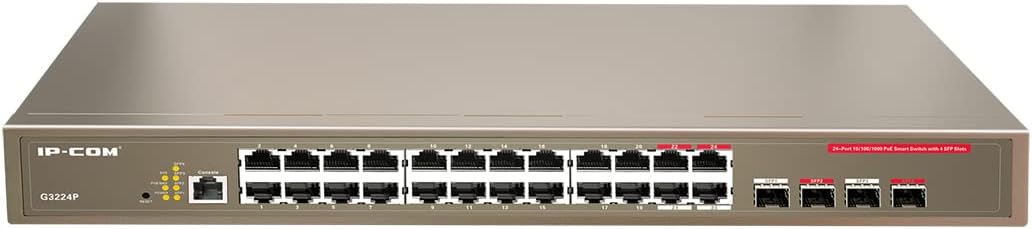
Figure 2.1: IP-COM G3224P Front Panel Layout
This image displays the front panel of the IP-COM G3224P switch. On the left, the IP-COM logo and model number G3224P are visible. To the right, there are LED indicators for SYS, PoE MAX, and individual port status. A console port is also present. The main section features 24 Gigabit Ethernet RJ45 ports, arranged in two rows, with port numbers 1 through 24. On the far right, there are four SFP ports labeled SFP1, SFP2, SFP3, and SFP4, which are used for fiber optic uplinks.
2.3 LED индикатори
| LED индикатор | Статус | Опис |
|---|---|---|
| SYS | Зелена (цврста) | Системот работи нормално. |
| SYS | Зелена (трепка) | System is booting up or firmware is being upgraded. |
| PoE MAX | Црвено (цврсто) | PoE power budget is nearing or exceeding its limit. |
| Врска/Акција (по порта) | Зелена (цврста) | Пристаништето е поврзано. |
| Врска/Акција (по порта) | Зелена (трепка) | Port is transmitting or receiving data. |
| PoE (по порта) | Жолта (цврста) | До поврзаниот уред се снабдува PoE напојување. |
3. Поставување и инсталација
3.1 Безбедносни мерки на претпазливост
- Обезбедете ја јачината на напојувањетоtage matches the switch's requirements (240V as per specifications).
- Не блокирајте ги отворите за вентилација.
- Држете го уредот подалеку од вода, оган и високи температури.
- Не обидувајте се сами да го отворате или поправате уредот.
3.2 Инсталација на Rackmount
- Прикачете ги испорачаните држачи за монтирање на решетка на страните од прекинувачот користејќи ги испорачаните завртки.
- Secure the switch into a standard 19-inch equipment rack using appropriate rack screws (not included).
- Ensure adequate airflow around the switch for proper cooling.
3.3 Десктоп инсталација
- Прицврстете ги обезбедените гумени стапала на дното на прекинувачот.
- Place the switch on a flat, stable surface with sufficient ventilation.
3.4 Поврзување на прекинувачот
- Поврзување за напојување: Connect the power cord to the power inlet on the rear panel of the switch and then to a grounded power outlet.
- Network Devices: Connect network devices (e.g., computers, servers, IP cameras, VoIP phones) to the RJ45 ports (1-24) on the front panel using standard Ethernet cables.
- PoE уреди: For PoE-powered devices, simply connect them to any of the RJ45 ports. The switch will automatically detect and provide power if the device is PoE compliant.
- Врски за довршување: Use the SFP ports (SFP1-SFP4) for fiber optic uplinks to other network devices or the core network. Insert compatible SFP transceivers into the SFP slots before connecting fiber optic cables.
- Конзолна врска (опционално): For initial configuration or advanced management, connect a console cable from your computer to the console port on the switch.
4. Упатства за работа
4.1 Почетно вклучување
After connecting the power cord, the switch will automatically power on. Observe the SYS LED indicator. It will blink during boot-up and turn solid green once the system is ready.
4.2 Basic Network Connectivity
Once powered on, the switch will automatically detect connected devices. The Link/Act LED for each connected port will illuminate solid green, indicating a successful link. It will blink when data is being transmitted or received.
4.3 Работа со PoE
When a PoE-compatible device is connected to a port, the switch will negotiate power delivery. The PoE LED for that port will turn yellow, indicating that power is being supplied. Monitor the PoE MAX LED; if it turns red, the total PoE power budget is being approached or exceeded, and you may need to reduce the number of PoE devices or use a higher-capacity power source.
4.4 Управување пристап
The IP-COM G3224P is a managed switch, offering various configuration options via a web-based GUI, CLI (Command Line Interface) via the console port, or SNMP. Refer to the detailed management guide (usually available on the manufacturer's website) for advanced configuration, including VLANs, QoS, port mirroring, and security settings.
- Web GUI: Пристапете до прекинувачот web interface by typing its default IP address (check the Quick Installation Guide or manufacturer's documentation) into a web прелистувач.
- CLI: Connect via the console port using a terminal emulator (e.g., PuTTY) with appropriate serial port settings.
5. Одржување
5.1 Чистење
- Regularly clean the exterior of the switch with a soft, dry cloth.
- Не користете течни или аеросолни средства за чистење.
- Осигурајте се дека отворите за вентилација се без прашина и пречки.
5.2 Ажурирања на фирмверот
Periodically check the IP-COM official website for firmware updates. Keeping the firmware up-to-date ensures optimal performance, security, and access to new features. Follow the instructions provided with the firmware update package carefully.
5.3 Разгледувања за животната средина
Ensure the switch operates within its specified environmental conditions (temperature, humidity) to prevent damage and ensure longevity.
6 Смена на проблеми
| Проблем | Можна причина | Решение |
|---|---|---|
| No power / SYS LED off | Кабелот за напојување не е поврзан или штекерот е неисправен. | Проверете го поврзувањето на кабелот за напојување. Обидете се со друг штекер. |
| No link on a port (Link/Act LED off) | Cable issue, device off, or incorrect port. | Check Ethernet cable. Ensure connected device is powered on. Try a different port or cable. |
| PoE device not powering on (PoE LED off) | Device not PoE compliant, cable issue, or power budget exceeded. | Verify device is PoE compliant. Check cable. Check PoE MAX LED; if red, reduce PoE load. |
| Network performance issues | Cable quality, network congestion, or incorrect configuration. | Use high-quality Ethernet cables. Check for network loops. Review switch configuration (VLANs, QoS). |
| Не може да се пристапи web интерфејс за управување | Incorrect IP address, network settings, or firewall. | Verify the switch's IP address. Ensure your computer is on the same subnet. Disable temporary firewalls. |
If problems persist, consult the full product documentation or contact IP-COM technical support.
7. Спецификации
| Карактеристика | Детал |
|---|---|
| Модел | G3224P |
| Пристаништа | 24 x 10/100/1000Base-T (RJ45) with PoE+, 4 x 1000Base-X (SFP) |
| Капацитет на префрлување | 56 Gbps |
| Стапка на пренасочување | 41.66 Mpps |
| PoE Стандард | IEEE 802.3af / at |
| Влез волуменtage | 240 волти |
| Димензии (Д x Ш x В) | 29 x 44 x 44 cm |
| Тежина | 15 килограми |
| Рекмаунт | Да |
| Управување | Управувано (Web GUI, CLI, SNMP) |
Забелешка: Спецификациите се предмет на промена без претходна најава.
8. Гаранција и техничка поддршка
8.1 Информации за гаранцијата
IP-COM products typically come with a limited warranty. Please refer to the warranty card included with your product or visit the official IP-COM webстраница за детални услови за гаранција специфични за вашиот регион и датум на купување.
8.2 Техничка поддршка
For technical assistance, product inquiries, or troubleshooting beyond the scope of this manual, please contact IP-COM technical support. Support contact information can usually be found on the official IP-COM webна локацијата или во пакувањето на производот.
IP-COM Official Webсајт: www.ip-com.com.cn


