1. Производот завршиview
The Sharp EL-531TG-GY is a scientific calculator designed for students and professionals requiring advanced mathematical functions. It features a 2-line display and Multi-Line Playback, facilitating the input and review of complex equations. This model is suitable for general math, algebra, geometry, trigonometry, statistics, biology, chemistry, and general science applications.
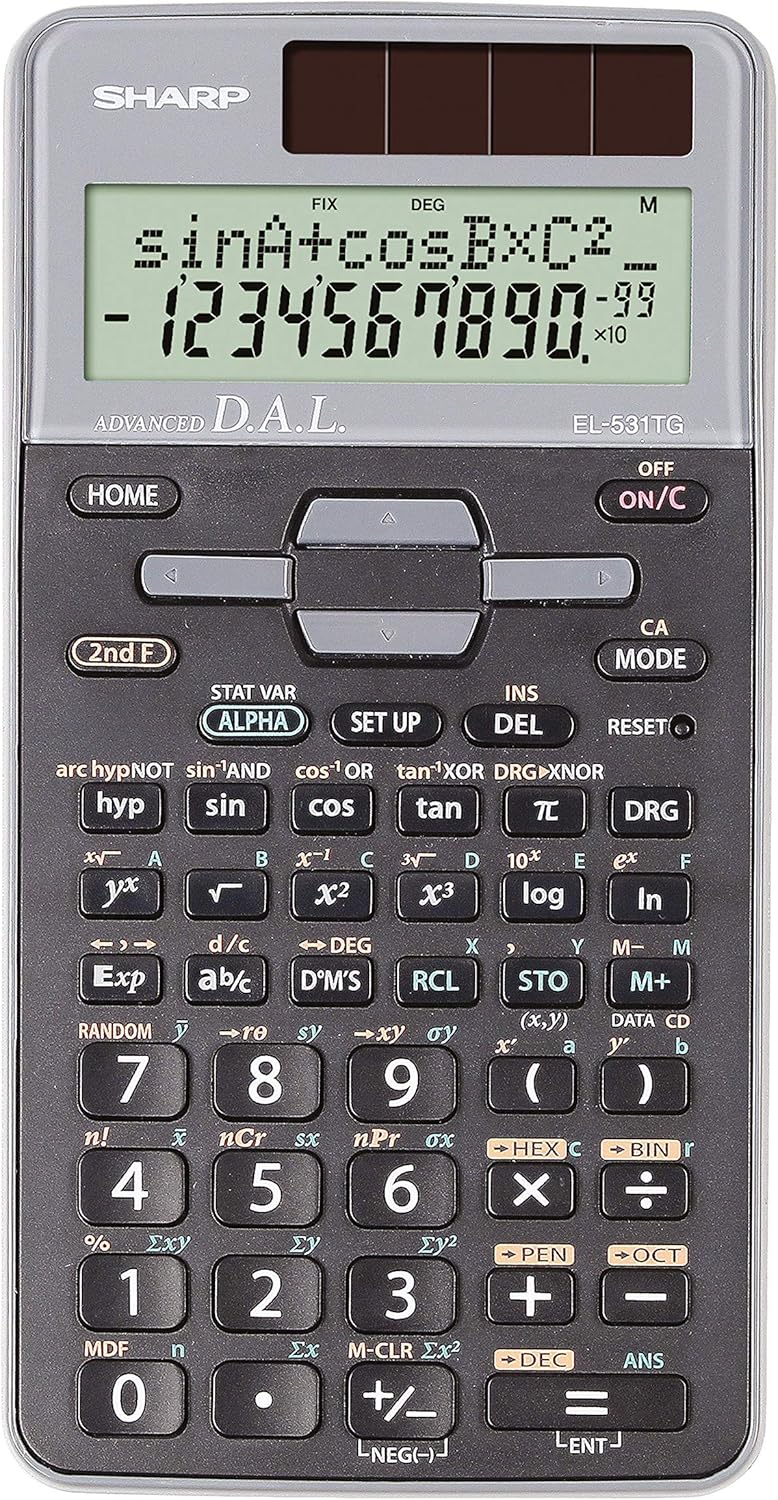
Слика 1: Предна страна view of the Sharp EL-531TG-GY Scientific Calculator, showing the display, keypad, and solar panel.
2. Поставување и првична употреба
2.1 Извор на енергија
The EL-531TG-GY calculator operates using both solar power and a single LR44 button cell battery. The solar panel provides power in well-lit environments, while the battery ensures operation in low-light conditions or when solar power is insufficient. An LR44 battery is included with the calculator.
2.2 Вклучување/исклучување
- To turn the calculator ON, притиснете го ON/C клуч.
- To turn the calculator ИСКЛУЧЕНО, притиснете го 2-ри Ф клуч проследен со ИСКЛУЧЕНО key (which is typically the same as ON/C).
2.3 Initial Display Settings
Upon first use or after a reset, the calculator will typically default to certain settings (e.g., DEG for angle units). Refer to Section 3.3 for details on changing mode settings.
3. Упатства за работа
3.1 Основни аритметички операции
Enter numbers using the numeric keypad. Use the +, -, ×, и ÷ keys for addition, subtraction, multiplication, and division, respectively. Press = за да се добие резултатот.
3.2 Научни функции
The calculator performs over 273 advanced scientific functions. Many functions are accessed by pressing the 2-ри Ф копче пред саканото функционално копче.
- Тригонометриски функции: Користете гревот, cos, тен. Inverse functions (sin⁻¹, cos⁻¹, tan⁻¹) are accessed via 2-ри Ф.
- Логаритамски функции: Користете дневник (основа 10) и ln (природен логаритам).
- Моќи и корени: Користете x², √, x³, ³√.
- Дропки: Користете го д/ц key for fraction input and conversion.
3.3 Mode Settings (DEG/RAD/GRAD)
To change the angle unit mode (Degrees, Radians, Gradians):
- Притиснете го ДСГ клуч.
- Постојано притискајте ДСГ to cycle through DEG (Degrees), RAD (Radians), and GRAD (Gradians). The current mode is indicated on the display.
3.4 Мемориски функции
Калкулаторот вклучува мемориски функции за складирање и повикување вредности.
- STO (Store): Притиснете КНИ followed by a variable key (e.g., A, B) to store the displayed value.
- RCL (Recall): Притиснете RCL followed by the variable key to recall the stored value.
- M+ (меморија плус): Ја додава прикажаната вредност во независната меморија.
- М- (меморија минус): Subtracts the displayed value from the independent memory.
3.5 Multi-Line Playback
The 2-line display allows for Multi-Line Playback, enabling users to review previous calculations and expressions. Use the directional arrow keys (up/down) to scroll through past entries and results. This feature is useful for checking work or re-using parts of previous calculations.
4. Одржување
4.1 Чистење
To clean the calculator, wipe the surface gently with a soft, dry cloth. Do not use abrasive cleaners, solvents, or excessive moisture, as these can damage the display or internal components.
4.2 Замена на батеријата
The calculator uses one LR44 button cell battery. If the display becomes dim or erratic in low-light conditions, the battery may need replacement. To replace the battery:
- Осигурајте се дека калкулаторот е исклучен.
- Пронајдете го преградата за батерии на задната страна од калкулаторот.
- Внимателно отворете го капакот на преградата.
- Отстранете ја старата LR44 батерија и вметнете нова, внимавајќи на точниот поларитет (+/-).
- Добро затворете го капакот на преградата за батерии.
4.3 Складирање
When not in use, store the calculator in a cool, dry place away from direct sunlight and extreme temperatures. The hard cover included with the calculator provides protection from scratches and minor impacts.
5 Смена на проблеми
5.1 Проблеми со приказот
- Празен или затемнет екран: Ensure sufficient light for the solar panel. If the issue persists, replace the LR44 battery.
- Erratic Display: This may indicate a low battery. Replace the LR44 battery.
5.2 Неточни резултати
- Check Mode Settings: Verify that the angle unit (DEG, RAD, GRAD) is set correctly for trigonometric calculations.
- Input Error: Review your input using the Multi-Line Playback feature to ensure the expression was entered correctly.
- Memory Contents: If using memory functions, ensure the stored values are correct.
5.3 Калкулаторот не реагира
Ако калкулаторот не реагира, обидете се да извршите ресетирање. Лоцирајте го РЕСЕТИРАЈ button (often a small recessed button requiring a thin object like a paperclip to press). Pressing this button will clear all memory and return the calculator to its factory default settings.
6. Спецификации

Слика 2: Предна страна view of the Sharp EL-531TG-GY Scientific Calculator, illustrating its dimensions.
| Карактеристика | Опис |
|---|---|
| Број на модел | SH-EL531TGGY |
| Тип на дисплеј | 2-line LCD with Multi-Line Playback |
| Функции | Over 273 advanced scientific functions |
| Извор на енергија | Solar and 1 x LR44 battery (included) |
| Материјал | Пластика |
| Димензии (Д x Ш x В) | 16.1 x 8 x 1.5 см (приближно) |
| Тежина | 100 g (приближно) |

Слика 3: Страна view of the Sharp EL-531TG-GY Scientific Calculator, showing its slim profile.
7. Гаранција и поддршка
7.1 Информации за гаранцијата
This product is covered by a manufacturer's warranty. Please refer to the warranty card included with your purchase or visit the official Sharp webстраница за детални услови за гаранција специфични за вашиот регион.
7.2 Поддршка за корисници
For technical assistance, troubleshooting not covered in this manual, or service inquiries, please contact Sharp customer support. Contact information can typically be found on the Sharp official webна локацијата или на пакувањето на производот.


