Производот завршиview
The Blackmagic Design Pocket Cinema Camera 4K (model CINECAMPOCHDMFT4K) is a handheld digital film camera designed for professional video production. It features a 4/3" CMOS sensor, 13 stops of dynamic range, and dual native ISO up to 25,600, enabling high-quality video capture in various lighting conditions. The camera supports recording in industry-standard formats such as Apple ProRes and 12-bit Blackmagic RAW.
Главните карактеристики вклучуваат:
- Неверојатен квалитет на сликата: 4/3" image sensor with 4096 x 2160 native resolution, active MFT lens mount, 13 stops dynamic range, and dual native ISO up to 25,600.
- Повеќе опции за снимање: Records to SD/UHS-II and CFast 2.0 cards, or external SSD via USB-C.
- Разноврсна File Формати: Supports Apple ProRes (up to 4K) and 12-bit Blackmagic RAW. Includes DaVinci Resolve Studio activation key.
- Дизајн пријатен за корисниците: Lightweight carbon fiber polycarbonate composite body with a multifunction handgrip and a large, bright 5" LCD display.
- Широка поврзаност: Full-size HDMI, mini XLR with 48-volt phantom power, 3.5mm microphone and headphones connections, USB-C, and Bluetooth.
Содржина на пакетот
The Blackmagic Design Pocket Cinema Camera 4K package includes:
- Blackmagic Design Pocket Cinema Camera 4K body
- DaVinci Resolve Studio activation key
- Lens turret dust cap
- 30W power supply with locking connector and international adapters
- LP-E6 battery
Водич за поставување
1. Инсталација на батерија
The camera uses an LP-E6 battery. To install:
- Пронајдете го преградата за батерии на дното од камерата.
- Отворете го капакот на преградата за батерии.
- Insert the LP-E6 battery, ensuring correct orientation.
- Добро затворете го капакот на преградата за батерии.

Слика 1: Заден дел view of the camera, showing the battery compartment location.
2. Вметнување на мемориска картичка
The camera supports SD/UHS-II and CFast 2.0 cards. To insert:
- Locate the memory card slots on the side of the camera.
- Отворете го капакот на слотот за мемориска картичка.
- Insert the SD or CFast card into the appropriate slot until it clicks into place.
- Затворете го капакот на слотот за мемориска картичка.

Слика 2: Страна view of the camera, illustrating the memory card slots.
3. Прикачување на објектив
The camera features an active Micro Four Thirds (MFT) lens mount. To attach a lens:
- Remove the lens turret dust cap from the camera body.
- Порамнете ја црвената точка на објективот со црвената точка на држачот за објектив на фотоапаратот.
- Нежно вметнете го објективот во држачот и вртете го во насока на стрелките на часовникот додека не кликне на своето место.
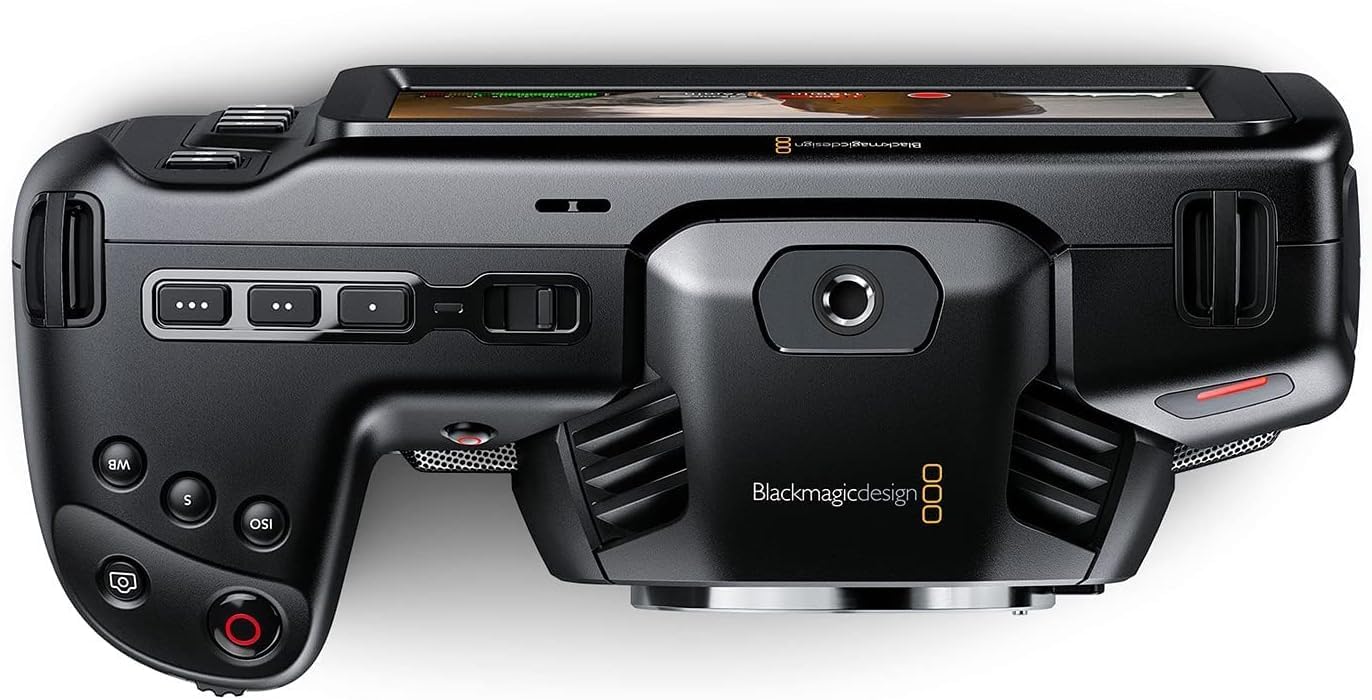
Слика 3: Предна страна view of the camera, highlighting the MFT lens mount.
4. Поврзување за напојување
For extended operation, connect the included 30W power supply:
- Connect the appropriate international adapter to the power supply.
- Приклучете го напојувањето во aиден штекер.
- Connect the locking DC power connector to the 12V input port on the camera.

Слика 4: Страна view of the camera, showing the 12V power input and other connectivity options.
Упатства за работа
1. Вклучување/исклучување
To power on the camera, slide the "ON/OFF" switch located on the top left side of the camera body. To power off, slide the switch back to the "OFF" position.
2. Основни контроли и интерфејс на екран на допир
The camera features a large 5" touchscreen LCD for intuitive control. Physical buttons are also available for quick access to essential functions such as ISO, Shutter, White Balance, and Record.

Figure 5: Camera screen showing various recording settings and options.
3. Поставки за снимање
Access recording settings via the touchscreen menu. You can select:
- Codec and Quality: Choose between Blackmagic RAW (Constant Bitrate, Constant Quality Q0, Q5) or Apple ProRes (422 HQ, 422, 422 LT, 422 Proxy).
- Резолуција: Options include 4K DCI (4096x2160), 4K 2.4:1 (4096x1720), Ultra HD (3840x2160), 2.8K Anamorphic (2880x2160), 2.6K 16:9 (2688x1512), and HD (1920x1080).
- Стапка на слики: Up to 60fps in 4K and 120fps in HD.

Слика 6: Детално view of the camera's menu for selecting recording codecs and resolutions.
4 Аудио влез
The camera offers versatile audio input options:
- Mini XLR: For professional microphones, with 48-volt phantom power support.
- Влез од 3.5 мм: For external microphones or line-level audio.
- Вградени стерео микрофони: For convenient on-camera audio capture.
- 3.5 мм приклучок за слушалки: За аудио мониторинг.
5. External Monitoring and Storage
Connect external monitors via the full-size HDMI port. For extended recording, use the USB-C port to connect external SSD media.
Одржување
- Чистење: Use a soft, dry cloth to clean the camera body. For the lens and sensor, use specialized cleaning kits and follow manufacturer guidelines.
- Складирање: Store the camera in a dry, dust-free environment, ideally in a protective case when not in use. Remove batteries during long-term storage.
- Ажурирања на фирмверот: Regularly check the Blackmagic Design webстраница за ажурирања на фирмверот за да се обезбедат оптимални перформанси и пристап до нови функции.
Решавање проблеми
If you encounter issues with your camera, consider the following general troubleshooting steps:
- Проблеми со моќноста: Ensure the battery is fully charged or the power adapter is securely connected. Check battery orientation.
- Проблеми со снимање: Verify that memory cards are correctly inserted and have sufficient free space. Check selected codec and resolution settings for compatibility with your workflow.
- Квалитет на слика: Ensure the lens is clean and properly attached. Check ISO settings for excessive noise in low light.
- Софтвер: If using DaVinci Resolve Studio, ensure it is updated to the latest version.
For more detailed troubleshooting, refer to the comprehensive manual available on the Blackmagic Design support webсајт.
Спецификации
| Димензии на производот | 7.01 x 3.37 x 3.78 инчи |
| Тежина на ставката | 1.53 фунти |
| Број на модел на ставка | CINECAMPOCHDMFT4K |
| Бренд | Блекмагичен дизајн |
| Технологија на фотосензор | CCD |
| Резолуција за снимање видео | 4K |
| Максимална решетка | 2.8 милиметри |
| Тип на флеш меморија | SD |
| Формат за снимање видео | Blackmagic RAW, ProRes 422 |
| Поддржан аудио формат | AAC, MP3, PCM |
| Големина на екранот | 5 инчи |
| Технологија за поврзување | USB |
| Батерии | Потребни се 1 батерии (вклучени) |
Гаранција и поддршка
For warranty information and technical support, please refer to the official Blackmagic Design webстраницата или директно контактирајте ја нивната служба за корисници. Чувајте ја сметката за купување како доказ за купување за гаранциски побарувања.
Online resources and additional documentation can be found at: Blackmagic Design Support


