BYTECH Wireless Optical Mouse User Manual
Model: BYTECH Wireless Optical Mouse
Вовед
This manual provides detailed instructions for the setup, operation, maintenance, and troubleshooting of your BYTECH Wireless Optical Mouse. Please read this manual thoroughly before using the device to ensure optimal performance and longevity.
Производот завршиview
The BYTECH Wireless Optical Mouse is designed for comfortable and efficient navigation. It features a precise optical sensor, a scroll wheel, and a DPI adjustment button for customizable sensitivity. Its ergonomic design and wireless connectivity provide a clutter-free workspace.

Слика 1: Од горе надолу view of the BYTECH Wireless Optical Mouse. The mouse is black with a silver stripe along its sides. A scroll wheel and a DPI button are visible on the top surface.
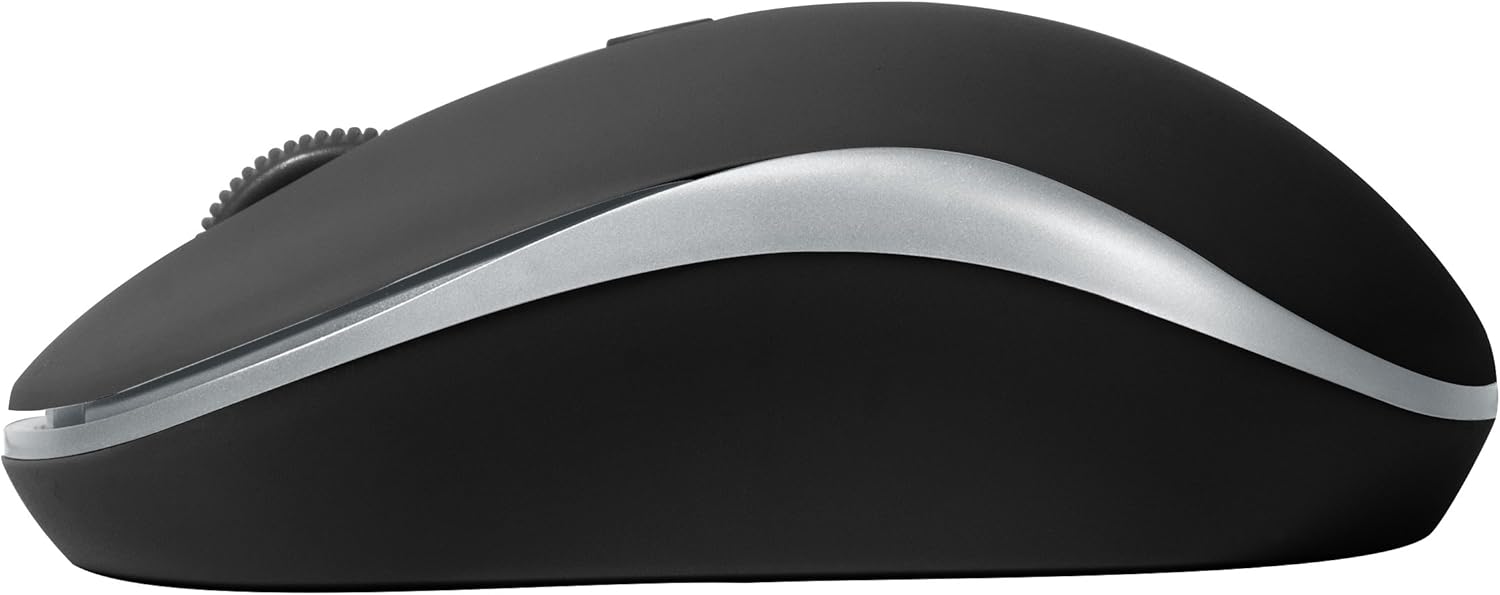
Слика 2: Страна view of the BYTECH Wireless Optical Mouse. This angle highlights the ergonomic curve and the silver accent line that runs along the side of the mouse.
Поставување
1. Инсталација на батерија
- Пронајдете ја преградата за батерии на долната страна на глувчето.
- Отворете го капакот на преградата за батерии.
- Insert one AA battery (not included) into the compartment, ensuring the correct polarity (+/-) as indicated inside.
- Добро затворете го капакот на преградата за батерии.
2. Поврзување со USB приемник
- Извадете го USB приемникот од неговиот слот за складирање, кој обично се наоѓа во преградата за батерии или близу до него.
- Приклучете го USB-приемникот во достапна USB порта на вашиот компјутер или лаптоп.
- Вашиот оперативен систем треба автоматски да ги открие и инсталира потребните драјвери. Ова може да потрае неколку моменти.
3. Вклучување
- Locate the On/Off switch on the underside of the mouse.
- Slide the switch to the "On" position. The mouse should now be ready for use.
Упатства за работа
Основни функции
- Лев клик: Притиснете го левото копче за да изберете ставки, да отворите врски или да активирате функции.
- Десен клик: Притиснете го десното копче за да отворите контекстуални менија или да пристапите до дополнителни опции.
- Тркало за лизгање: Вртете го тркалото нагоре или надолу за да скролувате низ документите или web страници. Притиснете го тркалцето за функционалност со среден клик (на пр., отворање врски во нови јазичиња).
Прилагодување на DPI
The mouse features a DPI (Dots Per Inch) button, typically located behind the scroll wheel. Press this button to cycle through different sensitivity settings. Each press will change the cursor speed, allowing you to find the optimal setting for your task.
- Притиснете го Копче DPI once to switch to the next sensitivity level.
- Repeat until you find your preferred cursor speed.
Режим на заштеда на енергија
To conserve battery life, the BYTECH Wireless Optical Mouse is designed to automatically enter a sleep mode after a period of inactivity. To wake the mouse, simply move it or click any button.
Одржување
Чистење
- Пред чистење, проверете дали глувчето е исклучено.
- Користете мека крпа без влакненца малку гampнаполнето со вода или благ раствор за чистење.
- Wipe the surface of the mouse gently. Avoid excessive moisture.
- За оптичкиот сензор, користете сува памучна крпа за внимателно отстранување на прашина или остатоци.
- Не користете абразивни средства за чистење, алкохол или растворувачи, бидејќи тие можат да ја оштетат површината.
Замена на батеријата
When the mouse performance degrades or the cursor becomes erratic, it may be time to replace the battery. Follow the battery installation steps outlined in the "Setup" section.
Складирање
When not in use for an extended period, it is recommended to turn off the mouse to conserve battery life. The USB receiver can be stored in its dedicated slot on the mouse's underside to prevent loss.
Решавање проблеми
- Глувчето не реагира:
- Проверете дали глувчето е вклучено.
- Проверете го нивото на батеријата и заменете го доколку е потребно.
- Проверете дали USB приемникот е безбедно приклучен во функционален USB порт. Обидете се со друг USB порт.
- Рестартирајте го компјутерот.
- Cursor erratic or jumping:
- Исчистете го оптичкиот сензор на долната страна од глувчето.
- Уверете се дека го користите глувчето на соодветна површина (нерефлектирачка, нетранспарентна). Се препорачува подлога за глушец.
- Проверете за силни електромагнетни пречки од други уреди.
- Проблеми со поврзувањето:
- Намалете го растојанието помеѓу глувчето и USB приемникот.
- Remove any large metal objects or electronic devices that might be obstructing the wireless signal.
- If using a USB hub, try connecting the receiver directly to the computer.
Спецификации
| Карактеристика | Детал |
|---|---|
| Бренд | Bytech |
| Модел | BYTECH Wireless Optical Mouse |
| Технологија за поврзување | Безжичен (USB ресивер) |
| Технологија за откривање на движење | Оптички |
| Боја | Црното |
| Извор на енергија | Напојува со батерии (1x AA, не се вклучени) |
| Компатибилност на оперативниот систем | macOS, Android (and generally Windows) |
| Тежина на ставката | 3.56 унци |
| Димензии на производот (ДxШxВ) | 1 x 1 x 1 инчи (приближно) |
Белешка: Спецификациите може да се променат без претходна најава.
Гаранција и поддршка
Bytech products are manufactured to the highest quality standards. For information regarding warranty coverage, technical support, or service, please refer to the warranty card included with your product or visit the official Bytech webлокација. Чувајте ја сметката како доказ за купување за гаранциски побарувања.
For further assistance, please contact Bytech customer support through their official channels.


