1. Вовед
This manual provides comprehensive instructions for the installation, operation, and maintenance of your BlueBird A1390 Automatic Irrigation Tap Programmer. This device is designed to automate your garden watering schedule, ensuring efficient and consistent irrigation. Please read this manual thoroughly before using the product to ensure correct operation and to prevent damage.
2. Информации за безбедност
- Do not immerse the unit in water. The unit is designed to be weather-resistant, but not submersible.
- Користете само алкални батерии од 1.5 V AA. Не мешајте стари и нови батерии или различни типови батерии.
- Отстранете ги батериите ако уредот нема да се користи подолг период за да се спречи истекување.
- Да се чува подалеку од дофат на деца.
- Не обидувајте се сами да го расклопите или поправите уредот. Контактирајте квалификуван персонал за сервис.
- Осигурајте се дека сите врски се безбедни за да спречите протекување.
3. Содржина на пакетот
Ве молиме проверете го пакувањето за следните ставки:
- 1x BlueBird A1390 Automatic Irrigation Tap Programmer
- 1x Упатство за употреба (овој документ)
Note: 2 AA 1.5V batteries are required for operation and are not included in the package.
4. Производот завршиview
The BlueBird A1390 features two main rotary dials for setting irrigation frequency and duration, along with a battery indicator and an ON/OFF switch.
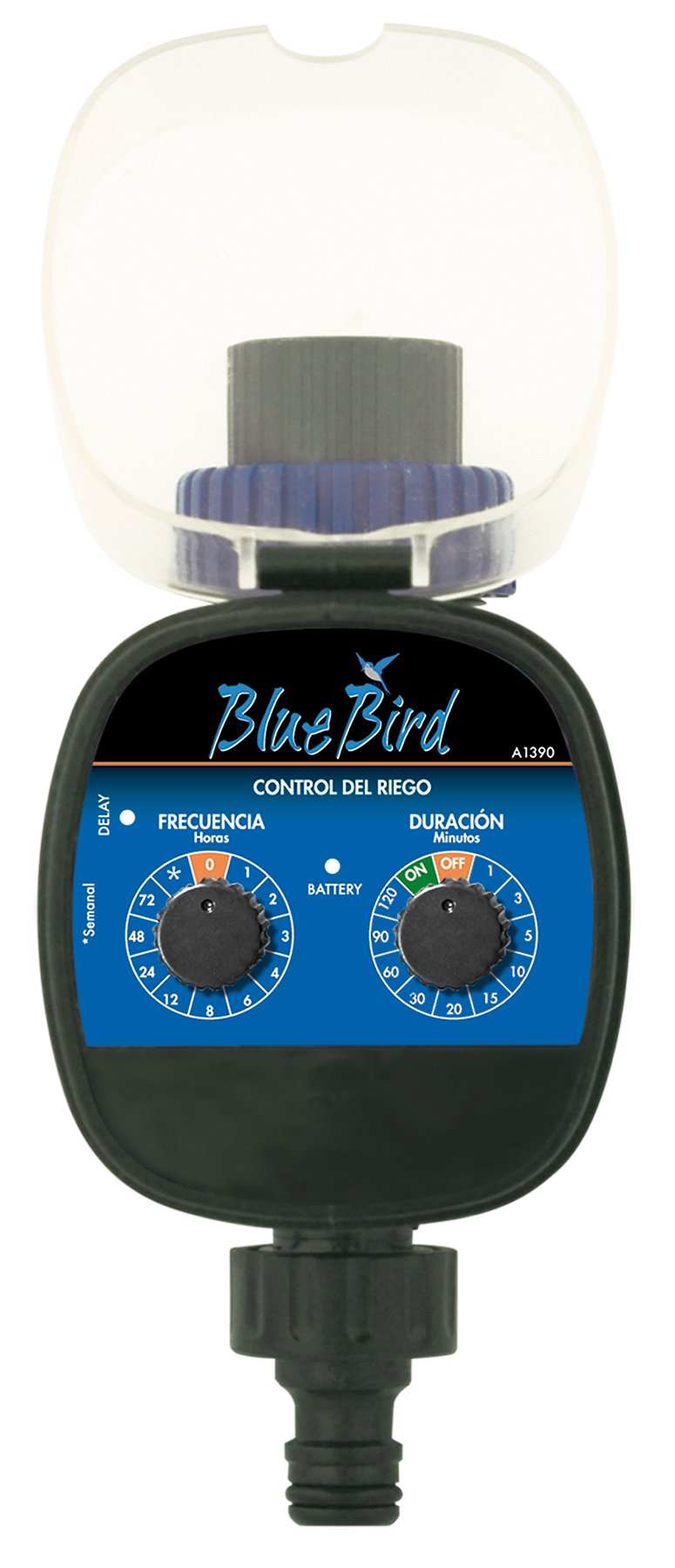
Слика 1: Предна страна view of the BlueBird A1390 Irrigation Programmer. The left dial controls irrigation frequency, and the right dial controls irrigation duration. A battery indicator light is located between the dials.
Компоненти:
- Frequency Dial (Frecuencia): Sets how often the irrigation occurs. Options include 0 (off), 1, 2, 3, 4, 6, 8, 12, 24, 48, 72 hours, and a '*' setting for manual or weekly operation.
- Duration Dial (Duración): Sets how long each irrigation cycle lasts. Options include 0 (off), 1, 3, 5, 10, 15, 20, 30, 60, 90, 120 minutes.
- ВКЛУЧЕН/ИСКЛУЧЕН прекинувач: Located on the Duration Dial, allows for manual override or turning the unit off.
- Индикатор за батерија: A light that indicates battery status.
- Оддел за батерии: Located at the rear of the unit (not visible in Figure 1).
- Влез/Излез за вода: Standard tap and hose connections.
5. Поставување
5.1 Инсталација на батерија
- Пронајдете го капакот на преградата за батерии на задната страна од уредот.
- Remove the cover by twisting or sliding it open.
- Вметнете две (2) нови алкални батерии од 1.5 V AA, внимавајќи на правилниот поларитет (+/-).
- Replace the battery compartment cover securely to maintain water resistance.
5.2 Connecting to the Tap
- Ensure your outdoor tap is turned off.
- Screw the BlueBird A1390 programmer onto your tap. Hand-tighten only to prevent damage.
- Connect your garden hose or irrigation system to the outlet of the programmer. Ensure a tight connection to prevent leaks.
- Slowly turn on your outdoor tap. Check for any leaks at the connections.
6. Упатства за работа
The BlueBird A1390 is designed for simple, intuitive programming using its two rotary dials.
6.1 Setting Irrigation Frequency
- Завртете го Фреквентно бирање (left dial) to your desired irrigation interval.
- Достапните поставки се:
- 0: No irrigation (off).
- 1, 2, 3, 4, 6, 8, 12, 24, 48, 72: Irrigation every X hours.
- *: This setting typically indicates a manual mode or a weekly cycle, depending on the specific model's internal logic. Refer to the example below for common usage.
6.2 Setting Irrigation Duration
- Завртете го Duration Dial (right dial) to your desired watering time per cycle.
- Достапните поставки се:
- ИСКЛУЧЕНО: No irrigation.
- НА: Continuous irrigation (use with caution).
- 1, 3, 5, 10, 15, 20, 30, 60, 90, 120: Irrigation for X minutes.
6.3 Прampле Програмирање
To water every 6 hours for 10 minutes:
- Поставете го Фреквентно бирање до 6 (часови).
- Поставете го Duration Dial до 10 (минути).
The programmer will automatically begin the cycle based on these settings. The first cycle will typically start shortly after programming, or after a short delay.
6.4 Рачно ВКЛУЧУВАЊЕ/ИСКЛУЧУВАЊЕ
To manually turn on the water, rotate the Duration Dial to the ON position. To stop manual watering, rotate the dial back to ИСКЛУЧЕНО or a timed setting.
7. Одржување
7.1 Замена на батеријата
When the battery indicator light dims or the unit stops functioning, it's time to replace the batteries. Follow the steps in Section 5.1 for battery installation.
7.2 Чистење
Clean the exterior of the programmer with a damp cloth. Do not use abrasive cleaners or solvents. Ensure no water enters the battery compartment or internal electronics.
7.3 Зимско складирање
Before the first frost, disconnect the programmer from the tap and hose. Remove the batteries. Store the unit indoors in a dry, frost-free location to prevent damage from freezing water.
8 Смена на проблеми
| Проблем | Можна причина | Решение |
|---|---|---|
| Unit does not turn on/display. | Мртви или неправилно инсталирани батерии. | Заменете ги батериите, осигурувајќи се дека е точен поларитетот. |
| Водата не тече. | Tap is off; programmer set to '0' or 'OFF'; low water pressure; clogged filter. | Ensure tap is fully open. Check frequency/duration settings. Verify water pressure. Clean any filters. |
| Unit leaks at connections. | Loose connections; missing or damaged washer. | Tighten connections. Check and replace washers if necessary. |
| Irrigation schedule is incorrect. | Incorrect frequency or duration settings. | Re-check and adjust the Frequency and Duration Dials according to your desired schedule. |
9. Спецификации
- Модел: A1390
- Бренд: BlueBird
- Производител: Altadex
- Извор на енергија: 2 x AA 1.5V алкални батерии (не се вклучени)
- Фреквенција на наводнување: 0, 1, 2, 3, 4, 6, 8, 12, 24, 48, 72 hours, or '*' (manual/weekly)
- Времетраење на наводнување: OFF, ON, 1, 3, 5, 10, 15, 20, 30, 60, 90, 120 minutes
- Димензии на производот: Приближно 19.4 x 10.6 x 10 cm
- Тежина на производот: Приближно 280 гр
- GTIN (UPC): 8426375113909
10. Гаранција и поддршка
This product is covered by a standard manufacturer's warranty. For specific warranty details, please refer to the documentation provided at the time of purchase or contact your retailer. For technical support or inquiries, please contact the seller or manufacturer directly.


