Вовед
The Akuvox SP-R50 is a business IP phone designed to provide high-quality, cost-effective communication solutions. It features HD Voice, a 2.3-inch 132x64 graphical LCD with backlight, and supports 3-way conferencing. This manual provides essential information for setting up, operating, maintaining, and troubleshooting your SP-R50 IP phone.
Содржина на пакетот
Пред да започнете, проверете дали сите елементи се присутни во пакетот:
- IP Phone (Akuvox SP-R50) x 1
- Стенд x 1
- Handset with Cord x 1
- Етернет кабел x 1
- Адаптер за напојување x 1
Поставување
Follow these steps to set up your Akuvox SP-R50 IP Phone:
- Прикачете го штандот: Securely attach the stand to the back of the IP phone.
- Поврзете го слушалката: Приклучете го едниот крај од намотаниот кабел на слушалката во слушалката, а другиот крај во приклучокот за слушалка на основата на телефонот.
- Поврзете се на мрежа:
- If using Power over Ethernet (PoE), connect one end of the Ethernet cable to the LAN port on the phone and the other end to a PoE-enabled network switch or router.
- If not using PoE, connect one end of the Ethernet cable to the LAN port on the phone and the other end to your network switch or router. Then, connect the power adapter to the phone's power port and plug it into a power outlet.
- Првично стартување: The phone will power on automatically. The LCD screen will display the boot-up sequence. Once complete, it will attempt to obtain an IP address and register with your SIP server.
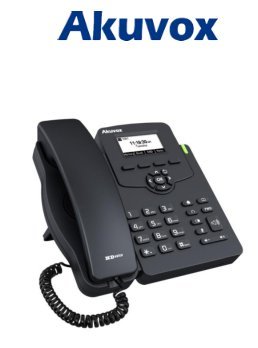
Image: Akuvox SP-R50 Business IP Phone, showing the main unit with the handset resting on its cradle and the stand attached, ready for setup.
Упатства за работа
This section covers the basic operation of your Akuvox SP-R50 IP Phone.
Упатување и примање повици
- За да остварите повик: Pick up the handset or press the Speaker button. Dial the desired number and press the Бирајте or # клуч.
- За да добиете повик: Подигнете ја слушалката или притиснете ја Говорник копче кога телефонот ѕвони.
- За да завршите повик: Исклучете ја слушалката или притиснете го Говорник копче.
Карактеристики на повик
- Повик на чекање: Allows you to answer a second incoming call while on an active call.
- Call Forward: Redirects incoming calls to another number.
- Пренос на повик: Transfers an active call to another party.
- Повик на чекање: Puts an active call on hold.
- Исклучи звук: Го исклучува микрофонот за време на повик.
- Автоматски одговор: Configures the phone to automatically answer incoming calls.
- Повторно бирање: Го бира последниот повикан број.
- Не вознемирувај (DND): Blocks all incoming calls.
- Local 3-Way Conference: Allows you to conduct a three-way conference call.
Phonebook and Settings
- Именик: The phone supports a phonebook of up to 500 groups and 5 remote phone book URLs. Access and manage contacts through the menu.
- Прилагодување на јачината на звукот: Use the volume keys on the phone to adjust the handset, speaker, or ringer volume.
- Тонови на ѕвонење: Select from various ring tones through the phone's settings menu.
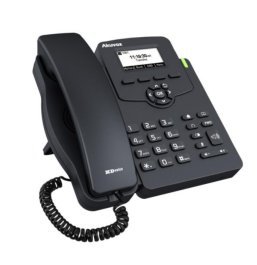
Image: Akuvox SP-R50 Business IP Phone, showcasing its ergonomic design and key layout from a slightly elevated angle, highlighting the display and navigation buttons.
Одржување
Правилното одржување обезбедува долготрајност и оптимални перформанси на вашиот IP телефон.
- Чистење: Use a soft, dry cloth to clean the phone's surface. For stubborn marks, slightly dampИзмијте ја крпата со вода. Не користете груби хемикалии, абразивни средства за чистење или растворувачи.
- Животна средина: Keep the phone away from direct sunlight, excessive heat sources, and moisture. Ensure it is placed on a stable surface to prevent accidental falls.
- Кабли: Periodically check all connected cables (handset, Ethernet, power) for any signs of wear or damage. Replace damaged cables immediately.
Решавање проблеми
If you encounter issues with your Akuvox SP-R50, refer to the following common problems and solutions:
| Проблем | Можна причина | Решение |
|---|---|---|
| Телефонот не се вклучува. | No power connection or faulty power adapter/PoE. | Check if the power adapter is securely plugged in or if the Ethernet cable is connected to a PoE-enabled port. Try a different power outlet or PoE port. |
| Без тон на бирање. | Проблем со мрежната врска или неуспешна SIP регистрација. | Verify the Ethernet cable is properly connected. Check the network status on the phone's display. Contact your network administrator or SIP service provider if the issue persists. |
| Не може да се остваруваат или примаат повици. | SIP registration failed, DND enabled, or network problem. | Ensure the phone is registered (check display). Disable DND if active. Confirm network connectivity. |
| Лош квалитет на повик (ехо, статичен звук). | Мрежна конгестија или пречки. | Ensure your network has sufficient bandwidth. Avoid placing the phone near other electronic devices that may cause interference. |
Спецификации
Key technical specifications for the Akuvox SP-R50 Business IP Phone:
| Карактеристика | Опис |
|---|---|
| Бренд | Акувокс |
| Модел | Akuvox SP-R50 |
| Приказ | 2.3'' 132*64 Graphical LCD with Backlight |
| SIP сметки | 1 Line (Support 1 SIP account) |
| Карактеристики на глас | HD Voice, 3-Way Conference |
| Капацитет на именик | 500 groups, 5 Remote Phone Book URL Поддржано |
| Дневници на повици | 100 записи |
| Моќ | PoE Support, Power Adapter (included) |
| Посебни карактеристики | Call Waiting, Call Forward, Call Transfer, Call on Hold, Mute, Auto-answer, Redial, DND, Speed Dial, Hotline, Direct IP call, Music on hold, Intercom, Call Pickup, Group Call Pickup, Anonymous Call, Anonymous Call Rejection |
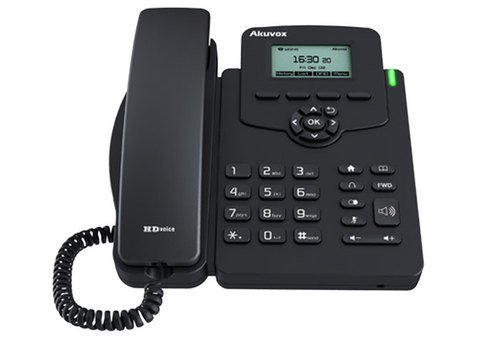
Слика: напред view of the Akuvox SP-R50 Business IP Phone, clearly showing the display, navigation keys, and numeric keypad.
Информации за гаранцијата
The Akuvox SP-R50 Business IP Phone comes with a 2 години гаранција from the date of purchase. This warranty covers manufacturing defects and malfunctions under normal use. Please retain your proof of purchase for warranty claims. For detailed terms and conditions, refer to the warranty card included with your product or contact Akuvox customer support.
Поддршка
If you require further assistance or have questions not covered in this manual, please contact your vendor or Akuvox customer support. You may also visit the official Akuvox website for additional resources and frequently asked questions.


