Вовед
This manual provides essential information for the safe and efficient operation of your Behringer EUROPORT MPA200BT portable PA system. Please read these instructions thoroughly before using the device to ensure proper setup, usage, and maintenance. Retain this manual for future reference.
The Behringer EUROPORT MPA200BT is an all-in-one portable PA system designed for various applications, featuring 200 watts of power, Bluetooth connectivity for audio streaming, and a wireless microphone for vocal performances or presentations. Its battery operation allows for use in locations without direct power access.
Важни безбедносни инструкции
Секогаш следете ги овие основни безбедносни мерки на претпазливост кога користите електрична опрема:
- Прочитајте ги сите упатства пред да го користите производот.
- Do not use this product near water or in wet environments.
- Чистете само со сува крпа.
- Не ги блокирајте отворите за вентилација. Инсталирајте во согласност со упатствата на производителот.
- Не инсталирајте во близина на извори на топлина како што се радијатори, топлински регистри, шпорети или други апарати (вклучувајќи ampлајфикатори) кои произведуваат топлина.
- Не ја нарушувајте безбедносната намена на поларизираниот или заземјувачкиот приклучок. Поларизираниот приклучок има две сечила со едно пошироко од другото. Приклучокот од типот на заземјување има две сечила и трет заземјувач. Широкото сечило или третиот жлеб се обезбедени за ваша безбедност. Ако дадениот приклучок не се вклопува во вашиот штекер, консултирајте се со електричар за замена на застарениот штекер.
- Заштитете го кабелот за напојување од одење или стискање, особено на приклучоците, приклучните приклучоци и местото каде што тие излегуваат од апаратот.
- Користете само додатоци/додатоци наведени од производителот.
- Исклучете го овој апарат од струја за време на громови или кога не го користите подолг временски период.
- Целото сервисирање упатете го на квалификуван сервисен персонал. Сервисирањето е потребно кога апаратот е оштетен на кој било начин, како што е оштетен кабелот за напојување или приклучокот, течноста е истурена или предмети паднале во апаратот, апаратот бил изложен на дожд или влага, не работи нормално , или е исфрлен.
Содржина на пакетот
Upon unpacking your Behringer EUROPORT MPA200BT, please verify that all components are present and in good condition:
- Behringer EUROPORT MPA200BT Portable PA System
- Wireless Microphone (ULM300M)
- USB Receiver for Wireless Microphone (ULM300USB)
- Кабел за напојување
- Упатство за употреба (овој документ)

Image: The Behringer EUROPORT MPA200BT portable PA system shown with its accompanying wireless microphone.
Производот завршиview: Контроли и врски
Familiarize yourself with the various controls and connection points on your MPA200BT unit.

Image: Rear panel of the MPA200BT, highlighting the main control interface, inputs, and outputs.

Слика: Детална view of the MPA200BT's control panel, including display, rotary encoder, and buttons.
Карактеристики на контролниот панел:
- Екран за прикажување: Shows current settings, input levels, and Bluetooth status.
- Ротирачки енкодер: Used to navigate menus and adjust parameters. Press to confirm selections.
- PROCESS Button: Activates or deactivates sound processing effects.
- Копче SETUP: Влегува во менито за системско поставување.
- Копче EXIT: Exits current menu or setting.
- Копче ENTER: Ги потврдува изборите во менијата.
- Копче Bluetooth: Го иницира режимот на спарување преку Bluetooth.
Влезни/излезни врски:
- INPUT 1 & 2 (XLR/TRS Combo Jacks): For connecting microphones or line-level instruments.
- WIRELESS SYSTEM (USB Port): For connecting the ULM300USB wireless microphone receiver.
- MP3 Input (3.5mm Stereo Jack): За поврзување на надворешни аудио плеери.
- MIX OUTPUT (XLR): For sending the mixed audio signal to another PA system or recording device.
- Влез за наизменична струја: За поврзување на кабелот за напојување.
Поставување
- Поврзување за напојување:
Connect the supplied power cable to the AC Power Inlet on the rear of the MPA200BT and then to a suitable power outlet. The unit can also operate on its internal battery.
- Почетно вклучување:
Press the power switch to turn on the unit. The display will illuminate.
- Позиционирање:
Place the MPA200BT on a stable, flat surface or mount it on a speaker stand (sold separately). Ensure proper ventilation around the unit.
- Влезови за поврзување:
- Жичени микрофони/инструменти: Connect to INPUT 1 or INPUT 2 using XLR or 1/4" TRS cables.
- External Audio Players: Connect to the MP3 Input using a 3.5mm stereo cable.
Упатства за работа
Bluetooth аудио стриминг

Image: The Bluetooth logo, representing wireless audio streaming capability.
- Ensure the MPA200BT is powered on.
- Притиснете го Bluetooth button on the control panel. The Bluetooth icon on the display will flash, indicating pairing mode.
- On your smartphone or Bluetooth-enabled device, navigate to the Bluetooth settings and select "BEHRINGER MPA200BT" from the list of available devices.
- Once paired, the Bluetooth icon on the MPA200BT display will stop flashing and remain solid.
- You can now stream audio from your device to the MPA200BT. Adjust the volume using your device's controls and the MPA200BT's master volume.
Wireless Microphone Usage (ULM300M/ULM300USB)
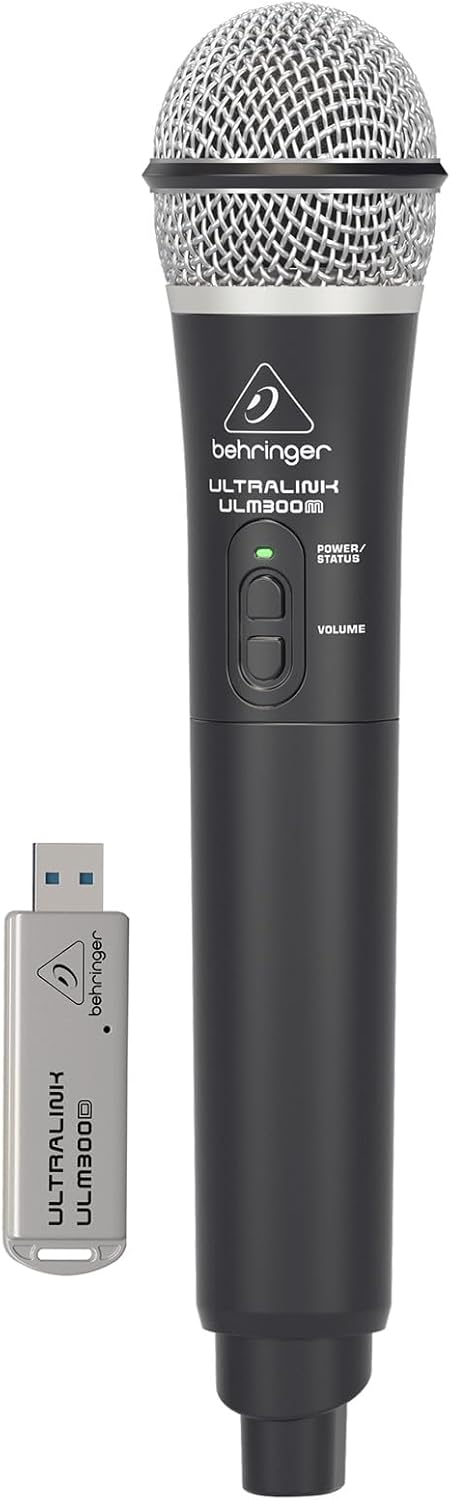
Image: The Behringer ULM300M wireless microphone shown with its USB receiver, the ULM300USB.
- Insert the ULM300USB receiver into the БЕЗБЕСКИ СИСТЕМ USB port on the MPA200BT.
- Ensure the ULM300M wireless microphone has fresh batteries installed.
- Power on the wireless microphone. The status LED on both the microphone and the receiver should indicate a successful connection (usually a solid green light).
- Adjust the microphone's volume using the controls on the microphone itself and the MPA200BT's input gain settings.
Remote Control via Smartphone App

Image: A smartphone screen showing the graphical user interface of the Behringer remote control application, used to manage the PA system settings.
The MPA200BT can be controlled remotely using a dedicated smartphone application. This allows for adjustments to volume, EQ, and effects from a distance.
- Download the official Behringer MPA200BT control app from your device's app store (iOS/Android).
- Ensure your smartphone is connected to the MPA200BT via Bluetooth (as described in the "Bluetooth Audio Streaming" section).
- Open the app. It should automatically detect and connect to your MPA200BT unit.
- Use the app's interface to control various parameters of the PA system.
Работа со батерии
The MPA200BT features an internal rechargeable battery for portable use.
- The battery charges automatically when the unit is connected to AC power.
- A battery level indicator on the display shows the remaining charge.
- For optimal battery life, fully charge the unit before its first use and periodically when not in use for extended periods.
Одржување
- Чистење: Користете мека, сува крпа за чистење на надворешноста на уредот. Не користете абразивни средства за чистење или растворувачи.
- Складирање: When not in use, store the MPA200BT in a cool, dry place, away from direct sunlight and extreme temperatures.
- Нега на батеријата: If storing for extended periods, ensure the battery is partially charged (around 50%) and recharge it every few months to prevent deep discharge.
- Вентилација: Ensure that the ventilation openings are not obstructed during operation to prevent overheating.
Решавање проблеми
| Проблем | Можна причина | Решение |
|---|---|---|
| Нема моќ | Power cable not connected; unit not switched on; battery depleted. | Check power cable connection; ensure power switch is ON; charge battery. |
| Нема излез на звук | Volume too low; input source not connected or selected; faulty cable; microphone off. | Increase master volume and input gain; check input connections; test cables; ensure microphone is powered on and paired. |
| Спарувањето со Bluetooth не успеа | MPA200BT not in pairing mode; device too far; interference. | Press Bluetooth button to enter pairing mode; move device closer; restart both devices. |
| Безжичниот микрофон не работи | USB receiver not connected; microphone off; depleted batteries in microphone; interference. | Ensure ULM300USB is fully inserted; power on microphone; replace microphone batteries; ensure clear line of sight. |
| Squealing/Feedback | Микрофонот е премногу блиску до звучникот; засилувањето на микрофонот е превисоко. | Move microphone further from speaker; reduce microphone input gain. |
Спецификации
| Карактеристика | Детал |
|---|---|
| Модел | EUROPORT MPA200BT |
| Излезен Ватtage | 200 вати |
| Извор на енергија | Battery Powered / AC Power |
| Технологија за поврзување | Bluetooth |
| Број на канали | 2 |
| Тежина на ставката | 12.1 кг (26.6 фунти) |
| Димензии на производот (Д x Ш x В) | 11.02 x 10.11 x 16.53 инчи |
| Тип на монтирање | На маса |
| Компатибилни уреди | Паметен телефон |
| Производител | Музичко племе САД |
Гаранција и поддршка
За детални информации за гаранцијата и техничка поддршка, ве молиме погледнете го официјалниот Behringer webстраницата или контактирајте ја нивната служба за корисници. Зачувајте ја сметката за купување како доказ за купување.
Онлајн ресурси: www.behringer.com
Производител: Музичко племе САД
Официјални видеа за производи
No relevant official product videos from the seller were found in the provided data for embedding.


