1. Вовед
This manual provides essential instructions for the safe and effective operation of the Mustool MT866 Digital True RMS Clamp Meter. The MT866 is a versatile instrument designed for measuring AC/DC voltage, AC/DC current, frequency, temperature, capacitance, resistance, and continuity. It also features a live wire check function and non-contact voltage detection for enhanced safety. Please read this manual thoroughly before using the device.
2. Информации за безбедност
Секогаш почитувајте ги следниве безбедносни мерки за да спречите телесни повреди или оштетување на мерачот:
- Do not exceed the maximum input limits for any measurement function.
- Бидете внимателни when working with live circuits. High voltages може да биде опасно.
- Ensure the test leads are in good condition, without any damage to the insulation.
- Do not operate the meter if it appears damaged or if the battery cover is not properly closed.
- Always disconnect the test leads from the circuit before changing the function dial.
- Use the correct function and range за секое мерење.
- Keep fingers behind the finger guards on the test probes during measurements.
- Avoid using the meter in wet environments or in the presence of explosive gases or dust.
- The meter is rated for CAT III 600V and CAT II 600V. Do not use it for measurements exceeding these categories.
3. Производот завршиview
The Mustool MT866 is a compact and feature-rich clamp meter. Familiarize yourself with its components:
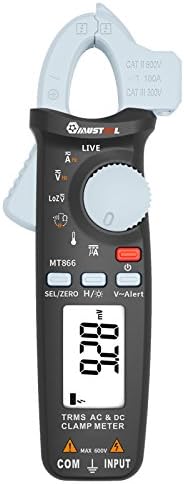
Слика 1: Предна страна View of the Mustool MT866 Clamp Метар. This image displays the main components including the clamp jaw, LCD display, function dial, and control buttons.
3.1. Компоненти
- Clamp вилица: Се користи за бесконтактно мерење на AC/DC струја.
- Clamp Рачка за ослободување: Го отвора cl-отamp вилицата.
- Бесконтактно волtage (NCV) Sensor: Открива AC волtagд без директен контакт.
- LCD дисплеј: Ги прикажува отчитувањата на мерењата, единиците и индикаторите за функции.
- Функциско бирање: Selects the desired measurement mode.
- SEL/ZERO Button: Selects sub-functions or zeros the DC current reading.
- H/💡 Button: Activates Data Hold or backlight.
- V~Alert Button: Activates the V~ alert function for live wire detection.
- Input Terminals (COM, INPUT): За поврзување на мерни кабли за вол.tage, мерења на отпор, капацитивност, фреквенција и температура.
- Back Hook: For convenient hanging of the meter.
3.2. Индикатори за прикажување
- AC/DC: Indicates Alternating Current or Direct Current.
- V: Волти (томtagд)
- A: Amperes (Current).
- Ω: Ohms (Resistance).
- F: Farads (Capacitance).
- Hz: Hertz (Frequency).
- °C/°F: Degrees Celsius/Fahrenheit (Temperature).
- ВО ЖИВО: Live wire detection indicator.
- LOZ: Ниска импеданса волtage режим на мерење.
- H: Data Hold activated.
- Симбол за батерија: Индикатор за слаба батерија.
4. Поставување
4.1. Инсталација на батерија
The Mustool MT866 requires batteries for operation (not included in the package). To install or replace batteries:
- Осигурајте се дека мерачот е исклучен и дека сите мерни сонди се исклучени.
- Пронајдете го капакот на преградата за батерии на задната страна од мерачот.
- Одвртете ги завртките за прицврстување и извадете го капакот.
- Insert new batteries, observing the correct polarity (+ and -).
- Вратете го капакот на батеријата и прицврстете го со завртката/шрафовите.
4.2. Поврзување на тест кабли
За повеќето мерења (волуменtage, resistance, capacitance, etc.), test leads are required.

Figure 2: Mustool MT866 with Test Leads. The black test lead is connected to the COM terminal, and the red test lead is connected to the INPUT terminal.
- Поврзете го црна мерна сонда на COM (common) input terminal.
- Поврзете го црвена тест сонда на ВЛЕЗ терминал.
- Ensure connections are firm before taking any measurements.
5. Упатства за работа
Turn the function dial to the desired measurement mode. Use the SEL/ZERO button to switch between sub-functions (e.g., AC/DC, Resistance/Continuity/Diode).
5.1. AC/DC Voltage Мерење (V)
- Свртете го тркалцето за функции на V позиција.
- Користете го SEL/ZERO button to select AC (V~) or DC (V=) voltage.
- Поврзете ги мерните кабли паралелно со колото или компонентата што се тестира.
- Прочитајте го томtagе вредност на екранот.
5.2. Low Impedance Voltage (LOZ) Measurement
- Свртете го тркалцето за функции на ЛОЗ позиција.
- This mode automatically detects AC or DC voltage with a low input impedance, which can help drain ghost voltages and provide more accurate readings in certain applications.
- Connect the test leads in parallel to the circuit.
5.3. AC/DC Current Measurement (A) - Clamp
- Свртете го тркалцето за функции на A позиција.
- Користете го SEL/ZERO button to select AC (A~) or DC (A=) current.
- Притиснете го clamp ослободете ја рачката за да го отворите clamp вилицата.
- Вклучете само еден проводник од колото во рамките на clamp вилицата.
- For DC current, press SEL/ZERO to zero the reading before measurement if necessary.
- Прочитајте ја моменталната вредност на екранот.
5.4. Resistance (Ω), Continuity, Diode Test
- Свртете го тркалцето за функции на Ω позиција.
- Користете го SEL/ZERO button to cycle between Resistance, Continuity, and Diode Test modes.
- Отпорност: Connect test leads across the component. Ensure the circuit is de-energized.
- Континуитет: If resistance is below approximately 30Ω, the buzzer will sound.
- Тест за диоди: Connect the red lead to the anode and black lead to the cathode. The display shows the forward voltagпад. Свртете ги каблите за да проверите дали има отворено коло.
5.5. Capacitance (µF) Measurement
- Свртете го тркалцето за функции на µF позиција.
- Discharge the capacitor completely before connecting the test leads.
- Поврзете ги мерните кабли преку терминалите на кондензаторот.
- Прочитајте ја вредноста на капацитетот на екранот.
5.6. Frequency (Hz) Measurement
- Frequency can be measured from the jaw (when in AC current mode) or from the input terminals (when in AC voltagе режим).
- When in ACV or ACA mode, press the SEL/ZERO button to cycle to the frequency measurement.
- Connect the test leads or clamp the conductor as appropriate for the primary measurement.
5.7. Temperature (°C/°F) Measurement

Figure 3: Mustool MT866 with Temperature Probe. The temperature probe is connected to the input terminals for temperature measurements.
- Свртете го тркалцето за функции на ТЕМП позиција.
- Connect the temperature test probe to the input terminals (red to INPUT, black to COM).
- Поставете го врвот на сондата за температура на или во близина на предметот чија температура треба да се мери.
- Read the temperature on the display. Use SEL/ZERO да се префрлате помеѓу Целзиусови и Фаренхајтови.
5.8. Live Wire Check (LIVE)
- Свртете го тркалцето за функции на ВО ЖИВО позиција.
- Insert the red test lead into the live wire socket. The display will show "LIVE" and an alarm will sound if a live wire is detected.
5.9. Бесконтактен томtage (V~Alert) Detection
- Притиснете го V ~ Предупредување копче за да го активирате NCV режимот.
- Move the top of the meter (where the NCV sensor is located) close to a conductor or outlet.
- Ако AC voltage is detected, the meter will beep and the LED indicator will flash, with the intensity increasing as the voltage strength increases.
5.10. µA HVAC Flame Rod Test
- Свртете го тркалцето за функции на μA позиција.
- This function is specifically designed for measuring microamperes in HVAC flame rod applications (0-200.0µA).
- Connect the test leads in series with the flame rod circuit.
5.11. Data Hold (H) and Backlight (💡)
- Притиснете го H/💡 button briefly to activate Data Hold, freezing the current reading on the display. Press again to release.
- Притиснете и задржете го H/💡 копче за вклучување или исклучување на позадинското осветлување.
6. Одржување
6.1. Чистење
- Избришете го мерачот со рекламаamp крпа и благ детергент. Не користете абразиви или растворувачи.
- Ensure the meter is completely dry before use.
6.2. Замена на батеријата
When the battery symbol appears on the display, replace the batteries as described in Section 4.1. Prompt battery replacement ensures accurate readings and proper device function.
6.3. Складирање
- If the meter is not used for an extended period, remove the batteries to prevent leakage.
- Чувајте го мерачот на ладно и суво место, подалеку од директна сончева светлина и екстремни температури.
7 Смена на проблеми
| Проблем | Можна причина | Решение |
|---|---|---|
| Нема екран или екранот е затемнет | Слаби или празни батерии; неправилна инсталација на батериите. | Replace batteries; check battery polarity. |
| "OL" or "OVER" displayed | Мерењето го надминува избраниот опсег. | Select a higher range or check if the input is too high for the meter. |
| Неточни читања | Poor test lead connection; incorrect function/range selected; external interference. | Ensure firm connections; select appropriate function/range; move away from strong electromagnetic fields. |
| Нема континуиран звучен сигнал | Circuit resistance too high; continuity mode not selected. | Ensure resistance is below 30Ω; press SEL/ZERO to select continuity mode. |
8. Спецификации
The following are the general specifications for the Mustool MT866 Digital True RMS Clamp Мерач:
- Макс. дисплеј: 6000 брои
- AC Current (ACA): 6A/60A/100A (±2.5%+5)
- Еднонасочна струја (DCA): 6A/60A/100A (±2.5%+5)
- AC Voltage (ACV): 6V/60V/600V (±1%+3)
- DC Voltage (DCV): 6V/60V/600V (±1%+3)
- Ниска импеданса Voltage (LoZ ACV-DCV Auto Scan): 600.0V / 300kΩ input impedance
- Отпорност (OHM): 600Ω/6KΩ/60KΩ/600KΩ/6MΩ/60MΩ (±1%+3)
- Капацитет: 600.0µF/6000µF (±4%+3)
- Фреквенција (Hz): 60Hz/1000Hz (from jaw or input terminals)
- Температура: -20~500°C / -4~932°F
- µA HVAC Flame Rod Test: 0~200.0µA
- Звучник за континуитет: Помалку од 30 Ω
- Стил: Дигитален
- Тип на мерење: Мултиметар
- Оценка за безбедност: CAT III 600V, CAT II 600V
9. Содржина на пакетот
The Mustool MT866 package typically includes the following items:
- 1 x Mustool MT866 Digital True RMS Clamp Meter (Batteries are not included)
- 1 x Pair Test Probe (Red and Black)
- 1 x 1M (Length) Temperature Test Probe
- 1 x English User Manual (This document)
10. Гаранција и поддршка
For warranty information, technical support, or service inquiries, please refer to the documentation provided at the time of purchase or contact your retailer. Keep your purchase receipt as proof of purchase.


