1. Вовед
The Sena SF1 Bluetooth Communication System is designed to provide essential communication features for motorcycle riders. This system facilitates 2-way intercom communication with a passenger, allowing for clear conversations up to 100 meters (110 yards) in open terrain. It also enables seamless connectivity with your mobile device for streaming music, managing phone calls, and receiving turn-by-turn GPS directions. Key features include VOX Phone commands, Audio Overlay, Quick Charging, and microphone mute options, enhancing your riding experience with convenience and safety.
2. Содржина на пакетот
The Sena SF1 package includes the following components:
- Sena SF1 Main Unit
- Кацига Clamp Комплет
- Звучници
- Жичен микрофон со бум
- Iredичен микрофон
- USB Power & Data Cable (USB-C type)
- Велкро влошки за звучници
- Velcro Pad for Wired Boom Microphone
- Velcro Pad for Wired Microphone
- Speaker Pads (thick)
- Ален клуч
Note: The specific component "Sena 843-01297" refers to the main unit or a specific part number within the kit.
3. Производот завршиview
The Sena SF1 unit features a sleek, low-profile design with intuitive controls for easy operation while riding.

Слика 3.1: Врв View of Sena SF1 Main Unit. This image displays the top of the Sena SF1 communication system, highlighting the central control button and the plus (+) and minus (-) buttons for volume and navigation. A blue indicator light is visible at the top center.

Слика 3.2: Аголна View of Sena SF1 Main Unit. An angled perspective of the SF1 unit, showing its compact form factor and the arrangement of its primary control buttons. The blue indicator light is also visible.
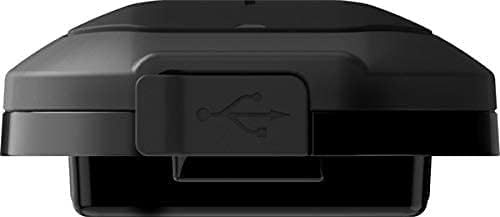
Figure 3.3: Sena SF1 USB Charging Port. This image focuses on the USB charging port, typically located on the side or bottom of the unit, protected by a rubber flap to ensure water resistance.

Figure 3.4: Sena SF1 Side View with Helmet Clamp. Страна view of the SF1 unit attached to a helmet clamp, illustrating how the unit integrates with the helmet and the connection points for speakers and microphone cables.
3.1 Контроли и индикатори
- Централно копче: Multi-functional button for power, pairing, and call management.
- (+) Копче: Increases volume, navigates forward through menus or tracks.
- (-) Копче: Decreases volume, navigates backward through menus or tracks.
- LED индикатор: Displays device status (power, charging, Bluetooth connection).
4. Инсталација
Proper installation ensures optimal performance and comfort. The SF1 is designed to fit on almost any helmet.
4.1 Монтирање на главната единица
- Choose a suitable location on the left side of your helmet for the clamp единица.
- Loosen the screws on the helmet clamp and slide it between the outer shell and the inner padding of the helmet. Tighten the screws securely.
- Alternatively, use the adhesive mount if the clamp unit is not suitable for your helmet type. Ensure the surface is clean and dry before applying.
- Лизнете ја главната единица SF1 на монтираниот клин.amp додека не кликне на своето место.
4.2 Инсталирање на звучници и микрофон
- Attach the speakers to the Velcro pads inside the helmet's ear pockets. Use the thick speaker pads if needed for better fit and audio quality.
- Connect the speaker cables to the main unit.
- For full-face helmets, attach the wired microphone to the inside of the chin bar using the Velcro pad. Position it close to your mouth.
- For open-face or modular helmets, attach the wired boom microphone to the inside of the helmet, ensuring it is positioned correctly for clear voice pickup.
- Route all cables neatly under the helmet padding to avoid interference and ensure comfort.
5. Поставување
5.1 Вклучување/исклучување
- Вклучување: Притиснете и задржете го Централно копче и на (+) Копче за 1 секунда.
- Исклучено: Притиснете и задржете го Централно копче и на (+) Копче за 5 секунди.
5.2 Bluetooth спарување со мобилен телефон
- With the SF1 powered off, press and hold the Централно копче 5 секунди додека LED-индикаторот наизменично не трепка црвено и сино, означувајќи режим на спарување.
- На вашиот мобилен телефон, овозможете Bluetooth и побарајте уреди.
- Select "Sena SF1" from the list of detected devices.
- If prompted, enter PIN "0000". The LED will turn blue when pairing is successful.
5.3 Intercom Pairing (2-Way)
- Ensure both SF1 units are powered on.
- On one unit, press and hold the Централно копче 5 секунди додека ЛЕР не трепка црвено.
- На вториот уред, притиснете и држете го Централно копче 5 секунди додека ЛЕР не трепка црвено.
- The units will automatically pair and connect. The LED on both units will turn blue.
5.4 Апликација за корисници Сена
For advanced configuration and firmware updates, download the Sena Utility App from your smartphone's app store. The app allows you to customize settings, manage speed dial presets, and access a quick guide.
6. Упатства за работа
6.1 Контрола на јачината на звукот
- Зголемете ја јачината на звукот: Допрете го (+) Копче.
- Намалување на јачината на звукот: Допрете го (-) Копче.
6.2 Музички функции
- Пушти/Паузирај музика: Притиснете го Централно копче за 1 секунда.
- Следна песна: Притиснете го (+) Копче за 1 секунда.
- Претходна песна: Притиснете го (-) Копче за 1 секунда.
6.3 Функции за телефонски повици
- Одговори на повикот: Допрете го Централно копче.
- Крај на повикот: Притиснете го Централно копче за 2 секунди.
- Одбијте го повикот: Притиснете го Централно копче for 2 seconds when a call is incoming.
- Voice Dial (VOX Phone): Притиснете го Централно копче за 3 секунди.
- Исклучување на микрофонот: Притиснете го (+) Копче и (-) Копче simultaneously for 1 second during a call.
6.4 Интерфонска комуникација
- Домофон за почеток/крај: Допрете го Централно копче.
- Audio Overlay: The SF1 supports Audio Overlay, allowing you to listen to music or GPS instructions while engaged in intercom conversation. The audio levels will adjust automatically.
6.5 GPS навигација
Once paired with your smartphone, turn-by-turn GPS directions from your navigation app will be transmitted directly to your SF1 speakers. Audio Overlay ensures that navigation prompts are heard even during other audio activities.
7. Одржување
7.1 Полнење на батеријата
- Connect the SF1 to a USB power source using the provided USB Power & Data Cable.
- The LED indicator will turn red during charging and blue when fully charged.
- Целосното полнење обично трае приближно 1.5 часа.
- The SF1 offers a talk time of up to 13 часа со целосно полнење.
- The Quick Charging feature allows for faster charging when time is limited.
7.2 Чистење и чување
- Избришете го уредот со меко, гamp крпа. Не користете груби хемикалии или растворувачи.
- Ensure the USB port cover is securely closed to maintain water resistance.
- Store the SF1 in a cool, dry place when not in use.
8 Смена на проблеми
8.1 Фабричко ресетирање
If the SF1 is not functioning correctly, a factory reset may resolve the issue. To perform a factory reset, press and hold the Централно копче for 12 seconds until the LED flashes red rapidly. Then, tap the Централно копче to confirm. The unit will power off and reset to default settings.
8.2 Заеднички прашања
- Без моќност: Ensure the battery is charged. Connect to a charger and check the LED indicator.
- Нема аудио: Check speaker connections. Ensure volume is not at minimum. Re-pair with your device.
- Исклучување на интерфонот: Ensure both units are within range (100 meters in open terrain) and re-initiate intercom connection.
- Проблеми со спарување Bluetooth: Ensure the SF1 is in pairing mode (red and blue flashing LED) and your phone's Bluetooth is enabled. Try restarting both devices.
9. Спецификации
| Карактеристика | Детал |
|---|---|
| Име на моделот | SF1 |
| Bluetooth верзија | 4.1 |
| Опсег на Bluetooth | Up to 100 meters (110 yards) in open terrain |
| Домофон | 2-начин |
| Време за разговор | До 13 часа |
| Време на полнење | 1.5 часа |
| Контрола на бучава | Напредно поништување на бучава |
| Отпорност на вода | Водоотпорен |
| Тежина | 3.52 унци (0.1 килограми) |
| Димензии (Д x Ш x В) | 3.94 x 1.57 x 2.36 инчи |
| Материјал | Пластика |
| Контролен метод | Допрете |
| Тип на батерија | Литиум полимер (вклучен) |
| Компатибилни уреди | Electronic devices with Bluetooth capabilities |
10. Гаранција и поддршка
10.1 Информации за гаранцијата
Sena products are covered by a limited warranty against manufacturing defects. The EU Spare Part Availability Duration is 2 years. For specific warranty terms and conditions, please refer to the official Sena webстраница или контактирајте ја службата за корисници. Зачувајте го доказот за купување за гаранциски барања.
10.2 Поддршка за корисници
For technical assistance, troubleshooting, or general inquiries, please visit the official Sena website for support resources, FAQs, and contact information. You can also utilize the Sena Utility App for quick access to support and product information.


