1. Вовед
Ви благодарам за купувањетоasing the auna V-20 Vertical Stereo System. This manual provides essential information for the safe and efficient operation of your device. Please read it thoroughly before use and keep it for future reference.
2. Инструкции за безбедност
- Внимателно прочитајте ги сите упатства пред да ракувате со уредот.
- Чувајте го уредот подалеку од вода, влага и екстремни температури.
- Не блокирајте никакви отвори за вентилација.
- Користете само додатоци/додатоци наведени од производителот.
- Исклучете го уредот од струја за време на громови или кога не го користите подолг период.
- Целото сервисирање упатете го на квалификуван сервисен персонал.
- Не го отворајте casing; внатре нема делови што може да ги сервисира корисникот.
3. Содржина на пакетот
Проверете дали сите предмети се присутни:
- 1 x auna V-20 Vertical Stereo System
- 1 x Remote Control (including 2 x 1.5V AAA batteries)
- 1 x адаптер за напојување
- 1 x Removable Stand Base
- 1 x Wire Antenna
- User Manual (English and German)
4. Производот завршиview
The auna V-20 is a versatile micro stereo system featuring a vertical design. It includes a CD player, DAB+ and FM radio, Bluetooth, NFC, USB, and AUX connectivity. The system can be used with its stand or mounted on a wall.

Figure 4.1: The auna V-20 Vertical Stereo System shown with its remote control in a modern living room environment.
Контроли и дисплеј на предниот панел
The front panel features a sleek design with a motorized CD drive cover and an LED display that shows time and operational information. Control buttons are located on the top edge of the unit.
Врски на задниот панел
The rear panel provides various connection ports for external devices and power.
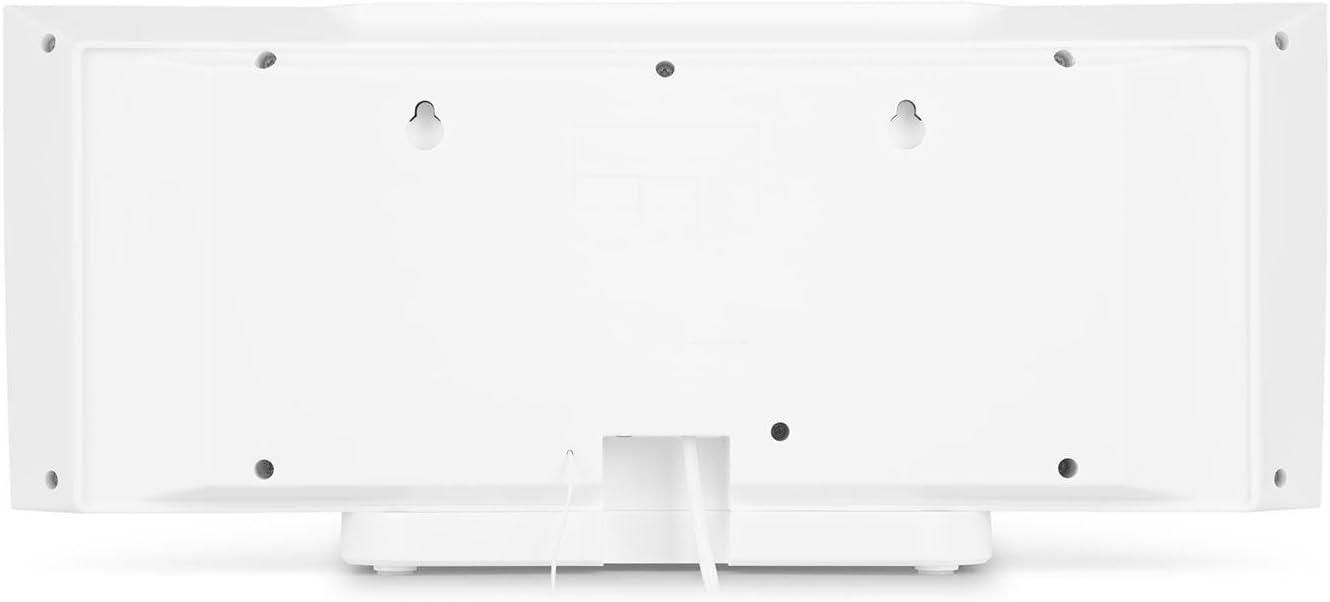
Слика 4.2: Заден дел view of the auna V-20, highlighting the USB port and AUX input.
Далечински управувач
The included remote control allows for convenient operation of all functions from a distance.

Слика 4.3: Детално view of the remote control for the auna V-20 stereo system.
5. Поставување
5.1 Опции за поставување
The auna V-20 offers flexible placement:
- Монтирање на штанд: Attach the removable stand base for desktop or shelf placement. Ensure the unit is stable on a flat surface.
- Монтирање на ѕид: The unit can be mounted on a wall to save space. Use appropriate wall mounting hardware (not included) and ensure the wall can support the unit's weight.

Слика 5.1: Заден дел view illustrating the wall mounting points and the stand attachment area.
5.2 Поврзување за напојување
Connect the provided power adapter to the DC IN port on the rear of the unit, then plug it into a standard wall outlet (AC 230V, 50 Hz).
5.3 Антенско поврзување
Extend the wire antenna for optimal DAB+ and FM radio reception. Adjust its position for the best signal quality.
6. Упатства за работа
6.1 Power On/Off and Standby
Притиснете го ВКЛУЧЕНО/СТАНД-БАЈ button on the unit or remote control to switch the system on or put it into standby mode.
6.2 Избор на режим
Притиснете го ФУНКЦИЈА button on the unit or the dedicated mode buttons (FM/DAB, USB, CD, AUDIO IN, BLUETOOTH) on the remote control to switch between different audio sources.
6.3 Контрола на јачината на звукот
Прилагодете ја јачината на звукот со помош на VOL+ и VOL- buttons on the unit or remote control. The LED display will show the current volume level.
6.4 Поставки на еквилајзерот
The system features a 2-band equalizer and equalizer presets. Use the EQ button on the remote control to cycle through presets or adjust bass/treble. The X-BASS function can be activated for enhanced bass.
7. Bluetooth and NFC Connectivity
7.1 Спарување преку Bluetooth
За безжично стримување музика од вашиот паметен телефон, таблет или лаптоп:
- Switch the stereo system to Bluetooth mode. The LED display will indicate pairing mode.
- Овозможете Bluetooth на вашиот мобилен уред и побарајте достапни уреди.
- Select "auna V-20" from the list to pair. Once connected, you can play audio from your device.

Figure 7.1: A smartphone being used to connect to the auna V-20 via Bluetooth.
7.2 Поврзување со NFC
For intuitive pairing with NFC-enabled devices:
- Проверете дали NFC е овозможен на вашиот мобилен уред.
- Gently swipe your NFC-enabled device over the NFC sensor on the auna V-20.
- The devices will automatically pair via Bluetooth.

Слика 7.2: Одблиску view of the NFC sensor for quick device pairing.
8. Работа со CD плеер
The auna V-20 features an MP3-compatible CD player with a motorized drive.

Figure 8.1: The motorized CD player mechanism with a disc inserted.
8.1 Вчитување на CD
- Притиснете го ОТВОРИ/ЗАТВОРИ button to open the motorized CD cover.
- Carefully place a CD (CD, CD-R/RW, MP3-CD) onto the spindle with the label side facing you.
- Притиснете ОТВОРИ/ЗАТВОРИ again to close the cover. The system will automatically switch to CD mode and begin playback.
8.2 Контроли за репродукција
- Пушти/Пауза: Притиснете PLAY/PAUSE за да започнете или паузирате репродукција.
- Прескокни ги патеките: Користете го ПРЕЗЕМЕ НАПРЕД or ПРЕСКОКНИ НАНАЗАД копчиња за навигација помеѓу песните.
- Стоп: Притиснете го СТОП копче за да ја завршите репродукцијата.
- Повторување/Случајно: Користете го ПОВТОРИ и СЛУЧАЈНИ buttons on the remote for playback options.
- Програмабилна репродукција: The system supports programmable title display for custom playlists.
9. Работење со радио (DAB+/FM)
The auna V-20 features both DAB+ digital radio and analog FM radio with RDS function.
9.1 Selecting Radio Mode
Притиснете го FM/DAB button on the remote control to switch between FM and DAB+ modes.
9.2 Автоматско скенирање на станици
In either FM or DAB+ mode, press the СКЕНИРАЊЕ button on the remote control to automatically scan and store available stations. The system can store up to 20 presets per reception type.
9.3 Manual Tuning and Presets
- Рачно подесување: Користете го ПРЕСУДА +/- buttons on the remote control for fine-tuning.
- Зачувување поставки: Once a station is found, press the ПОСТАВЕНИ button, then use the number buttons (0-9, 10+) to assign a preset number. Press ENTER да се потврди.
- Потсетување на мемории за поставување: Press the corresponding number button on the remote control to quickly access a saved station.
- Копче за информации: Во режимот DAB+, притиснете го ИНФОРМАЦИИ button to display additional information such as artist, title, album, or news.
10. Репродукција преку USB
The auna V-20 allows playback of MP3 audio fileдиректно од USB стик.
10.1 Поврзување на USB-уред
- Insert your USB stick into the USB port on the rear of the unit.
- Switch the stereo system to USB mode using the USB копче на далечинскиот управувач.
- The system will automatically detect and begin playing MP3 files.
10.2 USB Playback Controls
Playback controls (Play/Pause, Skip, Stop, Repeat, Random) are similar to CD player operation. Use the ПАРКА button on the remote to navigate through folders on the USB device.
11. Влез AUX
Connect external audio devices such as MP3 players, CD players, or computers using the AUX input.
11.1 Поврзување надворешен уред
- Connect a 3.5mm audio cable (not included) from the headphone jack or audio output of your external device to the AUX ВО port on the rear of the auna V-20.
- Switch the stereo system to AUDIO IN mode using the АУДИО ВО копче на далечинскиот управувач.
- Play audio from your external device. The sound will be output through the auna V-20 speakers.
12. Одржување
12.1 Чистење
- Секогаш исклучувајте го уредот од штекерот пред да го чистите.
- Користете мека, сува крпа за чистење на надворешните површини.
- Не користете абразивни средства за чистење, восоци или растворувачи бидејќи тие може да го оштетат финишот.
- За објективот на CD-то, користете специјализирано средство за чистење на објективи за CD-то доколку е потребно.
12.2 Општа нега
- Избегнувајте да ставате тешки предмети на уредот.
- Чувајте го уредот подалеку од директна сончева светлина и извори на топлина.
- Обезбедете соодветна вентилација околу уредот за да спречите прегревање.
13 Смена на проблеми
| Проблем | Можна причина | Решение |
|---|---|---|
| Нема моќ | Кабелот за напојување не е поврзан; штекерот е неисправен | Проверете го поврзувањето на кабелот за напојување; обидете се со друг штекер |
| Нема звук | Volume too low; incorrect source selected; mute activated | Increase volume; select correct source; deactivate mute |
| ЦД-то не се репродуцира | CD inserted incorrectly; CD dirty/scratched; unsupported format | Reinsert CD correctly; clean or replace CD; ensure CD is compatible (CD, CD-R/RW, MP3-CD) |
| Лош радио прием | Antenna not extended; weak signal | Extend and adjust antenna position; try moving the unit to a different location |
| Спарувањето со Bluetooth не успеа | Device too far; Bluetooth not enabled; incorrect pairing procedure | Ensure devices are close; enable Bluetooth on mobile device; follow pairing instructions (Section 7.1) |
14. Спецификации
| Карактеристика | Детал |
|---|---|
| Бренд | ауна |
| Модел | V-20 |
| Број на дел | AUVZ-1100-ghfr |
| Димензии на производот | 51 x 25 x 16 cm |
| Тежина | 2.6 кг |
| Извор на енергија | Електрични |
| Ватtage | 27 вати |
| Режим за излез на звук | Стерео |
| Конфигурација на звучник | 2.0 |
| Поддржани аудио формати | MP3 |
| Тип на медиум | ЦД, MP3 |
| Видови конектори | Bluetooth, NFC, USB, AUX |
| Компатибилен со Bluetooth | Да |
| Bluetooth верзија | 2.1 + EDR |
| Bluetooth Profile | A2DP |
| Компатибилни уреди | Smartphone, tablet, MP3 player |
| Посебни карактеристики | Лесен за користење |
| Батерии за далечински управувач | 2 x 1.5V AAA (вклучено) |
| Опсег на фреквенција DAB+ | 174 - 240 MHz (Band III) |
15. Гаранција и поддршка
This product is covered by a manufacturer's warranty. For detailed warranty information, please refer to the documentation provided at the time of purchase or contact auna customer support.
If you encounter any issues not covered in the troubleshooting section, or require further assistance, please contact auna customer service through their official webсајт или вашиот продавач на мало.


