1. Вовед
The Optex ORT 8930-HD is a digital terrestrial receiver designed to receive free-to-air digital programs broadcast in MPEG2/MPEG4 format, compatible with DVB-T2 and HEVC/H.265 standards. This device connects to your television via HDMI or SCART. It features a USB input for future software updates, multimedia file playback (photos, music, videos), and direct recording to an external USB storage device (not included).
This manual provides detailed instructions for the proper installation, operation, and maintenance of your Optex ORT 8930-HD receiver. Please read it thoroughly before use to ensure optimal performance and to prevent damage.
2. Информации за безбедност
- Обезбедете соодветна вентилација околу уредот за да спречите прегревање.
- Do not expose the receiver to rain, moisture, or extreme temperatures.
- Избегнувајте да го ставате уредот во близина на извори на топлина како што се радијатори или шпорети.
- Користете го само адаптерот за напојување испорачан со уредот.
- Не го отворајте casing; препуштете го целото сервисирање на квалификуван персонал.
- Исклучете го приклучокот за струја од штекерот за време на грмотевици или кога не се користи подолг период.
3. Содржина на пакетот
Проверете дали сите артикли се присутни во пакувањето:
- 1 x Optex ORT 8930-HD Digital Receiver
- 1 x далечински управувач
- 1 x Упатство за употреба
4. Производот завршиview
4.1 Преден панел

Слика 1: Предна страна view of the Optex ORT 8930-HD receiver, showing the display, USB port, and control buttons.
The front panel includes a digital display for channel numbers, a USB 2.0 port for external storage, and basic control buttons (CH+, CH-, Power).
4.2 Заден панел
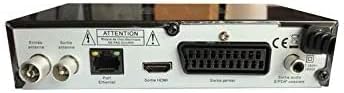
Слика 2: Заден дел view of the Optex ORT 8930-HD receiver, displaying various connectivity ports.
Задниот панел ги обезбедува следните врски:
- Antenna In/Out: IEC 9.52 mm connectors for terrestrial antenna.
- HDMI излез: For connecting to an HD television.
- SCART Connector: For connecting to older televisions.
- S/PDIF Coaxial Audio: Дигитален аудио излез.
- Влез на енергија: For the external power adapter.
Далечински управувач 4.3

Слика 3: The remote control unit for the Optex ORT 8930-HD receiver.
The remote control allows full operation of the receiver, including power, channel selection, volume, menu navigation, recording functions, and multimedia playback controls.
5. Поставување
5.1 Поврзување на антената
- Connect your terrestrial antenna cable to the "Antenna In" port on the rear panel of the receiver.
- If you wish to loop the antenna signal to another device, connect a coaxial cable from the "Antenna Out" port to the input of the next device.
5.2 Поврзување со вашиот телевизор
Изберете еден од следниве начини на поврзување:
- HDMI (Recommended for HD): Connect an HDMI cable from the "HDMI Output" port on the receiver to an available HDMI input on your television.
- SCART: Connect a SCART cable from the "SCART Connector" on the receiver to the SCART input on your television.
5.3 Поврзување за напојување
- Connect the power adapter to the power input port on the receiver.
- Вклучете го адаптерот за напојување во соодветен ѕиден штекер.
5.4 Почетно скенирање на канали
- Turn on your television and select the correct input source (HDMI or SCART) corresponding to your connection.
- Power on the Optex ORT 8930-HD receiver.
- The first-time setup wizard should appear. Follow the on-screen instructions to perform an automatic channel search. This will scan for all available digital terrestrial channels in your area.
- If the wizard does not appear, navigate to the "Menu" > "Installation" > "Automatic Search" using the remote control.
6. Упатства за работа
6.1 Основно работење
- Вклучување/исклучување: Притиснете го МОЌ копче на далечинскиот управувач или предниот панел.
- Избор на канал: Користете го CH+ / CH- копчиња или внесете го бројот на каналот директно со помош на нумеричката тастатура.
- Контрола на јачината на звукот: Користете го VOL+ / VOL- копчиња.
- Исклучи звук: Притиснете го МУТИРА копче за привремено замолчување на звукот.
6.2 Управување со канали
- Automatic/Manual Search: Пристап преку Мени > Инсталација to rescan for channels.
- Функција LCN: The Logical Channel Numbering (LCN) function automatically sorts channels into a logical order. This can usually be enabled/disabled in the installation menu.
- Favorite List: Create personalized lists of your preferred channels for quick access. Refer to the on-screen menu for instructions on adding and managing favorite channels.
6.3 Снимање и репродукција
To use recording and multimedia playback features, connect a USB storage device (e.g., USB flash drive or external hard drive) to the USB port on the front panel.
- Снимање преку USB: Притиснете го REC button on the remote control to start recording the current program. Press СТОП да заврши снимањето.
- Timeshift Function: This allows you to pause live TV and resume watching later. Activate Timeshift via the remote control (usually a dedicated button or through the menu).
- Мултимедијална репродукција: Access the multimedia player via the Мени. You can browse and play music, photo, and video files stored on your connected USB device.
6.4 Електронски програмски водич (EPG)
Притиснете го EPG копчето на далечинскиот управувач за да view the Electronic Program Guide, which displays program schedules for upcoming broadcasts.
6.5 Родителска брава
Set up a parental lock to restrict access to certain channels or programs. This feature is typically found in the Мени > Системски поставки > Родителска контрола дел.
6.6 Функција на тајмер
The timer function allows you to schedule the receiver to turn on/off or record a specific program at a set time. Access this feature through the Мени.
6.7 Software Update via USB
Периодично проверувајте ги упатствата на производителот website for available software updates. Download the update file to a USB drive and follow the instructions in the Мени > Системски поставки > Ажурирање на софтвер section to install it.
7. Одржување
- Чистење: Use a soft, dry cloth to clean the exterior of the receiver. Do not use liquid or aerosol cleaners.
- Вентилација: Ensure that the ventilation slots on the device are not blocked to prevent overheating.
- Софтвер: Keep the receiver's software updated to ensure optimal performance and access to the latest features.
8 Смена на проблеми
| Проблем | Можна причина | Решение |
|---|---|---|
| Нема моќ | Кабелот за напојување е исклучен; штекерот е неисправен. | Проверете го поврзувањето на кабелот за напојување; обидете се со друг штекер. |
| Нема сигнал / Нема канали | Antenna not connected; incorrect input source on TV; no channel scan performed. | Check antenna connection; select correct TV input; perform an automatic channel scan. |
| Далечинскиот управувач не работи | Батериите се испразнети; пречка помеѓу далечинскиот управувач и приемникот. | Replace batteries; ensure clear line of sight to the receiver's IR sensor. |
| Снимањето преку USB не работи. | USB device not connected or formatted incorrectly; insufficient storage space. | Ensure USB device is properly connected; format USB device (FAT32/NTFS); check available space. |
| Device freezes or becomes unresponsive | Привремен софтверски дефект. | Disconnect power for a few seconds, then reconnect. If problem persists, check for software updates. |
9. Спецификации
| Карактеристика | Детал |
|---|---|
| Модел | ORT 8930-HD |
| Бренд | Оптекс |
| Тип на тјунер | Теренски (DVB-T2) |
| Декодирање на видео | HEVC/H.265, MPEG-2.5 |
| Поврзување | 1x HDMI, 1x SCART, 1x USB 2.0, 1x S/PDIF Coaxial Audio, Antenna In/Out |
| Капацитет на каналот | Over 1000 channels |
| Снимање | External USB media (PVR function) |
| Репродукција на мултимедија | Music, Photos, Videos |
| Посебни карактеристики | Timeshift, EPG, Parental Lock, Favorite List, Multi-language Menu, LCN, 5V Antenna Power, Timer Function, Dolby Digital+ compatible |
| Режим за излез на звук | [SOM] |
| Конфигурација на опкружувачки звук на звучникот | 5.1 |
| Излезна моќност | 5 вати |
| Тежина на производот | 600 гр |
10. Гаранција и поддршка
Specific warranty information is not provided within this manual. Please refer to the warranty card included with your purchase, contact your retailer, or visit the official Optex webстраница за детални услови за гаранција.
For technical support or service inquiries, please contact your local Optex distributor or the customer service department as indicated on the product packaging or manufacturer's webсајт.


