1. Вовед
This manual provides detailed instructions for the installation, operation, and maintenance of your TooQ TQE-2528B 2.5-inch SATA USB 3.1 Gen1 HDD Enclosure. This device allows you to convert a 2.5-inch SATA I/II/III hard disk drive or solid-state drive into an external storage solution, connecting via USB 3.1 Gen1 for high-speed data transfer.
2. Содржина на пакетот
Ве молиме проверете дали сите артикли се присутни во пакетот:
- TooQ TQE-2528B 2.5-inch SATA USB 3.1 Gen1 HDD Enclosure
- USB 3.0 тип-A до микро-B кабел
- Упатство за употреба (овој документ)

Image 2.1: The TooQ TQE-2528B enclosure shown with its included USB 3.0 cable.
3. Производот завршиview
The TooQ TQE-2528B is designed for ease of use and portability. Key features include:
- Compatible with 2.5-inch SATA I/II/III HDDs and SSDs up to 9.5mm height.
- USB 3.1 Gen1 (USB 3.0) interface for data transfer speeds up to 5.0 Gbps.
- Tool-free installation for quick setup.
- LED indicator for connection status and data access.
- Powered directly via USB port.
3.1. Идентификација на компоненти
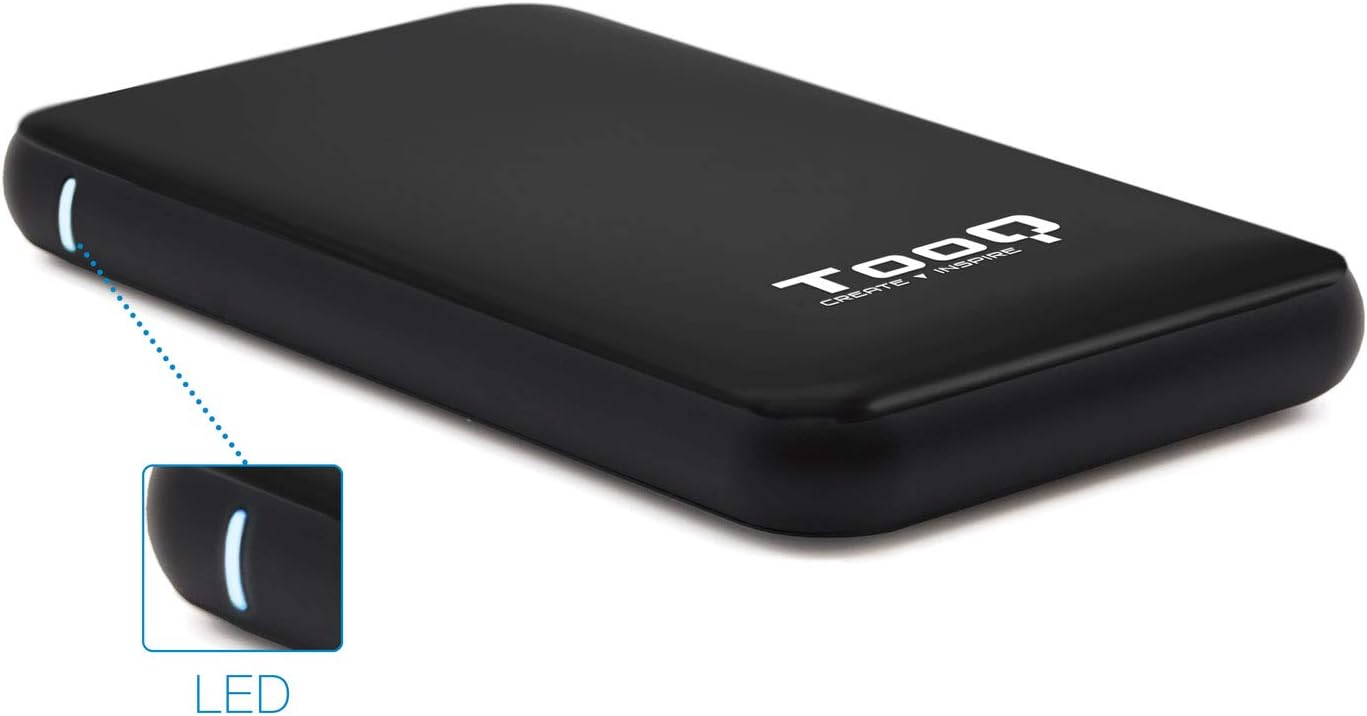
Image 3.1: The enclosure features an LED indicator on the side, which illuminates to show power and data activity.

Image 3.2: The rear of the enclosure includes a power button and a Micro-USB port for connection.
4. Setup: Hard Drive Installation
Follow these steps to install a 2.5-inch SATA HDD or SSD into the enclosure:
- Отворете го куќиштето: Gently slide the top cover of the enclosure to open it. The design allows for tool-free access.
- Поврзете го дискот: Align your 2.5-inch SATA HDD/SSD with the SATA connector inside the enclosure. Carefully push the drive into the connector until it is firmly seated. Ensure the drive is flush with the internal tray.
- Затворете го куќиштето: Вратете го горниот капак на место додека не кликне безбедно.
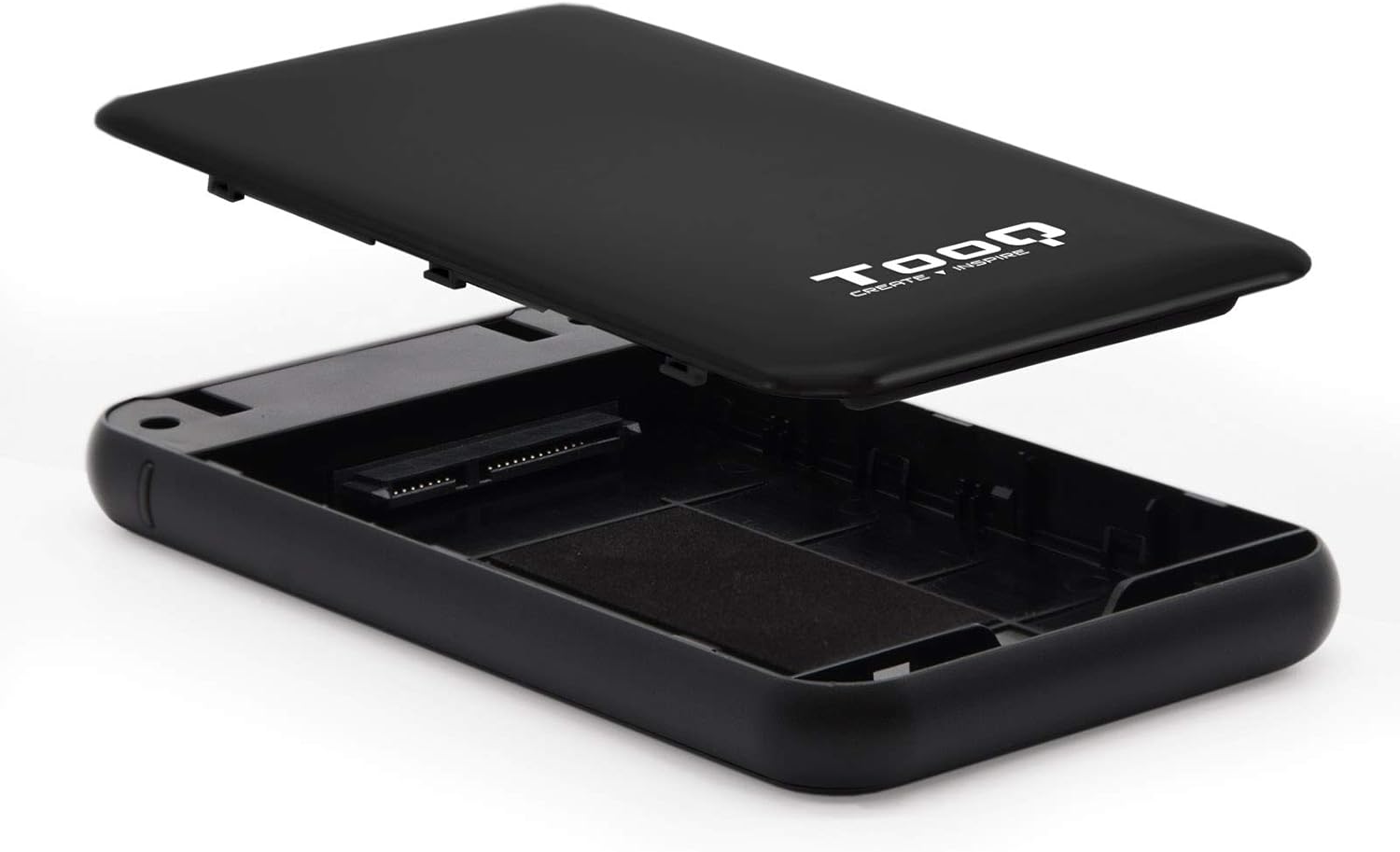
Image 4.1: The enclosure opened, revealing the internal SATA data and power connector for a 2.5-inch drive.
5. Упатства за работа
After installing your hard drive, connect the enclosure to your computer:
- Поврзете USB кабел: Plug the Micro-B end of the included USB 3.0 cable into the enclosure's Micro-USB port.
- Поврзете се со компјутер: Plug the Type-A end of the USB cable into an available USB port on your computer. For optimal performance, use a USB 3.0 or USB 3.1 Gen1 port.
- Вклучување: If the enclosure has a power button (refer to Image 3.2), press it to turn on the device. The LED indicator (Image 3.1) will illuminate, indicating power and connection status.
- Пристап до дискот: Your operating system should automatically detect the new storage device.
- Нови дискови: If you are using a brand new hard drive, it may need to be initialized and formatted before use. Refer to your operating system's disk management tools for this process.
- Existing Drives: If the drive contains data, it should appear as a removable drive in 'My Computer' (Windows) or on the desktop (macOS).

Image 5.1: The TooQ TQE-2528B enclosure connected to a laptop, demonstrating a typical usage scenario.
6. Одржување
To ensure the longevity and optimal performance of your enclosure:
- Одржувајте го куќиштето чисто и без прашина. Користете мека, сува крпа за чистење.
- Избегнувајте изложување на уредот на екстремни температури, влажност или директна сончева светлина.
- Не го испуштајте куќиштето и не го подложувајте на силни удари.
- Секогаш безбедно извадете го дискот од вашиот оперативен систем пред да го исклучите USB кабелот за да спречите оштетување на податоците.
7 Смена на проблеми
If you encounter issues with your TooQ TQE-2528B enclosure, refer to the following common solutions:
- Не е откриен диск:
- Осигурајте се дека USB кабелот е безбедно поврзан и со куќиштето и со компјутерот.
- Обидете се да се поврзете со друга USB порта на вашиот компјутер.
- Verify that the hard drive is correctly seated within the enclosure's SATA connector.
- Проверете го Управувањето со дискови (Windows) или Disk Utility (macOS) на вашиот компјутер за да видите дали дискот е препознаен, но неиницијализиран или неформатиран.
- Test the enclosure with a different 2.5-inch SATA drive, if available, to rule out a drive issue.
- Бавен пренос на податоци:
- Ensure you are connected to a USB 3.0 or USB 3.1 Gen1 port on your computer. Connecting to a USB 2.0 port will result in slower speeds.
- Проверете дали вашиот оперативен систем и драјверите се ажурирани.
- Enclosure Does Not Power On:
- Ensure the USB cable is properly connected and providing power. The enclosure is bus-powered.
- Обидете се со друга USB порта на вашиот компјутер.
8. Спецификации
| Број на модел | TQE-2528B |
| Компатибилни дискови | 2.5-inch SATA I/II/III HDD/SSD (up to 9.5mm height) |
| Интерфејс | USB 3.1 Gen1 (USB 3.0) |
| Стапка на пренос на податоци | До 5.0 Gbps |
| Напојување | USB Bus-powered (5 Volts) |
| Материјал | ABS пластика |
| Димензии (Д x Ш x В) | 13.5 см x 8 см x 1.6 см (приближно 5.3 x 3.1 x 0.6 инчи) |
| Тежина | 50 г (приближно 0.11 фунти) |
| Компатибилност на оперативниот систем | Universal (Windows, macOS, Linux) |

Image 8.1: Technical drawing illustrating the dimensions of the TooQ TQE-2528B enclosure.
9. Гаранција и поддршка
TooQ products are designed for reliability and performance. This product comes with a standard manufacturer's warranty. For specific warranty terms and conditions, please refer to the warranty card included with your product or visit the official TooQ webсајт.
For technical support, frequently asked questions, or to download the latest drivers (if applicable), please visit the official TooQ support webвеб-страница или контактирајте го нивниот оддел за услуги на клиентите. Контакт информациите обично може да се најдат на пакувањето на производот или на официјалната webсајт.
Производител: TOOQ
Глобален број на трговска ставка (GTIN): 08433281008304


