Вовед
This manual provides detailed instructions for the installation, operation, and maintenance of your Defiant Electronic Deadbolt Door Lock. Please read this manual thoroughly before installation and use to ensure proper function and safety.
The Defiant Electronic Deadbolt offers convenient keyless access with a touch keypad, along with the security of a traditional mechanical key. It is designed for use on garage, entry, home office, computer room, or utility room doors.
Информации за безбедност
Секогаш следете ги основните безбедносни мерки на претпазливост при инсталирање и ракување со овој производ за да го намалите ризикот од повреда или оштетување.
- Do not attempt to disassemble or modify the lock beyond the instructions provided in this manual.
- Користете само наведениот тип на батерија (не е вклучена).
- Чувајте ги клучевите на безбедно место подалеку од бравата.
- Осигурајте се дека сите компоненти се безбедно прицврстени за време на инсталацијата.
Содржина на пакетот
Verify that all parts are present before beginning installation:
- Склопување на надворешна тастатура
- Interior Assembly with Thumb Turn
- Deadbolt бравата
- Ударна плоча
- Завртки за монтирање
- Клучеви (2)
- Шаблон за инсталација (доколку е применливо)

Image: Included components such as keys, strike plate, and the cylinder housing.
Водич за инсталација
Потребни алатки: Philips screwdriver (included), measuring tape, pencil.
- Подгответе ја вратата: Ensure your door has the standard bore holes for a deadbolt. If not, use the provided template (if applicable) to drill necessary holes.
- Инсталирајте го бравата: Insert the deadbolt latch into the edge of the door. Ensure the "UP" arrow on the latch is pointing upwards. Secure with screws.
- Инсталирајте надворешна тастатура: Feed the cable from the exterior keypad through the cross bore hole. Align the keypad with the latch and press it firmly against the door.
- Инсталирајте внатрешен состав: Connect the cable from the exterior keypad to the interior assembly. Align the interior assembly with the mounting posts from the exterior keypad and secure with screws. Ensure the thumb turn operates smoothly.
- Инсталирајте ја заштитната плоча: Install the strike plate on the door frame, aligning it with the deadbolt latch. Secure with screws.
- Вметнете батерии: Отворете го капакот на батериите на внатрешниот склоп и вметнете 4 AA батерии (не се вклучени), почитувајќи ја поларноста.
- Тест операција: Test the lock with the mechanical key and by entering a default code (if any) or a newly programmed code.
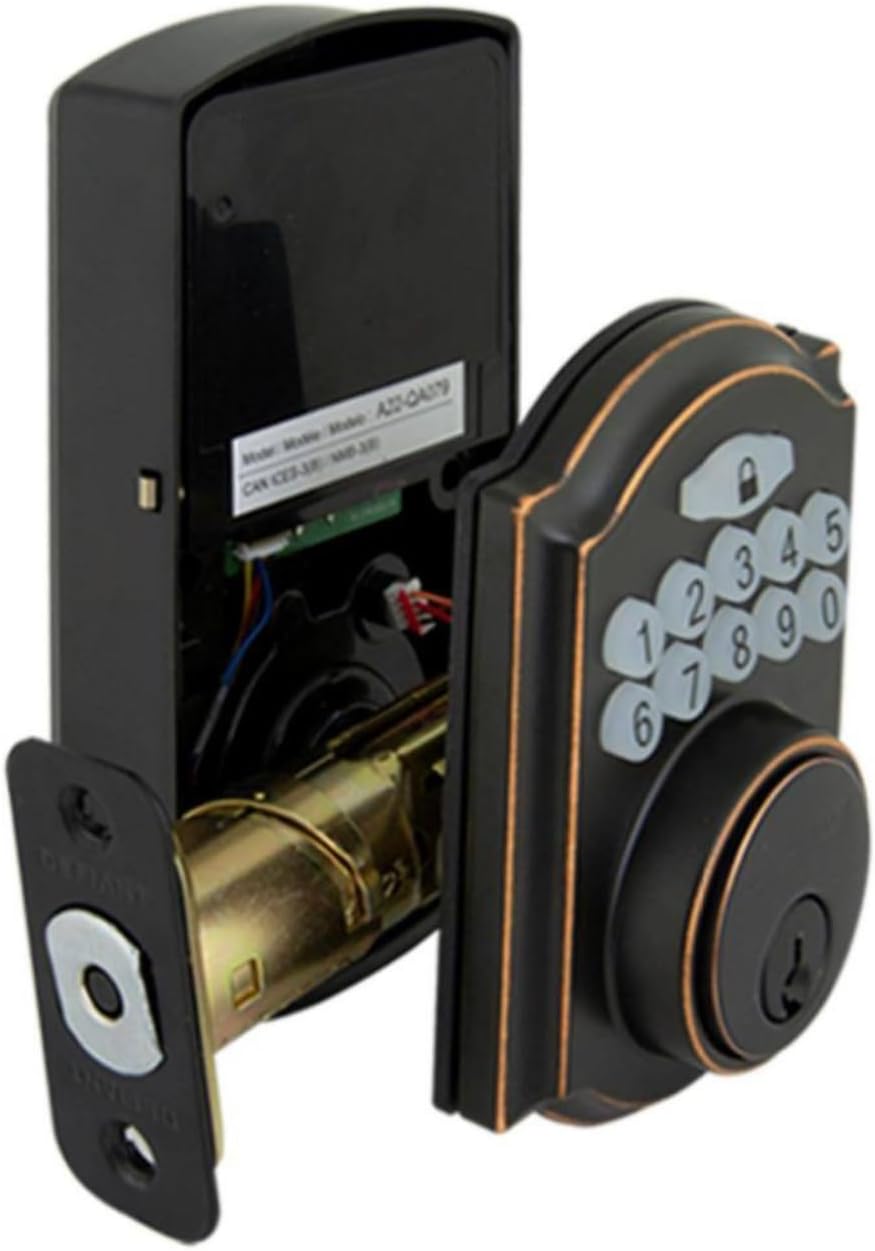
Image: The electronic deadbolt assembly, showing the interior mechanism and exterior keypad.

Слика: Надворешност view of the electronic deadbolt installed on a door, showcasing the keypad.
Упатства за работа
Програмирање Кориснички кодови
The lock can hold up to 10 user codes and 5 single-entry codes.
- Влезете во режим на програмирање: Locate the program button on the interior assembly (usually on the battery cover or near the battery compartment). Press it once. The keypad will illuminate.
- Додадете нов кориснички код: Enter your desired 4-digit user code. Press the Lock button (padlock icon) to confirm. The lock will beep to confirm successful programming.
- Избришете го корисничкиот код: Enter programming mode. Enter the 4-digit user code you wish to delete. Press the Lock button. The lock will beep to confirm deletion.
Заклучување и отклучување
- За отклучување: Enter your 4-digit user code on the keypad. The keypad will illuminate, and the deadbolt will retract after a few seconds.
- To Lock (from outside): Press the Lock button (padlock icon) on the keypad. The deadbolt will extend after a few seconds.
- За заклучување (одвнатре): Turn the thumb turn on the interior assembly to the locked position.
Функција за автоматско заклучување
The lock features an auto-lock function with an adjustable delay from 10 to 99 seconds. Refer to the full programming guide (usually a separate sheet or detailed section in the manual) for instructions on enabling and adjusting this feature.

Image: Close-up of the electronic keypad for code entry.
Одржување
- Чистење: Исчистете ја бравата со мека, дamp крпа. Избегнувајте абразивни средства за чистење или растворувачи кои би можеле да ја оштетат завршната обработка или електронските компоненти.
- Замена на батерија: When the battery indicator light flashes or the lock makes a low battery warning sound, replace all four AA batteries. Use only new, high-quality alkaline batteries.
- Подмачкување: Periodically lubricate the deadbolt mechanism with a silicone-based lubricant to ensure smooth operation. Do not lubricate the keypad.
Решавање проблеми
| Проблем | Можна причина | Решение |
|---|---|---|
| Тастатурата не свети. | Празни батерии или неправилна инсталација на батерии. | Заменете ги батериите, осигурувајќи се дека е точен поларитетот. |
| Lock does not respond to code. | Incorrect code entered, code not programmed, or lock is jammed. | Verify code, reprogram code, check for obstructions in door frame or latch. |
| Завртката не се извлекува/вовлекува целосно. | Misalignment of strike plate or latch, low battery. | Adjust strike plate, replace batteries. |
| Заклучете ги звучните сигнали постојано. | Предупредување за слаба батерија. | Веднаш заменете ги батериите. |
Спецификации
- Бренд: Пркосен
- Број на модел: 9a843b7d-eaac-472e-b6d2-4b1006f6f6a5
- Тип на заклучување: Електронски Deadbolt
- Материјал: Бронза
- Стил: Модерен
- Специјална карактеристика: Keyless Entry, Back-up Mechanical Key
- Кориснички кодови: До 10
- Single Entry Codes: До 5
- Одложување на автоматско заклучување: 10-99 секунди (прилагодливо)
- Извор на енергија: 4 AA батерии (не се вклучени)
- Тежина на ставката: 2.26 фунти
- Димензии на пакетот: 7.48 x 5.51 x 4.61 инчи
- UPC: 050134991163
Гаранција и поддршка
For warranty information or technical support, please refer to the official Defiant webлокација или контактирајте ја нивната служба за корисници. Зачувајте ја сметката за гаранциски барања.
Онлајн ресурси: Visit the Defiant website for FAQs, additional guides, and product registration.
Услуга за клиенти: Contact Defiant customer support for assistance with installation, programming, or troubleshooting issues.


