Jabra Evolve 20 MS Stereo Headset Instruction Manual
Model: Evolve 20 (GSA4999-823-109)
1. Вовед
The Jabra Evolve 20 MS Stereo Headset is a professional wired headset designed for clear communication and music listening. It features a noise-canceling microphone to reduce background distractions and an intuitive control unit for easy call management. This manual provides essential information for setting up, operating, and maintaining your headset.
2. Содржина на пакетот
Ве молиме проверете го пакувањето за следните ставки:
- Jabra Evolve 20 MS Stereo Headset with integrated control unit
3. Производот завршиview
3.1 Компоненти на слушалките
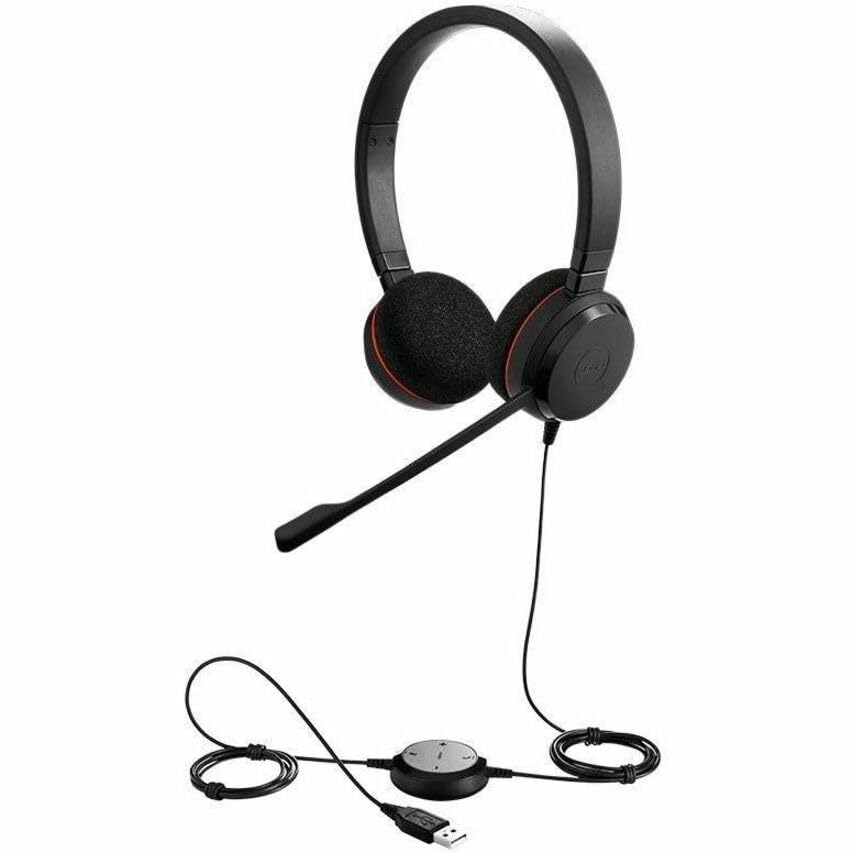
The Jabra Evolve 20 MS Stereo Headset features an adjustable headband, foam ear cushions for comfort, and a flexible microphone boom arm that can be positioned for optimal voice pickup.
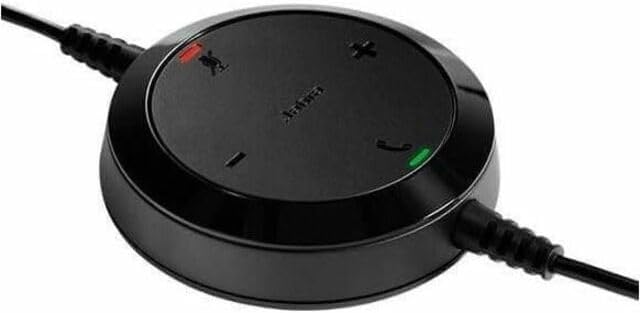
The inline control unit provides easy access to essential call management functions, including volume adjustment, microphone mute, and answer/end call buttons.
4. Поставување
4.1 Поврзување со вашиот компјутер
- Пронајдете слободен USB порт на вашиот компјутер (десктоп или лаптоп).
- Приклучете го USB-конекторот на слушалките Jabra Evolve 20 во USB-портата.
- Вашиот компјутер треба автоматски да ги открие и инсталира потребните драјвери. Ова може да потрае неколку моменти.
- Once installed, the headset will be ready for use. You may need to select the Jabra Evolve 20 as your default audio device (microphone and speaker) in your operating system's sound settings or your communication software (e.g., Microsoft Teams, Skype for Business).
5. Упатства за работа
5.1 Носење на слушалките
- Прилагодете ја лентата за глава за да обезбедите удобно и сигурно прицврстување на главата.
- Position the microphone boom arm so that the microphone is approximately 2-3 cm (1 inch) from your mouth.
5.2 Using the Control Unit
- Јачина на звук (+): Притиснете за да ја зголемите јачината на слушањето.
- Намалување на јачината на звукот (-): Притиснете за да ја намалите јачината на слушањето.
- Исклучи звук на микрофонот: Press the microphone icon button to mute or unmute your microphone during a call. An indicator light on the control unit may show the mute status.
- Одговори/заврши повик: Press the phone icon button to answer an incoming call or end an active call.
6. Одржување
Правилното одржување гарантира долготрајност и перформанси на вашите слушалки.
- Чистење: Gently wipe the headset and control unit with a soft, dry cloth. For ear cushions, use a slightly damp cloth if necessary, but avoid excessive moisture. Do not use harsh chemicals or abrasive cleaners.
- Складирање: Кога не ги користите, чувајте ги слушалките на чисто и суво место, подалеку од екстремни температури и директна сончева светлина. Избегнувајте заплеткување на кабелот.
- Грижа за кабел: Do not pull on the cable to disconnect the headset. Always grasp the USB connector.
7 Смена на проблеми
If you encounter issues with your Jabra Evolve 20 headset, refer to the table below for common problems and solutions.
| Проблем | Решение |
|---|---|
| Нема звук од слушалките |
|
| Микрофонот не работи |
|
| Копчињата за контрола на повици не реагираат |
|
8. Спецификации
Key technical specifications for the Jabra Evolve 20 MS Stereo Headset:
| Карактеристика | Опис |
|---|---|
| Име на моделот | Еволуирајте 20 |
| Технологија за поврзување | Iredичен (USB) |
| Контрола на бучава | Активно поништување на шум, пасивно поништување на шум |
| Микрофон | Поништување на бучава |
| Поставување на увото | Над уво |
| Форма фактор | На уво |
| Material (Ear Cushions) | Пена |
| Тежина на ставката | 4.6 унци (0.29 фунти) |
| Димензии на производот | 8 x 7 x 1.5 инчи |
| Компатибилни уреди | Desktops, Laptops, Softphones, Web Clients, Desk Phones |
| Тип на контролер | Answer/End, Mute, Volume |
9. Гаранција и поддршка
For detailed warranty information, please refer to the warranty card included with your product or visit the official Jabra webлокација. Условите за гаранција може да се разликуваат во зависност од регионот и продавачот.
For technical support, product registration, or to access additional resources, please visit the official Jabra support webлокација или директно контактирајте ја нивната служба за корисници. Зачувајте го доказот за купување за гаранциски барања.