Вовед
This manual provides instructions for the ZdalaMit GJ221-U replacement remote control. This remote is designed to function as a direct replacement for the original remote controls of compatible Sharp Aquos 4K LCD TV models. No programming or pairing is required for its operation.
Поставување: Инсталација на батерија
To begin using your ZdalaMit GJ221-U replacement remote control, you must first install the batteries.
- Пронајдете го одделот за батерии: Turn the remote control over. The battery compartment cover is typically located on the back of the remote, usually at the bottom section.
- Отворете го одделот: Slide the battery compartment cover downwards or press the release tab (if present) and lift the cover off.
- Вметнете батерии: Insert two (2) AAA batteries into the compartment. Ensure that the positive (+) and negative (-) terminals of the batteries align correctly with the markings inside the compartment. Incorrect insertion can prevent the remote from functioning.
- Затворете го одделот: Вратете го капакот на преградата за батерии со лизгање назад на своето место додека не кликне безбедно.
Once the batteries are installed, the remote control is ready for immediate use with compatible Sharp Aquos 4K LCD TVs. No additional programming or pairing steps are necessary.
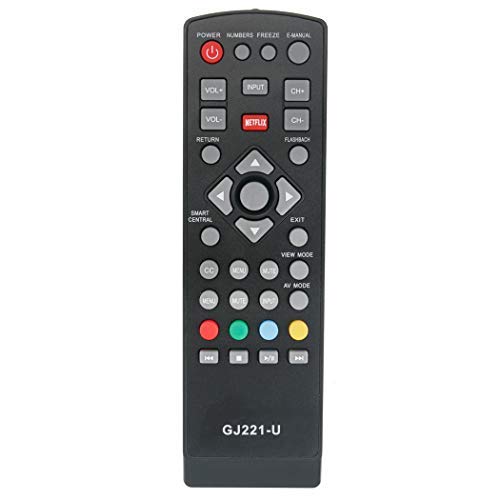
Слика: напред view of the ZdalaMit GJ221-U Replacement Remote Control. The remote is black with standard TV control buttons. The battery compartment is located on the reverse side.
Упатства за работа
The ZdalaMit GJ221-U remote control is designed to replicate the functionality of your original Sharp Aquos 4K LCD TV remote. After battery installation, simply point the remote at your television and press the desired buttons to control functions such as power, volume, channel selection, input source, and menu navigation.
- Копче за вклучување: Го вклучува или исклучува телевизорот.
- Јачина на звук нагоре/намалување: Го прилагодува нивото на аудио.
- Канал нагоре/надолу: Менува ТВ канали.
- Влез/Извор: Selects different input sources (HDMI, AV, etc.).
- Копчиња за навигација: Used to move through on-screen menus.
- Парче со броеви: За директен влез во каналот.
Refer to your Sharp Aquos TV's original user manual for specific functions of each button if you are unfamiliar with them.
Компатибилни модели на телевизори
This replacement remote control is compatible with the following Sharp Aquos 4K LCD TV models:
- LC-43UB30U
- LC-50UB30U
- LC-55UB30U
- LC-65UB30U
- LC43UB30U
- LC50UB30U
- LC55UB30U
- LC65UB30U
Одржување
- Чистење: За чистење на далечинскиот управувач, користете мека, сува крпа. Не користете течни средства за чистење или абразивни материјали, бидејќи тие можат да ја оштетат површината на далечинскиот управувач или внатрешните компоненти.
- Замена на батерија: Заменете ги батериите кога далечинскиот управувач ќе почне да реагира бавно или ќе престане да работи. Секогаш заменете ги обете батерии истовремено со нови од ист тип (AAA).
- Складирање: If the remote control will not be used for an extended period, it is recommended to remove the batteries to prevent leakage and potential damage.
Решавање проблеми
- Далечинското не реагира:
- Проверете дали батериите се правилно ставени со правилен поларитет (+/-).
- Заменете ги старите батерии со нови AAA батерии.
- Проверете дали има пречки помеѓу далечинскиот управувач и инфрацрвениот сензор на телевизорот.
- Уверете се дека сте во ефективниот опсег на IR приемникот на телевизорот.
- Одредени копчиња не работат:
- This remote is pre-programmed to match the original functionality. If a specific button does not work, ensure your TV model is listed in the "Compatible TV Models" section.
- Clean the remote's surface, especially around the buttons, to ensure no debris is interfering with button presses.
Спецификации
| Број на модел: | GJ221-U |
| Бренд: | ЗдалаМит |
| Компатибилни уреди: | Television (Sharp Aquos 4K LCD TVs) |
| Извор на енергија: | 2 x AAA батерии (не се вклучени) |
| Димензии на производот: | 6 x 2 x 0.5 инчи |
| Тежина на ставката: | 1.41 унци |
| Специјална карактеристика: | Пред-програмиран |
Гаранција и поддршка
This product is a replacement remote control. For any issues or support inquiries regarding the ZdalaMit GJ221-U remote control, please contact the seller or manufacturer directly through your purchase platform. Specific warranty details may vary by retailer or region.


