Добредојдовте
Thank you for choosing the iTek GGC 30-inch Curved Monitor. This manual provides essential information for setting up, operating, and maintaining your new monitor. Please read it thoroughly before use to ensure optimal performance and safety.
Важни безбедносни инструкции
To prevent damage and ensure safe operation, please observe the following precautions:
- Не го изложувајте мониторот на дожд, влага или екстремни температури.
- Обезбедете соодветна вентилација околу мониторот. Не ги блокирајте отворите за вентилација.
- Користете го само адаптерот за напојување што е испорачан со мониторот.
- Избегнувајте да ставате тешки предмети на кабелот за напојување.
- Исклучете го приклучокот за струја од штекерот ако мониторот не се користи подолг период.
- Не обидувајте се сами да го сервисирате мониторот. Сите сервиси обратете се на квалификуван персонал.
- Исчистете го екранот на мониторот иasinсо мека, сува крпа. Избегнувајте употреба на абразивни средства за чистење или растворувачи.
Содржина на пакетот
Ве молиме проверете го пакувањето за следните ставки:
- iTek GGC 30-inch Curved Monitor
- Поставка за монитор (основа и врат)
- Адаптер за напојување и кабел
- Кабел за DisplayPort
- HDMI кабел
- Упатство за употреба
- Завртки за склопување на држачот
Производот завршиview
The iTek GGC 30-inch Curved Monitor is designed for an immersive viewing experience, ideal for gaming and professional use. It features a WFHD (2560x1080) resolution, a high 200Hz refresh rate, and a rapid 1ms MPRT response time.

Key Performance Highlights
- 200Hz Refresh Rate & AMD FreeSync Technology: Experience ultra-smooth visuals and tear-free gaming with a high refresh rate and adaptive sync technology.

Figure 2: 200Hz Refresh Rate and AMD FreeSync Technology in action. - Flicker-Free & Low Blue Light: Designed to reduce eye strain during prolonged use, providing a more comfortable viewискуство.

Figure 3: Flicker-Free and Low Blue Light features for eye comfort. - 1ms MPRT Време на одговор: Minimizes motion blur and ghosting, crucial for fast-paced games and action sequences.

Figure 4: Rapid Refresh Rate and Response Time for smooth visuals. - Закривен дисплеј од 1800R: The immersive curvature brings the edges of the screen closer to your field of view, enhancing depth perception and reducing distortion.

Figure 5: 1800R Curved Display for an immersive experience.
Поставување
Составување на штандот
- Внимателно извадете ги компонентите на мониторот и држачот од пакувањето.
- Attach the stand neck to the monitor panel using the provided screws. Ensure it clicks securely into place or is fastened tightly.
- Attach the stand base to the stand neck, securing it with the thumb screw or screws from underneath.
- Поставете го склопениот монитор на стабилна, рамна површина.
Поврзување на вашиот монитор
The iTek GGC monitor offers multiple connectivity options for various devices:
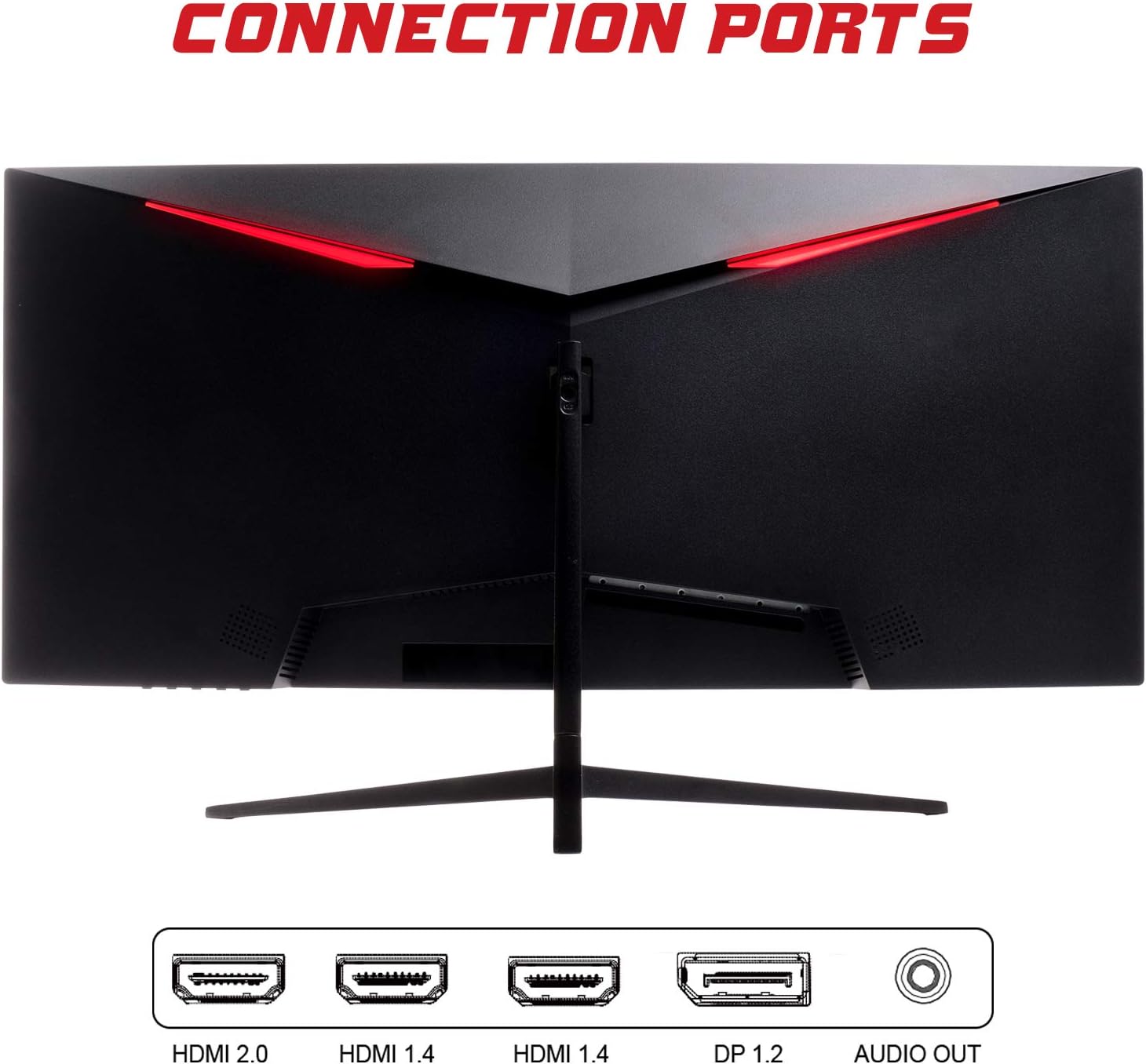
- ДисплејПорт (DP 1.2): For high-resolution and high-refresh-rate connections to your PC.
- HDMI (HDMI 2.0, HDMI 1.4 x2): Connect to PCs, gaming consoles, and other multimedia devices. HDMI 2.0 supports higher refresh rates at certain resolutions.
- Аудио излез: Поврзете надворешни звучници или слушалки.
After connecting the video cable, connect the power adapter to the monitor and then to a power outlet.
Работејќи го мониторот
Вклучување/исклучување
Press the power button, usually located on the bottom or back of the monitor, to turn it on or off. The power indicator light will illuminate when the monitor is on.
Мени за приказ на екран (OSD).
The OSD menu allows you to adjust various monitor settings. Use the buttons on the monitor (typically on the back or bottom right) to navigate the menu.
- Поставки за слика: Прилагодете ја осветленоста, контрастот, острината и гамата.
- Поставки за боја: Променете ја температурата на бојата, нијансата и сатурацијата.
- Избор на внесување: Рачно префрлајте помеѓу DisplayPort и HDMI влезовите.
- Аудио: Прилагодете ја јачината на звукот за аудио излезот.
- Системски поставки: Access language, OSD timeout, and reset options.
- Карактеристики на игри: Enable/disable FreeSync, adjust response time overdrive, and activate crosshair overlays if available.
Одржување
Соодветната грижа гарантира долготрајност на вашиот монитор:
- Секогаш исклучувајте го мониторот и извадете го кабелот за напојување од струја пред чистење.
- Користете мека крпа без влакненца за нежно да го избришете екранот. За тврдокорни дамки, малку избришете гоampИзмијте ја крпата со вода или со благ, неабразивен чистач за екран.
- Исчистете го мониторот casing со мека, сува крпа.
- Avoid spraying liquids directly onto the screen or casing.
- Do not use benzene, thinner, ammonia-based cleaners, or abrasive materials.
Решавање проблеми
If you encounter issues with your monitor, please refer to the following table for common problems and solutions:
| Проблем | Можно решение |
|---|---|
| Нема моќ | Ensure the power cable is securely connected to the monitor and the power outlet. Check if the power outlet is working. |
| Нема сигнал / Празен екран | Verify the video cable (DisplayPort or HDMI) is firmly connected to both the monitor and your computer. Select the correct input source via the OSD menu. Ensure your computer is powered on and not in sleep mode. |
| Трепкање на сликата или нестабилност | Check the video cable connection. Try a different cable or port. Ensure your graphics card drivers are up to date. Adjust the refresh rate in your computer's display settings. |
| Poor image quality (blurry, distorted colors) | Adjust brightness, contrast, and color settings in the OSD menu. Ensure the display resolution on your computer matches the monitor's native resolution (2560x1080). |
| Нема звук од аудио излезот | Check the audio cable connection to your speakers/headphones. Verify the volume setting in the OSD menu and on your computer. Ensure the correct audio output device is selected in your computer's sound settings. |
Технички спецификации
| Карактеристика | Спецификација |
|---|---|
| Бренд | Итек |
| Модел | ITMC30V201FHD |
| Големина на екранот | 30 инчи |
| Тип на панел | VA |
| Искривување | R1800 |
| Резолуција | 2560 x 1080 (WFHD) |
| Сооднос на аспект | 21:9 |
| Стапка на освежување | 200 Hz |
| Време на одговор | 1ms MPRT |
| Осветленост | 350 cd/m² |
| Сооднос на контраст | 3000:1 |
| Viewинголен агол | 178° (хоризонтално/вертикално) |
| Поврзување | 1x DisplayPort 1.2, 1x HDMI 2.0, 2x HDMI 1.4, Audio Out |
| Посебни карактеристики | HDR Ready, FreeSync, Low Blue Light, Flicker Free, VESA Mountable |
| Димензии на производот (со држач) | 70.68 x 40.89 x 18.48 cm |
| Тежина | 6.9 кг |
Енергетска ефикасност

For detailed energy consumption information and product registration, please refer to the official EPREL database:
Гаранција и поддршка
Your iTek GGC monitor is backed by a manufacturer's warranty. Please retain your proof of purchase for warranty claims.
- Гарантирана поддршка за производот: This product is guaranteed to have support available until at least January 1, 2031.
- For technical support, warranty inquiries, or service requests, please contact iTek customer service through their official webстраницата или информациите за контакт дадени со вашето купување.


