1. Вовед
This manual provides essential information for the setup, operation, and maintenance of your Blackweb BWC18SB001 2.0 Channel Google Assistant Smart Soundbar. Please read these instructions carefully before using the product to ensure proper functionality and to maximize your audio experience. This smart soundbar integrates speaker functionality with Google Assistant capabilities, enhancing your home entertainment system.
2. Што има во кутијата
Проверете дали сите компоненти се присутни при распакувањето:
- Црнотоweb BWC18SB001 2.0 Channel Google Assistant Smart Soundbar
- Далечински управувач
- Адаптер за напојување
- Relevant Audio Cables (e.g., Optical, Aux)
- Упатство за употреба (овој документ)
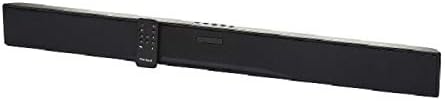
Слика: Црнотоweb BWC18SB001 Smart Soundbar, shown with its included remote control. The soundbar is black and rectangular, designed to sit beneath a television.
3. Карактеристики на производот
- 2.0-канален аудио: Delivers clear stereo sound for an enhanced listening experience.
- Integrated Google Assistant: Control your soundbar and smart home devices using voice commands.
- Повеќе опции за поврзување: Supports HDMI, Optical, AUX, and Bluetooth for versatile audio input.
- Контролни методи: Features on-device buttons and a dedicated remote control for easy operation.
- Компактен дизајн: Designed to fit seamlessly into your home theater setup.
4. Поставување
4.1 Поставување
Place the soundbar on a stable, flat surface directly in front of your television or mount it on a wall (mounting hardware not included). Ensure there is adequate ventilation around the unit.
4.2 Поврзување за напојување
- Поврзете го адаптерот за напојување со DC IN приклучокот на задната страна од саундбарот.
- Приклучете го другиот крај на адаптерот за напојување во ѕиден штекер.
4.3 Аудио поврзување
Choose one of the following methods to connect your soundbar to your TV or other audio source:
- HDMI (Препорачано): Connect an HDMI cable (not included) from the HDMI ARC port on your TV to the HDMI ARC port on the soundbar. This allows for high-quality audio and control via your TV remote.
- Оптички: Connect an Optical cable (included) from the OPTICAL OUT port on your TV to the OPTICAL IN port on the soundbar.
- AUX: Connect a 3.5mm audio cable (included) from the AUX OUT port on your TV or audio device to the AUX IN port on the soundbar.
5. Упатства за работа
5.1 Вклучување/исклучување
- Притиснете го копчето за напојување (U) on the soundbar or the remote control to turn the unit on or off.
- A green indicator light on the soundbar signifies that it is powered on.
5.2 Контрола на јачината на звукот
- Користете ја функцијата за зголемување на јачината на звукот (VOL+) и Намалување на јачината на звукот (VOL-) buttons on the soundbar or remote control to adjust the volume.
- Притиснете го копчето Исклучи звук (X) on the remote to mute or unmute the sound.
5.3 Избор на влез
Притиснете го копчето Внеси (M) on the soundbar or the corresponding input buttons (AUX, OPTICAL, HDMI, Bluetooth) on the remote control to switch between audio sources.
6. Интеграција на Google Assistant
Your Blackweb soundbar features integrated Google Assistant. To activate, ensure the soundbar is connected to your home Wi-Fi network (refer to the separate Google Home app setup guide for detailed instructions). Once connected, you can use voice commands:
- Say "Hey Google" or "Ok Google" followed by your command.
- Examples: "Hey Google, play music," "Ok Google, what's the weather?" "Hey Google, turn up the volume."
You can also mute the Google Assistant microphone using the dedicated button on the soundbar or remote control if you prefer privacy.
7. Bluetooth поврзување
За да поврзете уред со Bluetooth:
- Притиснете го копчето Bluetooth (BT) on the remote control or cycle through inputs on the soundbar until "BT" is displayed or indicated. The soundbar will enter pairing mode.
- На вашиот мобилен уред (паметен телефон, таблет, лаптоп), овозможете Bluetooth и пребарајте достапни уреди.
- Select "Blackweb BWC18SB001" from the list of devices.
- Once paired, the soundbar will indicate a successful connection, and you can play audio from your device.
Дометот на Bluetooth е приближно 10 метри (33 стапки).
8. Одржување
За да се обезбеди долготрајност и оптимални перформанси на вашиот саундбар:
- Чистење: Use a soft, dry cloth to wipe the exterior of the soundbar. Do not use liquid cleaners or abrasive materials.
- Вентилација: Осигурајте се дека отворите за вентилација не се блокирани.
- Животна средина: Avoid exposing the soundbar to extreme temperatures, humidity, or direct sunlight.
9 Смена на проблеми
- Без моќност: Ensure the power adapter is securely connected to both the soundbar and a working wall outlet.
- Нема звук:
- Check that the soundbar is powered on and not muted.
- Проверете дали е избран точниот влезен извор на саундбарот.
- Ensure audio cables (HDMI, Optical, AUX) are securely connected to both the soundbar and your TV/audio source.
- Adjust the volume on both the soundbar and your TV/audio source.
- Bluetooth не се поврзува:
- Уверете се дека саундбарот е во режим на спарување преку Bluetooth.
- Проверете дали Bluetooth-от на вашиот уред е овозможен и дали е во опсег.
- Обидете се да го распарите и повторно да го спарите уредот.
- Google Assistant не реагира:
- Проверете ја вашата Wi-Fi конекција.
- Ensure the Google Assistant microphone is not muted.
- Verify the soundbar is properly set up in the Google Home app.
10. Спецификации
| Карактеристика | Спецификација |
|---|---|
| Име на моделот | BWC18SB001 |
| Тип на звучник | Звучна лента |
| Конфигурација на каналот за опкружувачки звук | 2.0 |
| Контролен метод | Voice, Remote, On-device Buttons |
| Технологија за поврзување | HDMI, Optical, AUX, Bluetooth |
| Опсег на Bluetooth | 10 метри |
| Максимална излезна моќност на звучникот | 150 вати |
| Режим за излез на звук | Стерео, Опкружувачки звук |
| Извор на енергија | Електричен со кабел |
| Димензии на производот | 32 x 2.77 x 3.26 инчи |
| Тежина на ставката | 3.97 фунти |
| UPC | 681131237703 |
11. Гаранција и поддршка
For warranty information and technical support, please refer to the documentation provided at the time of purchase or visit the official Blackweb webстраница. Зачувајте го доказот за купување за гаранциски побарувања.