1. Вовед
This manual provides essential information for the proper installation, setup, and operation of your YoLuKe P1-4X-2.5 PTZ Dome IP Security Camera. This camera is designed for both indoor and outdoor surveillance, offering high-definition video, pan-tilt-zoom capabilities, and advanced features to enhance your security monitoring.
2. Компоненти на производот
Familiarize yourself with the various parts of your camera and included accessories:

Figure 2.1: YoLuKe PTZ Dome IP Camera Components. This image displays the main camera unit with its high-intensity antenna, HD zoom lens, waterproof IP66 body, microphone, reset button, power interface, audio port, and network interface.
- PTZ Dome IP Camera: Main surveillance unit.
- High-Intensity Antenna: За безжична конекција.
- HD Zoom Lens: Provides clear, magnified views.
- Waterproof Body (IP66): Ensures durability in various weather conditions.
- Микрофон: За аудио влез.
- Копче за ресетирање: За ресетирање на уредот.
- Интерфејс за напојување: За поврзување на адаптерот за напојување.
- Аудио порта: For external audio connections.
- Мрежен интерфејс: За жична мрежна конекција.
- Адаптер за напојување: To supply power to the camera.
- Етернет кабел: For initial setup and wired connection.
- Хардвер за монтирање: Screws and anchors for installation.
- ЦД: Contains software and drivers.
- Водич за брзо работење: Additional setup instructions.
3. Поставување
3.1 Физичка инсталација
Follow these steps for secure physical installation of your camera:

Figure 3.1: Detailed steps for mounting the PTZ camera. This image illustrates rotating the base, determining screw hole locations, drilling holes, inserting the base, and securing the camera.
- Rotate and Remove Base: Rotate the camera base to align with the arrow and remove it from the tail line.
- Одредете ја локацијата за монтирање: Identify and mark the desired location for the mounting screw holes on the ceiling or wall.
- Дупчете дупки: Drill holes at the marked positions and insert the expansion screws.
- Insert Base: Insert the camera base into the tail line and lift it into position.
- Безбедна камера: Insert the screws into the expansion screws to firmly secure the camera.
3.2 Поставување на мрежа и софтвер
Connect your camera to the network and set up the monitoring software:

Figure 3.2: Steps for setting up the camera using the CamHiPro app. This image shows downloading the app, powering on the camera, connecting the network cable, configuring Wi-Fi settings, and remote viewинг.
- Download CamHiPro APP: Scan the QR code in the quick operation guide or search for "CamHiPro" in your mobile app store (Google Play or Apple App Store).
- Вклучете и поврзете: Power on the camera and connect it to your network router using the provided Ethernet cable.
- Поставки за Wi-Fi: Follow the in-app instructions to configure Wi-Fi settings for wireless operation.
- Далечинско набљудување: Once configured, you can monitor your camera anytime, anywhere via the app.
3.3 Pairing with NVR (Network Video Recorder)
If you are using an NVR system, follow these steps to pair your camera:
Video 3.1: Manual Camera Addition to NVR. This video demonstrates the process of manually adding a camera to an NVR system, including powering on the devices, resetting the camera, and searching for it on the NVR interface.
- Power On NVR and Camera: Ensure both your NVR and the camera are powered on.
- Ресетирај камера: Long press the reset button on the camera until you hear a sound indicating a successful reset.
- Пребарај за Cameras on NVR: On your NVR interface, navigate to the camera setup or add device section and initiate a search for new cameras.
- Потврдете го спарувањето: Once the camera is detected and a "Wireless connection is successful" sound is heard, confirm the pairing on the NVR.
4. Упатства за работа
4.1 Контрола на панорамирање, навалување и зумирање (PTZ)
Контролирајте ја камерата viewing angle and zoom level remotely:
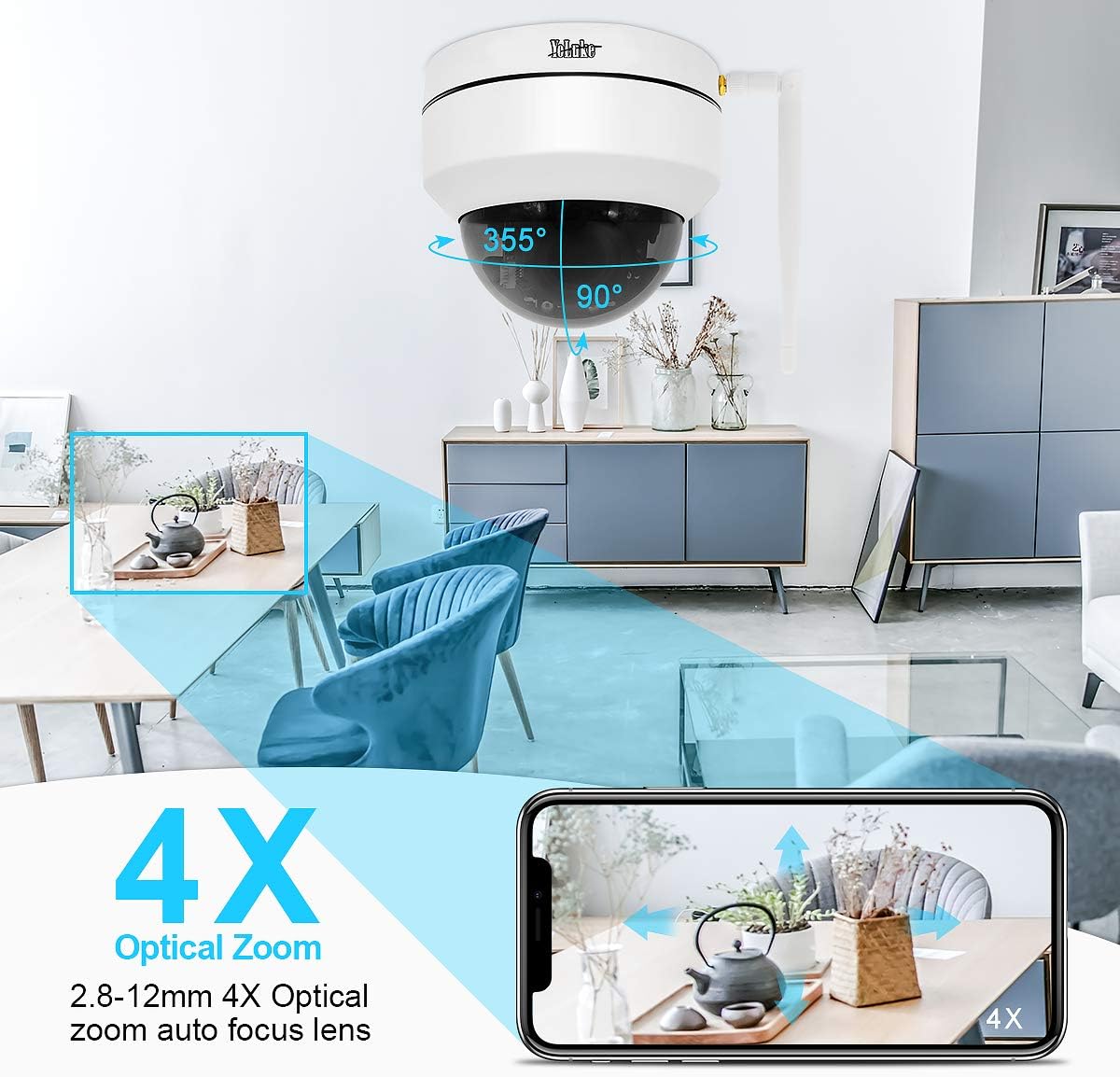
Figure 4.1: Remote PTZ and 4X Optical Zoom. This image demonstrates the camera's 355° horizontal rotation and 90° vertical pan, along with its 4X optical zoom capability, controllable via a smartphone app.
- Пан: Ротирајте ја камерата хоризонтално до 355°.
- Навалување: Прилагодете ја камерата вертикално до 90°.
- Зумирајте: Utilize the 4X optical zoom lens (2.8-12MM) for detailed views.
- Контрола: All PTZ functions are easily operable through the mobile application or PC client.
4.2 Ноќно гледање
The camera provides clear surveillance even in low-light conditions:

Figure 4.2: Day and Night Vision Comparison. This image illustrates the camera's ability to provide 24-hour surveillance with clear day vision and effective 20m night vision using LED arrays.
- Автоматско префрлување: The camera automatically switches between day and night vision modes based on ambient light.
- Подобрен ноќен вид: Equipped with two LED arrays, extending night vision range up to 65.6 feet (20 meters) in complete darkness.
4.3 Motion Detection and Alarm
Stay informed of any detected activity:
- Прилагодлива чувствителност: Motion detection area and alarm sensitivity can be customized via the app.
- Инстант известувања: Upon motion detection, the camera sends notifications to your mobile phone and video clips to your email.
- Сирена за аларм: The camera supports an alarm siren feature for deterrence.
4.4 Двонасочно аудио
Communicate through the camera:
- Вграден микрофон: Captures audio from the camera's vicinity.
- Speaker Support: Connect an external speaker for two-way communication.
4.5 Снимање и складирање
Manage your video recordings:
- Поддршка за SD картичка: Supports up to 128GB SD card (not included) for local storage.
- Smart H.265 Video Coding: Efficient compression allows for up to 15 days of 24-hour recording on a 128GB card.
- Далечинска репродукција: View recorded videos on your PC client, mobile app, or web прелистувач.
5. Одржување
- Редовно чистење: Периодично чистете го објективот и куќиштето на камерата со мека, дamp крпа за да се обезбеди јасен квалитет на сликата. Избегнувајте абразивни средства за чистење.
- Ажурирања на фирмверот: Проверете го производителот website or app for available firmware updates to ensure optimal performance and security.
- Проверка на напојувањето: Ensure the power adapter and cables are securely connected and free from damage.
- Мрежно поврзување: Verify stable network connection (wired or Wi-Fi) for uninterrupted monitoring.
6 Смена на проблеми
Доколку наидете на проблеми со вашата камера, погледнете ги следниве вообичаени решенија:
| Проблем | Можна причина | Решение |
|---|---|---|
| Камерата не се вклучува | Адаптерот за напојување е исклучен или неисправен. | Check power connections; try a different power outlet or adapter. |
| Не може да се поврзе на Wi-Fi | Incorrect Wi-Fi password; camera too far from router; network interference. | Verify Wi-Fi password; move camera closer to router; reset camera and reconfigure. |
| Нема видео довод | Network issue; camera offline; software glitch. | Check network connection; reboot camera and router; restart monitoring app/software. |
| Откривањето на движење не работи | Detection area not set; sensitivity too low; schedule not configured. | Adjust motion detection settings in the app/software; ensure schedule is active. |
| Лош квалитет на ноќно гледање | Obstruction in front of lens; insufficient ambient IR light. | Clear any obstructions; ensure IR LEDs are not blocked; consider additional IR illuminators if needed. |
7. Спецификации
| Карактеристика | Детал |
|---|---|
| Ефективна видео резолуција | 5 MP (1920*1080p@20fps) |
| Леќа | 2.8-12MM 4X Optical Zoom Lens |
| Опсег на пан/навалување | 355° Хоризонтално, 90° Вертикално |
| Ноќна визија | Up to 65.6 feet (20 meters) with two LED arrays |
| Складирање | 128GB Max SD card support (H.265 coding) |
| Поврзување | Wireless (Wi-Fi) and Wired (Ethernet) |
| Аудио | 2-Way Audio (Built-in Mic, external speaker support) |
| Оценка за отпорност на атмосферски влијанија | IP66 |
| Детекција на движење | Adjustable area and sensitivity, alarm siren |
| Моќ | 12 волти, 24 вати |
| Димензии | 5.91 x 5.91 x 5.91 инчи |
| Тежина | 2.27 фунти |
8. Гаранција и поддршка
Your YoLuKe P1-4X-2.5 PTZ Dome IP Security Camera is backed by a Целогодишна гаранција from the date of purchase. For any questions regarding installation, technical support, or warranty claims, please contact our support team via Amazon or through the contact information provided in your quick operation guide. We are always here to help.
For additional support and resources, please refer to the official YoLuKe store on Amazon: Visit YoLuKe Store


