1. Информации за безбедност
Ве молиме внимателно прочитајте ги сите упатства пред склопување и употреба. Зачувајте го ова упатство за во иднина.
- Потребно собрание: This desk requires self-assembly. Follow the provided assembly instructions meticulously to prevent injuries.
- Ограничување на тежината: This desk is not designed to carry heavy objects. The maximum weight capacity is approximately 17 kg (37.5 lbs) to ensure stability.
- Надзор: Children should be supervised while using the desk, especially during adjustments.
- Поставување: Place the desk on a flat, stable surface.
2. Производот завршиview
The TecTake Children's Desk is designed to provide a comfortable and adaptable workspace for various activities such as drawing, homework, and crafts. Its thoughtful design allows for height and tilt adjustments to suit the user's needs.
Клучни карактеристики:
- Навалување на работната површина: The work surface can be tilted to provide an ergonomic position for different tasks.
- Прилагодлива висина: The desk legs are adjustable in 7 steps, allowing the desk to grow with your child.
- Интегрирана фиока: A convenient drawer provides storage for school supplies, drawing materials, and other items.
- Removable Stopper Strips: Two removable stopper strips on the lower edge of the desktop prevent materials from sliding off when the surface is tilted.
- Стабилна конструкција: Built with robust materials for durability and stability during daily use.
- Заоблени агли: Работната маса има заоблени агли за зголемена безбедност.
- Лесно се чисти: The surface is washable with a damp крпа.

Figure 1: TecTake Children's Desk, showcasing неговиот дизајн и карактеристики.

Слика 2: Готовоview of key features including adjustable height, tilting desktop, and storage.
3. Поставување
The desk comes with detailed assembly instructions in the package. Please refer to the included manual for step-by-step guidance on assembling your TecTake Children's Desk.
Чекори на Генералното собрание:
- Распакувајте ги сите компоненти и проверете со списокот на делови во приложеното упатство.
- Assemble the main frame structure using the provided hardware.
- Attach the desktop to the frame, ensuring the tilting mechanism is correctly installed.
- Install the storage drawer and stopper strips.
- Пред употреба, проверете дали сите завртки и сврзувачки елементи се цврсто затегнати.

Figure 3: The desk's flexible design allows for various adjustments to suit user needs.
4. Упатства за работа
4.1 Прилагодување на висината на бирото
- Locate the height adjustment mechanisms on the desk legs.
- Carefully loosen the fasteners or pins that secure the legs at their current height.
- Adjust the desk to one of the 7 available height positions (from approximately 63 cm to 94 cm).
- Ensure both sides are adjusted to the same height and securely fasten the mechanisms before use.
4.2 Навалување на работната површина
- The desktop features a tilting mechanism for ergonomic positioning.
- To tilt, lift the desktop slightly and adjust it to the desired angle.
- Ensure the desktop is securely locked into place at the chosen angle.
- Utilize the two removable stopper strips to prevent items from sliding off the tilted surface.
4.3 Користење на фиоката за складирање
- The integrated drawer provides convenient storage.
- Pull the drawer out to access its contents.
- Push the drawer back in until it is fully closed to keep items secure and maintain a tidy workspace.
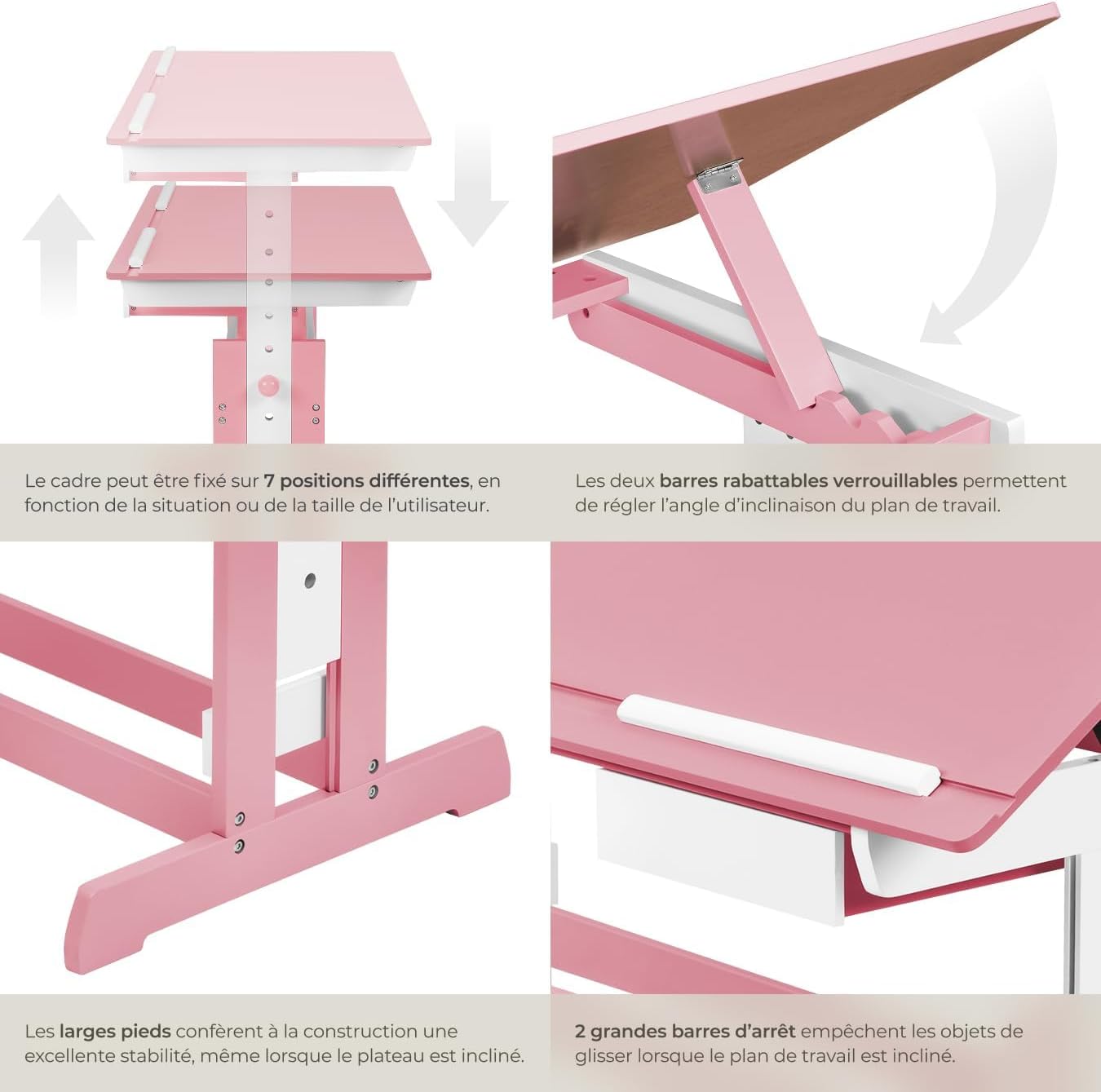
Figure 4: Close-up of the height adjustment and tilting mechanism.
5. Одржување
- Чистење: Избришете ги површините на работната маса со рекламаamp крпа. Избегнувајте абразивни средства за чистење или груби хемикалии кои би можеле да ја оштетат завршната обработка.
- Инспекција: Периодично проверувајте ги сите завртки и сврзувачки елементи за да се осигурате дека се цврсто затегнати. Затегнете ги повторно по потреба.
- Избегнувајте прекумерна влага: Do not expose the desk to excessive moisture or direct sunlight for prolonged periods to prevent warping or discoloration.
6 Смена на проблеми
If you encounter any issues with your TecTake Children's Desk, please refer to the following common solutions:
- Треперење на бирото: Ensure the desk is placed on a level surface. Check that all assembly screws and bolts are securely tightened.
- Difficulty Adjusting Height/Tilt: Verify that no obstructions are present in the adjustment mechanisms. Ensure fasteners are sufficiently loosened before attempting to adjust.
- Делови што недостасуваат или се оштетени: If any parts are missing or damaged upon arrival, please contact TecTake customer support for assistance.
7. Спецификации
| Карактеристика | Спецификација |
|---|---|
| Бренд | TecTake |
| Број на модел | 800117 |
| Димензии на работната површина | Приближно 109 x 55 см (43 x 21.7 инчи) |
| Опсег за прилагодување на висината | Approx. 63 cm to 94 cm (24.8 to 37 inches) in 7 steps |
| Drawer Interior Dimensions (HxWxD) | Приближно 6 x 27 x 22 см (2.4 x 10.6 x 8.7 инчи) |
| Тежина | Прибл. 17 кг (37.5 фунти) |
| Материјал | Plywood (lacquered) / Metal |
| Специјална карактеристика | Adjustable, Tilting Desktop |
| Инструкции за нега | Избришете со рекламаamp крпа |

Figure 5: Detailed dimensions and technical specifications of the desk.
8. Гаранција и поддршка
For warranty information, product support, or to order replacement parts, please refer to the documentation included with your purchase or visit the official TecTake webстраница. Ве молиме имајте го вашиот број на модел (800117) и датумот на купување кога контактирате со поддршката.


