Вовед
The Fender The Pinwheel Rotary Speaker Emulator Pedal is designed to replicate the classic swirling sounds of a rotary speaker, a sound traditionally associated with organs but widely adopted in modern music. This pedal offers three distinct rotary speaker voices, including Fender's unique Vibratone effect, allowing musicians to integrate this rich, modulated tone into their setup. It features switchable slow and fast speeds, an onboard overdrive for added tonal texture, and a sensitivity control that adjusts modulation rate based on playing dynamics. The pedal is built with a durable anodized aluminum chassis and includes LED-backlit knobs for visibility in various lighting conditions.
Клучни карактеристики
- Three distinct rotary speaker voicings, including 122, 145, and Fender Vibratone.
- Switchable slow and fast speeds for dynamic modulation control.
- Integrated onboard overdrive circuit to add texture and warmth.
- Sensitivity control for dynamic modulation rate changes based on playing intensity.
- True stereo inputs and outputs for versatile connectivity.
- Expression pedal/external footswitch input for enhanced control.
- LED-backlit knobs for clear visibility on dark stagес.
- Durable, lightweight anodized aluminum chassis.
Поставување
Before connecting your Fender The Pinwheel pedal, ensure all equipment is powered off to prevent damage.
- Поврзување за напојување: Connect a 9V DC power adapter (center-negative, 310mA minimum) to the 'DC IN' jack on the rear of the pedal. The pedal does not operate on internal batteries.
- Аудио врски:
- Mono Setup: Connect your instrument to the 'IN' jack. Connect the 'L/MONO OUT' jack to your ampлифирач или следен педал во сигналниот синџир.
- Стерео поставување: Connect your instrument to the 'IN' jack. If your instrument has stereo output, connect it to both 'IN' and 'EXP/FS' jacks (ensure 'FS SELECT' switch is set to 'EXP'). Connect the 'L/MONO OUT' and 'R OUT' jacks to two separate amplifiers or stereo input devices.
- Надворешна контрола (опционално): For an expression pedal or external footswitch, connect it to the 'EXP/FS' jack. Use the 'FS SELECT' switch on the rear panel to choose between 'EXP' (Expression Pedal) or 'FS' (Footswitch).
- Voicing Switch: On the rear panel, select 'GUITAR' or 'KEYBOARD' to optimize the pedal's frequency response for your instrument.
- Dynamics Switch: On the rear panel, set 'DYNAMICS' to 'ON' to enable dynamic modulation rate changes based on your playing intensity, or 'OFF' for a consistent rate.
- LEDs Switch: On the rear panel, set 'LEDs' to 'ON' to illuminate the control knobs, or 'OFF' to disable them.
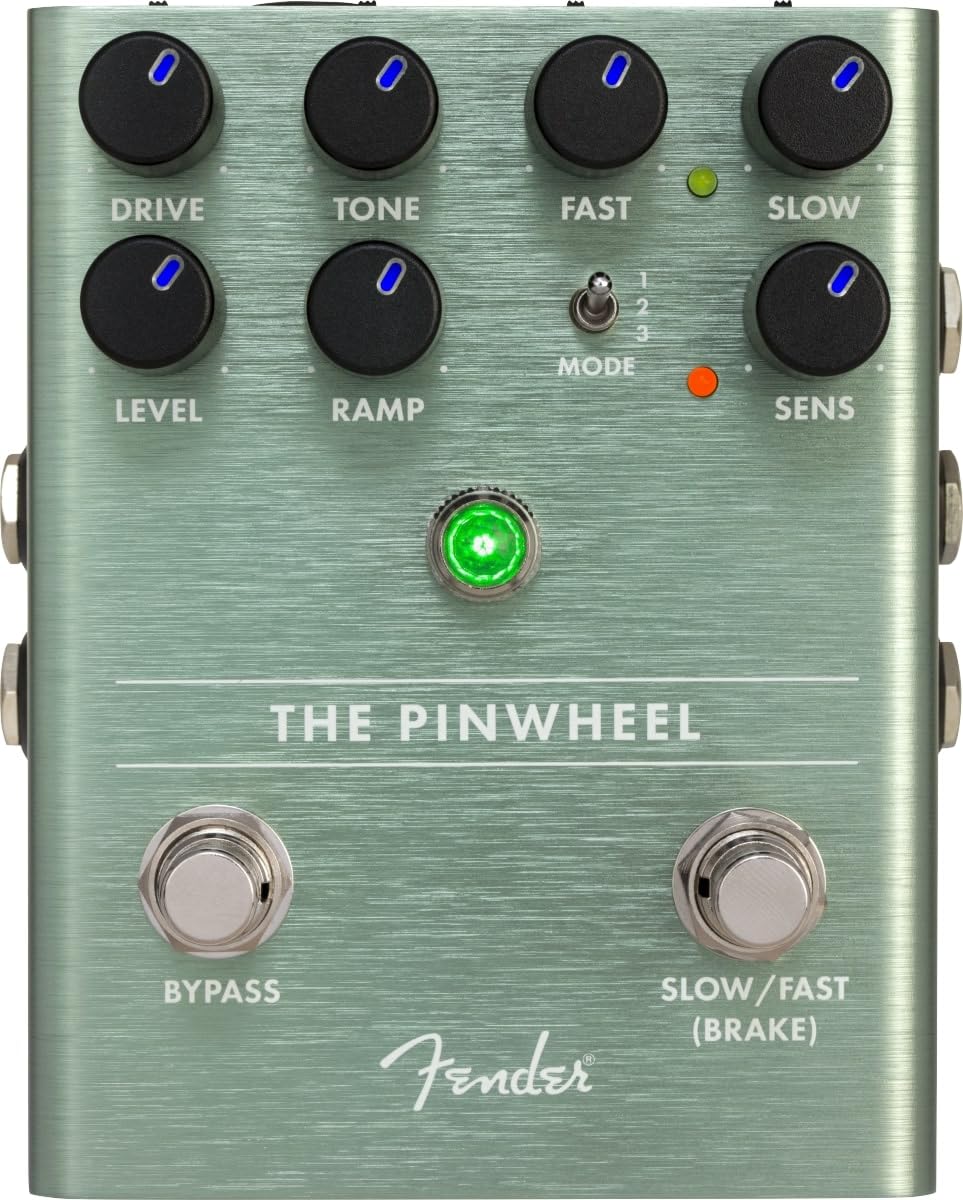
Слика 1: Врв view of the Fender The Pinwheel pedal, highlighting control knobs and footswitches.

Слика 2: Страна view of the pedal, illustrating the input and output jacks for mono and stereo connections.
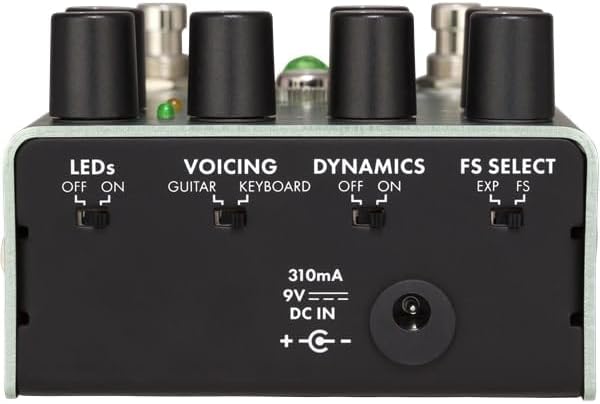
Слика 3: Заден дел view of the pedal, detailing the utility switches and power input.
Ракување со педалата
The Pinwheel pedal features two main sections: the overdrive/preamp emulation and the rotary speaker emulation.
Контроли:
- ВОЗЕЊЕ: Adjusts the amount of overdrive/distortion from the emulated tube power amplifier. Turn clockwise for more saturation.
- ТОН: Shapes the overall tonal character of the overdrive.
- НИВО: Controls the output volume of the overdrive section.
- БРЗО: Sets the speed of the fast rotary speaker effect.
- БАВНО: Sets the speed of the slow rotary speaker effect.
- RAMP: Adjusts the transition time between slow and fast speeds. A higher setting results in a slower, more gradual ramp.
- Прекинувач MODE: Selects one of the three rotary speaker voicings:
- Највисока позиција: Emulates a classic 122-type rotary speaker.
- Средна позиција: Emulates a classic 145-type rotary speaker.
- Долна позиција: Emulates the Fender Vibratone speaker.
- SENS (чувствителност): When the 'DYNAMICS' switch is 'ON', this knob determines how responsive the modulation speed is to your playing dynamics. Higher settings make the effect more intense with harder playing.
Прекинувачи за нозе:
- БИПАС: Toggles the effect on/off. When the effect is active, the main LED will be green.
- SLOW/FAST (BRAKE): Switches between the slow and fast rotary speeds. Holding this footswitch will engage the 'BRAKE' function, gradually stopping the rotation.
Надворешна контрола:
If an expression pedal is connected and 'FS SELECT' is set to 'EXP', the expression pedal can continuously vary the rotary speed between the 'SLOW' and 'FAST' settings. If an external footswitch is connected and 'FS SELECT' is set to 'FS', it will toggle between slow and fast speeds, mirroring the 'SLOW/FAST' footswitch on the pedal.
Video 1: Official product demonstration of the Fender The Pinwheel Rotary Speaker Emulator Pedal, showcasing its features and various sounds.
Одржување
To ensure the longevity and optimal performance of your Fender The Pinwheel pedal, follow these maintenance guidelines:
- Чистење: Use a soft, dry cloth to clean the pedal's exterior. Avoid abrasive cleaners, solvents, or excessive moisture.
- Складирање: Чувајте ја педалата на ладно и суво место, подалеку од директна сончева светлина, екстремни температури и висока влажност.
- Напојување: Always use a compatible 9V DC center-negative power supply with a minimum of 310mA. Using an incorrect power supply can damage the unit and void the warranty.
- Врски: Periodically check all cable connections for wear and tear. Ensure jacks are free of debris.
- Footswitches and Knobs: Handle footswitches and control knobs gently. Avoid excessive force that could lead to mechanical damage.
Решавање проблеми
If you encounter issues with your Fender The Pinwheel pedal, consult the following common troubleshooting steps:
- Нема звук:
- Ensure the pedal is powered on and the power supply is correctly connected and functioning.
- Check all audio cables for proper connection and integrity. Try swapping cables.
- Verify the 'BYPASS' footswitch is engaged (LED is green).
- Check the 'LEVEL' knob; ensure it is not set to minimum.
- Unexpected Sound/Noise:
- Ensure you are using a regulated power supply. Unregulated power supplies can introduce noise.
- Check for ground loops in your signal chain.
- Adjust the 'DRIVE' and 'TONE' knobs to find a desirable sound.
- If using the 'DYNAMICS' feature, adjust the 'SENS' knob or turn 'DYNAMICS' off to see if the issue persists.
- Rotary Speed Not Changing:
- Ensure the 'SLOW/FAST' footswitch is functioning.
- If using an external expression pedal or footswitch, verify the 'FS SELECT' switch on the rear is set correctly ('EXP' for expression, 'FS' for footswitch).
- Check the 'RAMP' knob setting; a high 'RAMP' setting will result in a slow transition.
If these steps do not resolve the issue, please contact Fender customer support or an authorized service center.
Спецификации
| Спецификација | Вредност |
|---|---|
| Број на модел | 234543000 |
| Тежина на ставката | 1.1 фунти (0.5 килограми) |
| Димензии на производот | 0.01 x 0.01 x 0.01 inches (approximate, actual dimensions may vary) |
| Материјал за тело | Анодизиран алуминиум |
| Боја | Сребрена |
| Извор на енергија | 9V DC (централно-негативен) |
| Тековно извлекување | 310 mA |
| Тип на конектор | 1/4 inch (6.35mm) audio jack |
| Хардверски интерфејс | Аудио од 1/4 инчи |
| Формат на сигнал | Аналогни |
Гаранција и поддршка
Fender products are designed for reliability and performance. For detailed warranty information, product registration, and technical support, please visit the official Fender website or contact your local authorized Fender dealer. Keep your purchase receipt as proof of purchase for warranty claims.
Онлајн ресурси: www.fender.com


