Вовед
Welcome to the Ipega PG-9033 Bluetooth Gamepad user manual. This guide provides detailed instructions for setting up, operating, maintaining, and troubleshooting your new wireless controller. Please read this manual carefully before use to ensure optimal performance and longevity of your device.
Производот завршиview
The Ipega PG-9033 is a versatile Bluetooth gamepad designed for an enhanced gaming experience across multiple platforms, including Android, iOS, and PC. It features an adjustable phone holder, dual analog sticks, a D-pad, and action buttons.

Figure 1: The Ipega PG-9033 Bluetooth Gamepad with a smartphone securely mounted in its adjustable holder, actively displaying a racing game. This illustrates the controller's primary use for mobile gaming.
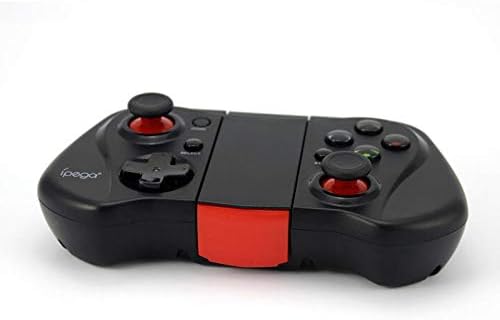
Слика 2: Страна view of the Ipega PG-9033 Bluetooth Gamepad, showcasing its ergonomic design and compact form factor when not in use. The red accent on the central hinge is visible.
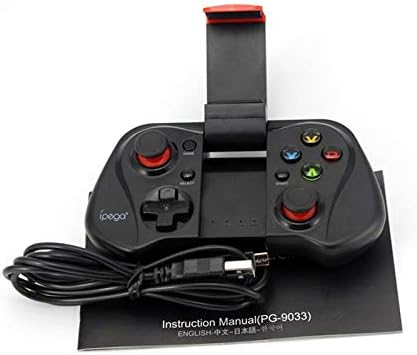
Figure 3: The Ipega PG-9033 Bluetooth Gamepad displayed alongside its USB charging cable and the included instruction manual, which clearly indicates the model number PG-9033.

Слика 4: Задниот дел view of the Ipega PG-9033 Bluetooth Gamepad, featuring a label with technical details such as "BLUETOOTH CONTROLLER," working voltage, working current, and input specifications.
Поставување
Полнење на Gamepad
Before first use, fully charge the gamepad using the provided USB cable.
- Connect the micro-USB end of the charging cable to the gamepad's charging port.
- Connect the USB-A end to a USB power source (e.g., computer, USB wall adapter).
- The charging indicator light will illuminate. It will typically turn off or change color when fully charged.
Спарување со уред
The PG-9033 supports different pairing modes for various operating systems.
Спарување на Android
- Ensure the gamepad is off.
- Притиснете и задржете го ДОМА копчето и X button simultaneously until the indicator light flashes rapidly. This puts the gamepad into Android pairing mode.
- На вашиот Android уред, одете во поставките за Bluetooth и пребарајте достапни уреди.
- Select "PG-9033" from the list to pair. The indicator light will become solid when connected.
iOS Pairing (iCade Mode)
- Ensure the gamepad is off.
- Притиснете и задржете го ДОМА копчето и B button simultaneously until the indicator light flashes rapidly. This puts the gamepad into iOS iCade pairing mode.
- On your iOS device, go to Bluetooth settings and search for available devices.
- Select "PG-9033" from the list to pair. The indicator light will become solid when connected.
Note: iCade mode has limited game compatibility. For broader iOS compatibility, check specific game requirements.
Спарување со компјутер
- Ensure the gamepad is off.
- Притиснете и задржете го ДОМА копчето и A button simultaneously until the indicator light flashes rapidly. This puts the gamepad into PC pairing mode.
- On your PC, go to Bluetooth settings and search for available devices.
- Select "PG-9033" from the list to pair. The indicator light will become solid when connected.
Note: A Bluetooth adapter may be required for PCs without built-in Bluetooth.
Упатства за работа
Прикачување на вашиот паметен телефон
- Gently extend the adjustable phone holder located on the top of the gamepad.
- Внимателно ставете го вашиот паметен телефон во држачот, осигурувајќи се дека е цврсто фатен и центриран.
- Прилагодете го аголот за оптимално viewинг.
Game Mode Selection
The gamepad automatically enters the last used mode upon reconnection. To switch modes, disconnect the gamepad and re-pair using the desired mode's button combination (HOME + X for Android, HOME + B for iOS, HOME + A for PC).
Вклучување/исклучување
За да го вклучите, притиснете го ДОМА копче. За да го исклучите, притиснете и задржете го ДОМА button for approximately 5 seconds until the indicator light turns off. The gamepad will automatically power off after a period of inactivity.
Одржување
To ensure the longevity and proper functioning of your Ipega PG-9033 gamepad, follow these maintenance guidelines:
- Чувајте го уредот сув. Избегнувајте изложување на влага или течности.
- Чистете го гејмпедот со мека, сува крпа. Не користете груби хемикалии или абразивни средства за чистење.
- Чувајте го гејмпедот на ладно и суво место, подалеку од директна сончева светлина и екстремни температури.
- Избегнувајте испуштање или изложување на гејмпедот на силни удари.
- Редовно полнете ја батеријата, дури и ако не е во употреба, за да ја одржите нејзината состојба.
Do not attempt to disassemble the gamepad. This will void the warranty and may cause damage.
Решавање проблеми
Gamepad not connecting or pairing:
- Осигурајте се дека гејмпедот е целосно наполнет.
- Потврдете дека Bluetooth е овозможен на вашиот уред.
- Make sure the gamepad is in the correct pairing mode for your device (Android, iOS, or PC).
- Обидете се да го заборавите уредот во поставките за Bluetooth и повторно да го спарите.
- Рестартирајте ги и гејмпадот и вашиот уред.
Копчињата или џојстиците не реагираат:
- Проверете дали гејмпедот е правилно поврзан.
- Осигурајте се дека играта што ја играте поддржува надворешни контролери.
- Some games may require specific controller mapping or settings adjustments within the game.
- If the issue persists, try resetting the gamepad (if a reset button is available, typically a small pinhole).
Доцнење или доцнење на влезот:
- Ensure your device is not too far from the gamepad. Maintain a clear line of sight.
- Намалете ги пречките од други безжични уреди.
- Затворете ги непотребните апликации во позадина на вашиот уред.
Телефонот не се вклопува во држачот:
- The holder is designed for most smartphones. Ensure your phone's dimensions are within the supported range.
- Отстранете ги сите гломазни футроли за телефон што би можеле да го спречат безбедното прицврстување.
Спецификации
| Карактеристика | Детал |
|---|---|
| Модел | PG-9033 |
| Бренд | Ипега |
| Поврзување | Bluetooth |
| Компатибилност | Android, iOS (iCade), PC |
| Работа Voltage | DC 3.7V |
| Работна струја | 30 mA |
| Влез волуменtage | DC 5V 500mA |
| ASIN | B07P52YH7M |
Гаранција и поддршка
За информации за гаранцијата и техничка поддршка, ве молиме погледнете ја официјалната страница на Ipega. webлокација или контактирајте го вашиот продавач. Чувајте ја сметката како доказ за купување.
Ова упатство е само за информативни цели. Спецификациите може да се променат без претходна најава.


