ASUS ROG Strix XG49VQ 49-inch Curved Gaming Monitor User Manual
1. Вовед
The ASUS ROG Strix XG49VQ is a super ultra-wide 49-inch Dual Full HD (3840 x 1080) 1800R curved gaming monitor designed to provide an immersive and smooth gaming experience. It features a 144Hz refresh rate, Radeon FreeSync 2 HDR technology, DCI-P3 90% professional color gamut coverage, and DisplayHDR 400 certification. This manual provides essential information for setting up, operating, maintaining, and troubleshooting your monitor.
2. Што има во кутијата
Проверете дали сите од следниве ставки се вклучени во вашиот пакет:
- ASUS ROG Strix XG49VQ Monitor
- DisplayPort кабел
- HDMI кабел
- Адаптер за напојување
- Водич за брз почеток
- Комплет за монтирање VESA
3. Поставување
3.1 Склоп на мониторот
Carefully remove the monitor and its components from the packaging. Attach the stand base to the monitor arm, then secure the assembled stand to the monitor. Ensure all connections are firm.
3.2 Кабли за поврзување
Connect the power adapter to the monitor and a power outlet. Use the provided DisplayPort or HDMI cable to connect your computer or gaming console to the monitor. The monitor features multiple input ports for versatile connectivity.
Слика: Заден дел view of the monitor highlighting accessible I/O ports and smart cable management for a tidy setup.
3.3 Физички прилагодувања
The monitor offers ergonomic adjustments for optimal viewудобност:
- Навалување: Прилагодете го аголот на екранот од +20° до -5°.
- Завртување: Ротирајте го екранот хоризонтално од +16° до -16°.
- Прилагодување на висината: Adjust the screen height up to 120mm.

Слика: Мониторот прикажуваasing its ergonomic design with arrows indicating available tilt, swivel, and height adjustment ranges.
4. Ракување со мониторот
4.1 Вклучување/исклучување
Притиснете го копчето за вклучување што се наоѓа на мониторот за да го вклучите или исклучите.
4.2 Карактеристики на екранот
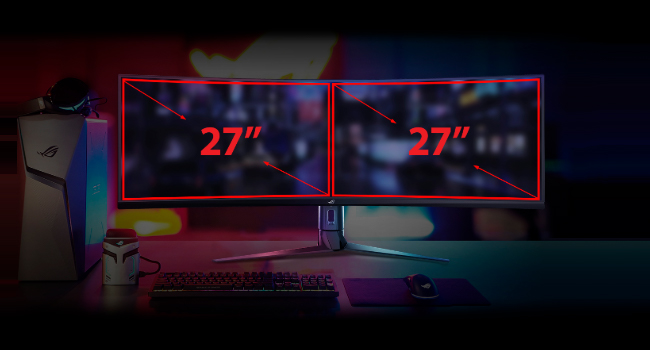
- Super Ultra-wide Display: The 49-inch curved screen provides an expansive view, equivalent to two 27-inch monitors side-by-side.
- Стапка на освежување 144Hz: Experience smooth, lag-free visuals, crucial for fast-paced gaming.
- Radeon FreeSync 2 HDR: Synchronizes the monitor's refresh rate with your GPU's frame rate to eliminate screen tearing and stuttering, especially with HDR content.
- DisplayHDR 400 & DCI-P3 90%: Ensures high color contrast and cinematic color performance for vibrant and realistic visuals.

Image: Visual representation of the 49-inch super ultra-wide display, showing its equivalence to two 27-inch monitors for an expansive workspace.

Image: A split-screen comparison demonstrating the enhanced visual quality with High Dynamic Range (HDR) enabled, highlighting DCI-P3 90% and DisplayHDR 400 certification.

Image: A split-screen comparison illustrating the difference in gameplay smoothness with Radeon FreeSync 2 HDR turned 'On' versus 'Off'.
4.3 ASUS Eye Care Technology
ASUS Eye Care technology is integrated to minimize eye fatigue during extended use. This includes flicker-free backlighting and blue light filters, certified by TÜV Rheinland, to protect your eyes.
4.4 GamePlus and GameVisual
Utilize exclusive GamePlus and GameVisual overlays and color modes to optimize your gaming experience. These features provide in-game enhancements and display adjustments tailored for various game genres.
4.5 Picture-by-Picture (PBP) Functionality
The ultra-wide display supports Picture-by-Picture (PBP) mode, allowing you to view content from multiple input sources simultaneously, effectively acting as multiple monitors on a single screen.
Video: Official ASUS ROG Strix XG49VQ product overview, demonstrating key features like the ultra-wide display, high refresh rate, HDR, and various gaming enhancements.
Video: A merchant's overview of the ASUS ROG Strix XG49VQ, highlighting its curved design, FreeSync technology, and eye care features.
5. Одржување
5.1 Чистење на мониторот
За чистење на екранот на мониторот, нежно избришете го со мека крпа што не остава влакненца. За тврдокорни дамки, лесно избришете гоampen the cloth with water or a mild, non-abrasive screen cleaner. Avoid using harsh chemicals or abrasive materials that could damage the screen surface.
5.2 Општа нега
Keep the monitor in a well-ventilated area. Avoid exposing it to direct sunlight, high humidity, or extreme temperatures. Do not block the ventilation openings on the monitor casing.
6 Смена на проблеми
6.1 Нема екран / Црн екран
- Осигурајте се дека кабелот за напојување е безбедно поврзан и со мониторот и со штекерот.
- Verify that the video cable (DisplayPort/HDMI) is firmly connected to both the monitor and your computer/console.
- Check if the correct input source is selected on the monitor's OSD (On-Screen Display) menu.
6.2 Image Quality Issues (e.g., Washed Out, Red Dot)
- If the display appears washed out or has unusual artifacts (like a red dot), try performing a "Reset All" from the monitor's OSD menu.
- Consider disabling HDR in your operating system or monitor settings if you experience poor image quality, as some content or system configurations may not fully support HDR effectively.
- Adjust brightness, contrast, and color settings via the OSD menu to suit your preferences.
6.3 Flickering or Stuttering
- Осигурајте се дека драјверите за вашата графичка картичка се ажурирани.
- Verify that Radeon FreeSync 2 HDR is enabled in both your monitor settings and graphics card control panel.
- Проверете го видео кабелот за оштетување или лабави врски.
7. Спецификации
| Карактеристика | Спецификација |
|---|---|
| Големина на приказ на стоечки екран | 49 инчи |
| Резолуција на екранот | 3840x1080 |
| Максимална резолуција на екранот | 3840 x 1080 пиксели |
| Бренд | ASUS |
| Серии | XG49VQ |
| Број на модел на ставка | XG49VQ |
| Тежина на ставката | 21.4 фунти |
| Димензии на производот | 46.98 x 20.83 x 13.57 инчи |
| Боја | Црното |
| Voltage | 100-240 волти |
| Број на USB 2.0 порти | 1 |
| Број на USB 3.0 порти | 2 |
| Сооднос на аспект | 32:9 |
| Опис на површината на екранот | Мат |
8. Гаранција и поддршка
За детални информации за гаранцијата и техничка поддршка, ве молиме погледнете го официјалниот ASUS webлокација или гарантната картичка вклучена со вашиот производ. Зачувајте ја сметката за гаранциски барања.


