1. Вовед
This manual provides detailed instructions for the operation and maintenance of your Trexonic TRX-68B-AMZ 3-Speed Turntable System. Please read this manual thoroughly before using the product to ensure proper function and to prevent damage.
2. Инструкции за безбедност
- Не го изложувајте уредот на дожд или влага.
- Не блокирајте никакви отвори за вентилација.
- Осигурете се дека кабелот за напојување не е приклештен или одење по него.
- Исклучете го уредот од струја за време на громови или кога не се користи долго време.
- Целото сервисирање упатете го на квалификуван сервисен персонал.
3. Содржина на пакетот
Проверете дали сите предмети се присутни во пакувањето:
- Trexonic TRX-68B-AMZ Main Unit
- Wired Shelf Speakers (2)
- Далечински управувач
- Упатство за употреба (овој документ)
- Адаптер за напојување

Figure 3.1: Trexonic TRX-68B-AMZ Turntable System with included wired shelf speakers.
4. Производот завршиview: Controls and Features
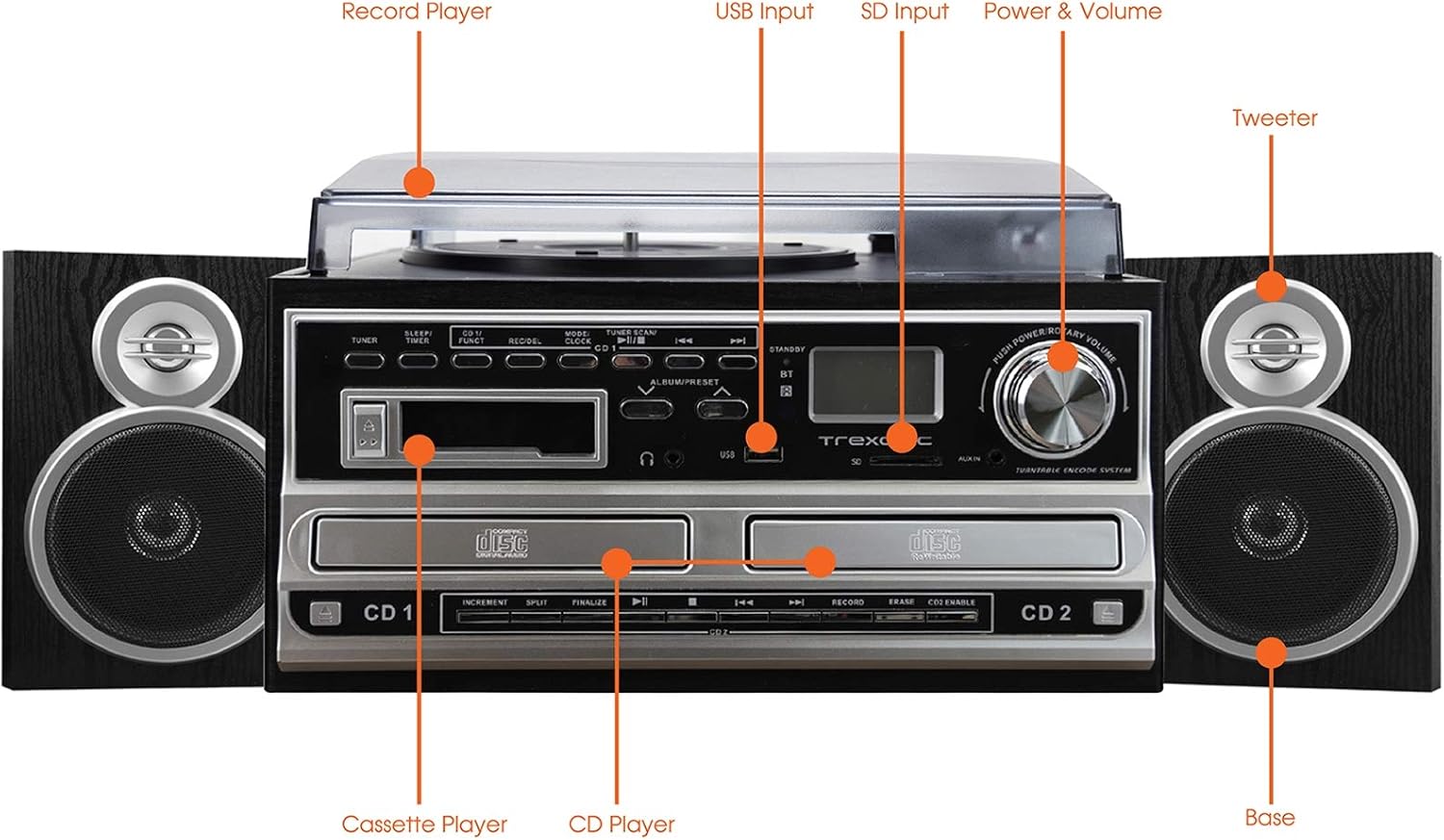
Figure 4.1: Front panel and top view of the Trexonic TRX-68B-AMZ with key components labeled.
- Record Player: For playing vinyl records.
- USB влез: Connect USB drives for playback or recording.
- SD влез: Insert SD cards for playback or recording.
- Power & Volume Knob: Controls power on/off and audio volume.
- Твитер: High-frequency speaker component.
- Base (Woofer): Low-frequency speaker component.
- ЦД плеер: For playing audio CDs and CD recording.
- Касетофон: За репродукција и снимање касети.
5. Поставување
5.1 Отпакување
Внимателно отстранете ги сите компоненти од пакувањето. Зачувајте ги материјалите за пакување за иден транспорт или складирање.
5.2 Поврзување на звучникот
Connect the wired shelf speakers to the speaker output terminals on the rear of the main unit. Ensure correct polarity (positive to positive, negative to negative) for optimal sound quality.
5.3 Поврзување за напојување
Plug the power adapter into the DC IN jack on the back of the unit, then plug the other end into a standard wall outlet (AC 100-240V, 50/60Hz).
6. Упатства за работа
6.1 Општи контроли
- Копче за напојување/гласност: Rotate to turn the unit on/off and adjust volume.
- Копче за режим/функција: Press to cycle through different modes (Turntable, CD, Cassette, FM, USB, SD, AUX, Bluetooth).
6.2 Работа со грамофонот

Слика 6.1: Одблиску view of the turntable platter and tonearm.
- Подигнете го капакот за прав.
- Ставете запис на чинија.
- Изберете ја соодветната брзина (33, 45 или 78 вртежи во минута) користејќи го прекинувачот за избор на брзина.
- Move the tonearm to the desired position on the record. The platter will begin to spin automatically.
- Lower the tonearm gently onto the record.
- За да ја запрете репродукцијата, подигнете ја тонерачката и вратете ја во мирување.
6.3 Работа со CD плеер
- Press the Mode/Function button to select CD mode.
- Притиснете го копчето OPEN/CLOSE за да ја отворите фиоката за ЦД.
- Ставете го ЦД-то со страната со етикетата свртена нагоре.
- Press the OPEN/CLOSE button to close the tray. The CD will begin playing automatically.
- Use the PLAY/PAUSE, STOP, SKIP FORWARD, and SKIP BACKWARD buttons for control.
6.4 Работа со касетофон

Слика 6.2: Одблиску view of the cassette player slot.
- Press the Mode/Function button to select Cassette mode.
- Вметнете касетна лента во отворот за касети.
- Use the PLAY, PAUSE, FAST FORWARD, REWIND, and STOP buttons for control.
6.5 Работа со FM радио
- Press the Mode/Function button to select FM Radio mode.
- Use the TUNER knob or SEEK buttons to find radio stations.
- Press the PRESET button to save or recall favorite stations.
6.6 USB/SD репродукција
- Insert a USB drive into the USB port or an SD card into the SD slot.
- Press the Mode/Function button to select USB or SD mode.
- The unit will automatically detect and play compatible audio files.
- Use the PLAY/PAUSE, STOP, SKIP FORWARD, and SKIP BACKWARD buttons for control.
6.7 Функции за снимање
The Trexonic TRX-68B-AMZ allows recording from various sources to USB or SD card.
- Recording from Vinyl, CD, Cassette, or AUX to USB/SD:
- Insert a USB drive or SD card into the respective slot.
- Select the desired source mode (Turntable, CD, Cassette, or AUX).
- Begin playback of the source material.
- Press the RECORD button. The recording indicator will illuminate.
- Press the STOP button to end the recording.
7. Одржување
7.1 Чистење на единицата
Wipe the unit with a soft, dry cloth. Do not use abrasive cleaners or solvents. For the dust cover, use a soft cloth and a mild detergent solution if necessary, then wipe dry.
7.2 Грижа и замена на пенкалото
The turntable stylus (needle) is a delicate component. Clean it periodically with a soft brush, brushing from back to front. A worn stylus can damage records and degrade sound quality. Replace the stylus approximately every 300-500 hours of playback, or if you notice a decrease in sound quality or increased record wear.
8 Смена на проблеми
| Проблем | Можна причина | Решение |
|---|---|---|
| Нема моќ | Кабелот за напојување не е поврзан; Приклучокот е неисправен | Проверете дали кабелот за напојување е безбедно поврзан; обидете се со друг штекер. |
| Нема звук | Volume too low; Speakers not connected; Incorrect mode selected | Increase volume; Check speaker connections; Select correct input mode. |
| Плочата не се врти | Unit not powered on; Tonearm not moved over platter | Turn on unit; Move tonearm over the record to activate platter. |
| ЦД-то не се репродуцира | CD inserted incorrectly; CD scratched/dirty; Incorrect mode | Reinsert CD correctly; Clean or replace CD; Select CD mode. |
| Проблеми со снимање | USB/SD full or incompatible; Source not playing | Check USB/SD capacity and format; Ensure source is playing during recording. |
9. Спецификации
| Карактеристика | Спецификација |
|---|---|
| Бренд | Trexonic |
| Број на модел | TRX-68B-AMZ |
| Брзини на грамофон | 33/45/78 вртежи во минута |
| Формати за снимање | MP3 (to USB/SD) |
| Медиуми за репродукција | Vinyl, CD, Cassette, FM Radio, USB, SD, AUX, Bluetooth |
| Вклучени компоненти | Remote Control, Wired Shelf Speakers |
| Извор на енергија | Електричен со кабел |
| Димензии (пакет) | 56.64 x 35.56 x 26.67 cm |
| Тежина (пакет) | 6.89 кг |
10. Информации за гаранцијата
Trexonic products are designed and manufactured to the highest quality standards. For specific warranty details, please refer to the warranty card included with your product or contact Trexonic customer support. Keep your purchase receipt as proof of purchase.
11. Поддршка за корисници
If you encounter any issues not covered in this manual or require further assistance, please contact Trexonic customer support. Contact information can typically be found on the manufacturer's official webна локацијата или на пакувањето на производот.