Вовед
Thank you for choosing the Astrum ET200 Earphone. This in-ear Bluetooth 4.0 earphone is designed to provide clear sound for both voice calls and music playback. Featuring dual pairing capability and a comfortable hook design, it offers up to 5 hours of talk time. Its high-performance speakers deliver rich bass and precise treble, ensuring a premium audio experience.
Производот завршиview

Слика 1: Предна страна view of the Astrum ET200 Earphone in white, showcasing its compact design and ear hook.
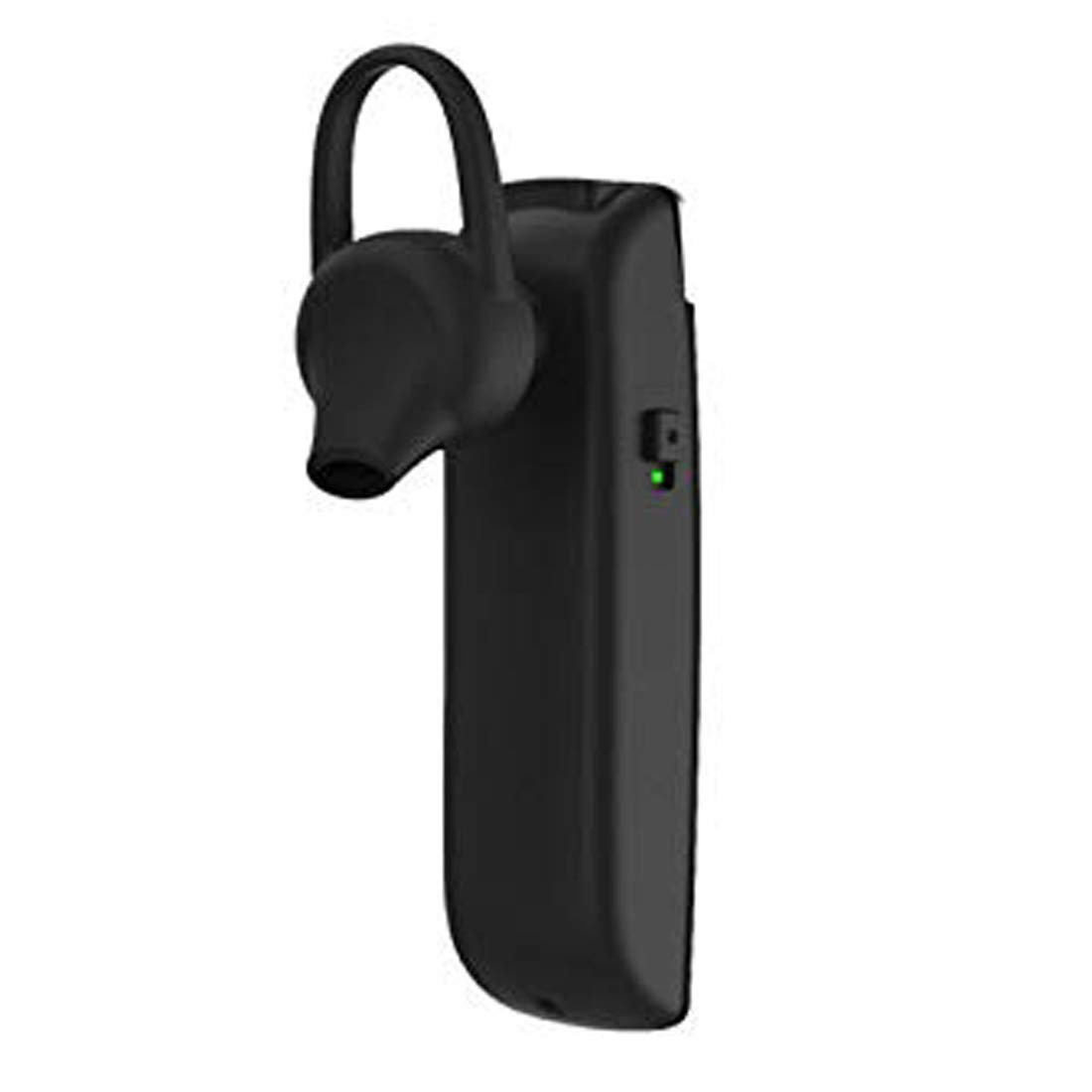
Слика 2: Страна view of the Astrum ET200 Earphone, highlighting the indicator light and control button area.

Figure 3: Both white and black versions of the Astrum ET200 Earphone, illustrating the overall form factor.
Поставување
1. Charging the Earphone
Before first use, fully charge the earphone. Connect the charging cable (not specified, assuming standard micro-USB) to the charging port on the earphone and the other end to a USB power source (e.g., computer USB port, wall adapter). The indicator light will typically show red during charging and turn blue or off when fully charged.
2. Bluetooth спарување
- Вклучување: Press and hold the Multi-function Button (MFB) until the indicator light flashes blue and red alternately. This indicates the earphone is in pairing mode.
- Активирајте Bluetooth: On your mobile device or computer, enable Bluetooth.
- Пребарај за Уреди: Scan for available Bluetooth devices. You should see "Astrum ET200" or a similar name appear in the list.
- Поврзете се: Select "Astrum ET200" from the list to connect. Once successfully paired, the indicator light will typically flash blue slowly or turn off.
- Двојно спарување: To pair a second device, disconnect the earphone from the first device, put it back into pairing mode, and connect to the second device. Then, reconnect to the first device from its Bluetooth settings. The earphone will now be connected to both devices simultaneously.
Упатства за работа
- Вклучување: Press and hold the MFB for approximately 3 seconds until the blue indicator light flashes.
- Исклучено: Press and hold the MFB for approximately 5 seconds until the red indicator light flashes and then turns off.
- Одговори/заврши повик: Press the MFB once to answer an incoming call. Press the MFB once again to end an active call.
- Одбијте го повикот: Press and hold the MFB for approximately 2 seconds to reject an incoming call.
- Повторно бирајте последен број: Double-press the MFB to redial the last dialed number.
- Пушти/Паузирај музика: Press the MFB once to play or pause music playback.
- Контрола на јачината на звукот: (Assuming volume buttons are present, as is common for BT earphones) Use the volume up (+) and volume down (-) buttons on the earphone to adjust the volume. If no dedicated buttons, adjust volume from your connected device.
- Следна / претходна песна: (Assuming track control buttons are present) Use the next track (>>) and previous track (<<) buttons on the earphone to skip tracks. If no dedicated buttons, control from your connected device.
Одржување
- Чистење: Користете мека, сува крпа за чистење на слушалките. Не користете абразивни средства за чистење или растворувачи.
- Складирање: Чувајте ги слушалките на ладно и суво место, подалеку од директна сончева светлина и екстремни температури.
- Нега на батеријата: To prolong battery life, avoid fully discharging the battery frequently. Charge the earphone regularly, even if not in use for extended periods.
- Отпорност на вода: This earphone is not waterproof. Avoid exposure to water or excessive moisture.
Решавање проблеми
| Проблем | Можна причина | Решение |
|---|---|---|
| Earphone does not power on. | Слаба батерија. | Наполнете ја слушалката целосно. |
| Не може да се спари со уредот. | Earphone not in pairing mode; Bluetooth off on device; too far from device. | Ensure earphone is in pairing mode (flashing blue/red). Turn on Bluetooth on your device. Move earphone closer to device (within 10 meters). |
| Нема звук или има ниска јачина на звук. | Volume too low on earphone or device; earphone not connected properly. | Increase volume on both the earphone and your connected device. Reconnect the earphone to your device. |
| Прекината врска. | Пречки; предалеку од уредот; слаба батерија. | Move closer to your device. Avoid strong electromagnetic interference. Charge the earphone. |
Спецификации
| Број на модел | 1046 |
| Bluetooth верзија | 4.0 |
| Форма фактор | In-Ear with Hook |
| Време за разговор | До 5 часа |
| Карактеристики | Voice + Music, Dual Pairing, Clear Sound, Rich Bass, Precise Treble |
| Димензии (ДxШxВ) | 3.5 x 3.5 x 12.8 cm |
| Тежина на ставката | 10 гр |
| Боја | Бело |
| Производител | Astrum Electronics India Pvt. Ltd. |
Гаранција и поддршка
Информации за гаранцијата
The Astrum ET200 Earphone comes with a 1 години гаранција од датумот на купување. Оваа гаранција ги покрива производствените дефекти. Ве молиме задржете го доказот за купување за гаранциски барања.
Поддршка за корисници
For any technical assistance, troubleshooting, or warranty claims, please contact Astrum customer support through their official website or the retailer from whom you purchased the product. Please have your product model number (1046) and proof of purchase ready when contacting support.


