1. Вовед
This manual provides detailed instructions for the installation, operation, and maintenance of your Dynavin N7-VT7 PRO Radio Navigation System. This system is designed as a direct replacement for the factory radio in VW Touareg models from 2003 to 2009, integrating seamlessly with your vehicle's existing systems.
Главните карактеристики вклучуваат:
- 7-inch capacitive LCD touch screen display (1024 x 600 resolution)
- Integrated GPS navigation with maps for North America, Europe, or Australia
- Bluetooth за повици без раце и аудио пренос
- Apple CarPlay and Android Auto compatibility via USB
- USB and Micro SD card media playback
- AM/FM радио приемник
- Backup camera readiness
- Integration with vehicle's DSP processor (if equipped)
2. Информации за безбедност
Важно правно одрекување од одговорност:
- Installation must be performed by a trained specialist.
- Ensure the vehicle is de-energized before beginning installation.
- In some cases, the vehicle battery may need to be disconnected. Consult your vehicle manufacturer's guidelines.
- Modifying vehicle electronics may affect manufacturer warranty.
Always prioritize safety during installation and operation. Avoid operating the system's complex functions while driving to prevent distractions.
3. Поставување и инсталација
The Dynavin N7-VT7 PRO is designed for plug-and-play installation, integrating with your vehicle's factory wiring and controls. Professional installation is highly recommended to ensure proper functionality and to avoid damage to the unit or vehicle.
3.1 Содржина на пакетот
Проверете дали сите компоненти се присутни во пакувањето:
- Dynavin N7-VT7 PRO Head Unit
- GPS антена
- USB кабел
- Wiring Harnesses (vehicle-specific)
- Упатство за употреба (овој документ)
- Надворешен микрофон (доколку е вклучен)
3.2 Инсталацијата завршиview
The unit replaces the existing factory radio. Specific steps for removal of the old unit and installation of the new Dynavin system will vary slightly depending on your vehicle's trim. Refer to a qualified installer or vehicle-specific guides for detailed instructions.

Слика 3.1: The Dynavin N7-VT7 PRO unit seamlessly integrated into a Volkswagen Touareg dashboard, demonstrating its OEM-look design.
After physical installation, connect all wiring harnesses, the GPS antenna, and any external accessories like a backup camera or SiriusXM tuner (sold separately).
4. Упатства за работа
The Dynavin N7-VT7 PRO features an intuitive touchscreen interface. Most functions are accessible via the main menu or dedicated physical buttons.
4.1 Main Interface Overview
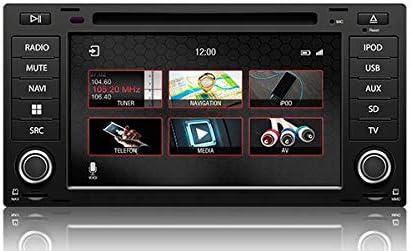
Слика 4.1: The main menu screen displaying various function icons such as Radio, Navigation, Telephone, Media, and AV input.
From the main screen, tap on the desired icon to access functions like Radio, Navigation, Bluetooth (Telefon), Media (USB/SD), and AV input.
4.2 Работа со радио
Tap the "Radio" icon from the main menu or press the physical "RADIO" button. You can tune to AM/FM stations, save presets, and access features like RDS (Radio Data System) where available.

Слика 4.2: The radio interface showing station presets and current frequency. Users can navigate between stations using the on-screen arrows or physical controls.
For SiriusXM compatibility, an SXV300 Tuner (sold separately) is required. Once installed, access SiriusXM through the dedicated icon or source selection.

Слика 4.3: The SiriusXM interface displaying channel information and presets, allowing access to satellite radio content.
4.3 Навигациски систем
Tap the "Navigation" icon to launch the integrated GPS navigation software. The system comes pre-loaded with maps for North America, Europe, or Australia, depending on your region.
- Влез во дестинација: Enter addresses, points of interest, or coordinates.
- Упатство за рута: Follow turn-by-turn voice prompts and on-screen directions.
- Карта View: Префрлете се помеѓу 2D и 3D views, adjust zoom levels.
4.4 Bluetooth поврзување
Спарете го вашиот паметен телефон преку Bluetooth за повици без раце и аудио пренос.
- Go to the "Telefon" (Bluetooth) menu.
- Овозможете Bluetooth на вашиот паметен телефон и побарајте достапни уреди.
- Select "Dynavin" from the list on your phone and confirm the pairing code.
- Once paired, you can make/receive calls and stream music.
4.5 Apple CarPlay и Android Auto
Connect your compatible smartphone via USB to use Apple CarPlay or Android Auto. This allows you to access select phone apps directly on the Dynavin display.

Слика 4.4: The Apple CarPlay interface displaying common applications like Phone, Music, Maps, and Messages, integrated with the Dynavin unit.
Ensure your phone's operating system is up to date for optimal performance with CarPlay or Android Auto.
4.6 Репродукција на медиуми (USB/SD)
Insert a USB drive or Micro SD card into the designated ports. The system supports various audio and video formats. Tap the "Media" icon to browse and play content.
4.7 Поставки за звук
Access the sound settings to adjust audio output, equalizer, and balance/fader controls. The system integrates with your vehicle's DSP processor if equipped.

Слика 4.5: The sound settings interface, allowing users to adjust audio parameters such as balance, fader, and specific sound profiles within the vehicle cabin.
Additional sound options may include confirmation tones, PDC (Park Distance Control) and warning tones, and settings for factory ampказните за слободни животи.
4.8 Системски поставки
The system settings menu allows you to configure various aspects of the unit, including:
- Регион: Set the geographical region for radio and navigation.
- Боја: Adjust display color schemes.
- Камера: Configure backup camera settings.
- Осветленост: Manually adjust screen brightness.
- Временска зона: Поставете ја точната временска зона.
- Обратно: Configure reverse camera and PDC integration.

Слика 4.6: The system settings interface, showing options for region, display color, camera settings, brightness adjustment, time zone, and reverse camera configuration.
5. Одржување
5.1 Чистење на екранот
Користете мека крпа без влакненца за нежно да го избришете екранот на допир. За тврдокорни дамки, малку избришете гоampИзбришете ја крпата со вода или средство за чистење безбедно за екрани. Избегнувајте абразивни материјали или груби хемикалии.
5.2 Ажурирања на фирмверот
Periodic firmware updates may be released to improve performance, add features, or address issues. Check the official Dynavin website or contact your distributor for information on available updates and instructions for installation.
6 Смена на проблеми
If you encounter issues with your Dynavin N7-VT7 PRO, refer to the following common solutions:
- Без моќност: Check all wiring connections and vehicle fuses. Ensure the vehicle battery is properly connected.
- Нема звук: Проверете ги поврзувањата на звучниците. Проверете ги нивоата на јачина на звук и поставките за исклучување на звукот. Проверете дали е избран точниот извор на аудио.
- Губење на GPS сигналот: Осигурајте се дека GPS антената е правилно инсталирана и има чиста view на небото.
- Проблеми со спарување Bluetooth: Delete previous pairings from both the unit and your phone. Restart both devices and attempt pairing again.
- Екранот на допир не реагира: Perform a soft reset (refer to specific instructions from Dynavin support if available).
- Apple CarPlay/Android Auto Not Connecting: Ensure your phone is compatible and its operating system is updated. Try a different USB cable.
For persistent issues, contact Dynavin customer support or your authorized dealer for assistance.
7. Спецификации
| Карактеристика | Спецификација |
|---|---|
| Број на модел | N7-VWTG-PRO |
| Големина на приказ | 7 инчи |
| Резолуција на екранот | 1024 x 600 |
| Тип на дисплеј | Capacitive LCD, Anti-glare Touchscreen |
| Оперативен систем | DynOS |
| Поврзување | USB, Bluetooth |
| Тип на карта | North America, Europe, or Australia (region-specific) |
| Тип на услуга на возило | Car (VW Touareg 2003-2009) |
| Димензии на пакетот | 13 x 11 x 9 инчи |
8. Гаранција и поддршка
For warranty information, please refer to the documentation provided with your purchase or contact your authorized Dynavin dealer. J&T Distributing is the official distributor of Dynavin in North America and can provide support for products purchased through their channels.
For technical assistance, troubleshooting, or inquiries regarding firmware updates, please visit the official Dynavin webсајт или контактирајте со нивната поддршка за корисници.


