Вовед
Thank you for choosing the NEDIS Wi-Fi Smart Fan Heater. This manual provides essential information for the safe and efficient operation of your new device. Please read these instructions carefully before use and retain them for future reference. Proper use and maintenance will ensure optimal performance and longevity of the product.
Инструкции за безбедност
За да го намалите ризикот од пожар, електричен удар или повреда, секогаш следете ги овие основни безбедносни мерки на претпазливост:
- Прочитајте ги сите упатства пред да го користите овој грејач.
- Не користете го овој грејач во непосредна околина на бања, туш или базен.
- Не го покривајте грејачот. Покривањето на грејачот може да предизвика прегревање и пожар.
- Држете ги запаливите материјали како што се мебел, перници, постелнина, хартија, облека и завеси на најмалку 1 метар (3 стапки) од предната страна на греалката и држете ги подалеку од страните и задната страна.
- Секогаш исклучувајте го грејачот кога не го користите.
- Не ракувајте со кој било грејач со оштетен кабел или приклучок или откако дефект на грејачот, паднал или оштетен на кој било начин.
- Не ставајте кабел под тепих. Не покривајте го кабелот со килими за фрлање, тркачи или слични прекривки. Распоредете го кабелот подалеку од сообраќајната зона и каде што нема да се сопне.
- Неопходна е голема претпазливост кога грејачот се користи од или во близина на деца или инвалиди и секогаш кога грејачот е оставен да работи и без надзор.
- This heater is equipped with a tip-over protection switch that automatically shuts off the heater if it is accidentally knocked over.
- Проверете дали грејачот е поставен на стабилна, рамна површина.
- Само за внатрешна употреба.
Производот завршиview
Familiarize yourself with the main components of your NEDIS Wi-Fi Smart Fan Heater.
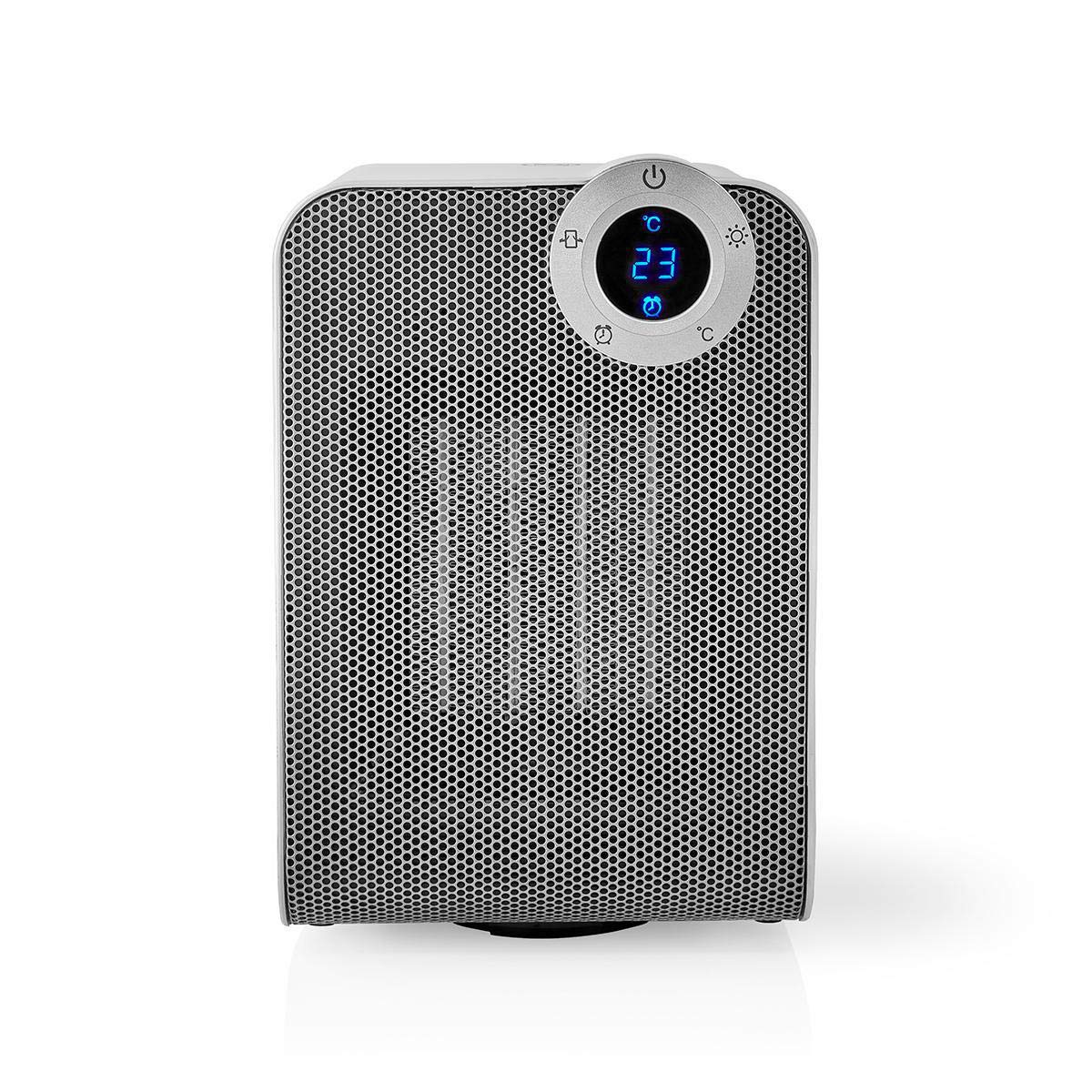
The front panel features a digital display that shows the current temperature and settings. Surrounding the display are touch-sensitive buttons for power, mode selection, oscillation, and timer functions.

The rear of the heater includes the main power switch (often a rocker switch) and the air intake grille. Ensure this area is not obstructed for proper airflow.

The compact design of the heater allows for easy placement in various indoor settings.
Поставување
Отпакување
- Внимателно извадете го грејачот од пакувањето.
- Проверете дали има оштетувања за време на транспортот. Доколку е оштетено, не го користете и контактирајте ја службата за корисници.
- Зачувајте ја амбалажата за идно складирање или транспорт.
Поставување
- Ставете го грејачот на цврста, рамна површина.
- Ensure there is at least 1 meter (3 feet) of clear space around the heater to allow for proper air circulation and to prevent fire hazards.
- Do not place the heater near curtains, drapes, or other loose fabrics that could block the air intake or outlet.
- Осигурајте се дека кабелот за напојување не е приклештен или поставен под тешки предмети.
Почетно вклучување
- Plug the heater into a suitable electrical outlet (220-240V AC, 50/60Hz).
- Flip the main power switch on the back of the unit to the 'ON' position.
- The digital display on the front will illuminate, indicating the heater is in standby mode.
Wi-Fi Connection & App Setup
The NEDIS Wi-Fi Smart Fan Heater can be controlled via the Nedis SmartLife app, offering advanced features and remote control.
- Преземете го Недис SmartLife апликација од App Store (iOS) или Google Play Store (Android).
- Регистрирајте се за нова сметка или најавете се ако веќе имате.
- Проверете дали вашиот паметен телефон е поврзан на Wi-Fi мрежа од 2.4 GHz.
- Во апликацијата, допрете ја иконата „+“ за да додадете нов уред.
- Follow the on-screen instructions in the app to connect your heater to your Wi-Fi network. This usually involves putting the heater into pairing mode (refer to the app for specific instructions, often by pressing and holding a button on the heater).
- Once connected, you can control the heater from anywhere using the app.
Упатства за работа
Рачна контрола
The heater can be operated directly using the touch buttons on the front panel:
- Копче за вклучување: Притиснете за да го ВКЛУЧИТЕ или ИСКЛУЧИТЕ грејачот.
- Копче за режим: Cycle through heating modes (e.g., High Heat 1800W, Low Heat 900W, Fan Only).
- Прилагодување на температурата: Use the '+' and '-' buttons (or similar) to set the desired temperature. The heater will operate at 1800W for rapid heating and automatically switch to 900W once the set temperature is approached.
- Копче за осцилација: Press to activate or deactivate the horizontal oscillation feature, distributing heat across a wider area.
- Копче за тајмер: Set a timer for the heater to automatically turn off after a specified duration.
SmartLife App Control
Once connected to the Nedis SmartLife app, you can access advanced control features:
- Далечинско вклучување/исклучување: Control the heater from anywhere.
- Прилагодување на температурата: Precisely set and monitor the room temperature.
- Избор на режим: Choose between different heating levels or fan-only mode.
- Контрола на осцилации: Вклучете ја или исклучете ја функцијата за осцилација.
- Закажување: Create custom heating schedules for different times of the day or week.
- Функција на тајмер: Set a countdown timer for automatic shutdown.
Гласовна контрола
The heater supports voice control through popular smart assistants. To enable this, link your Nedis SmartLife account with your preferred voice assistant (Google Home or Amazon Alexa) via their respective apps. Once linked, you can use voice commands such as:
- "Hey Google, turn on the heater."
- "Alexa, set the heater to 22 degrees."
- "Hey Google, turn off the heater."
Одржување
Чистење
Regular cleaning helps maintain the heater's efficiency and extends its lifespan.
- Секогаш исклучувајте го грејачот од струја и оставете го целосно да се олади пред чистење.
- Избришете ги надворешните површини со мека, гamp крпа. Не користете абразивни средства за чистење или растворувачи.
- Use a vacuum cleaner with a brush attachment to remove dust from the air intake and outlet grilles.
- Осигурајте се дека вода не влегува во внатрешноста на грејачот.
Складирање
Кога не се користи подолг временски период:
- Unplug the heater and clean it as described above.
- Store the heater in its original packaging or a suitable box to protect it from dust and damage.
- Чувајте го на ладно и суво место, подалеку од директна сончева светлина и влага.
Решавање проблеми
Доколку наидете на проблеми со вашиот грејач, погледнете ги следните вообичаени проблеми и решенија:
| Проблем | Можна причина | Решение |
|---|---|---|
| Грејачот не се вклучува. | No power, main switch off, tip-over switch activated. | Check power outlet, ensure main switch is ON, place heater upright on a stable surface. |
| Нема излезна топлина. | Incorrect mode, thermostat setting too low. | Select a heating mode (High/Low), increase the thermostat setting above the current room temperature. |
| Wi-Fi поврзувањето не успева. | Неточна лозинка за Wi-Fi, мрежа од 5 GHz, растојание од рутерот. | Verify Wi-Fi password, ensure you are on a 2.4GHz network, move heater closer to the router, try re-pairing. |
| Грејачот се исклучува неочекувано. | Overheating protection, tip-over protection, timer activated. | Ensure heater is not covered, clear obstructions, place upright, check timer settings. Allow to cool before restarting. |
Спецификации
| Карактеристика | Спецификација |
|---|---|
| Број на модел | WIFIFNH20CWT |
| Извор на енергија | Електричен со кабел |
| Излезна моќност | 1800W (висока), 900W (ниска) |
| Метод на загревање | Конвекција |
| Димензии (Д x Ш x В) | 16.5 x 14.5 x 25 cm |
| Тежина на ставката | 1.8 кг |
| Боја | Бело / Сребрено |
| Посебни карактеристики | On/Off Timer, Oscillation, Tip-over Protection, Thermostat, Wi-Fi, App Control, Voice Control (Alexa, Google Home) |
| Тип на инсталација | Монтирање на подот |
| Препорачана употреба | Внатрешна, Домашна, Студиска соба |
| Потребни се батерии | бр |
Гаранција и поддршка
Your NEDIS Wi-Fi Smart Fan Heater is covered by a manufacturer's warranty. Please refer to the warranty card included with your purchase for specific terms and conditions, including the warranty period and coverage details.
For technical support, troubleshooting assistance, or warranty claims, please contact NEDIS customer service. Contact information can typically be found on the product packaging, the NEDIS webстраницата или вашата сметка за купување.