Вовед
This manual provides essential information for the operation and maintenance of your SOAR NHL ShockBox LED Wireless Bluetooth Speaker. Please read this manual thoroughly before using the device to ensure proper functionality and to maximize your user experience.
The SOAR NHL ShockBox LED Wireless Bluetooth Speaker is a portable audio device designed for wireless music playback and hands-free calling. It features Bluetooth 5.0 technology for stable connectivity and integrated LED lights that synchronize with audio output.
Клучни карактеристики
- Пренослив и лесен дизајн: Engineered for easy transport and use in various environments.
- Премиум стерео звук: Delivers clear and robust audio output.
- Технологија Bluetooth 5.0: Ensures wireless connection to all Bluetooth-enabled devices within a range of up to 30 feet (approximately 9 meters).
- Продолжен век на батеријата: Provides over 5 hours of continuous music playback or talk time on a single charge.
- Батерија на полнење: Equipped with a built-in rechargeable battery; a Micro USB cable is included for charging.
- Динамични LED светла: Features multiple color LED lights that illuminate and move in sync with the rhythm of the music.
- Интегриран звучник: Includes a built-in microphone for hands-free calling.
- Officially Licensed NHL Product: Displays official NHL team branding.
Содржина на пакетот
Ве молиме проверете дали сите артикли се присутни во пакетот:
- SOAR NHL ShockBox LED Wireless Bluetooth Speaker
- Микро USB кабел за полнење
- Упатство за употреба (овој документ)
Водич за поставување
Полнење на звучникот
- Locate the Micro USB charging port on the speaker.
- Connect the included Micro USB cable to the speaker's charging port.
- Поврзете го другиот крај од USB кабелот со компатибилен USB извор на напојување (на пр., USB порт на компјутер, USB адаптер за ѕид).
- The LED indicator will typically show charging status (e.g., solid red while charging, off when fully charged). A full charge provides over 5 hours of operation.
Вклучување/исклучување
- To power on, press and hold the Power button until the LED indicator lights up and an audible prompt is heard.
- To power off, press and hold the Power button until the LED indicator turns off and an audible prompt is heard.
Bluetooth спарување
- Ensure the speaker is powered on and in pairing mode (indicated by a flashing LED light and an audible prompt).
- На вашиот уред со Bluetooth (паметен телефон, таблет, компјутер), одете до поставките за Bluetooth.
- Овозможете Bluetooth и побарајте достапни уреди.
- Select "SOAR ShockBox" from the list of found devices.
- Once paired, the speaker will provide an audible confirmation, and the LED indicator will typically change to a solid light or a slow pulse.
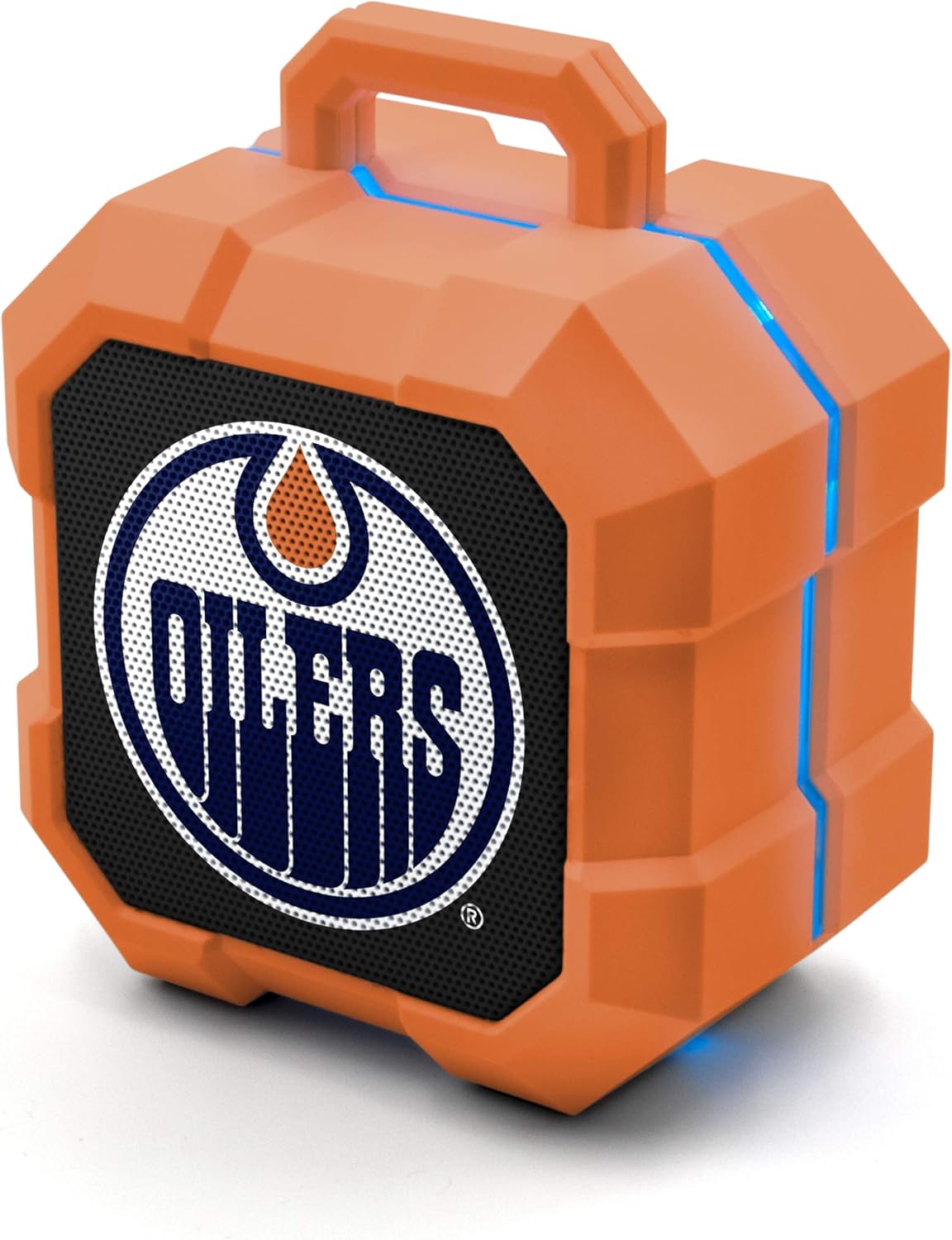
Image: The SOAR NHL ShockBox LED Wireless Bluetooth Speaker, featuring the Edmonton Oilers logo on the front grille and blue LED light accents along the top and sides. This image displays the primary product design.
Упатства за работа
Репродукција на музика
- After successful Bluetooth pairing, open your music application on your connected device and begin playback.
- Контролата на јачината на звукот обично се управува преку вашиот поврзан уред.
- The speaker's LED lights will automatically synchronize with the music's beat.
Функционалност на звучникот
- When a call is received while connected via Bluetooth, the speaker will ring.
- To answer a call, press the Multi-function button (often the Play/Pause button).
- To end a call, press the Multi-function button again.
- To reject a call, press and hold the Multi-function button.
Stereo Pairing (TWS Function)
For an enhanced audio experience, two SOAR ShockBox speakers can be paired together to create a true wireless stereo (TWS) system.
- Проверете дали двата звучника се исклучени.
- Power on both speakers simultaneously. They will enter pairing mode.
- On one of the speakers, double-press the Power button (or a dedicated TWS button if available). The speakers will attempt to connect to each other.
- Once successfully paired, an audible confirmation will be heard, and one speaker will act as the master (left channel) and the other as the slave (right channel).
- Connect your Bluetooth device to the master speaker as described in the "Bluetooth Pairing" section.

Image: This illustration demonstrates the True Wireless Stereo (TWS) function, showing two SOAR ShockBox speakers connected wirelessly to a single device for synchronized audio playback.
Нега и одржување
- Чистење: Use a soft, dry cloth to clean the speaker's exterior. Do not use abrasive cleaners, solvents, or harsh chemicals.
- Складирање: Чувајте го звучникот на ладно и суво место, подалеку од директна сончева светлина и екстремни температури.
- Отпорност на вода: Овој звучник не е водоотпорен. Избегнувајте изложување на вода, дожд или прекумерна влага.
- Нега на батеријата: За да го продолжите животниот век на батеријата, избегнувајте често целосно празнење на батеријата. Полнете го звучникот редовно, дури и ако не го користите подолг период.
- Ракување: Не го испуштајте, не го расклопувајте и не обидувајте се сами да го поправите звучникот. Ова може да ја поништи гаранцијата и да предизвика штета.
Решавање проблеми
| Проблем | Можна причина | Решение |
|---|---|---|
| Звучникот не се вклучува. | Батеријата е испразнета. | Наполнете го звучникот користејќи го испорачаниот микро USB кабел. |
| Не може да се спари со уред со Bluetooth. | Speaker is not in pairing mode; Bluetooth is off on device; device is out of range. | Ensure speaker is in pairing mode (flashing LED). Turn Bluetooth on your device. Move device closer to speaker (within 30 ft). Forget previous pairings on your device and try again. |
| Нема звук или има ниска јачина на звук. | Јачината на звукот на звучникот или уредот е прениска; звучникот не е поврзан. | Increase volume on both the speaker and your connected device. Ensure the speaker is successfully paired. |
| LED светлата не работат. | Feature may be disabled (if applicable); malfunction. | Ensure music is playing. If the issue persists, contact customer support. |
Спецификации
| Карактеристика | Детал |
|---|---|
| Број на модел | NHL-BTX2-LFS |
| Bluetooth верзија | 5.0 |
| Опсег | До 30 стапки (9 метри) |
| Траење на батеријата | Over 5 hours (music/talk time) |
| Порта за полнење | Микро USB |
| Излез на звучник | 3W |
| Димензии (приближно) | 3.6 in (width) x 4.5 in (height) |
| Производител | Prime Brands Group Inc. |
| Прво достапно | 18 јануари 2022 година |

Image: This graphic illustrates the approximate dimensions of the SOAR ShockBox speaker, showing a width of 3.6 inches and a height of 4.5 inches.

Image: A visual representation highlighting the 3-watt speaker driver, emphasizing its compact size while delivering significant audio output.
Гаранција и поддршка
For warranty information and customer support, please refer to the contact details provided on the product packaging or visit the official SOAR webлокација. Чувајте ја сметката за купување како доказ за какви било гаранциски побарувања.
Производител: Prime Brands Group Inc.


