Вовед
This manual provides comprehensive instructions for the setup, operation, and maintenance of your Perixx PERIBOARD-612 Wireless Ergonomic Keyboard. The PERIBOARD-612 features a split ergonomic design and offers dual-mode connectivity via 2.4 GHz wireless and Bluetooth 4.0, compatible with both Windows and Mac operating systems. Please read this manual thoroughly to ensure proper use and to maximize your keyboard's functionality.

Слика: Горе view of the Perixx PERIBOARD-612 Wireless Ergonomic Keyboard, showcasing its split design and integrated palm rest.
Содржина на пакетот
Проверете дали сите артикли се присутни во вашиот пакет:
- Perixx PERIBOARD-612 Wireless Ergonomic Keyboard
- USB 2.4 GHz Receiver (stored in the keyboard's battery compartment)
- 4 Extra Mac Keycaps (Option, Command)
- Привлечник за клучеви
- Упатство за употреба
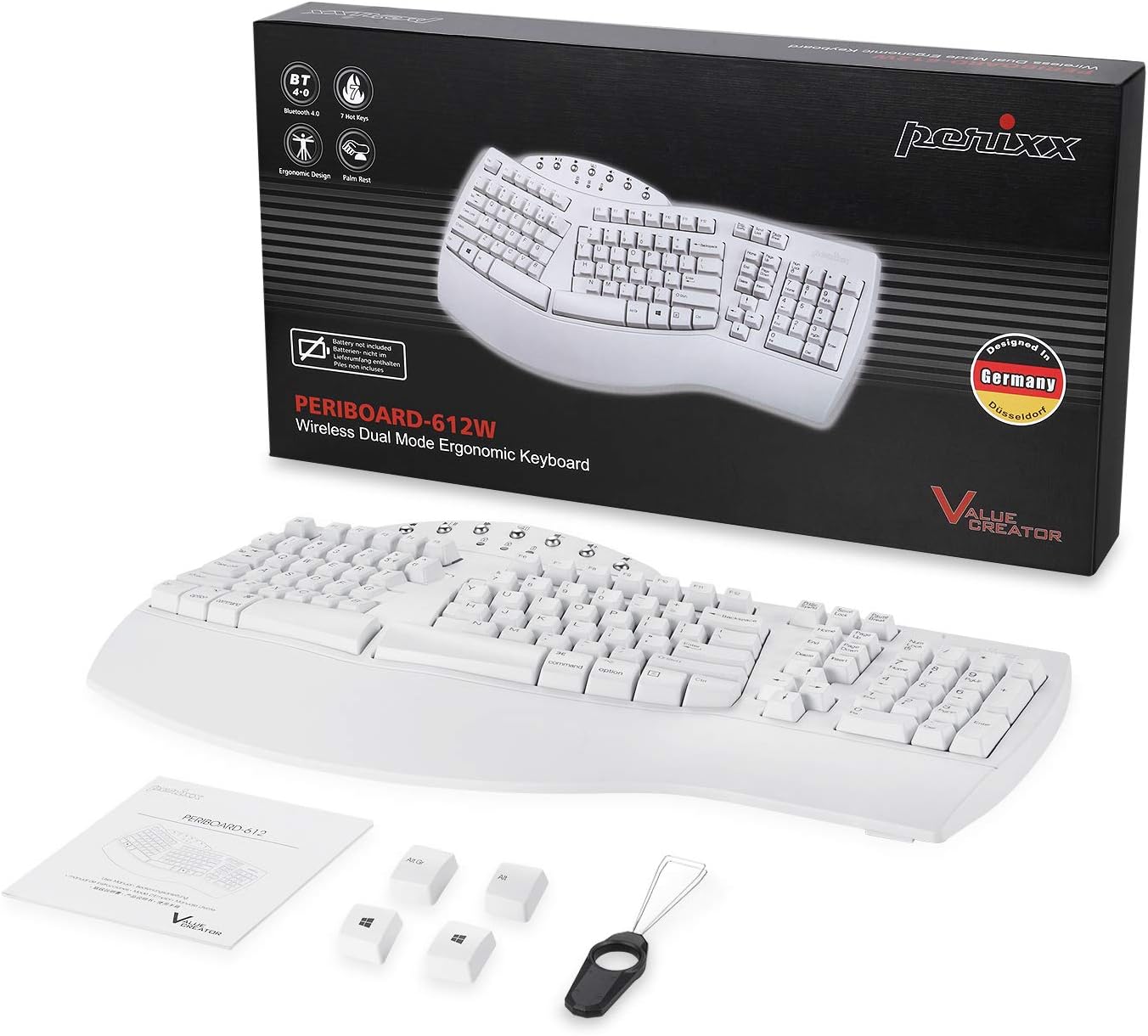
Image: Contents of the Perixx PERIBOARD-612 retail package, showing the keyboard, manual, USB receiver, extra Mac keycaps, and keycap puller.
Клучни карактеристики
- Ergonomic Split-Key Design: Features an integrated palm rest to support wrists, reduce median nerve pressure, and minimize forearm tension. Promotes natural arm and hand positioning to reduce the risk of Repetitive Strain Injury (RSI) and carpal tunnel syndrome.
- Wireless Dual Mode Connectivity: Seamlessly switch between 2.4 GHz wireless and Bluetooth 4.0 connections. The nano receiver for 2.4 GHz is conveniently stored in a compartment at the bottom of the keyboard.
- 7 мултимедијални копчиња: Dedicated function keys provide quick access to multimedia controls, including browser, email, volume up/down, mute, sleep mode, and search functions. Optimized for both Mac and Windows operating systems.
- Long Travel Distance Keys: Tactile and responsive keys offer a satisfying typing experience with a comfortable key travel distance.
- Компатибилност со двоен систем: Compatible with Windows (8/10/11) and Mac OS X. An OS switch located at the bottom of the keyboard allows for easy switching between systems.

Image: Hands positioned naturally on the split ergonomic keyboard, illustrating comfortable typing posture.

Image: Close-up of the keyboard keys, highlighting the full key travel distance for comfortable and responsive typing.
Поставување и поврзување
1. Powering On and OS Selection
- Locate the power switch on the bottom of the keyboard. Slide it to the "ON" position.
- Identify the OS switch (labeled "WIN" and "OS X") on the bottom of the keyboard. Slide it to match your operating system (Windows or Mac).
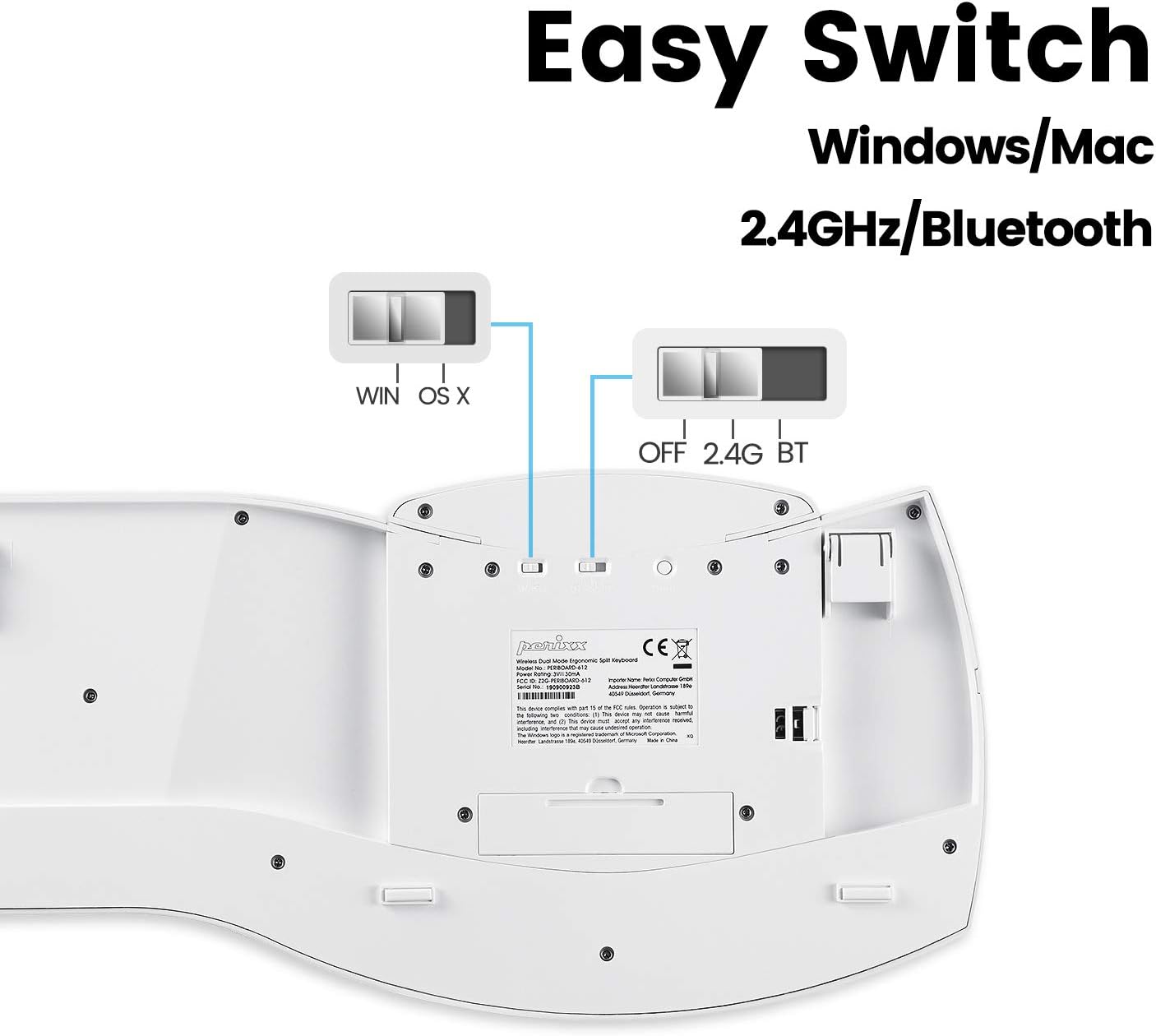
Image: Underside of the keyboard, showing the power switch, OS selection switch (WIN/OS X), and the 2.4G/BT connectivity switch.
2. Безжична конекција од 2.4 GHz
- Ensure the connectivity switch on the bottom of the keyboard is set to "2.4G".
- Remove the USB nano receiver from its storage compartment on the bottom of the keyboard.
- Вклучете го USB нано приемникот во слободен USB порт на вашиот компјутер.
- The keyboard should automatically connect. If not, ensure the keyboard is powered on and the receiver is securely plugged in.
3. Bluetooth 4.0 конекција
- Ensure the connectivity switch on the bottom of the keyboard is set to "BT".
- На вашиот компјутер или уред, отворете ги поставките за Bluetooth.
- The keyboard should appear as "PERIBOARD-612" in the list of available devices. Select it to pair.
- Следете ги сите предупредувања на екранот за да го завршите процесот на спарување.

Image: Diagram illustrating the dual wireless connectivity modes (Bluetooth and 2.4GHz) and compatibility with Mac and Windows.
Мултимедијални клучеви
The PERIBOARD-612 includes dedicated multimedia keys for enhanced control. These keys are located above the function row (F1-F12).
- Претходна песна: Go to the previous audio/video track.
- Пауза/Пушти: Toggle play/pause for media.
- Следна песна: Go to the next audio/video track.
- Mission Control (Mac) / Task View (Виндоус): Access system overview.
- Намалување на јачината на звукот: Намалете ја јачината на звукот.
- Јачина на звук нагоре: Зголемете ја јачината на звукот.
- Исклучи звук: Исклучи или вклучи звук.
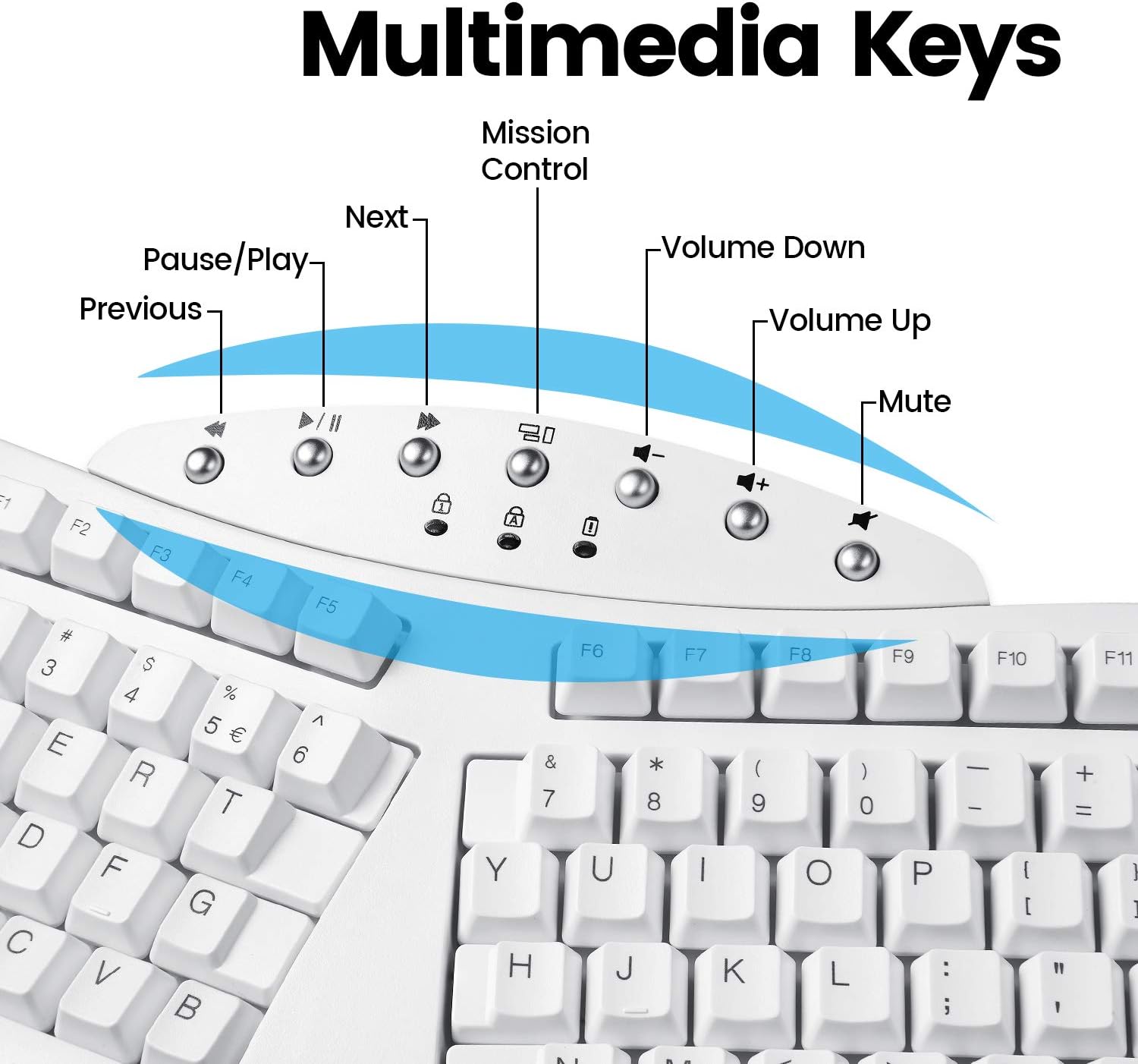
Слика: Детална view of the multimedia keys located at the top center of the keyboard, with their respective functions labeled.
Упатства за работа
The PERIBOARD-612 functions as a standard full-size keyboard with the added benefit of its ergonomic split design. For optimal comfort and to prevent strain, ensure your wrists are relaxed and your fingers are curved over the keys. The integrated palm rest is designed to support your wrists in a neutral position.
- Замена на капачето на копчето: If you are a Mac user, you can replace the default Windows keycaps (Alt, Windows key) with the provided Mac keycaps (Option, Command) using the included keycap puller. Gently pull the keycap straight up to remove it, then align and press down the new keycap.
- Траење на батеријата: The keyboard is battery-powered. Replace batteries when performance degrades or the low battery indicator (if present) illuminates.
Одржување
Regular maintenance helps prolong the life of your keyboard:
- Чистење: Користете мека крпа без влакненца малку гampened with water or a mild cleaning solution to wipe the surface of the keyboard. Avoid harsh chemicals or abrasive materials. For cleaning between keys, use compressed air to remove dust and debris.
- Складирање: When not in use for extended periods, store the keyboard in a dry, cool place. If using 2.4 GHz wireless, store the USB receiver in its designated compartment to prevent loss.
- Нега на батеријата: If the keyboard will not be used for a long time, remove the batteries to prevent leakage.
Решавање проблеми
If you encounter issues with your PERIBOARD-612, refer to the following common solutions:
- Тастатурата не реагира:
- Проверете дали тастатурата е вклучена.
- Проверете ги нивоата на батеријата и заменете ја доколку е потребно.
- For 2.4 GHz: Ensure the USB receiver is securely plugged into a working USB port and the keyboard switch is set to "2.4G".
- For Bluetooth: Ensure Bluetooth is enabled on your device, the keyboard switch is set to "BT", and the keyboard is paired correctly. Try re-pairing if necessary.
- Verify the OS switch on the bottom of the keyboard matches your operating system.
- Keys Not Functioning Correctly (e.g., sticking, multiple inputs):
- Исчистете околу и под засегнатото капаче на копчето со компримиран воздух.
- Gently remove the keycap with the keycap puller and inspect for any obstructions. Reinstall the keycap securely.
- Layout Issues (e.g., incorrect symbols when typing):
- Ensure your computer's operating system keyboard layout settings are configured for a US English keyboard.
- Наизменична врска:
- Move the keyboard closer to the receiver (for 2.4 GHz) or Bluetooth device.
- Avoid placing the keyboard near other wireless devices that may cause interference.
Спецификации
| Карактеристика | Детал |
|---|---|
| Број на модел | PERIBOARD-612 (Item model number: 11615) |
| Технологија за поврзување | 2.4 GHz Radio Frequency, Bluetooth 4.0 |
| Опис на тастатурата | Ergonomic, Split Keyset Design |
| Компатибилни уреди | Лаптоп, компјутер |
| Оперативен систем | Mac OS X, Windows (8/10/11) |
| Тежина на ставката | 2.2 фунти (приближно 1 кг) |
| Димензии на производот (ДxШxВ) | 19.09 x 8.98 x 1.57 инчи (приближно 48.5 x 22.8 x 4 см) |
| Боја | Бело |
| Извор на енергија | Напојува со батерија |
| Voltage | 4.25 волти (DC) |
Гаранција и поддршка
Perixx products typically come with a manufacturer's warranty. For specific warranty terms and conditions, please refer to the official Perixx website or the warranty card included with your product. In case of technical issues or support inquiries, please contact Perixx customer service.
A digital version of this user manual and other support documents may be available on the Perixx webстраницата или преку следниот линк: Perixx PERIBOARD-612 User Manual (PDF)
Информации за усогласеност
Овој уред е во согласност со Дел 15 од Правилата на FCC. Работењето подлежи на следните два услови: (1) Овој уред не може да предизвика штетни пречки и (2) овој уред мора да ги прифати сите примени пречки, вклучително и пречки што може да предизвикаат несакано работење.
For detailed compliance certificates, please refer to the official Perixx documentation or webсајт.


