1. Вовед
This manual provides essential information for the proper use and maintenance of your Zentality C-710 10-inch Dual SIM Tablet. Please read this guide thoroughly before operating the device to ensure optimal performance and longevity. Keep this manual for future reference.
2. Производот завршиview
The Zentality C-710 is a 10-inch Android tablet designed for communication and multimedia. It features dual SIM card support for cellular connectivity, a Quad-Core processor, 1GB RAM, and 16GB of internal storage. The device includes front and rear cameras, Bluetooth, and a vibrant IPS LCD display.
2.1 Компоненти на уредот
Familiarize yourself with the tablet's physical features and controls.

Слика 1: Напред и назад view of the Zentality C-710 Tablet, showing the screen, cameras, and rear casing.
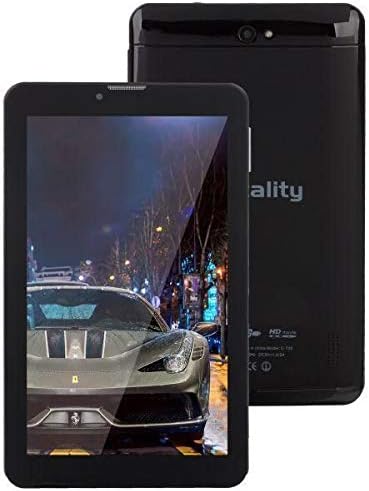
Слика 2: Предна страна view of the Zentality C-710 Tablet with the screen displaying an image, highlighting the display area.
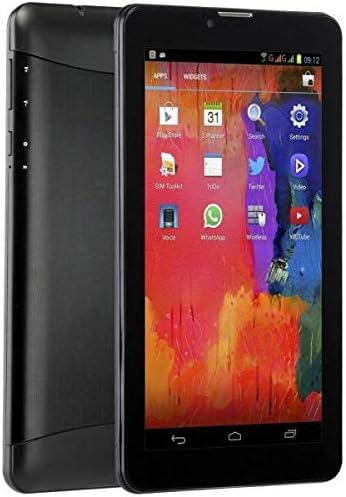
Слика 3: Страна view of the Zentality C-710 Tablet, illustrating the placement of physical buttons and ports.
3. Поставување
3.1 Полнење на батеријата
Before first use, fully charge the tablet's battery. Connect the provided charger to the tablet's charging port and plug it into a power outlet. The battery indicator on the screen will show charging status. A full charge typically takes several hours.
3.2 Вметнување SIM картички
The Zentality C-710 supports dual SIM cards for cellular network access. Locate the SIM card slot(s) on the side or back of the tablet. Carefully insert your standard or micro SIM cards into the designated slots, ensuring they are correctly oriented as indicated by the diagram near the slot. Close the tray securely.
3.3 Вметнување на MicroSD картичка
To expand storage, insert a microSD card (up to 32GB, not included) into the dedicated slot. Ensure the card is oriented correctly before gently pushing it in until it clicks into place.
3.4 Вклучување/исклучување
To power on, press and hold the Power button until the Zentality logo appears. To power off, press and hold the Power button until the power options menu appears, then select 'Power off'.
3.5 Почетно поставување
Upon first power-on, follow the on-screen prompts to select your language, connect to a Wi-Fi network, set up your Google account, and configure other basic settings.
4. Работење
4.1 Гестови на екран на допир
Навигирајте го вашиот таблет користејќи стандардни гестови на екранот на допир на Android:
- Допрете: Изберете ставка или отворете апликација.
- Допрете и задржете: Пристапете до контекстуални менија или преместете икони.
- Повлечете: Скролувајте низ екраните или листите.
- Штипење: Зголемување или намалување на сликите и web страници.
4.2 Поврзување на Wi-Fi
Одете на Поставки > Мрежа и интернет > Wi-Fi. Turn Wi-Fi on, then select your desired network from the list and enter the password if required.
4.3 Поврзување со уреди со Bluetooth
Одете на Поставки > Поврзани уреди > Bluetooth. Turn Bluetooth on, then select 'Pair new device' and choose your device from the list to connect.
4.4 Making Calls (3G)
With an active SIM card, you can make and receive calls. Open the 'Phone' application, dial the number, and press the call button.
4.5 Користење на камерата
Open the 'Camera' application. Tap the shutter button to take photos. Switch between front and rear cameras using the camera toggle icon. Adjust settings like flash and mode as needed.
4.6 Управување со апликации
Download new applications from the Google Play Store. To uninstall an app, tap and hold its icon on the home screen or app drawer, then drag it to the 'Uninstall' option.
5. Одржување
5.1 Чистење на таблетот
Use a soft, lint-free cloth to clean the screen and body of the tablet. Avoid using harsh chemicals or abrasive materials, which can damage the display or finish. For stubborn smudges, slightly dampИстријте ја крпата со вода или со средство за чистење екрани наменето за електроника.
5.2 Грижа за батерии
To prolong battery life, avoid extreme temperatures. Do not leave the tablet charging for extended periods after it's full. If storing the tablet for a long time, ensure the battery is charged to about 50%.
5.3 Ажурирања на софтверот
Редовно проверувајте и инсталирајте системски ажурирања за да се осигурате дека вашиот таблет ги има најновите функции, безбедносни закрпи и подобрувања на перформансите. Одете на Поставки > Систем > Ажурирање на системот.
6 Смена на проблеми
6.1 Таблетот не се вклучува
Ensure the battery is sufficiently charged. Connect the charger and wait a few minutes before attempting to power on again. If the issue persists, try a different charger or contact support.
6.2 Проблеми со Wi-Fi поврзување
Check if Wi-Fi is enabled in settings. Restart your tablet and your Wi-Fi router. Ensure you are entering the correct password. If the problem continues, try forgetting the network and reconnecting.
6.3 Бавни перформанси
Close unnecessary background applications. Clear cache data from apps in Поставки > Апликации и известувања > [Име на апликација] > Складирање и кеш > Избриши кеш. Consider uninstalling unused apps or performing a factory reset as a last resort (back up your data first).
6.4 App Crashes
Ensure the app is updated to its latest version. Clear the app's cache and data (this will reset the app). If the issue persists, uninstall and reinstall the app.
7. Спецификации
| Карактеристика | Спецификација |
|---|---|
| Бренд | Зенталност |
| Име на моделот | C-710 |
| Приказ на големината на екранот | 10 инчи |
| Тип на дисплеј | IPS LCD |
| Оперативен систем | Андроид |
| Процесор | Quad-core |
| Големина на инсталирана RAM меморија | 1 GB |
| Капацитет за складирање на меморија | 16 GB |
| Cellular Network Technology | 3G |
| Number of SIM Cards | Двојна СИМ-картичка |
| Тип на поврзување | Cellular, Bluetooth |
| Резолуција на задната камера | 5 мегапиксели |
| Предна страна WebРезолуција на камерата | 1.3 мегапиксели |
| Капацитет на батеријата | 4000 mAh |
| Боја | Црното |
| Тежина на ставката | 940 грама |
| Димензии на пакетот | 27.4 x 27 x 3.8 cm |
| Датум прв на располагање | 23 јули 2019 година |
8. Гаранција и поддршка
For warranty information and technical support, please refer to the documentation included with your purchase or visit the official Zentality webстраница. Зачувајте го доказот за купување за гаранциски побарувања.


