1. Производот завршиview
The P80 Smart Watch is a versatile fitness tracker and smartwatch designed to monitor various health metrics and provide smart notifications. It features a 1.3-inch IPS color screen, heart rate and blood pressure monitoring, and multiple sports modes. This manual provides essential information for setting up, operating, and maintaining your P80 Smart Watch.

Слика 1: Предна страна view of the P80 Smart Watch displaying time and a vibrant digital wallpaper.
2. Што има во кутијата
Upon unboxing your P80 Smart Watch, please verify that all components are present:
- 1 x P80 Smart Watch
- 1 x Charging Cable (magnetic interface)
- 1 x Упатство за употреба (овој документ)
- 1 x Original Retail Box
3. Водич за поставување
3.1 Полнење на уредот
Before initial use, fully charge your P80 Smart Watch. Connect the magnetic charging cable to the charging contacts on the back of the watch and plug the USB end into a compatible USB power adapter (not included) or a computer's USB port.

Figure 2: The P80 Smart Watch displaying a "Charging completed" message, with indicators for 200mAh battery capacity, 5-7 days working hours, and 15 days standby time.
A full charge typically takes approximately 2 hours. The watch has a 200 mAh Lithium polymer battery, providing 5-7 days of normal use and 10-15 days of standby time.
3.2 Инсталација и спарување на апликацијата
To unlock the full functionality of your P80 Smart Watch, you need to install the companion application, Da Fit, on your mobile phone.
- Download Da Fit App: Пребарај за "Da Fit" in your mobile phone's app store (Google Play Store for Android or Apple App Store for iOS) and install it.
- Системски барања: Ensure your mobile phone meets the minimum system requirements: Android 4.4 or above, or Apple iOS 9.0 or above.
- Овозможи Bluetooth: On your mobile phone, go to settings and enable Bluetooth.
- Отворете ја апликацијата Da Fit: Launch the Da Fit application. Follow the on-screen prompts to create an account or log in.
- Спари уред: Within the Da Fit app, navigate to the device pairing section (usually indicated by a device icon or "Add Device"). The app will search for nearby Bluetooth devices. Select "P80" or a similar identifier from the list to connect.
- Потврдете го спарувањето: A pairing request may appear on your watch or phone. Confirm the pairing on both devices if prompted.
Once successfully paired, the watch will synchronize time and data with your phone, and you can configure various settings through the app.
4. Упатства за работа
4.1 Основна навигација
The P80 Smart Watch features a 1.3-inch IPS color touch screen for navigation. It operates primarily via a single touch panel.
- Допрете: To select an item or confirm an action.
- Повлечете нагоре/надолу: To scroll through menus or notifications.
- Повлечете лево/десно: To switch between different function screens (e.g., heart rate, steps, weather).
- Долг печат: May activate certain functions or change watch faces (refer to app for customization).

Figure 3: The P80 Smart Watch interface displaying icons for blood pressure monitoring, heart rate monitoring, movement recording, sedentary reminder, calorie burning, IP68 waterproof rating, multi-motion mode, and durable endurance. The image also highlights the 1.3-inch color touch screen and its ability to display 50 words on a single screen.
4.2 Мониторинг на здравјето
The P80 Smart Watch is equipped with sensors for continuous health monitoring.
- Мониторинг на отчукувањата на срцето: The watch supports real-time heart rate measurement and all-day heart rate monitoring. To view your current heart rate, navigate to the heart rate screen on the watch. For detailed historical data and analysis, refer to the Da Fit app.
- Мерење на крвен притисок: The watch can measure blood pressure. For accurate readings, ensure the watch is worn snugly on your wrist. Consult the Da Fit app for instructions on initiating a measurement and viewсо резултатите.
- Следење на сонот: Wear the watch while sleeping to track your sleep patterns, including deep sleep, light sleep, and awake times. Data is synchronized and analyzed in the Da Fit app.

Figure 4: The P80 Smart Watch on a wrist, displaying a heart rate monitoring graph with real-time motion heart rate, 24-hour real-time heart rate, and section heart rate recording. This illustrates the watch's capability to keep track of your heart health.
4.3 Следење на активностите
Track your daily activities and workouts with the P80 Smart Watch.
- Бројач на чекори: Automatically records your daily steps, exercise time, exercise mileage, and calorie consumption.
- Мулти-спортски режим: The watch supports 8 kinds of sports modes, including walking, running, badminton, and football. Select the appropriate mode before starting your activity for more accurate tracking.
4.4 Smart Reminders and Notifications
Once paired with your phone, the P80 Smart Watch can provide various smart reminders and notifications.
- Потсетник за повик: Notifies you of incoming calls. You can configure the watch to refuse to answer calls directly from the device.
- Information Push Reminder: Receive notifications from SMS, QQ, WeChat, Skype, Facebook, Twitter, Line, and WhatsApp directly on your watch screen.
- Прилагоден потсетник за аларм: Set alarms through the Da Fit app, and the watch will vibrate to alert you.
- Седентарен потсетник: The watch can remind you to move if you have been inactive for a prolonged period.
- Intelligent Vibration Reminder: All sit-in, call, SMS, and APP notifications are accompanied by intelligent vibration, designed not to disturb others.

Figure 5: The P80 Smart Watch screen showing an incoming WeChat message notification, demonstrating its intelligent vibration reminder feature for various alerts.
4.5 Други функции
- Dial Selection: Customize your watch face through the Da Fit app.
- Wrist Display: Екранот автоматски се осветлува кога ќе го кренете зглобот.
- Приказ на времето: View current weather information (requires app synchronization).
- Приказ на време: Го прикажува тековното време и датум.
- Фотографија од далечина: Користете го часовникот како далечински бленда за камерата на вашиот телефон.
- Далечинска контрола на музиката: Контролирајте ја репродукцијата на музика на вашиот телефон од часовникот.
- Режим на не вознемирувај: Set periods when you do not wish to receive notifications.
- Пронајдете нараквица: Use the Da Fit app to locate your watch if it's within Bluetooth range.
- WeChat Спорт: Integration with WeChat for sports data sharing.
- APP Air Upgrade: Supports over-the-air firmware updates via the Da Fit app.
5. Одржување и грижа
Proper maintenance ensures the longevity and optimal performance of your P80 Smart Watch.
- Чистење: Wipe the watch screen and strap regularly with a soft, dry cloth. If necessary, use a slightly damp крпа, а потоа темелно исушете. Избегнувајте груби хемикалии или абразивни материјали.
- Отпорност на вода: The watch has an IP68 waterproof rating, meaning it is resistant to dust and can withstand immersion in water up to 1.5 meters for 30 minutes. However, it is not recommended for hot showers, saunas, or diving. Avoid prolonged exposure to water.
- Полнење контакти: Keep the magnetic charging contacts on the back of the watch clean and dry to ensure efficient charging.
- Складирање: Кога не го користите подолго време, чувајте го часовникот на ладно и суво место.
- Грижа за ремен: The watch comes with a silicone strap. Clean it regularly to prevent skin irritation.
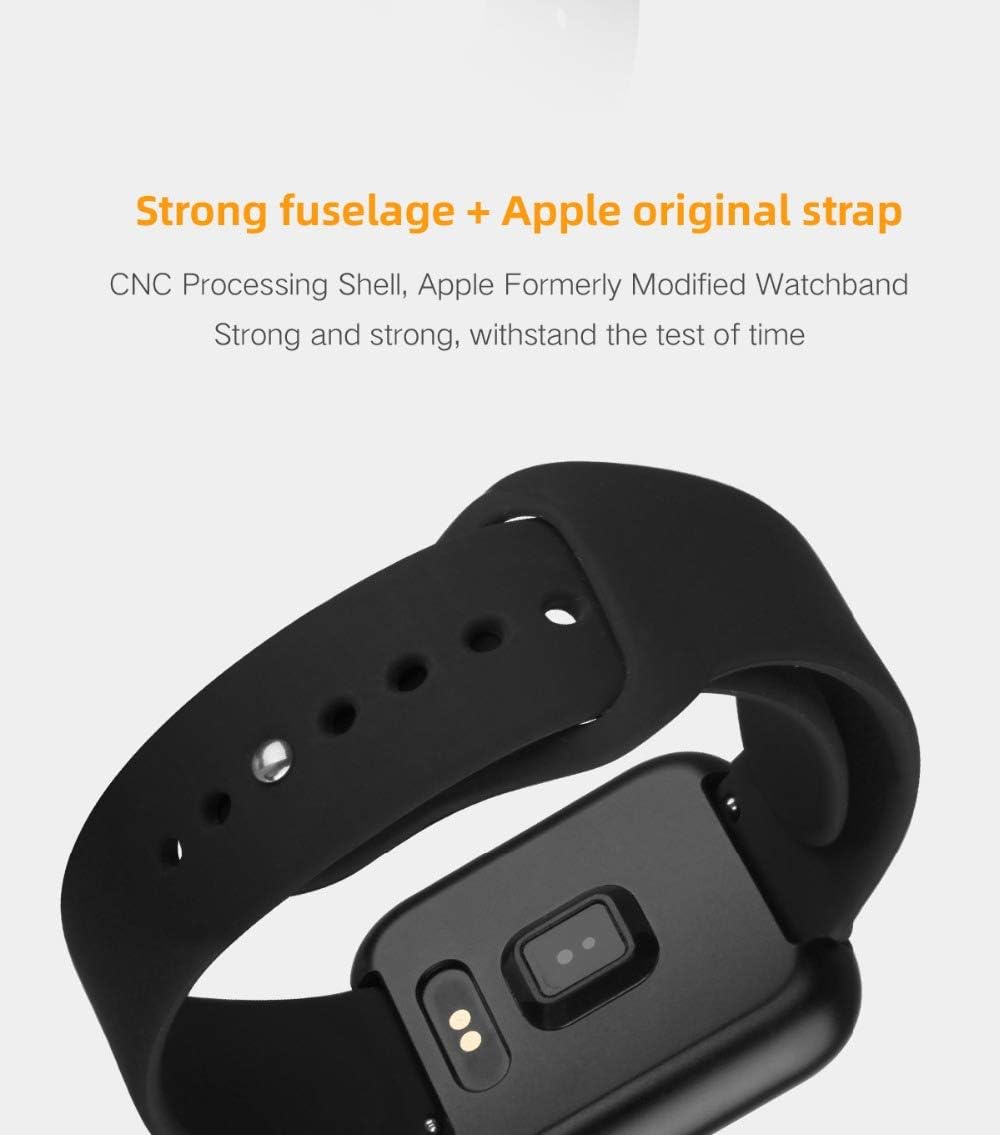
Figure 6: The back of the P80 Smart Watch, highlighting the charging contacts and optical sensors for health monitoring. This view also shows the durable strap attachment.
6 Смена на проблеми
If you encounter issues with your P80 Smart Watch, try the following troubleshooting steps:
- Часовникот не се вклучува: Проверете дали часовникот е целосно наполнет. Поврзете го со кабелот за полнење и извор на енергија најмалку 30 минути.
- Часовникот не се поврзува со телефонот:
- Проверете дали Bluetooth е овозможен на вашиот телефон.
- Проверете дали часовникот е во опсег на Bluetooth (обично 10 метри).
- Рестартирајте ги и телефонот и часовникот.
- Исчистете го кешот на Bluetooth на вашиот телефон (доколку е применливо).
- Обидете се да го распарите и повторно да го спарите уредот преку апликацијата Da Fit.
- Неточни здравствени податоци:
- Осигурајте се дека часовникот е цврсто носен на вашиот зглоб, не е премногу лабав или премногу тесен.
- Исчистете го сензорот на задната страна од часовникот.
- Избегнувајте прекумерно движење за време на мерењата.
- Известувањата не се појавуваат:
- Check notification permissions for the Da Fit app on your phone.
- Ensure the Da Fit app is running in the background.
- Проверете дали режимот „Не вознемирувај“ не е активен на часовникот или телефонот.
- Кратко траење на батеријата:
- Намалете ја осветленоста на екранот.
- Limit frequent screen wake-ups (e.g., wrist raise to wake).
- Оневозможете ги непотребните функции за континуирано следење доколку не се потребни.
- Уверете се дека часовникот е целосно наполнет секој пат.
If the issue persists, refer to the Da Fit app's help section or contact customer support.
7. Спецификации
Detailed technical specifications for the P80 Smart Watch:
| Компонента | Спецификација |
|---|---|
| Број на модел | P80 |
| Процесорот | NRF52832 QFAA |
| Сензор за забрзување | BOSCH BMA 421 |
| Приказ | 1.3 inch IPS color screen, 240*240 resolution |
| Режим на копче | Single touch panel |
| Тип на батерија | Литиум полимерна батерија, 200 mAh |
| Начин на полнење | Magnetic interface in-line charging |
| Потрошувачка на енергија во мирување | Standby 10-15 days, Normal use 6-8 days |
| Тип Bluetooth | Bluetooth 4.0 |
| Поддржана АПП | Da Fit |
| Мобилни системски барања | Android 4.4 and above, Apple iOS 9.0 or above |
| Димензии (прибл.) | 42.0*36.0*10.25мм |
| Отпорност на вода | IP68 |

Figure 7: A detailed table outlining the specifications of the P80 Smart Watch, including its dimensions, available shell and band colors, main chip, display specifications, battery type, charging mode, standby power consumption, Bluetooth type, and mobile system requirements.
8. Гаранција и поддршка
Информациите во врска со гаранцијата на производот и корисничката поддршка обично се дадени со вашата документација за купување или на официјалната страница на производителот. webстраница. Ве молиме задржете го доказот за купување за какви било гаранциски побарувања.
For technical support or inquiries not covered in this manual, please refer to the Da Fit app's help section or contact the retailer where you purchased the product.