1. Вовед
This user manual provides detailed instructions for the Waveshare Raspberry Pi 4 Model B Display Kit. It covers the assembly, setup, operation, and maintenance of your 7-inch capacitive touch LCD display kit designed for the Raspberry Pi 4. Please read this manual thoroughly before use to ensure proper functionality and to maximize your experience with the product.
2. Содржина на пакетот
Проверете дали сите артикли наведени подолу се вклучени во вашиот пакет. Доколку недостасуваат или се оштетени некои компоненти, ве молиме контактирајте ја службата за корисници.

Image: All components included in the Waveshare Raspberry Pi 4 Display Kit.
- 7-inch Capacitive Touch LCD
- Acrylic Case (Black/White)
- HDMI кабел
- USB-A to Micro-USB Cable (for touch and power)
- Адаптер за напојување
- Микро SD картичка (16GB)
- Читач на Micro SD картички
- Screws and Standoffs for assembly
3. Производот завршиview
The Waveshare Raspberry Pi 4 Model B Display Kit combines a high-resolution 7-inch capacitive touch screen with essential accessories, allowing you to build a compact, all-in-one computer solution with your Raspberry Pi 4.
3.1 Raspberry Pi 4 Model B Features (Raspberry Pi board sold separately)
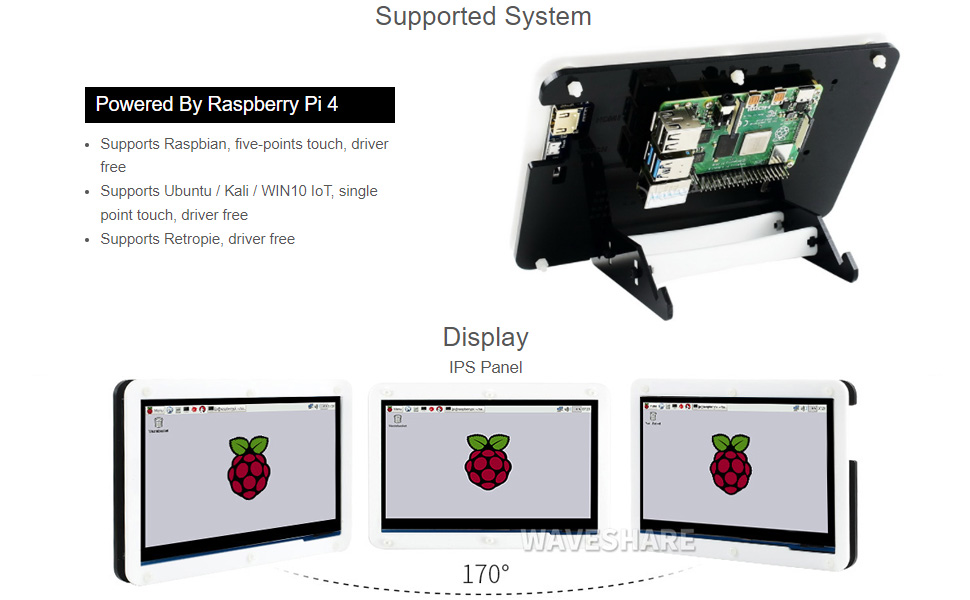
Image: Raspberry Pi 4 Model B board layout with key components labeled.
- Процесор: Broadcom BCM2711, четири-јадрен Cortex-A72 (ARM v8) 64-битен SoC @ 1.5GHz
- Меморија: LPDDR4-2400 SDRAM (available in 1GB, 2GB, 4GB, or 8GB options)
- Поврзување: 2.4 GHz and 5.0 GHz IEEE 802.11ac wireless, Bluetooth 5.0, Gigabit Ethernet
- USB порти: 2 × USB 3.0 ports, 2 × USB 2.0 ports
- Видео и звук: 2 × micro-HDMI ports (up to 4Kp60 supported), 2-lane MIPI DSI display port, 2-lane MIPI CSI camera port, 4-pole stereo audio and composite video port
- GPIO: 40-pin GPIO header
- Моќност: 5V DC via USB-C connector (minimum 3A recommended)
4. Водич за поставување
Follow these steps to assemble and set up your Waveshare Raspberry Pi 4 Display Kit.
4.1 Hardware Assembly

Image: Fully assembled Waveshare Raspberry Pi 4 Display Kit.
- Prepare the Raspberry Pi: Ensure your Raspberry Pi 4 Model B board is ready.
- Mount the Raspberry Pi: Attach the Raspberry Pi 4 board to the designated mounting points on the back panel of the acrylic case using the provided screws and standoffs.
- Connect the Display: Connect the 7-inch LCD to the Raspberry Pi 4. Typically, this involves connecting the HDMI cable from the display to one of the micro-HDMI ports on the Raspberry Pi, and the USB-A to Micro-USB cable for touch functionality and power.
- Собери го куќиштето: Secure the front panel of the acrylic case around the display and then attach it to the back panel, enclosing the Raspberry Pi and display. Ensure all cables are properly routed and not pinched.
- Прикачете го држачот: Assemble and attach the included stand to the bottom of the case for stable positioning. The stand often allows for adjustable viewing angles (e.g., 45° or 60°).
4.2 Конфигурација на софтвер
The Waveshare 7-inch capacitive touch LCD is designed for driver-free operation with several popular operating systems.
- Инсталација на оперативен систем: Install your preferred operating system (e.g., Raspbian, Ubuntu, Kali, WIN10 IoT, Retropie) onto the provided 16GB Micro SD card using a suitable imaging tool (e.g., Raspberry Pi Imager).
- Вметнете SD-картичка: Insert the prepared Micro SD card into the Raspberry Pi's Micro SD card slot.
- Вклучување: Connect the power adapter to the display kit. The Raspberry Pi and display should power on automatically.
- Работа без возач: For most supported systems, the display and touch functionality will work automatically without additional driver installation.
5. Упатства за работа
5.1 Функционалност на допир

Image: User interacting with the capacitive touch screen.
- The 7-inch display features a capacitive touch panel, supporting up to five-point touch input.
- Ensure the USB touch cable is securely connected between the display and the Raspberry Pi for touch input to function.
- Touch gestures and multi-touch capabilities will depend on the operating system and applications running on your Raspberry Pi.
5.2 Поддржани оперативни системи
The display kit offers broad compatibility with various Raspberry Pi operating systems:
- Малина: Supports five-point touch, driver-free.
- Ubuntu / Kali / WIN10 IoT: Supports single-point touch, driver-free.
- Retropie: Supports driver-free operation.
6. Спецификации
| Карактеристика | Спецификација |
|---|---|
| Големина на приказ | 7 инчи |
| Допрете Тип | Capacitive, up to 5-points |
| Интерфејс | HDMI за дисплеј, USB за допир |
| Компатибилност | Raspberry Pi 4 Model B |
| Поддршка за оперативен систем | Raspbian, Ubuntu, Kali, WIN10 IoT, Retropie |
| Memory Storage Capacity (SD Card) | 16 GB |
| Тежина на ставката | 1.28 фунти |
| Број на модел | PI4B Display Acce |
| Производител | Waveshare |
7. Одржување
- Чистење: Користете мека крпа без влакненца за нежно да го избришете екранот. За тврдокорни дамки, малку избришете гоampИзбришете ја крпата со вода или средство за чистење безбедно за екрани. Избегнувајте груби хемикалии или абразивни материјали.
- Складирање: Кога не е во употреба, чувајте го комплетот на ладно и суво место, подалеку од директна сончева светлина и екстремни температури.
- Ракување: Handle the display and Raspberry Pi board with care to avoid physical damage. Avoid applying excessive pressure to the screen.
8 Смена на проблеми
8.1 Нема излез на екранот
- Проверете ја моќноста: Ensure the power adapter is securely connected to the display kit and plugged into a working power outlet.
- HDMI поврзување: Verify that the HDMI cable is firmly connected between the display and the Raspberry Pi's micro-HDMI port. Try a different micro-HDMI port if available.
- SD-картичка: Confirm that the Micro SD card with a properly installed operating system is inserted correctly into the Raspberry Pi.
- Напојување: Ensure your Raspberry Pi is receiving adequate power (a 5V/3A USB-C power supply is recommended for Raspberry Pi 4).
8.2 Функционалноста на допир не работи
- USB конекција: Check that the USB-A to Micro-USB cable is securely connected from the display to a USB port on the Raspberry Pi.
- Поддршка за оперативен систем: Confirm that your operating system supports the touch functionality of this display. While most are driver-free, some configurations might require specific settings.
- Рестартирај: Try rebooting the Raspberry Pi.
8.3 Screen Flickering or Instability
- Напојување: Ensure a stable and sufficient power supply is used for both the display and the Raspberry Pi.
- Интегритет на кабелот: Check the HDMI and USB cables for any damage or loose connections.
9. Гаранција и поддршка
For warranty information, technical support, or further assistance, please refer to the official Waveshare webлокација или контактирајте го вашиот продавач. Чувајте ја сметката како доказ за купување за гаранциски барања.


